
🚀 Own your speed, save your cash, and future-proof your home network!
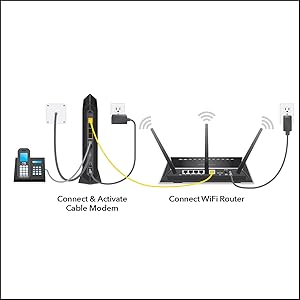
The NETGEAR CM1150V is a high-performance DOCSIS 3.1 cable modem designed for Xfinity Internet and Voice plans, delivering up to 2Gbps speeds with advanced 32x8 channel bonding. It supports two telephone lines with enhanced voice features and offers four Gigabit Ethernet ports with link aggregation for ultra-fast wired connections. Compatible with any WiFi router, it enables users to save up to $150 annually by eliminating rental fees, while providing a reliable, easy-to-setup, and future-ready home networking solution.






| ASIN | B07LCHLFD6 |
| Best Sellers Rank | #15,465 in Computers & Accessories ( See Top 100 in Computers & Accessories ) #75 in Computer Networking Modems |
| Brand | NETGEAR |
| Color | Black |
| Customer Reviews | 4.1 4.1 out of 5 stars (2,195) |
| Date First Available | January 2, 2019 |
| Is Discontinued By Manufacturer | No |
| Item Dimensions LxWxH | 6.1 x 10.3 x 3.4 inches |
| Item Weight | 1.33 pounds |
| Item model number | CM1150V-100NAS |
| Manufacturer | Netgear |
| Product Dimensions | 6.1 x 10.3 x 3.4 inches |
| Series | CM1150V |
| Voltage | 100240 Volts |
R**N
Best 3.1 DOCSIS Modem for XFinity
I was weary of some negative reviews at first, but after reading online reviews from reputable sources, and trying it for myself, this modem is simply amazing! First off, setup was super easy. In a nutshell: 1.) Power it up. 2.) Connect Ethernet cable from modem to laptop and go to xfinity.com/activate 3.) All you need to do is login like you're about to pay a bill and that's it - no account numbers or anything! 4.) CALL XFINITY TO ACTIVATE YOUR EQUIPMENT!!! Do not skip this step! 5.) Tell them the Serial Number and MAC Address (DOCSIS 3.1, not the DOCSIS 3.0 - look closely on the unit, not on the box, there are (2) MAC addresses, provide the 3.1 number). 6.) Connect modem to router via Ethernet (Cat 6 minimum), connect phone line, and you're gucci. Literally all those steps took me less than 15 minutes, including the call to XFinity. I had been wanting to switch to my own modem and start saving $11 per month (plus taxes) for a while, and finally decided to go for it. I hated paying the rental and then I also found out another little detail, you know that free XFinity hotspot thing they keep talking about, ever wonder where that comes from, that's right, your rental modem/router. That sucker is turned on by default and XFinity is using your electricity to power up a public XFinity hotspot. Totally lame, I killed it ASAP in the XFinity My Account application as soon as I realized that. Next thing I did with the rental was turn off the WiFi by switching the unit into Bridge mode. Just some advice for people still renting. I highly recommend switching to bridge and using your own router, it's way better than theirs. Better yet, buy your own modem and route. Ok, rant over, back to review. It is easily two times, if not three times smaller than the rental modem/router unit. Kinda goes as a given since it's one device replacing two. And to that point, it is better to have two discrete devices than two devices in one package for reliability and ease of diagnosis. The device is also very discrete looking and sufficiently aesthetic, at least to me, to be in plain sight. Overall, the build quality, construction, and overall perception does seem to line up with the price tag. I feel like I'm getting my money's worth for the time being. Reliability will ultimately solidify or uproot that. It boots up way quicker than the rental (~1-2 min) and performs better. The latency on my speed tests went down from 12-15 to about 7-9ms aand I'm getting just slightly better downloads but not by much. However, this is one of two of the only XFinity approved DOCSIS 3.1 modems - think up to 10Gbps connection. Now I'm on blast - 250mbps (getting all 250 and then some) but am thinking of going to 1Gbps. And while we're dreaming, this modem will do 2Gbps with link aggregation, but the software update is still in the works. Basically two Ethernet cables from your modem going to your router, each 1Gbps but acting like a "single" cable to provide 2Gbps of total throughput. Way out of the league of most people, but XFinity does have a 2Gbps option over coax so I figured I'd throw it out there. I have only had it for a few days, but was so thrilled with the easy set-up and exceptional performance, I decided to leave a review. I will update ofcourse over the years with reliability and how it holds up, but so far, very promising.
R**A
Refurbish modem works like new. Clean too.
I have no problems with my Xfinity cable service (300 Mbs) with single line voice with this modem. I did need to chat with Xfinity to activate the modem however; auto/self-service activation failed.
S**0
Works as stated, but really not Xfinity compliant for diagnostics, if u have connection issues.
I'm using Comcast in Richmond TX. My paid service is 400Mbps, and I'm not getting much higher, so can't say if this is a screamer, but haven't had any problems so far. It was easy to setup. UPDATE 1: There is a lot of construction in our development. Comcast Xfinity service has been intermittent on many days. Restarting the modem does not help, either using the power switch, or by having Xfinity do it thru an automated phone call, via tech support, or thru their Xfinity My Account (XMA) app. You have to actually call in and get tech support to REFRESH the modem (haven't got a sense of what that actually is). This is not available as an option in the XMA app for end-user-owned modems. Also, they push out the firmware updates, which I am ok with, but Xfinity tech support also says that they don't "touch" our modems. So, we paid $250 for basically (or as Netgear tech support put it) a "dumb" plug-n-play modem that can't really be controlled by Xfinity (or yourself), other than RESTART and REFRESH, for which you have to call in to initiate. They also cannot read the logs to see why the modem is having problems. At $10/month, just get the Xfinity XB6. If I could return this one, I would! UPDATE 2: It does not have the ability to talk to the XMA app for diagnostics and actions. There is a disconnect between Netgear and Xfinity and the customer is getting shafted. I've arranged to return the modem, if the tech guy brings it. Since I'm out of the 30 day period, I'm out ~$60 after 2.5 months of use.
S**T
Warning: You can use only 1 of the 4 Ethernet ports on this device at a time
The setup of this device was complete nightmare because neither Netgear nor Comcast provided two crucial pieces of information: • You can use only 1 of the 4 Ethernet ports on this modem. The other 3 ports are apparently for some ethereal future use. Probably vaporware that will never materialize. • Each time you switch the single device you can have linked to this modem, you must completely power down the modem for at least 10 seconds and restart the modem (some call this process recycling) or the device will not obtain an IP address. Lacking this information caused me to spend multiple hours on many calls with smart and kind Xfinity agents featuring an amazing diversity of difficult-to-understand accents. I just wanted to set this modem up like my old one; with one router and my work laptop directly wired to it. It took three long phone calls just to get the modem fully registered on my Xfinity account and to get the Xfinity Voice feature working. But no matter what we tried, the modem we linked to the router failed to obtain an IP address. My work laptop got an IP address, but the modem did not. After a little online research, I figured that my 3½-year-old modem must have gone the way of all the earth. So I ran out and bought a new modem, only to find that it also failed to obtain an IP address. While some of the Xfinity agents claimed deep knowledge of this modem, at no point did any of them seem to realize that only one Ethernet port could be used at a time. Online discussion threads suggest that many have spent hours on the phone with Netgear to discover this crucial information. As soon as I realized this was an issue, I disconnected my laptop so that only the router was linked to the modem, but the router still failed to obtain an IP address. Xfinity ended up arranging for a technician to come to my house, but another Xfinity agent later called to see if we could fix the issue without a physical visit. After that didn't work, I finally found an obscure discussion thread online that said you had to recycle the modem after switching devices or the new device would not obtain an IP address. Sure enough, following this procedure caused the modem to obtain an IP address. I kept my old modem and returned the new one. Despite the horrible process of getting the modem fully functional for our needs, I have to say that it works great. Our download speeds have literally doubled. If this modem lasts more than four years, as did our last one, we will have saved nearly $300 by owning rather than renting the cable modem. So go ahead and buy this modem for your Xfinity needs. But directly wire only your main networking device (router) to it. If you ever switch routers, make sure to fully recycle the modem so that the router will obtain an IP address. Many Boffins died to bring you this information.
Trustpilot
2 months ago
1 month ago



