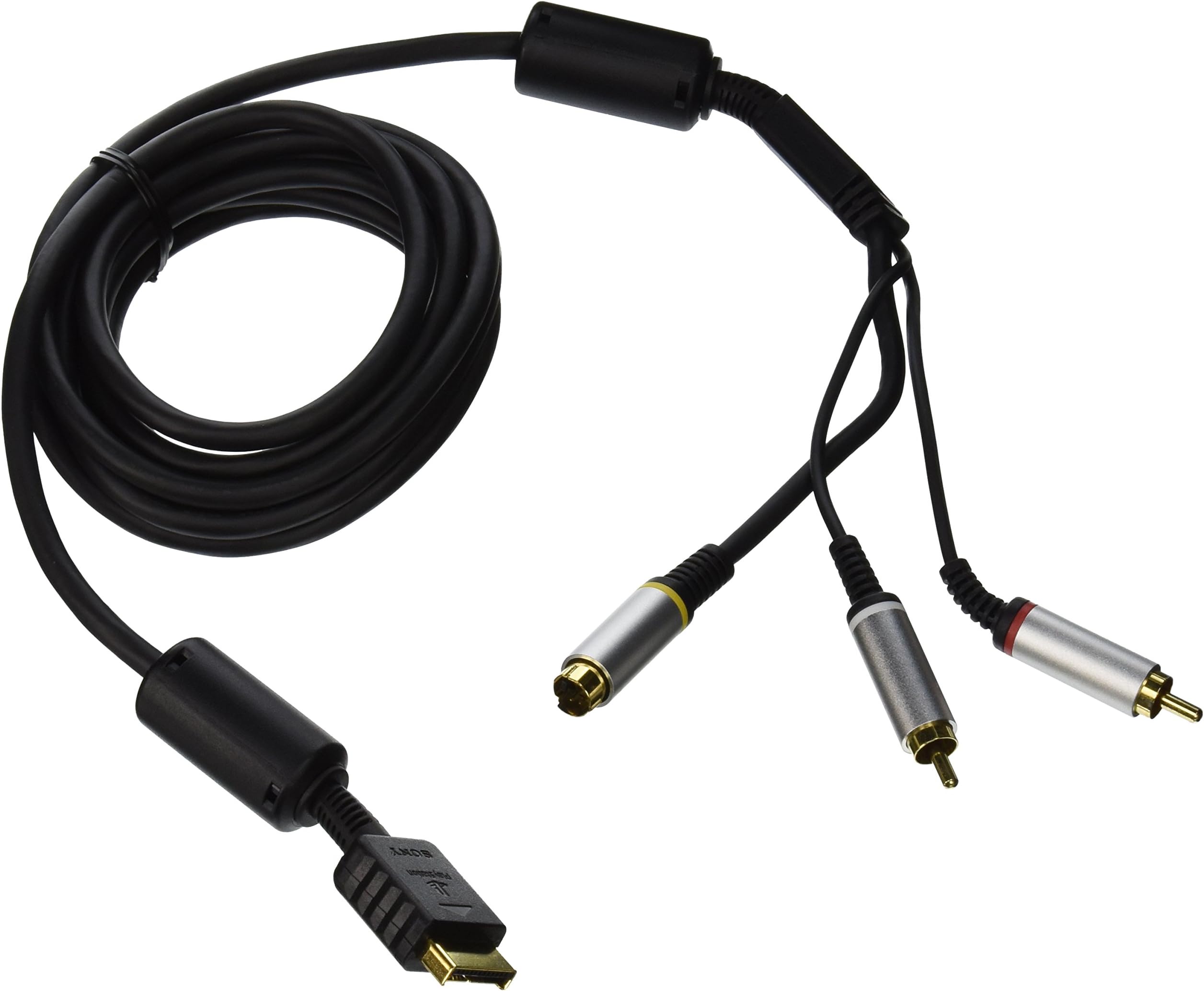

PS3 S Video Cable
Product ID: 6673687
Buy anything from 5,000+ international stores. One checkout price. No surprise fees. Join 2M+ shoppers on Desertcart.
Desertcart purchases this item on your behalf and handles shipping, customs, and support to Peru.
24-carat gold-plated connectors and OFC (oxygen-free copper) coating / 10 Feet Long
D**E
Best option for PS2, best option for interlace.
If you're using the S-video cable for PS2, it is definitely the best. Component cables aren't compatible with earlier PS2 systems and also bring out more jaggies because of being literally too crisp, surprisingly. As far as PS3, if you're handicapped by an interlaced signal, s-video is fantastic for those new games, too; much better color than composite video and barely less colorful than component, if at all.Again, if your signal is interlaced it is cheaper and basically as good if not better than component, in my opinion. Most of component's pros aren't noticeable unless through a progressive signal, and the better color really isn't nearly as big a difference between s-video and component as from yellow composite to s-video (displaying at 480i).Personally, I think S-video is overlooked and underrated. Give these a go especially if for PS2 games--even if playing them on first-revision PS3s with full PS2s inside (whether or HD upscaling them with the PS3 or not).
I**K
S-video is great for the PS2, but...
Honestly these cords have provided some of the best quality I've seen on a PS2 so far with the exception of component (its just an inch shy of component). People should also bear in mind my setup. I have a auto-switching composite/S-video box and i use that to switch between my console's quickly without much effort. I also have a composite/S-video to HDMI converter which is one reason why I got S-video instead of component for the PS2. I tested the PS2 in three different formats: Directly to the converter with S-video, with Composite, and using my switch box's ability to convert S-video to composite, since I don't have a native S-video port. I tested all my games, but these three showed the greatest difference:Shadow of the Colossus720p S-video-HDMI: Colors where more vibrant, shadow's stood out, Wander's face didn't look like a pixel monster, and it played flawlessly without lag. However, there was a bit of motion blur, but I would say this was the developers fault or the fact that this game pushes the PS2 to its limits while going through two electrically powered devices before finally appearing on the TV. Lowering the brightness makes the blur less harsh.720p Composite-HDMI: Do you love composite? Do you love pixels? Do you want the second worst quality image to be stretched, expanded, and look uglier but with HDMI improved shadows and color? Then choose this option.480i S-video-composite: Looked almost exactly like S-video-HDMI just washed out, less vibrant colors. Not as bad motion blur.Zone of the Enders720p S-video-HDMI: It did what emulator's couldn't do. Make the few cutscenes that where blurry, clear and have the game be playable while looking crisp. Again this is a game that pushed the PS2 to its limits so there is motion blur like SotC but it's not as bad. HDMI color and shadow improvements are also a plus.720p Composite-HDMI: Adequate, but I don't like the background being blurry or being a bunch of pixels.480i S-video-composite: Again washed out, okay qualityMetal Gear Solid -PS1720p S-video-HDMI: No mortal man should see the abomination that I saw. The video quality I saw was the kind people have nightmare's about. maybe its just the converter and PS1 games, but S-video and PS1 games is abominable.720p Composite-HDMI: It is the most beautiful thing I ever saw, and that's saying a lot after how badly S-video butchered the game. I'd say its almost on par with playing it on PS3 though PS3 is the best.480i S-video-composite: S-video + PS1= nightmare.So is the PS3 S video cable worth it? Well for me yes because of my setup and wanting compatibility with those few PS2 games, like my copy of ICO, However, for PS1 games its a big disappointment and I'd rather wait to get a PS3 then use S-video.Its a great cable and very sturdy, but if you have component inputs on your TV and you don't care much for some incompatible PS2 games then get some quality component cables. If you use a CRT TV and it can use S-video get these they are great for they are probably better with a direct analog input.
H**H
Think composite is fine? You haven't tried this.
If you are using a PS2 or even a PS3 on an older CRT TV that has an S-Video port but doesn't have component (YPbPr), do yourself a massive favor and get one of these.I keep all my old pre-HDMI consoles on a 13 year old Sanyo 27" flat-tube CRT. It has two composite and two S-video inputs but no component. I used to just hook everything up composite through a 4-in 1-out mechanical A/V switch. I thought it was fine till I tried to play Mana Khemia 2 on my PS2. I had so much trouble reading any of the text because this game seems to be a bit high res for a PS2 game and has kinda small text. I already owned the component cable for PS2 but I can only use it on my HDTV and I just don't like playing PS2 games on it. Then I discovered this cable exists. I ordered this along with a new regular S-video cable to change the output on my switch (to my surprise my switch supports both composite and S-video)."Wow" was all I could say. The text in Mana Khemia 2 was SOOOO much clearer. EVERYTHING was clearer. I could see far more detail in the character illustrations. Then I had to try some of the other games and switched back and forth to see the difference in cables. I chose Dragon Quest VIII, .hack//Infection, Tales of the Abyss for PS2 games, MegaMan X4 (both the original PS1 release and the MegaMan X Collection PS2 re-release) and Chrono Cross to represent PS1, and the Original MegaMan X from the MegaMan X Collection to weirdly represent the Super Nintendo.Every PS2 game was amazingly clear. Dragon Quest, .hack, and Mana Khemia were amazing looking (especially Dragon Quest VIII, still a beautiful game). Tales of Abyss did look better but the jaggies were more apparent. Weirdly the composite sorted anti-aliased it a bit but also muddied it up a lot in the process.PS1 games, well. MegMan X4 didn't really benefit from this cable. It did look different, but it was neither better nor worse to me. Just different. Chrono Cross though did look somewhat better. And the original MegaMan X was actually quite clean looking. It cleaned up better than 4 did somehow.So basically, if you have component inputs, get you the official Sony component cables, but if you are like me and only have S-Video as an alternative to composite on your TV of choice, buy this cable NOW. It just makes the overall PlayStation experience considerably better. Thanks to this cable, I also started hunting down an S-Video cable for my GameCube.
J**J
Very Clear Output!
I was able to snag a KV-27FS100 at a yard sale for just $20 so naturally I had to do the logical thing and buy a new-in-box Sony S-video cable for $50 because composite signal on a 27" was eye-bleed ugly and I wanted to play some PS3 games. Now the picture is so much sharper that it almost looks more like a 480p signal than a 480i signal. Nice!
J**N
Excellent!
Bought this to enhance my game play recording (better video quality opposed to composite) as I used to have an older tv. Worked perfectly!
Trustpilot
2 weeks ago
1 month ago