


🎧 Elevate your stereo game—because your music deserves the Pro treatment!
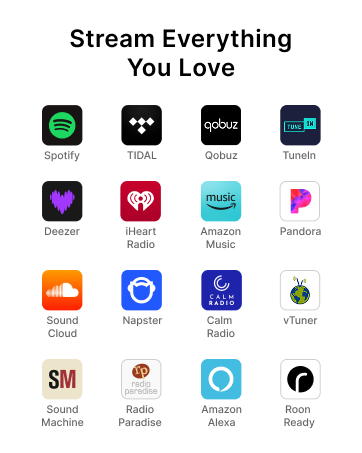
The WiiM Pro AirPlay 2 Receiver transforms any stereo system into a high-resolution wireless streaming powerhouse. Supporting 24-bit/192kHz audio, multiroom WiFi streaming, and voice control via Alexa, Google Assistant, and Siri, it integrates effortlessly with Spotify, TIDAL, Amazon Music, and more. Designed for audiophiles and modern professionals alike, it offers quick setup, superior sound clarity, and versatile connectivity to future-proof your home audio experience.
















| ASIN | B0BJDY6D1W |
| Best Sellers Rank | 2,229 in Electronics & Photo ( See Top 100 in Electronics & Photo ) 8 in Hi-Fi Receivers |
| Guaranteed software updates until | unknown |
| Item model number | ASR002 |
| Manufacturer | Linkplay Technology Inc. |
| Product Dimensions | 13.97 x 13.97 x 4.06 cm; 328.85 g |
C**L
Great sound and software connecting devices and services; perfect for 'modernising' vintage hifi
I originally bought the Pro version before the Pro Plus was released - the Pro Plus is a definite upgrade from the Pro and well worth the extra money in my opinion despite the similarities. Pro's: 1. Really easy to setup via the WiiM app that is provided - was up and running within 2 minutes of plugging it in. 2. Functionality is amazing - I have used Sonos and others in the past and this for me is the most versatile device with the best user software. The included remote also has excellent voice connectivity if you don't have another smart device running into it. 3. Versatility is also great - I have connected Amazon bluetooth devices that play by default through this device and it works perfectly effectively as the 'main speaker' for an echo dot. Yet I can still use the remote to get the WiiM to directly play anything from my connected services such as Amazon Music and Spotify. It just works. 4. Clarity and quality of audio - this is where the Pro Plus earns its money as it's immediately obvious that the DAC is superior to the Pro version. I run this into high quality vintage hifi via quality coax cables and it sounds as clear and impressive as my high quality CD source. In some cases with high quality audio files it's actually superior. 5. Size is great, it sits on the bottom shelf of my hifi rack, innocuously going about its business! Cons: 1. The price is much higher than the Pro version and their connectivity and usability is the same - so go for this if you have higher quality audio kit that needs a good source 2. For the price I would love to have seen a front display of some form, beyond the single LED that sits there, just to show source/levels etc. However I'd rather the money was spent of the excellent DAC that sits within the device I guess. Overall, I love this device and feel no need to look elsewhere at far more expensive alternatives with a few more flashy features. It does what it does exceptionally well and I hope it continues to do so (and be fully supported) for years to come.
M**K
Unbelievable for the money!
I had previously been using a Raspberry Pi to stream Qobuz to my DAC in my 2 channel hifi system; however, I was becoming tired of the clunky user experience so decided to give the Wiim Pro Plus a try. As I have already have a (very nice) DAC I was unsure whether to simply get the non-pro version and save a little money as I anticipated I would use my DAC rather than the built in one in the Pro Plus; however, at the time there was a 10% discount on the Pro Plus version and I fancied a remote control. The unboxing experience was excellent and didn’t feel budget at all, the device is wrapped in protective plastic within the box and you get all the plugs and cables you need to get going. If I could criticize the build, there are some faint marks on top of the case when the light hits the case at a certain angle. I think this might be from the protective plastic the device is shipped in? The device was very straight forward to get going, simply plug it into your system, switch it on and follow the prompts in the app. The device will update itself and within a few minutes from unboxing it is ready to start using. I didn’t experience any bugs or frustrations during setup. The app is quite comprehensive, so I recommend reading the online Wiim Pro Plus manual while you await the delivery of the device. I think you will then find it easier to navigate and set up the app the way you prefer it right from the off. Initially, I used the RCA outs directly into my amplifier and I was pleasantly surprised at the sound quality. The sound is smooth with no obvious harshness or other annoying traits and I can listen to music for hours without fatigue. I tried using my DAC and used a good quality QED glass optical cable from the Wiim to the DAC and set the Wiim to 24/192 output via optical. The sound was what I would expect from my DAC, most notably, the sound was more holographic, wider soundstage and the bass was a bit punchier; however, not as forgiving of poorer recordings. Things I didn’t like about using my DAC were a slight grain to the music which I eventually sorted by reducing the resolution from the optical out of the Wiim from 24/192 to 16/44.1, I don’t know if this is a Wiim issue, a DAC issue or choice of cable. Also there would be a pop through the speakers when switching between tracks with different resolutions e.g. going from 24/192 to 16/44.1. This popping was reduced by adjusting the settings in the app; however, it still occurred on occasion. Ultimately, I went back to using RCA directly to my amplifier and while the sound is not as holographic, as wide or as punchy, it is not far off and I need to A/B compare them to pick out the differences. I now use my DAC solely for playing CDs. I stream using Qobuz and using Qobuz through the Wiim app is glitch free and a pleasure to use. It doesn’t have all the functionality of the Qobuz app, and I’ve noticed when listening to an album and choosing to view similar albums, these similar albums are the same no matter what genre of music or album you listen to. When using Qobuz Connect, this is a non issue; however, Qobuz Connect seems to have a bug just now (noticed this through the Raspberry Pi as well) in that the track time bar on the now playing screen freezes sometimes and only works again if I minimise the now playing screen and then bring it back. This issue doesn’t occur when using Qobuz via the Wiim app. The Roomfit functionality through the app can work well; however, I find it to be inconsistent and needed a number of attempts to get a sound I liked. When I eventually got a sound I liked, the difference was subtle. I would say the biggest benefit is a more focussed, slightly more holographic sound. I recommend reading the manual on how to operate the Roomfit as there are a few settings to adjust. There is EQ functionality too, and this can be used in conjunction with the Roomfit; however, I’m happy with the tonal balance of my system and don’t use EQ. Overall, it's amazing how far inexpensive streamers (and DAC’s) have come in the last few years. I'm pleased I went for the Pro Plus version and I recommend it.
W**U
Nice streamer. Included remote control is very nice as I don't want to use my smartphone for vol. control all the time. I'm running a tablet for this with different. apps like Internet radio, Spotify, Soundcloud etc. All well. In configuration can set individual sound profiles (Equalizer) and save them . However, I wish once you run Soundcloud for instance and then switch to Internet radio that my saved eq presets would follow. But they do not. This as Soundcloud is very bass heavy so my Soundcloud equipment setting would be too anemic when switching to another music app. Have to do always manually. Having that linked automatically would be really great. Otherwise very satisfied with quality of that streamer. Gets very regular updates. Kudos to the developer.
P**S
Good
P**L
Bardzo dobry streamer. Jakość dźwięku świetna, łatwość instalacji i kompaktowe gabaryty to dodatkowy plus. Największym zaskoczeniem jednak jest dedykowana aplikacja, która działa perfekcyjnie i bardzo uprzyjemnia korzystanie ze sprzętu. Pilot również jest ok, można przypisać kilka przycisków do np. ulubionych stacji radiowych. Polecam niezdecydowanym 😎
C**R
I was looking for a Network streamer and did a bit of research on the internet and Youtube. After comparing the risk reward of each streamer, I finally bought one Wiim Pro Plus streamer. The initial sound from the Wiim Pro Plus connected to my Muzishare X7 integrated amp via a pair of Van Den Hul (The First) interconnect played through a pair of 92db Focal JMLab speakers was definitely better sounding than streaming via a Bluetooth receiver. Initially, even while I was streaming hi-res audio via Tidal, it sounded slightly flat and the sound stage felt a little compressed at the start. However, after watching a YouTube video on Best EQ settings by the cheapaudioman, I punch in the same setting he suggested and make some minor tweaks, and immediately the sound stage opened up, and the bass felt fuller. Now, I'm truly enjoying music that is streaming through the Wiim Pro Plus, playing Tidal via the Wiim home app. Be sure to fit this streamer with the best quality audio you can find, and it will definitely shine, it will not disappoint you. This is a highly recommended streamer at this price point for sure.
E**N
Excelente receptor, una actualizacion en el firmware y en la aplicacion permite ajustar un ecualizador parametrico con el microfono del celular, despues de probar esta configuracionme encanto el sonido de mi sistema, lo tengo conectado a un amplificador de bulbos El34 y a unas KLIPSCH RP-600M
Trustpilot
2 months ago
4 days ago



