Desert Online General Trading LLC
Dubai, United Arab Emirates
Desert Online General Trading LLC
Dubai, United Arab Emirates


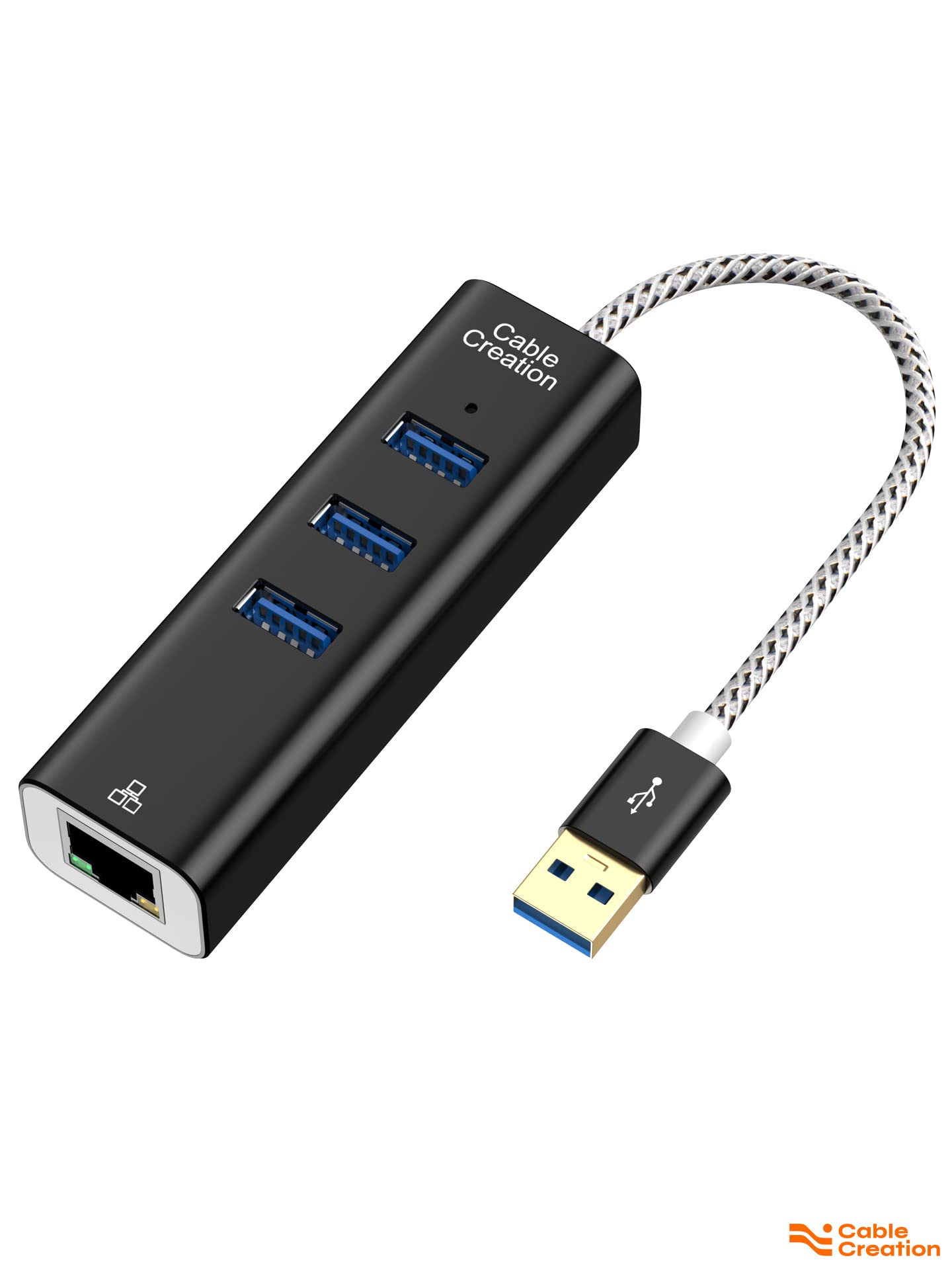
🚀 Elevate Your Connectivity Game!
The CableCreation USB to Ethernet Adapter is a versatile 3-port USB 3.0 hub that allows you to connect multiple devices while providing high-speed data transfer and reliable wired network access. Compatible with various operating systems, it’s the perfect solution for professionals seeking efficiency and speed in their tech setup.


S**2
Fits my need perfectly
I needed a compact USB A hub with a short cable that was sturdy. This one fit my need exactly. It's sturdy enough to mount to my monitor stand and securely enough to hold my cables.
J**.
Does The Job for a Great Price
I have only two 3.0 USB ports on my computer. I have a USB 3.0 receiver on one port and a 3.0 USB HDD on the other. I want to plug in an additional 3.0 USB HDD. What to do? CableCreation's 4-Port USB 3.0 Data Hub provided the solution. The hub worked as advertised, out of the box. I was not only able to connect my new HDD to the computer, I can transfer files from my original HDD to the new HDD, both plugged into the same hub. And, it does not seem to interfere with the operation of my USB 3.0 receiver which receives inputs from my wireless mouse.I give USB hub my five (*****) star rating. I was able to transfer two-years-acquired worth (1TB) of MegaSceneryEarth files (Flight Simulator scenery software) in less than 4 hours. Transfer rates varied from 40 to 90 MB/s, depending upon computer activity at the time of transfer.This hub is an inexpensive solution for those who have a limited number of USB 3.0 ports on their computers.
J**.
If you need a hub, don't cheap out
I bought one a few years ago for like $5 and it worked ok for a few months. Then it started losing connection on ports randomly. The wire then started to come loose. Eventually, I opened it and noticed that the points were the USB wire was soldered to the circuit board had broken off. I soldered it then taped it up. It never worked right and looked bad.This product is only $9 more and looks like it should be $25+. It has USB 3.0 and can handle 4 devices like a mouse, keyboard, gamepad and USB drive at once. USB 2.0 would typically cut off 1 or 2 devices if they are drawing too much power or using too much bandwidth. The cheap 2.0 hub I had couldn't run a simple 360 wired gamepad along with a normal mouse and keyboard. Forget about a 3.5 inch external drive. This hub is much better and worth the $9 or $10 extra.
J**A
Great except mine does not work well with Logitech mouse/keyboard receiver
Look and feel is great. Ethernet works excellent. Works with flash drives and external drives (my external drive requires 1/2 of an amp and 5 amps are available for all devices plugged into the hub).The only issue is my Logitech mouse/keyboard receiver. Both the mouse and keyboard have pauses lastings up to 5 seconds where the mouse does not move and the keyboard does not type. At first I thought it was the receiver or battery issues so I swapped to a different Logitech receiver and replaced the batteries but the same problems persisted. I then tried different ports on the hub but the same problems persisted. Finally, I plugged the Logitech receiver into the same (and only) USB port on my HP Spectre x360 (15-inch) laptop and it worked fine. Clearly the issue is the hub. I contacted the manufacturer.The CableCreation representative informed me that USB 3.0 technology does not work well with USB 3.0. The exact wording was:We have learnt the fact that USB 3.0 will interfere with 2.4GHz Wireless Devices, including Bluetooth. There's no perfect solution to avoid this from happening based on current technology. Please see attached file for your reference. Hopefully USB-IF will debug this flaw some day.I read the Intel document and it does indeed talk about interference but I have never experienced any of the interference they described. I tried plugging in a cheap 4-port Anker ($10) hub with the Logitech receiver and had no problems at all.The CableCreation representative later pointed out that two Anker reviews also mentioned problems with Logitech and Microsoft receivers. She appears to be correct.At this point I would say that if you are not going to use it with a wireless keyboard/mouse receive, it is an excellent choice. If you are planning to use it with one then you may want to consider other options.
S**I
Carol Anne, listen to me! Do not go into the light...
A very nice piece of equipment, especially considering the price. I like that the case is made from aluminum. It has a robust feel to it and is quite heavy for its size.Worked fine from the moment I plugged it in, no problems here. I'm using this on a USB 3 port on my PC to charge my tablet and/or phone, use a USB stick, and run a Bluetooth transmitter. All good!It has a green LED to indicate that it's working. So far, so good. However, if you look at the LED directly from straight above, the light is incredibly bright! So much that it blinds you. That's somewhat annoying, as it prevents me from positioning the hub in the way I'd prefer. Not a biggie, though. If you look at it at an angle, it's fine.Overall, I give a strong recommendation for this one.
J**E
Does the job!
I needed this little gizmo to be an 'extension' for my USB plug in that connects with my wireless keyboard/mouse. I also decided to plug my USB Wifi Adapter in. What sold me is that this has a longer cable, I needed more than just 2-3 feet that was available from other sellers. The price was right, and i'm happy to say, this little gizmo is doing the job. I added two pieces of Command picture hanging strips to attach it to the base of my monitor to keep it from flopping all over the place and that's been a huge help. So, stop searching and add to your cart. do it. do it now!
W**Y
Easy install and all of the Ethernet's goodness
Installed the USB hub/Ethernet adapter on a 3 year old ACER Chromebook. Started up the computer, then turned WiFi off. When browsing now, pages arrive much quicker and scrolling those pages is immediate...as in no lag. For sure, this makes this little laptop much more pleasurable to use. The USB mouse, 2.5" portable drive, flash drive and keyboard work great...and while all the devices are plugged into the hub and computer's ports at the same time. I'm yet to run some speed tests to see if the 1GB/s claim comes close. I'm not sure how that speed is achievable since the USB 3 port's have much lower capability. CableCreation says it can do it, but I'd like to know more about the "How?"
Trustpilot
2 weeks ago
2 days ago