
DOWNLOAD THE APP


Customer Services
Copyright © 2025 Desertcart Holdings Limited
DOWNLOAD THE APP
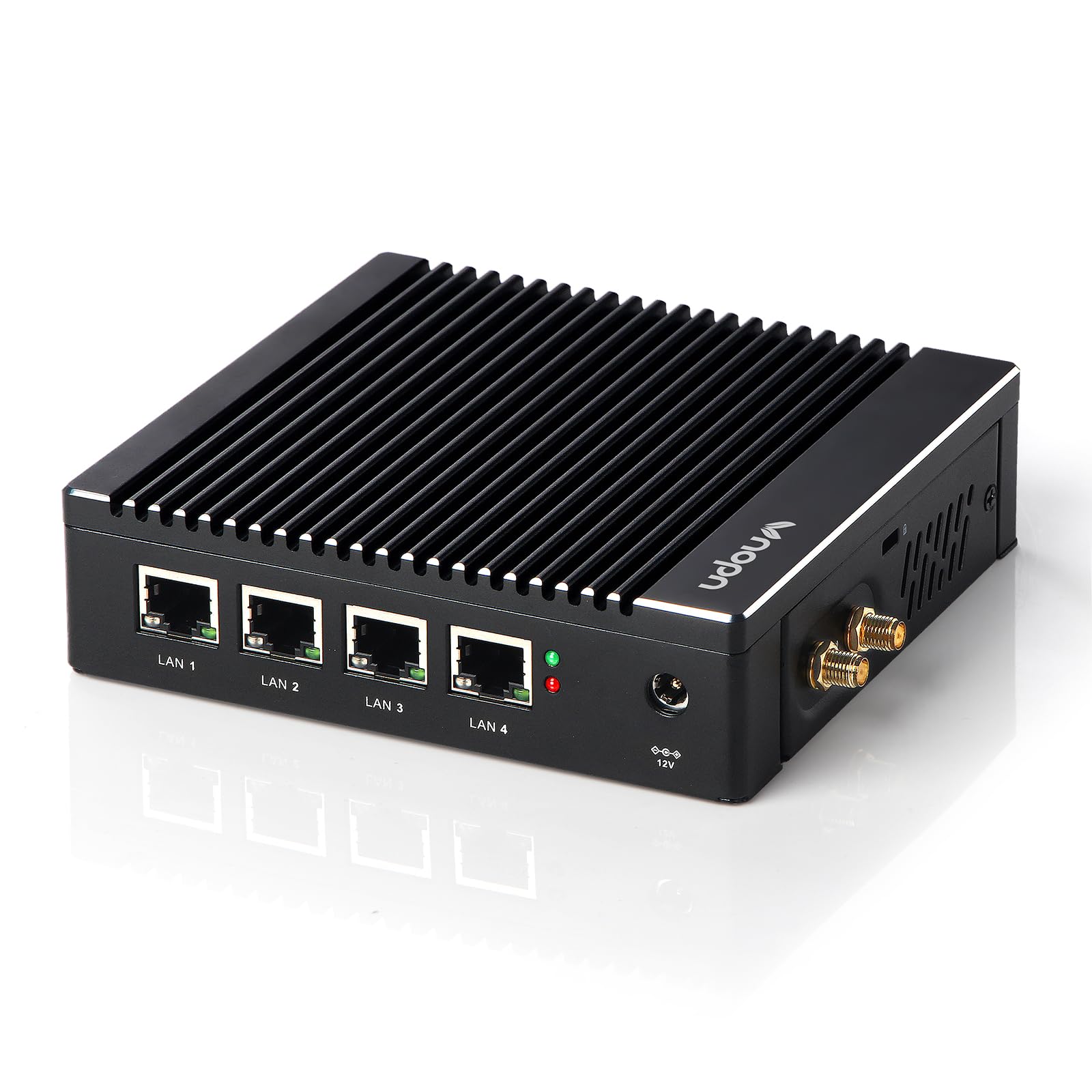
🚀 Elevate your network game with silent power and pro-grade speed!
The VNOPN Fanless Firewall Mini PC is a compact, silent powerhouse featuring an Intel N3700/N3710 quad-core CPU with AES-NI support, 4GB DDR3 RAM (expandable to 8GB), and a 64GB SSD. Equipped with four 2.5GbE Intel LAN ports, it delivers robust, future-proof network performance ideal for advanced home or small business firewall, VPN, and routing applications. Its fanless aluminum design ensures silent operation and efficient heat dissipation up to 60°C, while VESA mounting options save space. Pre-tested with pfSense and other open-source OSes, it offers a flexible, reliable platform for professional-grade network security and management.







| ASIN | B09J4J73YW |
| Additional Features | Fanless mini PC, silent, with heat dissipation through the casing, which can withstand temperatures up to 60°C. |
| Aspect Ratio | 16:9 |
| Best Sellers Rank | #18,439 in Computers & Accessories ( See Top 100 in Computers & Accessories ) #628 in Mini Computers |
| Brand | VNOPN |
| Built-In Media | 1x Bracket & Screws, 1x US Power Supply, 1x User Manual, 1x Vnopn Mini PC |
| CPU Model | Pentium |
| CPU Model Number | Intel Pentium N3700 |
| CPU Model Speed Maximum | 2.4 GHz |
| CPU Speed | 1.6 GHz |
| Cache Memory Installed Size | 2 MB |
| Cache Size | 2 MB |
| Color | Black |
| Compatible Devices | Various |
| Connectivity Technology | Ethernet |
| Cooling Method | Fanless Passive Cooling |
| Customer Reviews | 4.0 out of 5 stars 139 Reviews |
| Display Resolution Maximum | 3840x2160 |
| Display Type | LCD |
| Graphics Card Description | Integrated |
| Graphics Card Interface | Integrated |
| Graphics Coprocessor | Intel HD Graphics |
| Graphics Description | Integrated |
| Graphics Ram Type | DDR3 SDRAM |
| Hard Disk Description | SSD |
| Hard Disk Interface | Solid State |
| Hardware Interface | 802.11 b/g/n, Ethernet, USB 3.0, VGA |
| Human-Interface Input | Keyboard, Mouse |
| Item Dimensions | 5.27 x 4.98 x 1.43 inches |
| Keyboard Description | Standard USB keyboard |
| Keyboard Layout | QWERTY |
| Manufacturer | Sharevdi |
| Memory Storage Capacity | 4 GB |
| Model Name | F12 |
| Model Number | F12 |
| Native Resolution | 3840 x 2160 |
| Number of Component Outputs | 2 |
| Operating System | Firewall OS |
| Personal Computer Design Type | Mini PC |
| Power Consumption | 6 Watts |
| Power Plug Type | Type A - 2 pin (North American) |
| Processor Brand | Intel |
| Processor Count | 4 |
| Processor Series | Pentium |
| Processor Socket | BGA 1170 |
| Processor Speed | 1.6 GHz |
| RAM Memory Installed | 4 GB |
| RAM Memory Technology | DDR3L |
| RAM Type | DDR3 SDRAM |
| Ram Memory Maximum Size | 8 GB |
| Resolution | 3840 x 2160 |
| Speaker Type | Monitor |
| Specific Uses For Product | Controller mini server vpn, Network Gateway, firewall Router |
| Specification Met | CE, UL |
| Style Name | Minimalist |
| Total Expansion Slots Quantity | 1 |
| Total Number of HDMI Ports | 1 |
| Total Usb Ports | 2 |
| Video Output | HDMI, VGA |
| Video Output Interface | HDMI |
| Video Processor | Intel |
| Warranty Description | 1 year |
| Wireless Compability | 802.11bgn |
| Wireless Network Technology | Wi-Fi |
| Wireless Technology | Wi-Fi |
A**S
Perfect for pfSense use
I have a decent amount of IT gear in the home (Synology NAS, VM host server, etc), along with an abundance of mobile devices, PCs, Macs, and a bunch of connected devices (TVs, AppleTV, Fire Stick, Ring, MyQ, Insteon, and more). Gigabit service from Xfinity was serving the home through an ASUS RT-AC86U with another RT-AC86U in AP mode with a wired back haul to ensure our entire home is blanketed in fast interwebz. Lately the RT-AC86U that was serving as the router would become unresponsive and require a reboot. Internet would be slow to unavailable entirely. If I could get the router to respond it looked like both CPU cores were maxed. I never looked into what the culprit was…I decided I’d just go a different route entirely. I had experience with pfSense when I managed IT operations for a bit and got to thinking this was a good excuse to go that route. Tried it out on a 15 year old gaming PC I built first to get things dialed in and prove out it would work. After some tinkering I got things working great…our power consumption was INSANE. Enter this awesome alternative. Priced attractively. 4 gigabit Intel based Ethernet connections. AES-NI compatible CPU. 128GB HDD and 8GB of RAM. Perfect/overkill for hosting pfSense in a home setup. I spent a few minutes tinkering with the BIOS to get things the way I wanted, installed pfSense, restored my pfSense config, and put it into service. Within 30 minutes I was done. It’s been running without issue since. Power consumption is almost non existent…it’s super efficient. pfSense doesn’t put a strain on the system resources at all, and it runs cool, as well as completely silent. Absolutely nothing not to like. I expect this to serve my needs for many years to come, and will do so much more reliably than any consumer router. Aside from all this, I have a MUCH more powerful device to improve my home network if I wish to, and I have a much better security posture in my home, running Snort and pfBlocker, etc. I can’t speak for using it as a pc, but if you want to use it as a firewall, I have zero issues recommending this unit.
W**E
Very Reasonable Value network appliance
I purchased this device and it has been running in my home for 8 months now and since I first wrote this review the device has had plenty of time to burn in and be evaluated. While its only in residential use, I have remote working, online gaming, media streaming and education needs that I believed this device could address better than consumer level wifi routers. My experience is that this is so much more powerful and cost effective than any consumer or prosumer level router/firewall hardware. Some of the more advanced features I was looking for for my application were -heavy VPN usage with between two and three VPN connections. This makes good use of the on-board acceleration. -8 Segregated VLANS -Parental controls -Advanced network insights -Advanced firewall rules and routing. Comparing specifications this device was very reasonable for the features. It seems that some models now are shipping with 2.5 gig network cards for the same price. If you can get it with the 2.5 gig network ports that would make it all that much more future proofed and powerful. It also seems that there is more competition in this space offering 2.5ghz solutions. Consider my review is on a unit with 1ghz ports as that was shipping when I purchased it. Here are my observations. I was fearful of some of the reviews on quality and was considering buying one of the more mainstream network appliances to save myself a headache but i did decide to take a chance. This unit had proven itself more robust and a worthy product. Its specs are perfect for high end residential use into moderate sized small business use. Right out of the box its a much more solid build than some branded open source network appliances that are housed in plastic. Other than the wifi that this comes with, this is a step change from consumer based products or all-in-one wifi-routers. It showed up, no lose parts, no issues powering it up and it does come with a preloaded OS for POST testing. That OS is not really usable and you should expect to provide your own operating system for whatever its intended purpose. Installation of the open source firewall on it was a breeze and required no special configuration, I used pfSense for first install. All hardware was fully recognized on the initial install and went seamlessly. It comes packed well, securely and environmentally sustainable in paper based packaging. It comes with an L-bracket to attach to the back of a monitor should you desire to mount it there or use it as a small personal computing device, but you will need to install a different OS than the one that is included for that purpose. It comes with some screws to attach to monitor or for use in a wall mount setting using two recesses on the bottom of the chassis, rubber feet for a desktop install. Also the box contains a very brief user manual, QA certificate a robust power supply and two small wifi antennas. The device is about 5-1/4 inches by 5-1/2 inches but will require more install space for cables and included antennas. The foot print is significantly smaller than most consumer grade products. The case is robust being made from aluminum. Access to the internals is easy and expansion seems straight forward, but it isn't made for frequent access and expansion as some gaming computers may be, but that's to be expected. The motherboard is an American Megatrends and as I looked at it you will be restricted to the one slot of memory. Initial set up you do need a keyboard mouse and direct monitor connection but once configured it can run like any other consumer network device accessed over the network. It runs quietly since there is no fan. It does run warm to the touch but nothing concerning and doesn't raise any safety concerns, however I would not use it on a desktop where it could get covered by something that would restrict natural airflow or allow heat to build up. My first configuration suggestion specific to this hardware should you run PfSense is to customize these two settings right out of the box. Navigate to System->Advanced->Miscellaneous scroll down to the section on Cryptographic & Thermal Hardware and set the following fields. Cryptographic Hardware = AES-NI CPU-based Acceleration Thermal Sensors = Intel Core* CPU on-die thermal sensor I've been running many devices (15 to 25 peak) over a full time VPN with about 4 or 5 consistently using moderate bandwidth for remote working, remote education, streaming and hardcore gaming. In 8 months the hardware has only been restarted two maybe three times (once for an upgrade in software, once for a power failure and if I recall once for an ISP outage) so its been running largely uninterrupted for the majority of 8 months flawlessly. I conservatively average 1.2 TB (1.6 TB peak) of download data per month from my ISP. All of that goes over this box so it does get a workout. There is additional workload for uploads and local network traffic. The important thing for me was that under that load the only time i see the CPU get out of single digit utilization numbers ( 4%) is when I run extended speed tests over a VPN. In fact my ISP gates my capacity because I use so much data so I can't really give the device the full level of scrutiny I'd like to. As I hinted, CPU never really gets over 4% utilization, memory hovers around 7% and temp is constant 49 Degrees C. Running a prolonged series of speed tests over a VPN can push CPU to 40%, temp to 51 Degrees C however memory isn't really impacted by these tests. Any concerns I had about this device having sufficient power to meet my needs have been fully dispelled with room to grow. This was a key reason for purchasing this hardware as the CPU fully supports AES-NI for encryption. Full disclosure, I do not expect to use the wifi capabilities on this device since and purchased this knowing full well that I wouldn't. Most of the linux based open source software you may run on this box doesn't support more powerful cards than what this came with. You can replace the wifi card with a 3G/4g LTE cell card but it will also be bandwidth limited. I'd refer you to the following links for education. OpnSense https://docs.opnsense.org/manual/how-tos/cellular.html PfSense https://docs.netgate.com/pfsense/en/latest/cellular/hardware.html I would recommend the path that I took which was to externalize the wifi and install a few wifi 6 access points hanging off a powered switch. This is a bit more expensive but for that expense in addition to increased bandwidth, I can run multiple SSIDS on different vlans/subnets for security, take full advantage of the opensource software as well as get 5ghz and 6ghz wifi in addition to the 2.4ghz coverage in a mesh over a whole house with no dead spots. Like the wifi, if you plan to use Cell service as primary or backup internet connection I'd externalize that as well since a wired network connection will provide better throughput than any cards you can put into this device internally. I'd also suggest that if you are looking at 5G cell you should fully look to get the 2.5Ghz network ports because 5G cell service can support over 4Gbps. In reality if you are planning to play in that space on the leading edge of 5G, you may be a power user and may need different hardware quickly. This device enabled some more advanced use cases that I have. Having an Adolescent gamer in the house I am able to manage traffic and avoid lag and latency and make specific hardware tuning required by certain games. That is partially a function of the open source software but I just couldn't do these things on consumer hardware. We are using this device for parental controls those features are more of a function of the open source software that you install on the device so I will refrain from going into this here. I will say that the features that this hardware provides me to run that software which provides me much more control and sophistication. The hardware offers the capacity capacity to run the additional software packages needed to perform advanced monitoring, diagnostics and control software under a heavy (for personal use) networking workload. If my review is a bit dis-joined, please understand that it is difficult to draw a fair comparison of this device against the consumer based wifi router that I'm using this to replace. This review is intended to be more specific to this hardware. I've attempted to minimize most references to the various opensource firewalls that would run on it. Consumer based wifi routers are a combination of both hardware (the specs of which you may never know) and the home grown (limited) software supported by the manufacturer. None of the hardware in this unit is esoteric or unsupported and I found that the opensource software was able to easily identify it and take full advantage of the capabilities, providing great monitoring. My conclusions are that if you are looking to get into Open Source firewalls and replace a consumer based wifi router, i can fully recommend this hardware. Its an affordable and fully featured device and has all indications of having a robust service life. Its not entry level so you will not run out of capacity unless you are using this in a quickly growing mid sized business, but I more than expect it to take care of a lifetime of residential needs, even with growing network usage. I would say that I wish I had been able to get a model with the 2.5 ghz network connections because that would benefit wifi 6 access points and anything connected. If you are looking to get into this space you are probably looking for advanced network capabilities and may consider ensuring you can get a 2.5 ghz unit one way or another. The fact that 2.5ghz network ports became available for the same price point was something i didn't anticipate. I didn't review this as a PC however it could be used in that way, but as a network appliance its a very robust piece of hardware. As an admonition, If you have simple and straight forward consumer based needs and don't want to learn about more advanced networking this device may not be for you. This machine is purpose built for networking users with advanced needs, moderate workloads and looking to learn/employ more advanced networking topics. The real benefits of this device are that it is so much more cost effective, full featured and robust than equivalent capacity business grade products or branded network appliances. It can fully support home use to small business use. Community support for the hardware and software is pretty solid too. Lastly I would say that there is an advantage in purchasing this on Amazon as you get better customer service, faster delivery and more security than you may obtain by purchasing alternative hardware on other sites.
C**P
BIOS issue
Nov 2022 - this unit has been running nonstop for months. I am very happy with the unit. UPDATED - The second unit came in and works much better and as i would expect. I need to first modify the bios and do the install again [on this new unit], and compare it to the legacy mode install i had to do on the first defective unit... more to come ORIGNIAL POST - The unit powered on great and went into windows. I made the one change to prepare for install, in BIOS, that others left comments saying they did, and now i cant back into the BIOS. Power button and reset work, makes the green light goes off and on, BUT no red light activity, aka disk access to boot from OS. The only way to get back into windows is to remove power cord and wait few min. My other concern is the vnopn website is not accessible and i cant find any info on updating the BIOS or any other tech info other than submitting via amazon customer feedback which is concerning. Waiting for new unit now - so much for using the long weekend to install and test pfsense, which is very disappointing
M**L
An ok machine, returning due to poor ssd performance, driver issues, and other problems
This machine was missing a rubber foot for some reason, however, I ended up returning it for another reason. I'm an embedded engineer and built my own router from scratch. What I found is the performance was sub-optimal with the drivers for the NIC. There is also a problem where the systemd gpt auto generator throws out errors. To solve that, you can set "systemd.gpt_auto=0" in the kernel parameters. This may be ok to use with pfsense/opnsense but that wasn't good for my use case. The SSD itself seems to be poor quality, but would work as long as there isn't any heavy i/o. I've gone back to my original setup and upgraded it which is passing through a NIC card to a virtual machine. That has worked better than this particular appliance.
R**.
Great little computer
Worked well from the first I fired it up. It event came pre-loaded with Pfsense, so that was a plus. It is well built. Great for Pfsense firewall.
M**I
False Advertising - Missing Capabilities
I was able to install pfSense and get it to run successfully, only to find out that one of the advertised capabilities is not available i.e. Auto power on after a power outage. On boot up, pressing the DEL key will open BIOS settings, then under Chipset -> South Bridge there is a configuration option for "Restore AC Power on Power Loss". Setting this option to 'Power On' should cause the device to automatically power on after power is restored. In reality, after a power outage, the "Restore AC Power on Power Loss" option mysteriously resets to 'Power Off'. Not having this capability effectively renders this device useless to me because there is no way I'm going to risk not having VPN access to my home network if there is a power outage. Every time the power goes out, someone has to manually press the power button on the device. I am giving this one star because I consider this false advertising when the listing here clearly states that there is an auto power on feature, but the feature doesn't work.
O**V
pfSense slow
My former firewall setup, powered by an Atom processor, was able to hit download speeds of approximately 550Mbps. I was seeking an improvement, and thus, decided to transition to a VNOPN Micro Firewall Appliance. This device, equipped with 4 Intel 2.5GbE NIC Ports in a compact, fanless PC design, seemed promising. However, despite the more advanced hardware, the results fell short of my expectations. Upon testing this new setup, the speed boost was marginal, with throughput failing to outstrip my previous 550Mbps by a substantial margin. This was surprising and disappointing given the potential that the new hardware was supposed to offer. Wanting to understand the root cause, I tested another setup - an i7 Second Gen mobile box. This four-core 3.1GHz CPU delivered a drastically different outcome. The download speed peaked close to my internet connection's full capacity, achieving an impressive 980Gbps. These trials led me to a conclusion: in order to fully utilize a 1Gbps connection with pfSense, a more potent CPU appears to be necessary. The Atom processor and the VNOPN Micro Firewall Appliance both fell short of reaching this level of throughput, leading me to believe that the key lies in the processing capabilities of the system.
M**6
As advertised. Works great with Arista. I'll be buying more soon.
As advertised. Works great with Arista. I'll be buying more soon.
Trustpilot
1 month ago
1 month ago