
🚀 Flip Your Productivity Into High Gear with ASUS Chromebook C433!
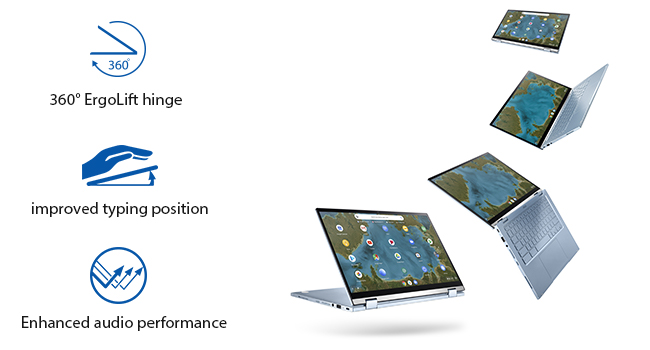
The ASUS Chromebook Flip C433 is a sleek, convertible 14-inch laptop featuring a stunning Full HD NanoEdge touchscreen, powered by an Intel Core m3-8100Y processor and 8GB RAM. Its 360-degree hinge offers versatile usage modes, while the backlit keyboard and Chrome OS deliver fast, secure, and seamless performance with up to 10 hours of battery life—perfect for multitasking millennials who demand style and efficiency on the move.


| ASIN | B08ZLF99VD |
| Audio Output Type | Headphones, Speakers |
| Audio Recording | Yes |
| Automatic Backup Software Included | Gmail, Google Drive, Google Play, Microsoft Office 365 |
| Battery Cell Type | Lithium Ion |
| Battery Life | 10 Hours |
| Best Sellers Rank | #16,273 in Computers & Accessories ( See Top 100 in Computers & Accessories ) #187 in 2 in 1 Laptop Computers |
| Bluetooth support? | Yes |
| Brand | ASUS |
| Built-In Media | 1 |
| CPU Model | core_m |
| CPU Model Generation | 8th Gen |
| CPU Model Number | Core m3-8100Y |
| CPU Model Speed Maximum | 3.4 GHz |
| Cache Memory Installed Size | 4 |
| Camera Description | Front |
| Color | Silver |
| Compatible Devices | External displays, keyboards, mice, storage devices (via USB 3.2 Gen 1 Type-C/Type-A), and Bluetooth-enabled devices (headphones, speakers, mice) |
| Connectivity Technology | Bluetooth |
| Control Method | Touch |
| Customer Reviews | 4.2 out of 5 stars 1,414 Reviews |
| Display Resolution Maximum | 1920x1080 Pixels |
| Display Technology | IPS, LCD, LED, IPS |
| Display Type | LCD |
| Form Factor | Convertible |
| Global Trade Identification Number | 00195553135870 |
| Graphics Card Ram | 8 GB |
| Graphics Coprocessor | Intel HD Graphics 400 |
| Graphics Description | Integrated |
| Graphics Ram Type | DDR4 SDRAM |
| Hard Disk Description | Emmc |
| Hard Disk Interface | USB |
| Hard Disk Size | 64 GB |
| Hard-Drive Size | 64 GB |
| Hardware Interface | USB |
| Has Color Screen | Yes |
| Human-Interface Input | Keyboard, Touchscreen |
| Item Dimensions L x W x Thickness | 12.64"L x 8.15"W x 0.65"Th |
| Item Height | 0.65 inches |
| Item Weight | 3.31 Pounds |
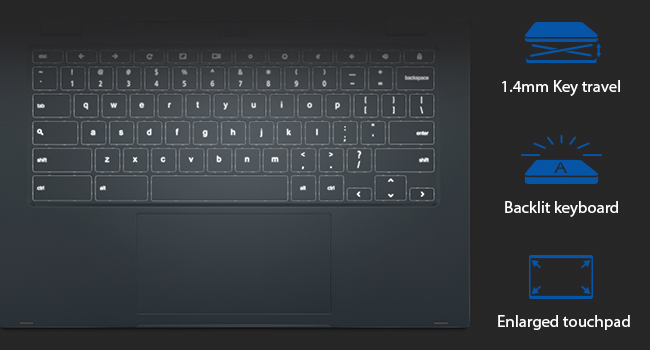
| Keyboard Description | Backlit |
| Keyboard Layout | QWERTY |
| Lithium-Battery Energy Content | 48 Watt Hours |
| Manufacturer | ASUS |
| Memory Clock Speed | 3.4 GHz |
| Microphone Form Factor | Built-In |
| Model Name | Chromebook Flip |
| Model Number | C433TA-AS384T |
| Model Year | 2021 |
| Native Resolution | 1920 x 1080 pixels |
| Number of Ports | 2 |
| Operating System | Chrome OS |
| Optical Storage Device | No Optical Drive |
| Other Special Features of the Product | Backlit Keyboard |
| Processor Brand | Intel |
| Processor Count | 1 |
| Processor Series | core_m |
| Processor Speed | 1 GHz |
| RAM Memory Installed | 8 GB |
| RAM Memory Technology | DDR4 |
| RAM Type | DDR3 SDRAM |
| Ram Memory Maximum Size | 8 GB |
| Refresh Rate | 165 Hz |
| Resolution | 1080p |
| Screen Size | 14 Inches |
| Specific Uses For Product | Student |
| Total Usb Ports | 2 |
| Touch Screen Type | Capacitive |
| UPC | 195553135870 |
| Video Output | USB Type-C |
| Video Processor | Intel |
| Virtual Reality Ready | No |
| Voltage | 3.7 Volts |
| Warranty Description | 1 |
| Warranty Type | Limited |
| Webcam Capability | Yes |
| Wireless Compability | 802.11ax |
| Wireless Technology | Bluetooth |
M**W
The keyboard is NOT useless!!
I got this for use at work as we got new ePCR software and were handed iPADS without physical keyboards and I just couldn't do it. That being said.. I use it at home also! This machine has turned out to be a great overall device. The display is nice and bright. It's fast.. and the battery life will last well into 2 days in a single charge! The fact that it starts up in seconds is a plus as I can do what I need to do and shut it completely down and be back up in a moment's notice. The keyboard took some getting used to. I have seen folks mentioning that the keyboard being backlit being useless especially during the day as the contrast makes the markers on the keys nonexistent. I've seen that there are lots of folks who haven't been able to turn the brightness down or even off. I have your solution.. using the alt key plus the up or down brightness key will turn it up or all the way off. I have found this to be quite useful as the only complaint that I have had thus far is this problem. But no more! Alt key plus the brightness key (up or down depending on what you're after) and you're good! I'm using it all the way off right now with only the screen brightness being just fine. The screen is halfway up. Give that a try before you seek to write it off as useless. I hope this has helped!
D**N
Just completely Awesome
I bought this Asus 2 and 1 Chromebook Flip not expecting to be as good as what's written. But I have to say it's better. This is the best computer I have ever invested in. It works out excellent for what I do and it's teaching. I can do everything that a high price computer at Bestbuy can do. I would recommend everyone to have one. Besides the operation system the Chromebook is just out right stylist and the flip is just out of this world. People are so amazed when I use it they can't stop admiring it.. You will read reviews about the key board backlight. I have to say they are all wrong the backlight is more then sufficient to see. I like the way Asus went with the crime style inside and out. Even on the keyboard. I can't stand the basic black. That's for those who don't want to move on with time. Now Check this out it hae a charging slot on both sides of the laptop 💻 so you can switch it to charge in either side. The touch screen is just beyond sensitive, but that what you want. The Volume is excellent and the picture is just wow. Now please sleep in mind this is a piece of machinery that need to be taken care of. If you drop it it will break just like any other computer. So stop the complaining about it being cheap because it's not. The only set back is that Asus don't have a protective hard case for it. They definitely need one for this laptop. Oh yeah you can woke on multiple screens at one time as well that just a bonus for me. Hope this was helpful.
M**E
Almost Perfect
This is my first Chromebook, and I love almost everything about it. 1. The speed is lightening fast 2. It is extremely easy to use. I set it up & played around with it for a couple of hours, and learned a ton about the ins & outs of the Chromebook. 3. A big 'Yay', on the lack of useless bloatware that is so common on Windows systems. 4. The touch screen and mouse pad are both very responsive. 5. The screen is crystal clear, and I absolutely LOVE the night time blue light filter. It is so much more pronounced than similar filters on any of my other devices. It really helps with eye strain, and you can use it during the day if you want as well. If I think of any more positives as I use it more, I will add updates. And now, for the one glaring flaw that kept me from giving five stars; The keyboard could be much better, visually. The keys are light, and so are the letters. There is not much contrast at all, so the letters/numbers are really hard to see. Luckily, I've been typing for so long that I can get by. But it'd be much easier if I could see the letters without straining! Since I love everything else about it though, I will happily keep it. I am good about updating my reviews, so if I run into any more pros or cons I will be sure to edit this. EDIT: I ended up buying a keyboard skin cover that fits and works perfectly. The item description of the one I got here in Amazon is: Keyboard Cover for ASUS Chromebook Flip C434 2 in 1 Laptop, ASUS C302CA/C423NA/C425TA/C433TA/C434TA-DH342T DSM4T DS384T C523NA Chromebook, ASUS Chromebook Protective Skin, Black
D**G
Great computer for the price
If you want a laptop with a nice-sized screen, 360 rotation, and touchscreen it's a great laptop at a great price. I've had mine for 3 months now with no issues. I use it for college and a charge lasts me all day until I get back to my dorm. If I don't use it much over the weekend say an hour a day then a full charge will last all weekend. The only downside is that the touch screen is capacitive and not active. If you want to write a lot of notes on your laptop and you can spare another hundred or so get the C436 it has an active screen. My notes are really sloppy and it's not the easiest but it works fine and I only use it in lectures to make annotations on pdfs and then take notes on paper when I get back to my dorm. I wouldn't use it for notes all the time because of that. But for the price it's the best all around for what it offers.
C**D
I really like it.
Having always used "Windows", and therefore completely new to Chromebook, it is a definate learning curve. I feel hampered as I've only ever used Microsoft type computers and being elderly may have slowed my learning speed. I will try to update this review as time goes by. My old laptop was extremely slow and I was looking for something different and speedy. First impressions after having a Chromebook for 1 week: -It is FAST. Pages load really fast! -It was easy to transfer all my data & settings from my old computer, thanks to using Chrome in past years. All my photos are there. The Chromebook shows you how and guides the process. -The keyboard lighting CAN be brightened to improve key visibility. This was one of my big concerns as many reviews mention it. The key were hard to see due to the low lighting at first. I didn't find a reference to it on the Chromebook at first and needed a quick fix. A search on Google showed me how. I followed the instructions and now I can see the keys very well in normal household lighting. -It is a learning curve to learn the keyboard shortcuts. I am jotting down notes in a notebook. -There is a Chromebook simulator for learning. -It has a easy, sensitive touchscreen. -Screen brightness is easy to adjust. -No detectable heat output. -Battery lasts a long time. -Tablet mode: Open it completely until the two outside surfaces touch and it is completely flat. The touchscreen is quite responsive. - Any questions I have regarding how to use this Chromebook can be easily answered by a quick Google search. - The screen comes on instantly when opening, if I don't turn the Chromebook off. Navigation icons are at the bottom of the screen. Still learning; will update.
D**T
I love it but TERRIBLE keyboard and Mouse pad
Final update: Been about a year, finally found a use for it. It looks great flying across the room into the wall. I will never USE, and will promise you, will never buy another Chromebook as long as I live. Slight update: The mouse pad is huge which you would think would be great but you hit it all the time and it moves the mouse around by accident. Its really quite annoying. Great Chromebook but the keyboard is terrible. There is no caps-lock key or Del key which I use a lot. It is also back lit which sounds nice but unless its dark it makes it very hard to see the keys and every time you turn it off and on it resets and you have to turn the back light off again. The track pad is a bit annoying too. It is very big so you hit it a lot and there is not right click option you have to do Alt+click to get a right click. The screen and battery life and all the other things are great but just a terrible keyboard.
W**7
Unexpectedly awesome except for 2 details
After reading many reviews I did not expect anything other than a Chromebook. However many of the things that others seem to be critical of are not an issue here..... magnets stick when you close and open into tablet mode. The touch screen works great. The pad works great and the screen is bright. I have reservations because of the many negative reviews. So far so good. I will update you if anything comes up. Update: 7/27/211 Backlit keyboard works great too! I think that most people would agree that once you know how to use a chromebook there are few complications. However, I still hate the way the cameras work. Why are they sooooo bad? It seems like this model would at least off a better camera.. ....So I am disappointed about the camera and that I cannot use the blur background in meetings. These seem like small concessions that chromebooks should add. I may actually need to swith to a windows computer because of this issue. Who wants to see my unmade bed during a zoom or teams meeting? Noone., and nooine should have to worry about such details. le
F**R
Tried Chromebook instead of Laptop--BIG Mistake!
I'm a senior lady who is 71 years old. I have used computers my whole adult life. When I ordered this Chromebook instead of my usual purchases in the past of Laptops, I did so by reading what the differences were between the two, then I spoke with my son-in-law about the differences and got the impression that there was not that much difference. I just received my Chromebook four days ago. I was surprised at how nice it was. Very heavy to me at first, compared to all other Laptops I've used, but as I'm using it, it does not fall off my lap when I move a little! I am going to keep this in mind when I find the right Laptop for me. This Chromebook in my opinion, is one of great quality! Quite solid and sturdy! I have two favorite things on this Chromebook. One is the screen! It is so clear, very colorful, easy to read. It is the BEST SCREEN I have ever used! The Touch Screen is more precise when using it as a laptop. For example, ones I have used in the past, have always been difficult to select the exact spot where you want the cursor to be! I would need to select, go back, select again, go back, the line, the letter, the number. I don't know if it's due to the clarity of the screen or if it's programming, but not having to constantly select and re-select over and over again, is a blessing! The fact in which you can fold this screen over and work on it as a tablet is great! What I don't necessarily like is how "touchy" it is. When I folded it over and started using it as a tablet, My hands, in holding it to use as tablet, kept touching the on/off button on the side. I would touch the enter keys and shift keys and kept ending up somewhere that I didn't want to be! This Chromebook said one of the features was a "backlit keyboard". If it is, it is a very poor one! I could see some lighting underneath the keys, but the letters and numbers on the keys do not light up with this! What good is some lighting underneath if it doesn't light up the actual letters/numbers? I'm also frustrated with this Chromebook that the keyboard is too simple! With a Laptop, I could switch between screens I had opened by using the Alt Key with the Tab key. Not on Chromebook! If I wanted to type a word fully in caps, I just had to touch the Shift Key. Not on Chromebook! For those who learned and worked on a Chromebook in the past, I believe this would be a good one to try, really feels very solid and sturdy. For me, I'm going to be returning this one and keep researching for the best inexpensive Laptop I can get. I will be sending it back for a refund and keep looking for the Laptop I'm use to.
Trustpilot
4 days ago
2 months ago



