
🚀 Elevate your home network to pro-level speed and coverage—because buffering is so last decade!
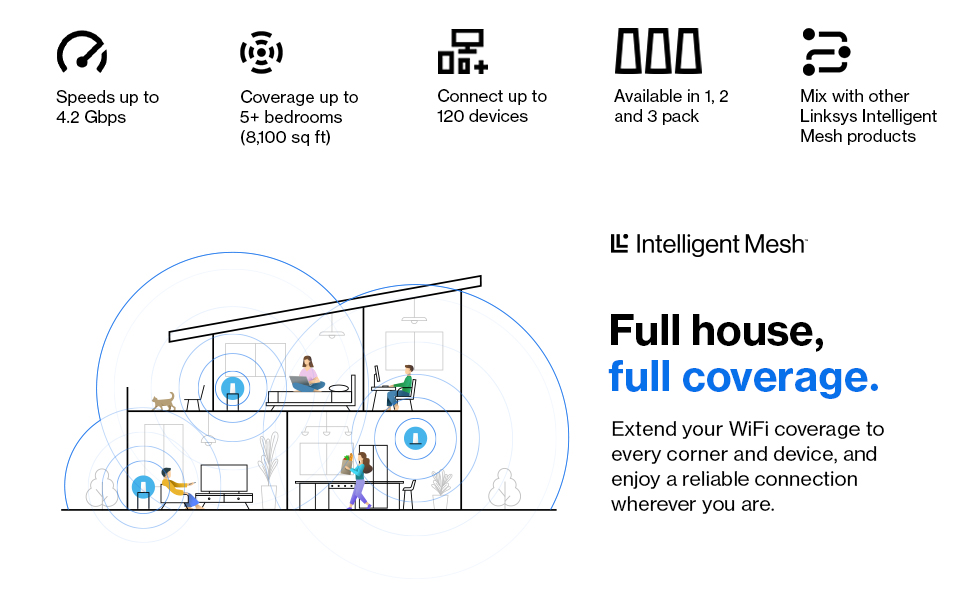
The Linksys Velop MX12600 is a premium tri-band WiFi 6 mesh system delivering ultra-fast speeds up to 4.2 Gbps and coverage up to 9000 sq ft. Designed for busy households and smart homes, it supports over 120 devices simultaneously with advanced parental controls and robust security features. Easy app-based setup and Apple HomeKit compatibility make it a future-proof choice for seamless, reliable connectivity.


| ASIN | B08WJCC7BL |
| Antenna Location | Home |
| Antenna Type | Internal |
| Best Sellers Rank | 2,990 in Computers & Accessories ( See Top 100 in Computers & Accessories ) 11 in Whole Home & Mesh Wi-Fi Systems |
| Box Contents | What’s in the box: Linksy Velop WiFi 6 Tri-Band Series node (x3) Ethernet cable UK power adapter (x3) Quick Start Guide Printed Documentation |
| Brand | Linksys |
| Brand Name | Linksys |
| Colour | White |
| Compatible Devices | Laptop, Personal Computer, Smart Television, Tablet |
| Compatible devices | Laptop, Personal Computer, Smart Television, Tablet |
| Connectivity Technology | Wi-Fi |
| Control Method | App |
| Controller Type | App Control |
| Country of Origin | Vietnam |
| Coverage | 3000 sq ft |
| Customer Reviews | 3.9 out of 5 stars 4,057 Reviews |
| Data Transfer Rate | 4.2 Gigabits Per Second |
| Frequency | 2.4 GHz |
| Frequency Band Class | Tri-Band |
| Frequency band class | Tri-Band |
| Is Modem Compatible | No |
| Item Dimensions L x W x H | 29.3L x 25W x 25.9H centimetres |
| Item Weight | 4.43 Kilograms |
| Item height | 25.85 centimetres |
| LAN Port Bandwidth | 10/100/1000 |
| Manufacturer | Linksys [UK] |
| Maximum Upstream Data Transfer Rate | 4200 Megabits Per Second |
| Model Name | MX12600 |
| Model Number | MX12600-UK |
| Model name | MX12600 |
| Number of Ports | 5 |
| Operating System | Windows |
| Other Special Features of the Product | Parental Control |
| Security Protocol | WPA2-PSK |
| Special feature | Parental Control |
| UPC | 745883821235 |
| Unit Count | 1.0 count |
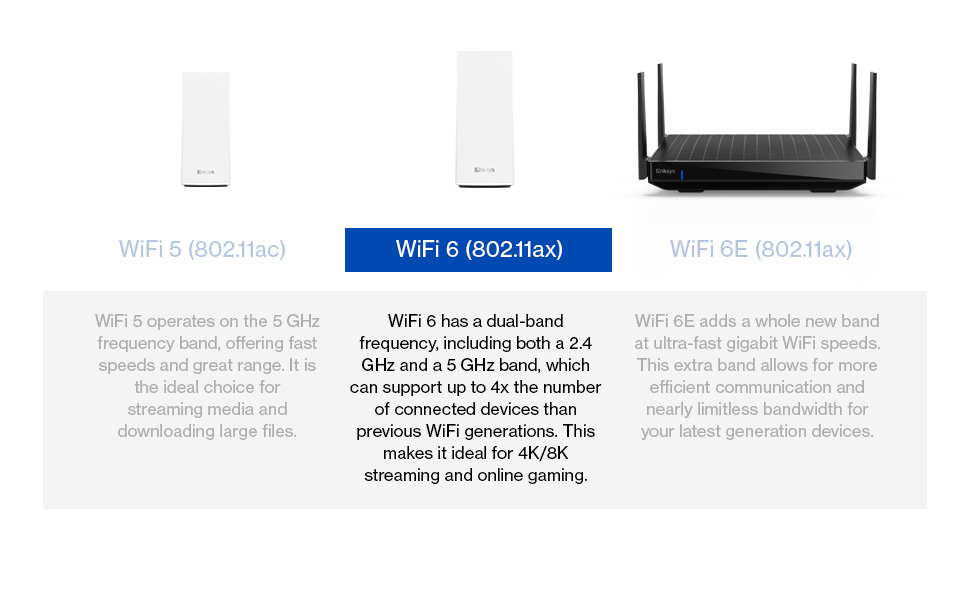
| Wireless Compability | 802.11ac, 802.11ax |
| Wireless communication standard | 802.11ac, 802.11ax |
A**W
Cutting edge Wifi 6 router
Intro - Setting up this device was a very straight forward. Turn it on, download an app, follow the guide and you're online. Obviously being a WiFi 6 (AX) device there is plenty to talk about when it comes to it's coverage and speed. To give a quick caveat, I'm sure this device could achieve much faster speeds with purely WiFi 6 clients. There are not many available so these tests were performed in a mixed environment. From a Apple Watch Series 3 (2.4Ghz WiFi 4 N standard) to an iPhone 11 (5Ghz WiFi 6 AX standard) and a couple of AC WiFi 5 standard laptops. Testing - when my iPhone 11 is in the same room as the Velop router it gets 705Mbps, a Lenovo laptop with an AC wifi adapter I get 866Mbps. Further away on the ground floor my iPhone gets 300-400Mbps on average, the laptop gets 400-700Mbps. The WiFi signal barely manages to go beyond our outer house walls. I am certain this is because our house is made of traditional stone on the outside and pretty solid masonry on the ground floor between rooms. Explains the above speed drop off for the iPhone. So I'll likely need a second device in/or near our conservatory to get garden WiFi. As a baseline reference; with an older Asus RT68U AC router this is significantly better coverage for a single router. Overall I am very impressed. Device Management - is a different kettle of fish. You can use a web browser and login to it. However, it's very keen you use the Linksys App instead. The app does it's job well. It's geared towards novice users who just want to set it up. Speaking of which the app device setup flow was a piece of cake. Very simple UI with minor user input, it's impressive how things have changed. The apps main purpose seems to be more about current status and info, than making any significant change to its operation. It does lack information on device connectivity speed (I had to use a separate app for testing mobile to router connection speeds). It is also missing control which of the tri-bands have specific WiFi traffic on. For instance I'd like my iPhone on one 5Ghz band at WiFi 6 speeds, the other 5Ghz band in mixed mode for WiFi 4 + 5 speeds. 2.4Ghz for any device that needs to defer to it for better range. This is technically managed by the routers own algorithms as is the channel selection for each to be broadcast. I appreciate that is a selling point of this device - self management be it a mesh setup or a single node. I just like to make my own technical decisions. Ultimately for the price of the device it does give you a very technically sophisticated device that operates very effectively. For said price, I'd have expected an expert mode, allowing me to change what I want though. Summary - I think the product itself is excellent and does exactly what I needed it to do; make sure all our devices get WiFi and the router has plenty of resources in reserve to manage all the traffic we throw at it. I did originally have the Velop WHW0303 3 pack (WiFi 5 AC Tri-band version) but wanted more wired ports for our Hive, office desktop computer etc. WiFi 6 also future proofed us and because it's physically bigger allows for more antennas for each one of the three WiFi bands. I'd like to see Apple Homekit support as the cheaper WHW0303 has it advertised as 'Coming Soon'. So I'd hope that extends to their top product too. Also expose more control in the app for the routers features.
Q**N
Easy to set up and great signal strength with no black spots
Whilst this is an expensive mesh solution, it has worked perfectly so far and done exactly what it is intended for - creating a single network that covers our house. We have an old property with a newer extension and previous BT Home Hub had areas it would not reach, and we had to use two networks to get coverage downstairs, and upstairs was always extremely patchy. The Linksys app worked really well and guided the set up using our Home Hub 4 as the modem. When plugging in the parent node, the app says use any port on your modem, but it actually has to be an ethernet port - the WAN port will not work. It just took a minute or two to connect, choose a new network name and it was a simple as that. The second node connected without a problem and the app helped check that the position upstairs was suitable. The third node for our extension has a wired connection, as we put in a Cat 5 cable during the extension build. Again, this was simple to set up - just switch on the node (close to the parent) and add it to the network as a wireless node. Move it to your desired location and use your Cat 5 cable to attach one of the the node's ethernet ports to a parent node ethernet port. It's a simple as that, as the system automatically will switch the new child node to wired set up. All 3 nodes now cover our 4 bed house and single story extension in a unified network, which is great for mobile wifi calling (very poor mobile network), shifting where you work, wireless printing etc. The speed of the wifi has noticeably improved with the tri-band too, which is a bonus, though it wasn't that bad previously. One final adjustment was to change the Home Hub configuration via the online Home Hub Manager to disable its wifi, just so there was no contention with two networks. It's now just working purely as a modem and seems fine to do so. Overall, very happy with the investment in this. It may be pricier than some, but so far no complaints at all.
S**R
Latest firmware fixes all of the early adopter bugs and this is now a stable and superb product.
*Have updated again at the bottom* *Have now returned it, updated with reasons why below* Let me preface this by saying that I know my way around technology, I know my spanning tree from from my VLAN's, my preferred way to configure a router is via a command line, I've built Linux servers from source code (Linux From Scratch) and have been an IT specialist for over 20 years, in other words I generally know what I'm doing and am not usually beaten by technology. These devices made me want to throw them at the wall and then put the remains back into the box and ship them back to Amazon. The first node configured without a hitch, the app saw it, I configured it, the firmware updated, everything was good in the world. The second node kept getting as far as having joined the network, then the app would say it was testing to see if the location was optimal, then the whole thing would finally fail and ask me to restart the process. I tried again about 4 times, then I factory reset the second node and tried again, then I moved the node so that it was only about a foot away from the first node and tried again, every time I had the same issue. Then I thought that maybe the second node was faulty and tried to configure the third node. The third node did exactly the same and would fail when it was detecting if the location was optimal. I then factory reset the third node and reconfigured it as if it was a brand new setup, this worked fine and allowed me to update the firmware. I then factory reset it (thinking that now it had the latest firmware maybe that would fix the problems), this time it failed at roughly the same point but with a different message and the light on top was red. I tried to add it again and then had the same issue. I then tried turning off every node and restarting just the master node again. This rebooted fine just as expected. I then tried powering on the third node and adding it again, it worked! I then moved the third node to it's proper location and it still seemed to work. I then tried to add the second node again and it again failed where it did the other times, however I did note the light on top was solid blue which the things I could find online said meant it was working fine. At this time I was tired and frustrated and decided I would pick it up again in the morning. Two hours later just before I was about to go to bed, on a whim I decided to check the Linksys app, and was surprised to see all the nodes were listed, all were shown as being updated to the latest firmware and all said they were working fine. I've now done some tests and can say that the speed and coverage is awesome. 4K direct rip content streams perfectly from my plex server, I'm getting at least 200mbits from every device when testing my internet connection, local network transfers are blindingly fast, I'm getting no drop outs anywhere. Basically, setting these devices up is one of the most frustrating technology experiences I've ever had, but once you actually get them working they are truly superb. *Update 19/12/17* Other than providing whole house WiFi, one of my other requirements was to be able to wire in certain devices such as my NAS for home media serving. I kept noticing that may connections to my media server would keep disconnecting with no seeming reason, so on the assumption that maybe the node serving the top of the house was maybe having signal issues, I then purchased an additional two node Velop system so that I could place one node in the center of the house and use the other node at a future point. Unfortunately this didn't make any difference, and infact, although initially the two furthest nodes would show as connected to the new mid point node, after a few hours they would go back to being connected to the master node. After some more investigation, I kept noticing that the network connection on my media server would every now and then (a few times an hour) show "Link Disconnected" and then a minute or so later "Link Connected" on the Ethernet connection. Thinking that maybe it was the ethernet cable, I switched it out for a brand new one with no difference. I then tried it connected to a gigabit managed switch, with no difference, I then swapped the satellite node with another one to see if maybe it was the node that was faulty, no difference. I also noticed that once I disconnected the Ethernet connection from the Xbox in the living room from the node in there and configured it to just use the WiFi, suddenly the intermittent lags and drop outs in online games disappeared. I spent about 5 hours on the phone with Linksys technical support and they could barely actually understand what the problem I was trying to convey was, let alone fix it. In the end I was forced to return this product and have now installed a 3 node Netgear Orbi RK50. The Orbi isn't as fast on the WiFi, but it was literally up and running in under 30 minutes and everything just works. *Update 23/03/19* After a friend of mine deploying a three node Velop system and swearing by it with the more recent firmware updates, when I moved recently I decide to give it another try. It now is superb. I've deployed a four node mesh in my new home and it's been working awesomely. Deployment was an ease, adding a repeater node out of range of the primary node worked without a hitch and the whole system flies.
P**S
Avoid like the plague
Updated again following several weeks of use. Unfortunately I have now downgraded my review from an original 4 stars to a shameful 1 Star. I have been using this system to provide coverage to my home office. Unfortunately the mesh network is unreliable with child nodes that are connected at an RSSI level of -55 and speeds in excess of 165mbs are going offline or deciding to reconnect back to the master node and happily sit there with an RSSI level of -95 and throughput of 0.5mbs, no warning or reason as to why this is happening. There are no options within the software to force nodes to pair with each other as Linksys insists that their software knows what it is doing. A simple solution that would turn these bookends into a useful product. Unfortunately I’ve passed the window to return this product so I’m now stuck with dead duck. Updated Review following addition of 3rd Node: I am still impressed with this kit however I am starting to have some reservations regarding stability of the firmware. My set up is Master Node in front room of House connected to Virginmedia router with the VM wifi disabled. My second node is installed in an IP65 enclosure on the side of my house approx 13 meters distant from the master with the mesh transmitting through three double skinned brick walls. It is placed outside to provide an uninterrupted direct line of site to the 3rd node located in my log cabin approx 30m from node 2. During configuration it can be hit or miss how the mesh configures. For some reason the nodes seem to prefer to connect to the master node leading to weak / unstable connections between Node 1 & 3 rather than establishing a stepping stone type arrangement of 1-2-3. It took me several attempts of rebooting node 3 for it to finally establish a mesh link to node 2. Another frustrating thing is that you cannot assign devices to certain nodes. For example my Netatmo Energy WIFI relay located in my cabin always connects to the Node 2 (30 meters away) with an intermittent signal rather than the cabin node 3 only 3 meters away! Another issue is the lack of a signal to noise ratio or power meter in the app to be able to check node placements manually. I still like this kit but I have a few niggles and as a consequence I have dropped my review to 3 stars. With a bit of development work this could be so much better. Original Review: Excellent WiFi coverage. Purchased this to ensure WiFi coverage throughout my home and down to my log cabin approx 40m from the house. I have still to connect the 3rd node in the cabin but using only two (0ne in lounge connected to Virginmedia hub 3 router, second in rear upstairs bedroom) I have full 220meg download speed throughout the house, a 1950’s 3 bed semi. At the cabin end I’m getting 184meg connection to the upstairs node nearly 40m away. Very pleased. I had no issues setting up the system. The app walkthrough was painless, as was the addition of the second node. The dashboard is simple and easy to navigate. Everything is now connected to the Linksys and I’ve turned off the VM WiFi in the user interface so it still acts as a router. Walking around the house my Iphone automatically connects to the strongest signal with no loss of service or noticeable drop outs. The nodes themselves are unobtrusive and are styled along the Apple theme. It works for me and does exactly what I need it to do. I’m not a power user so not concerned with the lack of high tech features that some complain about. I wanted fast, uninterrupted WiFi through the house and garden and I now have it. Only reason I’ve given it 4 stars instead of 5 is the price. This is an expensive bit of kit and I’d like to see it priced around £250, but you get what you pay for!
S**N
Expensive, awful setup, but well worth it
Firstly, this is not intuitive to set up. It is imperative that you start with a full charge on your phone as the process of frequent checking and needing the screen on requires a lot of juice. The instructions provide loads of tips but nothing answers basic beginners’ questions, online, in the system manual or anywhere else. If you want to speak to someone who knows what they are talking about you may find you may have to wait some hours for a call back. Sadly, I didn’t call them until I’d spent a day re-configuring everything because it didn’t seem to work. I called them the following day, was told to wait 4 hours for a call back, at which time I gave it one last try, and hallelujah, it worked. The whole procedure is slow and tedious. It doesn’t seem to matter if your phone goes into standby or not during the procedure, you just cannot see what is happening. You could stop your phone going into standby at all, but this will use even move battery power and anyway, the process will work or it won’t work. It seems to be a lot about luck. I also found that the app touch sensitivity can be flaky (I don’t have this problem with any other apps on my phone). Sometimes it just responds to touch very slowly, but when you give up waiting and touch twice, it moves on 2 steps (the missed one may be crucial). It takes ages to locate a node from the app (which node, who knows, but presumably the new node you are adding). This is even when the phone is directly beside the new node. To see what is happening, you must check frequently, bringing your phone back out of standby each time. I have a four-bedroom house and am glad I purchased the three-node pack, reduced in the Prime sale on 11 June. Previously, over the last 7 years I have used Wi-Fi booster plug ins from TP Link and later from BT and Netgear when the TP Link ones proved to have a short life. I still use the wired versions for two TVs and my husband’s PC for a fast and reliable connection, rather than using the Wi-Fi unnecessarily. I would still recommend the latter for devices that are permanent fixtures. You do need the app to set up the system and add nodes, but you can also log in with the same username and password to the Linksys Smart Wi-Fi where there is much more information and, from a desktop PC, the system is much easier to administer. I have shown a couple of illustrations for this. Click any of the icons on the left to open the corresponding popup window, one of which is shown. Click the big left pointing chevron > to close the popup. In conclusion, this is expensive and, contrary to the blurb, is certainly not easy to set up. It takes patience and concentration, which gets tricky when you get bored stiff. Better documentation would be helpful. As a software technical author, I know I would do it differently. However, I can now walk around my house and watching the Wi-Fi indicator on my phone I can see it changing from node to node whichever provides the strongest signal unlike the Wi-Fi boosters I have used before that you need to select in relevant locations. I am glad I bought this system and if it lives a good long time, I will feel that I’ve had my money’s worth. I also don't have my husband moaning at me about having to select a different network when he's upstairs or in the den.
R**D
The best WiFi network I've ever had
I thoroughly researched the market before buying this product, looking at improving WiFi coverage around the house and finally decided to order the set of three units (AC6600). This system is a bit unusual and as a result some people, even those with network configuration experience, may find themselves confused when they set it up. I read several reviews complaining about what you cannot do with this system, however I found that it works very well for my needs and in my opinion it can satisfy the needs of most average users. So here is how it works: First of all, this system is not a modem and has to be connected to a device that can function as a modem, connect to the internet, acquire a public (WAN) IP address and then allocate a local (LAN) IP address to the mesh network. Most, if not all, the modems/routers supplied by the usual internet providers can do this. If you are looking at buying this product, you most likely already have a modem and WiFi router at home. To connect the Velop, just follow the incredibly basic and simple instructions. Essentially the process consists of creating an account with the manufacturer, download an app to your mobile phone or tablet (I use both the Android and Apple versions and they both work seamlessly), connect one of the three bases to the modem/router with the provided network cable and follow the process as instructed. One key element is to be patient and once the first base is configured, adding the other bases to create the mesh network is straight forward. Note that the Velop will create its own WiFi network, separate to the WiFi network provided by the existing modem/router. Most likely the modem/router will create the usual LAN with a 192.168.x.x IP range, whereas the Velop will create its own LAN with a 10.120.x.x IP range. Anyone with even just a basic networking experience knows that the two networks WILL NOT communicate with each other so there is no point in keeping, for example, a printer linked to the modem/router and a computer linked to the Velop network as you won’t be able to print. For either network to work as intended all devices have to be connected to the same network. The best thing to do once everything is configured, is to switch the old modem/router’s WiFi network off and just use the Velop network – you will never look back! It goes without saying that if the Velop has to work completely wirelessly, the bases MUST be able to communicate with one another and therefore be within their WiFi range. They do not necessarily have to communicate with the unit directly plugged into the modem/router, so long as there is a path to it, such as: base 1 connected to the modem/router, base 2 connected to base 1, base 3 connected to base 2. In this case base 2 will bridge the connection between bases 3 and 1; meanwhile all three bases will provide WiFi connection locally to them and roaming from one base to the others will be seamless. The system can work even if the bases are not in each other’s wireless range so long as you can connect them via a cable or via power line adapters. Once you have configured everything, you will have a great network able to provide high speed connection (subject to your internet provider’s maximum bandwidth). This system allows a lot of settings such as various WiFi configurations and options, parental control, device bandwidth prioritisation, remote monitoring of the home network via the app and online account, DHCP or manual settings, port forwarding (single and range), uPnP, MAC filters, separate WiFi guest network, etc.. I know there are people who are not happy about creating an account or having to use an app (though in fact you can also use a browser on any computer), however all taken into account this is by far the best network I have ever had at home and I had no problems to configure it to meet my needs. So much so that I bought another two units. I am now running a mesh network with 5 units in total, which covers the whole house with no gaps, plus a sizeable area around it. A real five-star network that you'll be happy with.
R**H
Easy to fit and connect
These have been great. I read all the bad reviews about connecting. I found it extremely easy. I followed on U-tube. Download the app and follow. They are working really well.
M**D
Gives a Good Signal, Need to Reset too often, the app is naff
If you are reasonably tech savvy this is a good solution for getting good network coverage, if you are more of a plug and play type I would suggest this is not for you. 3 stars on balance. I bought this product to extend coverage within my house as the solution I had only covered half the house. Large'ish 4 bed Detached house The units arrived promptly and were well packaged. The system was reasonably simple to setup, I setup my new Wi-Fi and Guest Wi-Fi and now have coverage through the whole house and into the back garden. All have a great signal in every room, the signal power is very good, I cannot fault the signal, however; I have had to reset a node a couple of times, a secondary node will continualy fall over and lose connection to the primary node (connected to the router), first time I thought it was totally broken, couple of web searches later found out to Reset it and re-attach back, the app was no use what-so-ever and gave no useful diagnostic help. (My Tip to get working again. Remove from the network and add it as a new one (press and hold the reset button for 10 seconds, power off, then wait until Light goes Purple)), that loses one star, three resets in 5 months with no idea why, not good enough. Second star lost because the accompaning app is not very good for fault finding and telling you what is going on, Why has this node decided to give up, why cannot the app tell me, why no log file?). I am technical so feel less techy people would probably drop this by 3 stars... My problem with this unit is how fiddly it is to get working again when it fails over, if you are not techy, I would avoid. With that said, all in all it is a good product, was going to buy a second system for my Mother-in-Law but reading the reviews it's not that I am unlucky with the faults (and secondary review I have read) all say have the issue over time with resets etc... I do not want to be a constant Tech-Support for this item with Mother-In-Law so will look for a more user friendly experience.
Trustpilot
2 weeks ago
2 weeks ago



