Desert Online General Trading LLC
Dubai, United Arab Emirates
Desert Online General Trading LLC
Dubai, United Arab Emirates


📷 Snap with Ease: Elevate Your Photography Game!
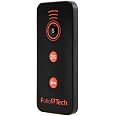
The RMT-DSLR2 Replaced Remote is a versatile IR remote control designed for a wide array of Sony interchangeable lens digital cameras. With no programming or setup required, it offers a user-friendly experience, allowing photographers to capture stunning images effortlessly. Its compact design ensures portability, making it the perfect companion for both professional and amateur photographers alike.
Y**G
A++ Must Have Bang for Buck Remote!!!
Why did I wait so long to get this RMT-DSLR2 remote? I've bought quite a few stuff for my photography hobby over the year, and hands down, this remote is the best gear I've purchased to add to the bag, and only for $7! There's so many out there to choose from, but lets just stop here, give this remote a try, and if you're not satisfy then you only dropped $7.The RMT-DSLR2 remote is the exact design as Sony's with the same functions, and features, except the only difference is the name Sony on it and for the price of $30. Your three main buttons are shutter button that snaps photos, 2 sec button that snaps a photo after 2 seconds, and the red button for start and stop recording. You can also view back photos, delete photos, and access the camera's menu. For all the other buttons, you can look up Sony's user manual, which I've included screen shots with photo's here, or find it on Youtube. Note that for the other button's features, camera will have to be connected to an external viewing device through HDMI.The remote uses infrared (IR) to communicate to the camera so, when using the controller, make sure not to block the IR sensor located on the camera body handle. If blocked, the camera will not take photos, or react to the controller. I see comments regarding the distance camera can receive signal from remote being poor, and believe or not, I was able to get the camera to take photo's up to 90ft. Now this won't be the case for everyone due to interference, and obstruction, with IR signal but I did notice the most effective distance was around 35 feet and under.All in all I highly recommend this remote for your bag. If you do recordings, you can easily press start and stop recording from a distance, or access menu, without having to go back and forth between takes. And if you do product photography, or astro-photography, and portraits, this remote helps rid of shake in camera wile its mounted on tripod, because you won't have to touch the camera itself. It's affordable, easy to use, and you'll be glad you got it for when you need it. Enjoy and stay clicking away one moment at a time!Camera Body used with RMT-DSLR2 Remote: Sony A6400note: Remote requires a CR2025 battery so don't forget to add one to cart before checkout
M**R
Just as effective as the name brand one!
This remote has been great! It works well, is super easy to set up, and is overall as effective as the name brand one for a fraction of the cost!
G**_
No instruction manual
No instructions, no battery. Bought batteries and used the instructions from other customer review pictures, and it doesn’t work!!!! Glad I was being super careful and bought two others for what I need it for!
S**Z
Comes in handy
Works perfectly with my A6000.
A**E
Almost Good
This remote is better than the base model that I had bought previously. But did not extend the range at which it worked. Or the angle at which it worked.
A**O
Remote control
Very nice wireless remote controller
E**0
Great remote for the price!
I got this for my A7III its a great remote! Lots of features for the price. I have since upgraded to a A7CR, which unfortunately this remote isn't compatible with (I dont think the A7CR has IR functions? can't remember).
I**.
Works well with A7RIIIA
I have not had a chance to compare this remote control to the original Sony version but for all practical purposes it works great and every button does exactly what I woud expect it to do. These are the functions of the remote I tested with Sony A7RIIIA camera:1. Shutter: starts autofocus (if camera has it enabled) and then triggers shutter release (similar to camera own shutter release button).2. [Shutter] 2 sec: camera beeps during 2-second delay and then performs the same as in #13. Start/Stop: starts/stops video recording regardless of the camera mode (the same as the video button on the back of the camera - needs to be enabled in the menu)4. Disp: cycles through display modes5. Histogram: toggles histogram mode6. Play: same as the play button on the camera7. Slideshow: triggers the slideshow mode (cycles over all the images in the camera)8. Zoom +/- : triggers 1x-4x digital zoom (works with JPEG files only and when digital zoom is enabled)9. Menu: triggers camera menu10. Up/Down/Left/Right/Center: work the same way as the camera control wheel buttons11. Delete: works the same way as the camera delete button12 Print: does not seem to do anything (likely because I do not have printing setup in the camera)The range in front of the camera is more than 30ft. It also works from behind (need to be close to the camera)
Trustpilot
5 days ago
2 months ago