![[2PCS] Trackpad Protector Skin for 2021 2020 MacBook Air 13 Inch A2337 M1 A2179 A1932 Touch Pad Cover Skin Anti-Scratch Anti-Water for MacBook Air 13 Inch A2337 A2179 A1932 Touch ID Accessories, Clear](https://m.media-amazon.com/images/I/71L7FGU3LiL.jpg)
🖱️ Keep your MacBook Air trackpad flawless — because first impressions swipe fast!
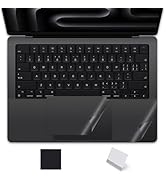
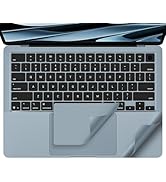
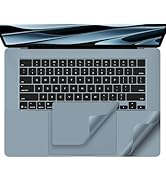
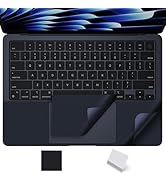
This 2-pack of ultra-thin, clear trackpad protectors is engineered exclusively for 2020-2022 MacBook Air 13" models (A2337, A2179, A1932). Designed to shield your trackpad from scratches, spills, dust, and daily wear without affecting touch sensitivity, these easy-to-apply skins maintain your MacBook’s sleek aesthetic while extending its lifespan.







| ASIN | B08FYKQJNQ |
| Best Sellers Rank | #45 in Computer Keyboard Skins |
| Customer Reviews | 4.4 4.4 out of 5 stars (2,188) |
| Date First Available | August 15, 2020 |
| Item Weight | 0.635 ounces |
| Manufacturer | imComor |
| Product Dimensions | 4.7 x 3.2 x 0.1 inches |
M**N
Great cover.
Gets the job done. I never could remember the short cuts. These covers make it easy and it protects the keyboard from dirt and accidentally spills. I would buy again when I need it.
L**�
Works for Lenovo Legion 9i 10 Gen 18 inc
Excellent quality works pretty well for Lenovo Legion 9i Gen 10 18 inc trackpad, installed easy
J**Y
Good
Works great.
M**N
Great Value.
This accessory product helps me to maintain the value of my MacBook Air; while not distracting from the full functionality of my laptop.
D**B
Great Protector - LOTS OF GUIDANCE FOR INSTALLATION
Everything is 5 stars for this protector except installation. Someone in a prior review published the numbered instructions below which I followed - Thank you! I'd add to APPLICATION #2: as follows: "It's not enough to **get started** w/ a perfect fit on the left side & upper top." I recommend you do this AND make sure the trajectory of the protective film aligns w/ the top of the track pad cut out before you commit. If you don't have perfect alignment at start, the film will ever so gradually end with it overlapping the trackpad. The attached pic illustrates my first try & what happens at the end of the install if alignment isn't perfect at start (look under the Option Key). Good luck! PREPERATION: 1. Clean the track pad w/ glass cleaner before you clean with the alcohol pad. 2. Clean the track pad w/ the provided alcohol pad next. Place the alcohol pad back in the sleeve in case your 1st try doesn't work out. 3. Dry the alcohol fluid w/ a cloth suitable to clean expensive eye glasses. 4. If you have a magnifying glass / glasses look @ the surface. The cloth in step 2 above should remove all wetness, dust & other unwanted micro debries. APPLICATION: 1. It's critically important to understand this protector is cut to fit the trackpad EXACTLY. Hence #2 below... 2. Make SURE you start w/ a perfect fit on the left side & upper top, applying the film left to right (IMO this is way easier than applying top to bottom). 3. Adhere the film & remove bubbles as you apply the film while releasing the #1 labeled protector - slowly. This means - see #4 below... 4. Applying the film on the left side of the trackpad while pulling the #1 labeled protector to the right is a little awkward. Remove the #1 protector slowly to tackle the job a little bit a time. 5.Upon completion, use the included cardboard piece to remove bubbles. Return to the invaluable eye glass cloth and use w/ firm pressure from your finger tips to remove bubbles / pockets. IMO the cloth works better than the cardboard & doesn't scratch the protectors or the film. 6.Almost done. Don't remove the #2 protector. Let it set over night. The next day - reinspect for unwanted streaks, bubbles or poor adhesion. 7.Finally, remove the #2 protector and use the eye glass cloth once again to insure you have great film adhesion / no future bubbles. The cloth won't scratch the film (Don't use the cardboard).
J**R
Does what it says, and well
So far, so good. Went on pretty easily, is sticky enough to stay in place but still be removable, and doesn't interfere with the inputs. Can't complain at all yet.
Y**B
Make it work
Not really made to stay in place but my brother insists he can use it so I gave it to him to use …HOPEFULLY
G**L
👌🏽
Good idea.
A**R
Leicht anzubringen und funktioniert sehr gut.
T**K
気泡が入ってしまい貼り直したがやはり気泡が入ってしまう。
F**S
Great work thanks
I**O
Es un PPF perfecto para proteger tu Trackpad del desgaste y las manchas, te recomiendo busques videos en Internet para poder saber cómo ponerlo de manera correcta, dado que no es muy sencilla su colocación, en mi caso, no sé si sea en general, la mica protectora le sobra poco menos de 1 mm del Trackpad, lo que hace que no quede al 100% pegada, te recomiendo que antes de pegarla la midas solamente para ver si puedes hacer este recorte milimétrico y que ajuste al 100%, lejos de todo ello se me hace un buen producto
L**O
No lo recomiendo si te importa y buscas que se vea estético. Tiene un acabado brillante que en lo personal no me gusta, preferiría que hubiera sido mate. Tiene unas stickers para “ayudarte” a desprenderlo y aplicarlo, pero estas le dejan un rastro cuando las retiras y se le queda el rastro de donde estaba el sticker y ese pedacito se ve mal y sucio. Después de ser paciente para aplicarlo sí cumple su función y respeta el “touch”, solo se ve mal. Lo dejaré un tiempo así mientras encuentro otra mejor opción. Les estaré actualizando si encuentro otra!
Trustpilot
1 month ago
4 days ago



