


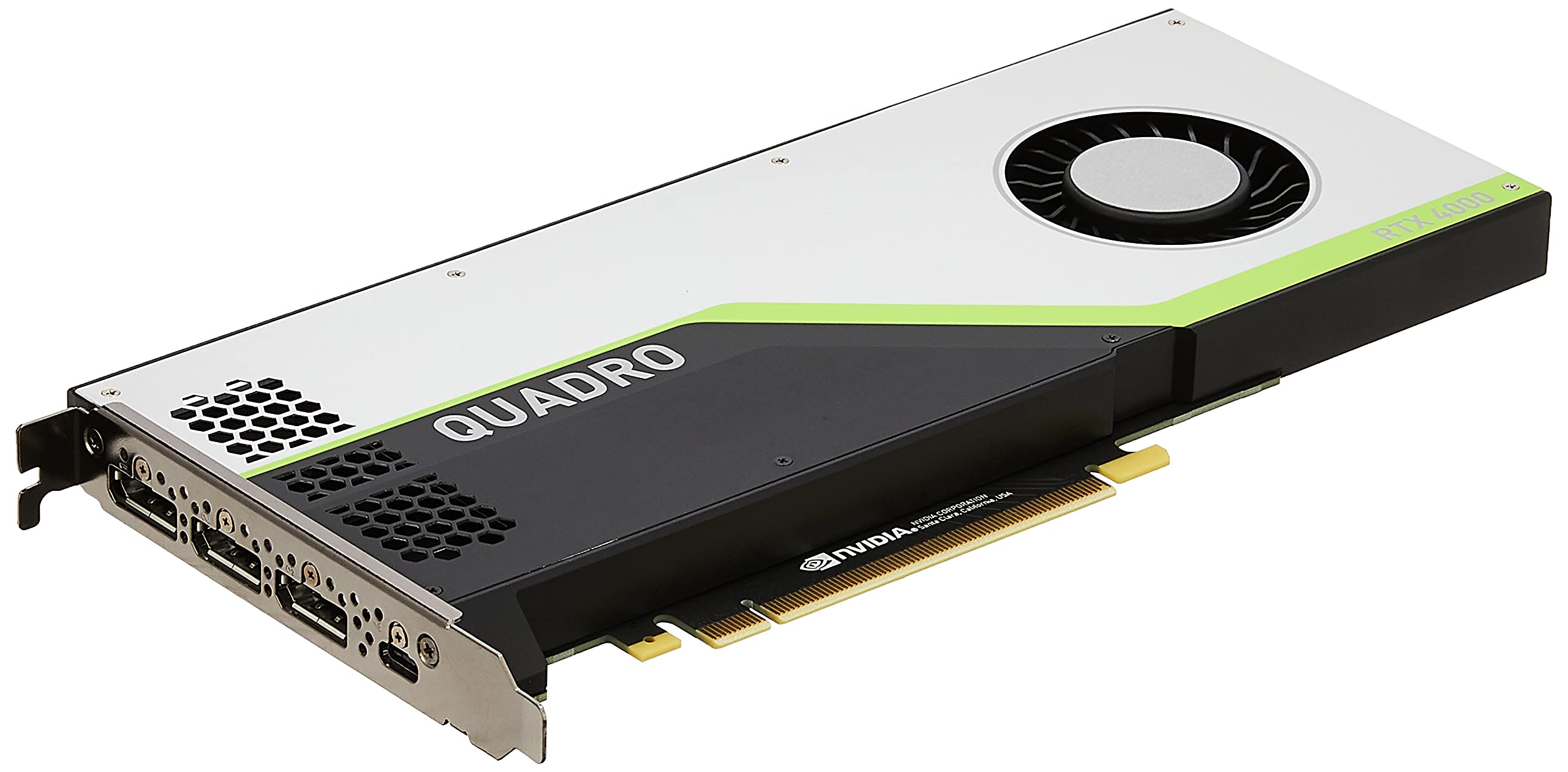

🚀 Elevate your creative edge with the world’s first ray tracing GPU—don’t just keep up, lead the pack!
The PNY NVIDIA Quadro RTX 4000 is a professional-grade graphics card featuring NVIDIA’s Turing architecture with 36 RT cores for real-time ray tracing, 288 Tensor cores for AI acceleration, and 8GB of ultra-fast GDDR6 memory. Designed for demanding applications like CAD, 3D rendering, VR, and AI workloads, it supports up to four 4K HDR displays and next-gen VR connectivity, delivering unmatched performance and stability for creative professionals and engineers.





| ASIN | B07P6CDHS5 |
| Best Sellers Rank | #257 in Computer Graphics Cards |
| Brand | PNY |
| Built-In Media | Quadro Graphic Card |
| Compatible Devices | Desktop |
| Customer Reviews | 4.5 out of 5 stars 211 Reviews |
| Display Resolution Maximum | 3840x2160 |
| Global Trade Identification Number | 00751492623375 |
| Graphics Card Interface | PCI-Express x16 |
| Graphics Card Ram | 8 GB |
| Graphics Coprocessor | NVIDIA Quadro RTX 4000 |
| Graphics Description | NVIDIA Quadro RTX 4000 with 8GB GDDR6, 2304 CUDA cores, 36 RT cores, 288 Tensor cores, peak performance of 7.1 TFLOPS (FP32), 14.2 TFLOPS (FP16), 28.5 TOPS (INT8), and 57.0 TFLOPS (Deep Learning), supporting 4 simultaneous displays at 7680x4320 resolution at 60Hz. |
| Graphics Processor Manufacturer | NVIDIA |
| Graphics RAM Type | GDDR6 |
| Graphics Ram Size | 8 GB |
| Graphics Ram Type | GDDR6 |
| Item Dimensions L x W | 8"L x 4"W |
| Item Height | 8 inches |
| Manufacturer | PNY |
| Model Name | RTX 4000 |
| UPC | 751492623375 |
| Video Output Interface | DisplayPort |
| Video Processor | NVIDIA |
| Warranty Description | 3 Year |
M**L
RTX 4000 - (**UPDATE: Feb 2020**)
I now own both the Quadro P4000 and Quadro RTX 4000 – so, I’ll try to help with your Professional decision making. Gamers should refer to Geforce RTX & GTX reviews: From research and what I have experienced personally – Quadro leans heavily towards OpenGL stability and accuracy – especially, when matched with ECC memory and multi-core CPUs (greater than 4 cores IMO). The exception is single-core performance when modeling (CPU architecture – which I favor Intel in this category). The RTX 4000 is unique – because it unlocks FP16 performance normally reserved for Gaming cards (hmmm..). And, every program I have based on Direct 3D performance is on steroids now. **UPDATE: My favorite programs (SolidWorks 2019, **Solid Edge 2020, Adobe Premiere/Photoshop,** Keyshot 9, Blender) – all love this new RTX 4000 card (in one form or another): >SolidWorks 2019 (heavy on OpenGL and some D3D) – the performance increase is ridiculous (thank you Dassault) – especially viewport performance, animation, and rendering. Go bigger than the 4000 – if you need scientific data / accuracy. Dassault is paying attention (IMO) >** Solid Edge 2020 (OpenGL with acceptance to D3D) – is stable and functional – WELL DONE SIEMENS - the newest version is a treasure (Simulation & Generative design are incredible). RTX 4000 and P4000 are both good choices >** Keyshot 9 Render (Holy God!!!) – I have to change this review - because the new Keyshot 9 is amazing with GPU / CPU rendering that will blow your socks off. The RTX 4000 is a beast at GPU rendering (Thank You Keyshot Team) >Blender (Direct 3D heavy) – models are much more fluent, viewports load and manipulate better, Mesh conversions and animations are incredible (thanks to FP16 performance gains). A lot easier to work between Parametric (files with high triangles) and Polygonal (files with low triangles) with the RTX >**Adobe (Everything You Got) – A lot more support for RTX since my last review. Adobe will not be silenced in this revolution. The RTX 4000 is a strong performer with Adobe products. OpenGL (professionals): is used extensively in the fields of computer-aided design (CAD), virtual reality, scientific visualization, information visualization, flight simulation, and video games. [Wikipedia] Direct3D (gamers & professionals now): is a graphics application programming interface (API) for Microsoft Windows. Part of DirectX, Direct3D is used to render three-dimensional graphics in applications where performance is important, such as games. [Wikipedia] Please do your research – and, I hope this helps the newbies looking for the Quadro experience
B**G
Good for solid works
Makes pretty lines and shapes on my work pc monitor.
F**N
Rock Solid Drivers
I am not a gamer... Now that that is out of the way. I use this card with Blender, Maya, Unity, and Adobe Dimension, as well as various other multimedia software for video/audio like Adobe Illustrator, Davinci Resolve, and Steinberg Cubase. Overall, I am very pleased with the no-hassle performance of this card, along with the very fast real-time render performance I get in Blender and Unity. It carries a load well, and the drivers are rock solid, which was important for me. I had several driver issues with my previous Radeon RX 5700 XT with Win 10 Pro. For reference, my CPU is an Intel i9-10990k and my MB is an Asus ROG Strix z490-e.
F**E
Finally ran Proshow 9 Producer
Both my daughters got married this year and I made them very nice video's of their 800+ largeformat professional photos that my old computer couldn't do with Proshow 9 Producer. The old computer was pretty strong in video creation until I tried to do this huge job. This card wasn't blazing fast but it smoothly handled the task without giving any errors like "ran out of memory" which I got with my old computer that I built myself specifically geared towards video creation. I finally got 2 beautiful keepsake videos of each wedding and hopefully these will be passed down through the future generations. I'm not a gamer but tried Crysis on it and it worked well. I also use Vegas Pro and that works well so I'm happy with it.
M**G
Not original box! No documents and would not return!
I regret getting a expesive tech item from Amazon after this purchase. I personally did not know much about computers. however it sat for about 1.5-2 months before the our IT tech built the workstation. We Imediatly asked if we can return it. the seller kept saying no! and he guarentees its real... Well PNY can not and they will not warrienty it because there is no documents and the numbers did not match to their system. so i could not register this. we have not used it for 4-5 months and hardly done any Cad drawings it had now bottlenecked and showed down significantly. screen flickering, fan full high throttle. the IT guy reset it he said it is weird and would get a new card so i guess we are out $900 because we purchased it Via amazon. We though it was directly from PNY because there products are at the top and it was prime. last time i purchase anything expensive and tech from amazon unless sold by amazon. 3rd party sellers suck. it was brand new or opened and they would not return it at 40 days that's when a pro opened it and said i'm not sure about this card! I'm not going to straight say it was a fake but it there was something weird about it. PNY said they can not determine if its a fake unless i send it in. So now we have to buy a new card and spend around $2K so 3k thanks to this seller.
N**L
UPDATE: So far...
Firstly, I've been looking forward to receiving this because I'm in desperate need of an upgrade to my GPU. After an extensive amount of research this was the best option for me on both performance and financial levels. Moving on. I was extremely excited to receive this package. It's a big size compared to the standard GPU's that's installed in mii PC. But, upon unboxing it did not come with any documentation as a few others complained about. And as a newbie to the technology field there was no installation manual. I feel there should be an install manual regardless of one's level of expertise. I ended up taking my PC to the local tech shop to help install the new GPU. When I pick it up tomorrow and play with it for the next couple of weeks I'll update this review for everyone regarding its overall performance. UPDATE: 12/15/20 - *This is mii review as a film maker/video editor, not a gamer. Pro's: So, after a LOT of troubleshooting with how to better utilize this card so it can deliver on its hype regarding all specs, I have to say I'm pretty pleased with the outcome. I'm not that tech savvy so apologies for not being able to provide you all with actual numbers. But, I use this card for editing in mii Davinci Resolve software and the performance is more fluid than what I was experiencing before. Mii work flow consists of the normal steps for editing a feature film: color, sound, trimming, etc. Additionally, it handles well with creating 2d models in Fusion and rendering them out. I was able to create some portal effects for mii current project and it ran fairly smoothly. Rendering out mii projects has been a cinch! I think that's what I'm most pleased with out of everything. The clips that I'm currently rendering out finish (depending on length) anywhere between 0:30 secs - 3:35. It really does help when you know the program you're working with and how to set everything so it works in unison with your GPU before beginning a project. Teamwork makes the dream work with these babies :) Con's: I have to say that while I am enjoying the work flow more now, I did have to divide mii film into 8 separate sections in order to work fluidly. It was still giving me issues with lag and freezing and I presumed that was because of the amount of work (data) I had in mii film. Especially, the SPFX with the portals I was creating. Working in smaller sections helped immensely, but it can't deliver when it comes to editing a film with "fair" amount of SPFX. To give you an idea, I'm not doing anything "ILM" type. I'm merely creating some basic particles that swirl around and have that nice glow to it, then adding that as a layer to mii footage. That's it. Next, I did "some" digging and found that the RTX 4k can't be joined with a similar GPU to increase performance. This is what I'm currently searching for so that I can get more for less since the higher end GPU's are just too expensive for me. I'm not sure if this is true or not, but if you're more of an expert at this than I am I'm sure you'll figure it out. Mii last bit is regarding the price and where to purchase. Mii next go-around will be with Newegg, B&H, etc. Amazon definitely upscales their prices on these cards and it's not right. I found this card via a compatibility search for mii motherboard, on Newegg for HALF the price I paid on here! Yea, that pissed me off! But you live and learn and newbies like miiself will simply have to do more research when it comes to products they don't fully understand. Regardless, I won't be purchasing any sort of electronics (in this capacity) from Amazon ever again as I found they upscale ALL of their cards. Right now I'm saving for the GeForce RTX 3090 to get back in stock and Newegg had it marked at $1,800, while Amazon has it currently at $2,600. I hope this helps some of you. Stay safe out there and happy editing/gaming holidays to you all :)
H**R
impressive used product that takes a long time to self-install
Once set up works really well and at a good price. The original install included a black screen for quite a while, then several reboots from an unfinished boot and finally after a long time it finished the install and has worked well since quickly booting up. It took so much time the first time to boot I almost returned it.
D**.
Great product
Works as advertised.
Trustpilot
2 weeks ago
1 month ago



