Desert Online General Trading LLC
Dubai, United Arab Emirates
Desert Online General Trading LLC
Dubai, United Arab Emirates


✨ Elevate Your Surface Experience! ✨
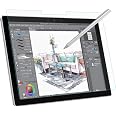
The MoKo Matte Screen Protector is a premium PET film designed for Microsoft Surface Pro 4 to 7 Plus models. It offers a unique matte surface that mimics the feel of paper, enhancing the drawing and writing experience with the Surface Pen. The anti-reflective properties ensure clarity in bright environments, making it ideal for creative professionals on the go.


| Standing screen display size | 12.3 Inches |
| Brand | MoKo |
| Item model number | P840034608397 |
| Item Weight | 0.92 ounces |
| Product Dimensions | 0.39 x 0.39 x 0.5 inches |
| Item Dimensions LxWxH | 0.39 x 0.39 x 0.5 inches |
| Color | Clear |
| Manufacturer | MoKo |
| ASIN | B07M7WLTW7 |
| Country of Origin | China |
| Is Discontinued By Manufacturer | No |
| Date First Available | January 11, 2019 |
A**R
Have a Surface and Looking at a Remarkable? Get this instead.
I had zero problems with installing, zero bubbles. Just take your time and work slowly from one side to the other. The alignment tabs are helpful and the protector is flexible so you can work the bubbles out as you go.I take a lot of notes at work and I hate carrying around binders and notebooks. I bought my surface pro 4 as a senior in college. From the beginning, this thing has saved me and helped me organize my life and work.I noticed that writing wasn't as fluid as I once remembered. I thought it was the pen, tried different tips, but it just has never been the same as good ol' fashion pen on paper. I was considering buying a Remarkable or another style of "paper-like" digital notebook. Then I thought, I already have the tech. I just want that rough finish. I found this screen protector.Let me tell you, folks. The screen response time is better, finger smudges are easier to clean, my handwriting is more legible, and it does reduce glare, plus, I get a paper-like matte finish for reading on my kindle app.This screen protector has dramatically improved the quality of my experience with my old, faithful Surface. If it wasn't for the battery life, I'd think I had a whole new computer.
M**D
Great feel, good install, ok anti-glare and that's just fine!
Installation instructions are a little to be desired, but it's pretty obvious how to install - just remember that back goes to the screen and the rest is obvious. It adheres very easily, and as long as you clean the screen and squeeze bubbles as you're putting the screen down. It was easy to install, and works great! No photo posted, because it's virtually invisible. Writing on it feels wonderful - very paper-like. The anti-glare isn't great, but that's probably better because I've seen that really strong anti-glare screens that make the screen fuzzy. You can always get a clip-on screen when you need it. Overall, very happy!
J**.
Definitely feels like paper! Keep reading...
PROS:As advertised, this screen protector for the Microsoft SP7 definitely feels like writing on paper. I immediately noticed a higher resistance in the gliding of my stylus pen, and you can feel the grainy texture of the screen. I do not need to press hard on the screen to write, draw, etc (with stylus).As you can see in my screen shot, there is not much difference in how my handwriting or drawings look when I used my stylus before and after screen protector installation.Antiglare is great! Although I didn't have an issue with the glare of my SP7 in the first place.The installation of the screen was straightforward, with all the necessary tools to complete. I was left with a couple minute air bubbles I could not scrape out, but I don't even notice them at all. The scraping tool is EXCELLENT. Package includes small tabs to help you align screen protector in place before taking off the layer that exposes the adhesive side. I was able to align the screen protector perfectly.CONS:I immediately noticed a decrease in responsiveness when using my finger to control the touch screen. I would say it is fairly significant. Without the screen, I used to lightly tap on anything, and the responsiveness would be flawless. Now I need to press my finger a little firmly. HOWEVER, the screen responsiveness is fine when using my stylus to select, scroll down, etc. I do not need to press hard on the screen to write, draw, or use any touch screen function.The sharpness and high resolution of the screen decreased a little after paper screen installation. You can see the paper-like texture at all times. Not a big deal for me.I was hoping the package would come with two screen protectors, but oh well.Finally, my package came unsealed on one side (see pic) but nothing was missing.
S**O
Doesn’t feel like paper at all
I had some installation issues, and then when it’s on the device with a Surface Slim pen it just feels like a white board basically.I cleaned the device as instructed and the instructions showed a very different sticker to fully clean it. Overall the instructions were clearly not meant for this device and are just generic. The first time I laid down the protector it went down well, but when I went to pull off the second part it pulled up the entire screen. This introduced a bunch more dust. I was able to get most of them cleared out but it was way worse than the first time.I’m using a Surface Pen 1 and it feels very weird. I’m not happy at all with it and will be replacing it with another paper like protector.
M**E
Tricky to apply but great texture
Be very careful to clean the screen thoroughly before apply the screen cover. Every speck of dust will cause an irremovable bubble. A caution, not a show-stopper. The anti-glare function is not what quite I had hoped, but I got this protect for an improved texture for writing with the stylus on my Surface tablet, and I got exactly what I wanted. It has the right traction for me to write freely. Microsoft handwriting recognition, at least for my scrawl, can still be improved, but finally(!), I am comfortable handwriting manuscripts. If you want to write seriously with a stylus directly into Word, this screen protector helps. A lot.
J**.
Not too bad
The product is decent for the price, it is a little wide for protective cases and it has a lot of bubbles that are pretty much impossible to get out. It does feel like a paper tablet until you write on it and it just feels like glass again, it responds pretty well to touch and writing regardless of the bubbles. All in all not bad for a starter under a budget, but I would recommend shopping around more, if you can afford it.
Trustpilot
2 months ago
1 month ago