

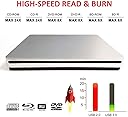

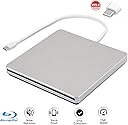


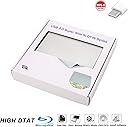
External Blu Ray DVD Drive Burner Player USB3.0 Portable Slim Automatic slot-loading CD/DVD-RAM/BD-ROM Superdrive +/- RW Rewriter/Reader with High Speed Data for Laptop Windows Mac OS (USB3.0 TYPE-C)
Product ID: 84315995
If you are not sure how to use the DVD drive, please use the following link to view tutorial: https://yThe DVD drive does not run and the disc cannot be recognized. It is caused by many factors. If you encounter problems during use, please contact us by email. Choose our Blu-ray external CD/DVD/BD optical drive and won't let you down ✦ Name: Inhaled external USB3.0 TYPE-C Blu-ray Disc DVD Burner ✦ Interface type: USB3.0 TYPE-C ✦ According to the installation method: no drive type (except WINDOWS98SE) ✦ Error correction function: Yes ✦ Disc specifications: 12CM, 8CM ✦ Dimensions: length 15.2CM / width 14.5CM / height 1.8CM ✦ Read speed: maximum CD read speed 24X, maximum DVD read speed 8X ✦ Burn speed: maximum CD burning speed 24X, maximum DVD burning speed 8X ✦ Support operating system: WIN98/ME/2000/XP, VISATA, WIN7, WIN8, MAC OS8.6 or above ✦ Scope: laptop, mobile PC and compatible PC ✦ Function parameters: BD-ROM Please check to see if this product supports the DVD/CD/BD-ROM format you want: ✦ Burn speed: BD-ROM: 6X; DVD-R: 8X; DVD-RW: 4X; DVD+R: 8X; DVD+RW: 4X; DVD+DL(D9): 4X; DVD-DL: 4X; CD-R: 24X ; CD-RW: 16X ✦ Read speed: (readable DVD-RAM) BD-ROM: 6X; DVD-R: 8X; DVD-RW: 6X; DVD+R: 8X; DVD+RW: 6X; CD-RW: 16X; CD-ROM: 24X ✦ Read parameters: DVD-ROM: 8X; CD-ROM: 24X; DVD-RAM: 5X ✦ Burn parameters: Blu-ray: BD-R: 6X; 4X BD-RDL; BD-RE / BD-REDL (Blu-ray rewritable disc): 2X DVD-R: 8X; DVD+R: 8X; DVD-RW: 6X; DVD+RW: 8X; DVD-RAM: 5X; DVD+R DL 2.4X; DVD-R DL: 2X; CD-R: 16X; CD-RW: 10X ✦ Notes: The heat problem is very important, we must pay attention to the ventilation conditions of the computer. Quality is guaranteed. If you have any questions, please feel free to contact us by email and we will help you solve the problem. Review: Good product - To play a Blue Ray in a MAC you need to download some free software from the Apple store Review: doesn't read Verbatim BD-R DLs (or BD-R consistently) and there is no eject button - I bought this to replace an old BD-ROM I couldn't get it to read any of my BD-R discs on a consistent basis on multiple PCs. Here is the problem summary 1. Won't read BD-R DLs at all (inconsistently reads BD-R) 2. No eject button. That's just weird. 3. USB cable hardwired into unit. It the cable goes the unit is worthless. A detachable and thus replaceable cable unit is the best way to go.
| ASIN | B07H3V75WS |
| Additional Features | Anti-Shock, Blu-Ray Disc, CD Burner, DVD Burner, Portable |
| Brand | VSVABEFV |
| Cache Memory Installed Size | 2 MB |
| Color | USB3.0 TYPE-C |
| Compatible Devices | Laptop |
| Connectivity Technology | USB |
| Customer Package Type | Box |
| Customer Reviews | 3.2 out of 5 stars 20 Reviews |
| Form Factor | Portable |
| Hard Disk Description | usb 3 |
| Hard Disk Interface | USB 3.0 |
| Hardware Interface | CD-R, USB 3.0 |
| Hardware Platform | Laptop, PC |
| Item Dimensions L x W x H | 5.98"L x 5.71"W x 0.71"H |
| Manufacturer | fhong |
| Mfr Part Number | DVD08 |
| Model Number | DVD08 |
| Operating System | Windows 2000, Windows 7, Windows 8, Windows 98 SE, Windows Me, Windows XP, mac os |
| Optical Storage Read Speed | 8x |
| Product Dimensions | 5.98"L x 5.71"W x 0.71"H |
| Special Feature | Anti-Shock, Blu-Ray Disc, CD Burner, DVD Burner, Portable |
T**.
Good product
To play a Blue Ray in a MAC you need to download some free software from the Apple store
G**M
doesn't read Verbatim BD-R DLs (or BD-R consistently) and there is no eject button
I bought this to replace an old BD-ROM I couldn't get it to read any of my BD-R discs on a consistent basis on multiple PCs. Here is the problem summary 1. Won't read BD-R DLs at all (inconsistently reads BD-R) 2. No eject button. That's just weird. 3. USB cable hardwired into unit. It the cable goes the unit is worthless. A detachable and thus replaceable cable unit is the best way to go.
R**E
Works great, very slim design
The DVD player connected easily with my laptop and windows 10. Took a while to locate the software on the install disk since install instructions were not included. A small carry bag would really be a good idea but a Crown Royal bag works just as well.
R**N
This item is not very stable
It plays DVD just fine but it cant seem to play and Blu-Ray disk. It wont even recognize 50% of the time and has only played one. Don't buy this item. I sent the first one back hoping that the second one would work better. No luck.
P**L
Slow & buggy
The drive is very slow and extremely low-quality. The bottom surface is not flat. Scrolling through a DVD video takes several minutes, when it should only take seconds.
M**Y
No manual eject button or option
For the most part this is a great product, I use it for both a Linux and a Windows computer. My only problem occured when I put in an unreadable disk and couldn't get it to eject - for some reason I could not get the 'eject' in Windows to respond and I got no eject option in Linux (because Linux could not mount the disk). I finally unplugged the device and used tweezers to get the disk out. Admittedly this kind of thing does not happen often.
Y**E
produit
respecte les attentes et le délai de livraison a été respecté. Le produit fonction très bien
A**R
Needs a burner software to work
Bought EasyFab software to marry up with this and burn a library to SSD. If you use the right format, have a computer that has enough ram, good video card, a big enough hard drive, and format the external SSD correctly, you can have all of your DVD collection plugged directly into a smart TV... That's allot of if's. I also read that this product can burn CD's... It DOES NOT BURN CD's. I have since bought an exclusive CD burner which works well with pretty much any freeware.
L**D
Ne marche pas sur mon mac
Il ne marche pas sur mon mac ,j’ai toit essayer je suis terriblement déçu
J**C
Misleading box info.
If you search for anything Bluray written anywhere on the box containing the product, you'll be disappointed. Then you'll become skeptical that there is a bluray machine in there. But there is! And the operation is very easy. Just pop the bluray disc in the machine (after you've connected it to your computer of course) and voila! Please make sure you also have bluray software. I have informed the company that they need to revisit the writings on the box. Other than that, the product is excellent.
Trustpilot
3 weeks ago
2 weeks ago