⌨️ Elevate your number crunching game—wireless, sleek, and always ready to perform!
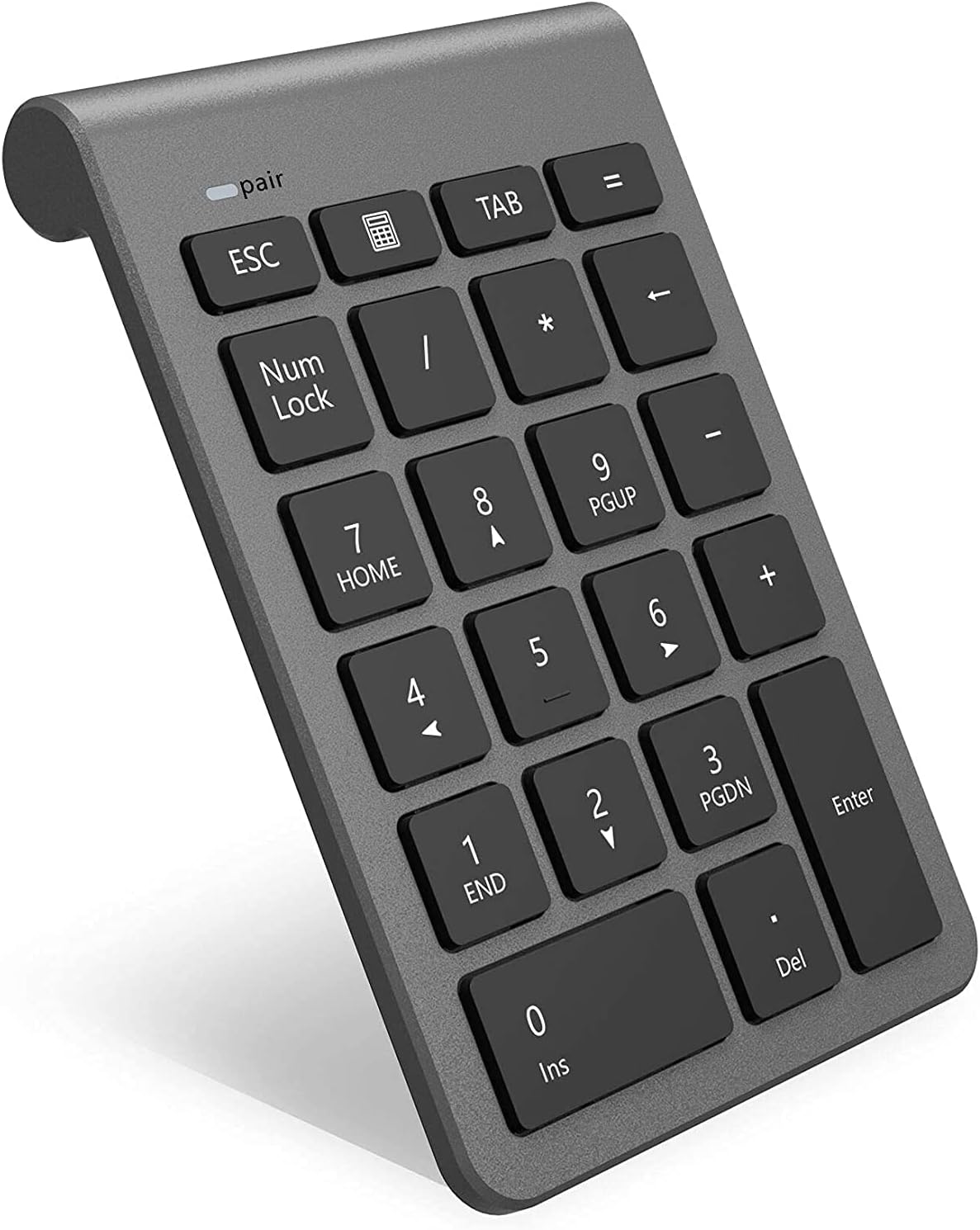
The Arkidyn Bluetooth Numeric Keypad is a compact, wireless 22-key external number pad featuring Bluetooth 3.0 for stable, driver-free connectivity up to 10 meters. Designed for professionals, it includes essential shortcut keys like NumLock, ESC, and a calculator launch button, housed in a durable, ergonomic design that ensures quiet, responsive typing. Compatible with Windows, Mac, and Linux, it’s the perfect portable tool to enhance productivity in data entry, accounting, and spreadsheet management.
| ASIN | B07H5K5KW3 |
| Additional Features | Ergonomic |
| Antenna Location | Office |
| Brand | Rytaki |
| Built-In Media | USB Cable |
| Button Quantity | 22 |
| Color | Bluetooth Wireless Number Pad |
| Compatible Devices | Laptop, PC, Tablet |
| Connectivity Technology | Bluetooth |
| Customer Reviews | 4.1 out of 5 stars 708 Reviews |
| Hand Orientation | Ambidextrous |
| Keyboard Description | Ergonomic |
| Keyboard Layout | QWERTY |
| Manufacturer | Rytaki |
| Model Number | BKB-22K-RY |
| Number of Keys | 22 |
| Power Source | Battery Powered |
| Recommended Uses For Product | Office |
| Series Number | 22 |
| Special Feature | Ergonomic |
| Style Name | Modern |
| UPC | 761780171686 761780172294 |
C**E
Give yourself time to get acquainted and then love how much easier data is to input
Disclaimer: give this thing a few days of decent use before you rate it. I’m a teacher and in order to move my desk to the best spot in the room for me and for students to have the maximum ability to see, I needed to use my school-provided laptop which of course has only two USB ports and no number pad (you know, because we teachers don’t enter a ton of numbers at one time that might require a 10 key...like grades...). This was my cheap little prayer. I was hesitant at first because I had attempted a USB version years ago but it wasn’t compatible with our gradebook software or most applications. This one, however, worked beautifully and paired easily. My dumb issue is that when I turned it on, if the pairing had somehow disconnected I’d see that a device was connected under the Bluetooth settings on Windows 10 and get frustrated that it wasn’t working. This was total user error as for some reason, usb connections to my mouse (and not any other usb connections) were appearing under Bluetooth, making me think that they were already paired. Once I figured that out, it’s been a dream since. You may have to press a key twice each time you start as the first keystroke wakes it up, but since I’m usually entering hundreds of grade columns or tons of data into spreadsheets at once, this is nothing more than wiggling a mouse to wake it up. So glad I took the leap for faith for this one!
T**T
An Essential Bluetooth Number Pad with Great Build Quality and Features
This is a professional review for which I received compensation. As an official Amazon Influencer I take reviews seriously and have tested this product vigorously before reviewing it. I am an independent reviewer and the opinions expressed here are mine alone. WIRELESS SETUP Setup was quick and painless. I flipped the switch located at the back of the unit to "on," long pressed the Bluetooth paring key until it started blinking, and enabled Bluetooth on my PC. From there, I was able to quickly select the number keyboard from the bluetooth device list and add it to start using it. AESTHETICS The number pad is well made and has a premium feeling weight and build quality. I found the addition of micro LEDs on the Bluetooth pairing key and Num Lock function especially useful. PERFORMANCE The low-profile keys are quiet, feel reasonably ergonomic, and are enjoyably responsive. The bit of heft this unit has coupled with the rubber feet keeps it well in place while typing. I also like that there is a dedicated button to launch Windows Calculator. It's sleek, minimalistic and unintrusive, yet has everything most people will ever want or need in a wireless number pad. BATTERY LIFE I used the unit I was provided extensively for several days with two rechargeable lithium batteries that had been charged to 100% capacity. I tested them afterward and they're both still at 100%, so, while it will take a bit longer to be sure, the early results seem to indicate great energy efficiency.
A**R
Great Bluetooth 10-key!
Nice little peripheral. Works well with bluetooth to avoid having to use a USB dongle. I use it every day and the battery life seems to be pretty good, as I am still on the original battery. Sleep mode is handy to help battery life. If it goes to sleep, just a quick tap on any key will wake it back it in just a couple seconds. Lightweight but not too "cheap" feeling. It stays in place and doesn't slide around my desk. My only "OCD trigger" is that the #8 key seems to be misprinted and is offset to fhe bottom instead of center. After a few days, I didn't care anymore.
R**H
So far, so good
When I was choosing a laptop size, I wanted something small enough to be light weight, but then I realized that it wouldn't have a number pad, and I reaaaally like having a number pad. Suddenly my dad had the idea to get an external one - brilliant! Now, the laptop I bought only has 2 USB ports, and I'm already using one of them for a mouse. It's a Logitech brand mouse, and a techie told me that if I bought a Logitech number pad, I could use the same dongle for both, so that's what I was planning to do. But have you SEEN the prices on those things?? $89?? $250??? Why???? Who in the world would pay that? It did not occur to me to get a bluetooth number pad until I did an Amazon search. And then, this deal seemed too good to be true. $20 and not very many reviews, so I was skeptical. Still, I chose this one as opposed to some others because the key setup is pretty similar to that of a normal keyboard, and if I end up doing lots of calculations using this, I don't want to have to adjust back to something different. I chose it over the Jellycomb because of the reviews saying you had to have a fairly consistent keystroke to key the numbers to register. It came in the mail quickly with Prime, and I got some AAA batteries. But, it would not pair. The red light blinked until the thing turned off. Finally I figured out how to pair it. I went to the task bar at the bottom right of the screen, opened the carrot that shows more apps, and right clicked on the Bluetooth icon. I clicked Add a Bluetooth device. Then the plus button "Add Bluetooth or other device." I clicked on "Bluetooth: mice, keyboards, pens, etc" and "Bluetooth keyboard" came up. It's not a whole keyboard, but I clicked it, and it immediately paired!! I pressed the calculator picture, and it pulled up my calculator app! That calculator button is soooo cool. As others have said, the little rubber feet make it solid, the keys have a nice amount of height (higher than my laptop!). As promised, it seems to go to sleep after you're not using it, and it turns on immediately when you touch a button. I've only had it a few days, so I can't speak for the longevity, but so far - it's perfect!
R**N
Disconnects frequently
I bought this to use with a mac. I don't do a lot of 10-key entry but when I do, i prefer to use a key pad. For my use, it's ok It's simple enough to set up (minimal effort using bluetooth preferences) and it works. If you do a lot of 10-key data entry, this is not the keypad for you. It disconnects frequently enough to be bothersome. Also, you often have to reconnect from scratch when attempting to get a connection after turning it off and not using it for a few days. Maybe it's better connectivity for a PC, but for Mac use, it's just ok. I'm sure I'll eventually get frustrated enough with dropped connection and end up ordering a different one, but for now, I'll tough it out.
R**N
Small laptop necessity
I wanted a small laptop for class and got a nice dell. I knew it didn't have the numerical keypad but believed I could use the numbers on the keyboard. Little did I realize how much distance is between the 1 and 0; it began to wear me out doing calculations for Discrete math. This keypad paired quickly and easily with the BT and the on/off switch saves the battery while it's bouncing around in my backpack. It is a perfect size in my opinion in that it is about the size of a desktop calculator, and it is angled to make using it comfortable. The keypads body is thin overall, with the exception of the top 1/3 of the keypad where the two AA batteries are installed and the switch is located(there is also a small area under the battery cover to store the dongle if you don't buy the BT Model). The buttons are nicely spaced and slightly larger than the keyboards on small laptops. I would not hesitate buying this again.
B**A
Very short useful life
This is the second of these keypads that I've tried. The first one was unresponsive after only 1 month. Amazon did send me a replacement at no charge. The second one lasted 2 months before dying. I am going to try another keypad next. Don't buy this one.
A**T
Not suitable for accountants or others who normally heavily rely on the 10-key on a full keyboard
I bought this keypad to use with my laptop while working remotely. I use the 10-key on my full size keyboard all the time. The problem with this is that the '/' is now the '=' key, the '*' key is now the '/' key, the '-' key is now the '*' key, and the '+' key is half the size and shares the space with the '-' key. For anyone who does a lot of number crunching by muscle memory, this keypad really throws off your rhythm. I gave it 2 stars because it does connect fairly easily and the numbers themselves are fine. So, if you are filling out a bunch of numbers on a spreadsheet and are using your left hand to tab, this won't be an issue. However, if you are trying to do normal calculations, you can wind up multiplying when you want to subtract, which will give some really bad results.
Trustpilot
3 weeks ago
1 month ago