🚀 Unlock lightning-fast Linux WiFi — Stay ahead, stay connected!
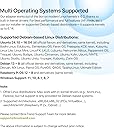
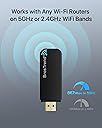
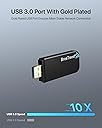
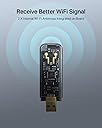
The BrosTrendLinux USB WiFi Adapter AC1200 delivers dual-band wireless speeds up to 867Mbps on 5GHz and 300Mbps on 2.4GHz. It supports over 30 Linux distributions with kernel 6.2+ and Windows 11, making it ideal for professionals using diverse systems. Featuring multi-mode operation and advanced WPA3 encryption, it ensures secure, flexible, and high-performance connectivity for streaming, gaming, and development environments.


| ASIN | B07FCNP2VL |
| Best Sellers Rank | 12,447 in Computers & Accessories ( See Top 100 in Computers & Accessories ) 122 in USB Computer Network Adapters |
| Guaranteed software updates until | unknown |
| Item model number | 1200Mbps Linux USB WiFi Adapter |
| Manufacturer | BrosTrend Technology LLC |
| Product Dimensions | 7.87 x 2.54 x 0.76 cm; 9.9 g |
G**E
Excellent - works great on Ubuntu 18.04 LTS - but not plug-and-play
I'm using the BrosTrend AC1L Wireless Dual Band USB Adaptor on a 10 year old Asus X401A laptop to give me 5GHz Wifi - the laptop only has 2.4GHz as standard. It works very well, much faster than I expected since the laptop has only USB-2 ports. I don't normally review products I buy on Amazon but this one is good enough to make me do so. So, if you are looking for a dual band wi-fi USB adaptor for Linux, then you need to read the description from BrosTrend very carefully to make sure it will work for you. Specifically, it does not work on all Linux distros. So, make sure your distro is not on the unsupported list - as Red Hat Enterprise Linux and Centos are for example. If you pass this test, make sure the version of your Linux distro is present in the supported list. If it is, you are good to go. For anything else, contact BrosTrend by email and ask them, don't waste your time and money on a gamble. Before you order from Amazon, check again that you are ordering the Linux adaptor, rather than the Windows or Apple one. What you will receive will be the adaptor and a mini-CD containing drivers. The packaging will also tell you that you can contact BrosTrend for technical support. I found I didn't need the support ticket, I simply went to the BrosTrend website and found the download page for the AC1L, and downloaded the Quick Installation Guide for Linux. It's a PDF that gets displayed using a Google online viewer but it works fine. I then followed the instructions absolutely as specified - they are complete, simple and commendably brief. The installation script downloads all of the necessary libraries and code to build the driver, and installs it in kernel space. The run time on my (aged) laptop is about 15 minutes, the compilation phase takes several minutes so be patient. Once complete, I didn't even need to reboot, after a minute or so I could see two wireless network interfaces in Wi-Fi Settings. These are the two network interfaces of the AC1L and they both work! I can choose either as the interface I want to use, and additionally the Aeroplane Mode function key of the Asus turns off both of them. The performance of the 5GHz is surprisingly good - bear in mind I am using USB-2 on a 10 year old laptop, your experience may vary. Finally, if you send your Amazon order number to [email protected], you get 30 months warranty on the product, rather than just 24 months. It doesn't get much better than this.
A**X
Reliable and High-Speed Connectivity
I recently purchased the Linux USB WiFi Adapter AC1200, and I am delighted with its reliable performance and high-speed connectivity. This adapter has proven to be a valuable addition to my Linux-based system, providing seamless wireless internet access with impressive speed capabilities. The Linux USB WiFi Adapter AC1200 has exceeded my expectations in terms of performance and reliability. As a Linux user, finding compatible hardware can sometimes be a challenge, but this adapter has seamlessly integrated with my system, providing a hassle-free wireless internet connection. One of the standout features of this adapter is its support for the AC1200 standard. With dual-band functionality and speeds of up to 1200Mbps, it offers a significant improvement in wireless performance compared to older adapters. This increased bandwidth allows for smooth streaming, online gaming, and fast file transfers, enhancing overall internet experience. The adapter's compatibility with Linux operating systems is a major advantage. It works out-of-the-box with popular Linux distributions, eliminating the need for additional driver installations or troubleshooting. This seamless integration ensures a straightforward setup process and a stable connection without any compatibility issues. In terms of build quality, the adapter feels solid and well-constructed. Its compact design makes it convenient for use with laptops or desktop computers. Additionally, the USB interface provides flexibility, allowing for easy installation and removal without the need to open up the computer case. The adapter's range and signal strength are noteworthy. It maintains a stable connection even at a considerable distance from the router, and the signal strength remains strong even through walls and obstacles. This reliable performance ensures consistent internet access throughout my home or workspace. Furthermore, the Linux USB WiFi Adapter AC1200 supports advanced security protocols, ensuring a secure and protected wireless connection. It offers encryption options such as WPA2 and WPA3, adding an extra layer of security to prevent unauthorized access. Overall, the Linux USB WiFi Adapter AC1200 is a reliable and high-speed solution for wireless connectivity on Linux-based systems. Its support for the AC1200 standard, compatibility with Linux distributions, solid build quality, extended range, and advanced security features make it an excellent choice for Linux users seeking a fast and stable wireless connection.
N**G
Watch out with Linux and the Raspberry pi.
Be careful if you are buying this item for a Linux machine. I can't judge it for Windows or MAC. The rest of this is quite technical..... Basically it will not work out of the box on new versions of Linux which in my case was Debian 13 (Trixi) and I am using it on a Raspberry pi 3b (ARM64). This is because at this moment in time (Nov 2025) Debian 13 doesn't include a working set of device drivers for this network device running with the Realtek RTL8812BU/AU chipset. I have no doubt that it will get fixed eventually in a future release of Debian 13's kernel. I was actually a bit suspicious because on the 'BrosTrend' website, there is very sparce information about installing it on Linux, yet Windows and MAC is well documented. If, like me you are able to rebuild the kernel, then you will be able to get it going by downloading an applicable set of souce code from github for the RTL8812BU/AU. After rebuilding the kernel I tested it and it worked as a network adaptor and I was able to connect to the Internet. I then tried to set it up as an AP. I managed to connect my phone to the AP, but there wasn't any Internet. It tuned out to be a routing configuration (iptables) issue on the Pi. I fixed that and the Internet finally came alive. However im not totally convinced of its overall reliability, plus the speed is quite poor. I have read various reports about the Realtek RTL8812BU/AU chipset under linux and its not brilliant. I believe that I can tune it somewhat, but its never going to be good. I was going to send it back to Amazon, but I will actually keep hold of it so I can keep playing with it. Now, I need one that will actually work well on linux.
C**O
Acquistata per un pc fisso, ora con Linux, che era sprovvisto di connessione perché da poco mi è stato installato un nuovo modem/router con fibra ottica in un'altra stanza. Premetto che conosco poco Linux Ubuntu, ma leggendo alcune recensioni pensavo fosse davvero problematica l'installazione e relativo riconoscimento del dispositivo. Sinceramente questo mi ha un po' impensieriro. Invece all'atto pratico si è rivelata una procedura fin troppo facile. Una volta collegata la chiavetta credo che il driver si sia autoinstallato perché sul monitor sinceramente non ho visto richieste di nessun tipo. Subito dopo ho cercato tra i wifi disponibili e c'era il mio modem per cui era già rilevato e la chiavetta ovviamente stava funzionando. Ho anche inserito nel dvd del pc il mini cd che c'è incluso nella confezione ma non è servito praticamente a nulla. Ho descritto passo passo la procedura per far capire che tra le recensioni o alcuni lamentano cose inesistenti, oppure hanno vecchi sistemi operativi Linux non aggiornati. In sintesi, è stato un ottimo acquisto per cui 5 stelle sono strameritate. Consegna puntuale e avvenuta persino di domenica. *** Breve annotazione Consiglio di inserire la chiavetta in una presa USB sul retro del PC e non sul davanti. Questo perché a me ha dato problemi, ossia non sempre riuscivo a collegarmi alla rete ed ho risolto spostando appunto la chiavetta WiFi sul retro, cioè su una presa della scheda madre.
A**X
Funciona con drivers in-kernel en Debian 13, asi que debería funcionar bastante bien en otras distros
S**8
Linux Mint 22 - Works out of box, no messing about. 👏👏👏
J**E
plug and play replacement wifi on linux (pop os). works flawlessly.
V**N
Clear instructions so getting the drivers installed on my home PC under Debian 12 was plain sailing.
Trustpilot
1 month ago
2 months ago