




MOBAPAD CHITU Wireless Controller for Switch
Product ID: 777897856
Review: Great controller, Manufacturer honored warranty and firmware is upgradable - I've used mine for about a year and I love this controller. Feels good in my hands, not too big, not too small. So good I bought a second one. I did have an issue with one of the controllers, where the usb cable would get a bit wobbly in the controller usb-c port and would disconnect from the console, but the manufacturer replaced it right away with no issues. I bought it for my Nintendo Switch and now that I got my Switch 2, I was able to easily upgrade the firmware to make it compatible with the new Switch, though once the firmware is updated there is an activation process needed which is not very well documented in the firmware upgrade app. The instructions say to press Home+Start but Nintendo controllers have not had a button labeled Start since the GameCube I think , where Start and + where the same button, so you need to press Home and the + button. Then it says to wait for the light to flash orange but mine just turned solid green. After that you need to wake up the Switch 2 using the attached joycon and then release the left side joycon. If all went right, the controller light will turn blue. Review: Amazing Feel and No Drift vs. Glaring Battery Issues - I have used this controller for approximately 6 months or so, and I have many positives and negatives to speak of. First, the size and feel of the buttons and controller base itself is excellent. The clickiness and minimal to no delay is an even better bonus. Also, incredibly important to note, due to how fluid and clean the joysticks themselves feel (I believe Mobapad uses magnet technology) I am happy to report that ZERO DRIFT has occurred. I was extremely surprised to know that my Joycon controllers (NS1) were operating on a 3-5 frame delay, so after using a controller that worked the way it was intended, I am a changed man. Despite this, it takes ages to connect with the Nintendo Switch and Nintendo Switch 2 system (almost 30 seconds in some instances if other controllers/players are connected). This is not unreasonable given that it is a 3rd party controller. The main issue I have with the product is this: the battery life is absolutely terrible. While the design choice to have an LED logo is nice, it certainly drains the battery far quicker than it should. Compared to the similarly priced PowerA, the Mobapad controller is completely drained around 10 hours or so, while the PowerA has lasted me around 30. I have had gaming sessions where the Mobapad controller is fully depleted within 8-9 hours. This is completely unacceptable, and the charging time is not quick either. If the battery could reach even a stable 20-25 hours of play, this would suffice for the price. Until then, the controller suffers from an unfortunate design flaw.
| ASIN | B0C86Q7B4Y |
| Best Sellers Rank | #39,680 in Video Games ( See Top 100 in Video Games ) #659 in GEM Box Microconsole #1,028 in Nintendo Switch Controllers #1,594 in PC Game Controllers |
| Customer Reviews | 3.8 3.8 out of 5 stars (68) |
| Date First Available | June 15, 2023 |
| Manufacturer | Guangzhou Xinxiang Culture Ltd. |
W**E
Great controller, Manufacturer honored warranty and firmware is upgradable
I've used mine for about a year and I love this controller. Feels good in my hands, not too big, not too small. So good I bought a second one. I did have an issue with one of the controllers, where the usb cable would get a bit wobbly in the controller usb-c port and would disconnect from the console, but the manufacturer replaced it right away with no issues. I bought it for my Nintendo Switch and now that I got my Switch 2, I was able to easily upgrade the firmware to make it compatible with the new Switch, though once the firmware is updated there is an activation process needed which is not very well documented in the firmware upgrade app. The instructions say to press Home+Start but Nintendo controllers have not had a button labeled Start since the GameCube I think , where Start and + where the same button, so you need to press Home and the + button. Then it says to wait for the light to flash orange but mine just turned solid green. After that you need to wake up the Switch 2 using the attached joycon and then release the left side joycon. If all went right, the controller light will turn blue.
T**2
Amazing Feel and No Drift vs. Glaring Battery Issues
I have used this controller for approximately 6 months or so, and I have many positives and negatives to speak of. First, the size and feel of the buttons and controller base itself is excellent. The clickiness and minimal to no delay is an even better bonus. Also, incredibly important to note, due to how fluid and clean the joysticks themselves feel (I believe Mobapad uses magnet technology) I am happy to report that ZERO DRIFT has occurred. I was extremely surprised to know that my Joycon controllers (NS1) were operating on a 3-5 frame delay, so after using a controller that worked the way it was intended, I am a changed man. Despite this, it takes ages to connect with the Nintendo Switch and Nintendo Switch 2 system (almost 30 seconds in some instances if other controllers/players are connected). This is not unreasonable given that it is a 3rd party controller. The main issue I have with the product is this: the battery life is absolutely terrible. While the design choice to have an LED logo is nice, it certainly drains the battery far quicker than it should. Compared to the similarly priced PowerA, the Mobapad controller is completely drained around 10 hours or so, while the PowerA has lasted me around 30. I have had gaming sessions where the Mobapad controller is fully depleted within 8-9 hours. This is completely unacceptable, and the charging time is not quick either. If the battery could reach even a stable 20-25 hours of play, this would suffice for the price. Until then, the controller suffers from an unfortunate design flaw.
J**A
First and second impressions.
First impressions; the "letter" buttons feel nice as they use mouse switches. The dpad does not use mouse switches but still feels good. The analog sticks feel very clean and tactile. Triggers feel nice. Back buttons feel okay, but also don't feel very easy to use constantly the way I have my hands while gaming. (It might take some getting used to, even though I've used paddles in the past). Pairing was easy on the switch, but kinda annoying on Android (it can have more than one name on the Bluetooth list). Second impressions; I don't like the home, screenshot, +,- buttons at all. They are hard to locate. I often find myself pressing home instead of the pause button or the screenshot instead of the - button. I'm not sure if this is just me, but I rarely do this on a pro controller. Also, it TURNS OFF during gameplay. This happens once per session on both switch and Android. I don't know when or what causes it but it will be playing fine, and suddenly it will shut off. On switch this is less of a problem as you just wake it back up and it is connected again, but it nearly ended a dread rush run on Metroid Dread because my character kept walking for a bit before the console paused itself. On Android however you actually have to reconnect everytime it turns off, using the Bluetooth menu. Turning it back on in android mode does not automatically reconnect to your android device, even though most other controllers can do this no problem. It seems to be fine on the second connection of each play session though. Also, it might just be Metroid Dread timings, but it feels like it misses inputs sometimes. I'll try some other games to see if this issue persists, as I haven't noticed this issue on Android. Latency? It doesn't seem fine. Timings for Metroid Dread can fairly precise and it felt comparable to a switch pro controller. Also, little nitpick. You can change the color of the LED logo on the controller, but NOT the 4 lights down by the turbo button. This will remain the same color, and appear to only be for showing which device system it is connected to.
N**Y
Almost flawless controller. Wish it had octagonal gates!
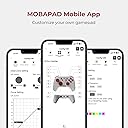
Been using this for 6 months now. It's a flawless controller and perfect for my needs. I use this controller for speedruns and it has not let me down. The D-Pad is tactile as it should be, the sticks are hall-effect with metal rings to prevent degradation, and the buttons are flat making it easy to slide fingers across them. I can't understate how much I LOVE this controller. It's the right amount of tactile and responsive, comfortable in the hands, and very affordable. The only thing I don't really like is the app isn't very accessible and annoying to use. The controller itself though, MOBAPAD really knocked it out of the part with this one. Will be buying more, but really wish the joysticks had octagonal gates.
J**N
GameGear and Mobapad customer services are top.
Edit 18-Feb-25: I have to drop to 3 stars due to the product. I am not sure if it is the older one or the replacement, but will hope it's the former. The right hall effect stick is pointing up randomly. I have updated the firmware, tried calibrating and the issue persists. It's disappointing that one cannot have a controller for more than one year without issues. I didn't mind paying a higher price due to the promise of no drift, and it is not fair to again place GearGame in a position to provide the solution due to a manufacturing defect so I will not pursue getting another replacement and will not purchase another controller made by Mobapad. Original review: The controller is great. It has a nice weight and is sized very closely to the Power-A wired controllers for Switch which are (or were) my favorite. The battery lasts for a good while. I have never had it shut off while playing. I have not experienced any kind of stick drift (one issue with the Power-A), mechanical buttons (another Power-A fault – membrane buttons) are mostly great and the gyro works as well, though I don’t use it often. I also do not really use the custom buttons, rumbling or NFC so I cannot comment on those features. Occasionally, the wake-up function does not work first try, but it’s a minor aggravation. I bought 2 of these controllers about a year apart. I am giving a full 5 stars due to the great response from both MobaPad and GearGame for recent issues with one of the controllers. I am not sure which it was as there are no serial numbers on the box nor controller. The top right back button stopped clicking. I noticed the sporadic response on a game where that is the trigger. It was not firing consistently when pressed quickly. I first emailed MobaPad as they are the manufacturer and it is a failure of the button. MobaPad advised to get in touch with the seller and also to check function on the test screen. Their response was same-day, just hours after I emailed so I appreciated that. I did test the function on the switch test screen and confirmed the button would mostly work when pressed slowly but started to miss more the faster it was pressed. I emailed GearGame next, explaining the issue and MobaPad’s response. GearGame also responded very quickly and addressed the issue, no additional information needed. Very satisfying, so I will repeat business with them.
O**O
Awesome controller only missing one feature.
Really good controller feels great in hand. Mechanical buttons feel great It’s only missing true button mapping to the back button. Other wise I’d would have kept it.
A**S
Irksome Ergonomics, Macro Buttons Can't Be Programmed as Regular Buttons, Bad for AC6
I don't know what it is about these controllers that ape the Switch Pro Controller formfactor, but they always seem to get it wrong despite looking identical to their inspiration (I also have a Gulikit King Kong Pro 2, which has the exact same problem). The main issue appears when using use both your index and middle fingers to access all shoulder buttons simultaneously: it does NOT feel good. The curvature of the grips make it so that your ring finger and middle fingers stretch out farther than they should if you want to get a tight grip while using the shoulder buttons, and this is not a problem with the actual Switch Pro Controller. As a result, instead of actually gripping the controller with my bottom two fingers, I kind of just keep them loose and hold the controllers by pressing its sides with my palms. It's not great. I admit I don't have the largest hands, but considering that these controllers are actually smaller than the Switch Pro Controllers, I don't think large hands would appreciate this either. That said, if you're old school and still grip a controller like an SNES gamepad (using only your index fingers for shoulder buttons), it feels fine. Honestly, I got this controller to play Armored Core 6, a game that demands the use of all the shoulder buttons, and could actually benefit from MORE shoulder buttons. Thus, when I saw the programmable buttons on the back of the controller, I thought I could use them just like any other button. Alas, this was not to be: the macro buttons only perform a single instance of the programmed button presses (with a mandatory interval between presses), NOT holds or long-presses. This makes it worthless for my purposes, as the reason I needed more shoulder buttons was for weapons that required buttons held to charge (like shoulder lasers) or multi-lock (like missiles). If I were to swap them for the other potential layout, where I'd use them for jump and quick boost, I wouldn't be able to hold down jump to fly, and the weird mandatory interval between macro presses makes them too slow for rapid-fire quickboosts. I tried the Android app to see if I could find a way to reprogram the macro buttons to be regular buttons, but as nice and intuitive as the app was, I couldn't find a way to accomplish this. This seems like a really strange design choice that ruins a huge amount of utility for this controller, as it avoids the most simple and obvious uses of the buttons in lieu of a really niche and complex gimmick that most people would probably ignore. All that said, the sticks and buttons don't feel awful. The buttons have a nice tactile click without feeling stiff, the sticks do appear to be proper hall effects sticks, and even that silly disc d-pad was nicer than expected. The lack of analog triggers is a shame, but expected for a Pro Controller imitator, so no demerits there. If I could simply get those damn macro buttons to be regular buttons, I'd happily raise the score to a five, bad ergo and all. I can work around bad ergo. But I can't work around insipid functionality.
S**K
Great mechanical controller
A really solid mechanical controller. Buttons are well placed and comfortable, I like both dpads. The triggers I'm not a huge fan of. They're too large and uch short travel you don't quite want to keep hitting them. I prefer membrane digital triggers. Otherwise works well on PC.
A**5
Bastante bien
Se siente muy bien, los joycon me ayudaron en juegos freneticos como Hades, y los botones son buenos para cualquier juego que ocupe botonazos rapidos. En switch2 se empareje y reconoce rapido, tambien tiene buen gyro, en pc tambien se empareja bien pero en steamdeck si me hace batallar y aparte lo tengo que emparejar 2 veces, como generico y switch a la vez. El dpad si me quedo mal porque no tiene pivote y en juegos de peleas te da mal direcciones porque permite presionar hasta 4 direcciones juntas y el juego las interpreta mal.
Trustpilot
5 days ago
3 weeks ago