⚡ Print fast, work smart — the office essential you can’t afford to miss!
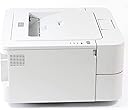
The Brother HL-2130 Mono Laser Printer delivers professional-grade black-and-white prints at a swift 20 pages per minute, with the first page out in under 10 seconds. Its 250-sheet paper capacity minimizes interruptions, while Energy Star certification ensures low power consumption. Compact and cost-effective, it connects effortlessly via high-speed USB 2.0, making it the ideal choice for small offices aiming to boost productivity without breaking the budget.
| Power consumption | 421 Watts |
| Included components | Paper tray (250 sheets), power cord |
| Print media | Paper (plain) |
| Max input sheet capacity | 250 |
| Max copy speed (black and white) | 20 ppm |
| Compatible devices | Laptops, PC |
| Maximum colour print resolution | 2400 ppp x 600 ppp |
| Sheet size | A4 [NA] |
| Maximum black and white print resolution | 2400 x 600 dpi |
| Warranty type | extended warranty |
| Colour depth | 1 bits |
| Dual-sided printing | Yes |
| Maximum copies per run | [VERY_HIGH] |
| Wattage | 421 watts |
| Product Dimensions | 47.5 x 45.4 x 33.1 cm; 6.67 kg |
| Item model number | HL2130G1 |
| Manufacturer | Brother |
| Processor Count | 1 |
| RAM Size | 8 MB |
| Number of USB 2.0 Ports | 1 |
| Are Batteries Included | No |
| Item Weight | 6.67 kg |
| Guaranteed software updates until | unknown |
E**N
Easy as pie with an iMac
After ten years sterling service, I reckoned it was about time to replace my old XT machine and my trusty Brother laser printer. I invested in an iMac and, to go with it, a new Brother HL-2130, which arrived yesterday, two days after I ordered it - great work Amazon and Hermes. The reason for this review is that I want to call out just how easy it was get the printer working with my Mac. As soon as I plugged in the USB and before I'd put the CD in the drive, the iMac scurried off to the Brother support site, grabbed the latest drivers (I'm running 10.9.3) and installed them. Job done. I was printing in less than two minutes. Now I know that a good deal of this is just down to how smart the Mac is but, that notwithstanding, I was really impressed. Print quality? Excellent, wouldn't expect anything less. Speed - a tad slow to the first print but quick after that. If you want a cheap, good quality printer for your Mac, I'd highly recommend this one.
J**T
Quality and exceptional value printing
Have had this printer for several weeks now and have been very impressed with it. The print quality is excellent and the speed is as impressive as the much more expensive models at work. As I only print infrequently this laser printer is the best option as there are no ink jets to dry up. It is a quality product at an incredible price offering exceptional value for money. The clarity of the printing is excellent and meets the standard for printing airline boarding passes and other travel documents which are now being regularly emailed by travel agents. It was also very easy to install the driver and set it up. I have no hesitation in recommending this printer which also now comes with a cable. Definitely merits it's 5 star rating.
S**T
Basic, straightforward monochrome laser printer
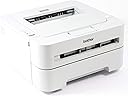
This printer was bought to provide cheap, quick printout from a basic, home-use desktop where colour isn't necessary and does the job admirably. It has a compact form factor but is nonetheless bigger than most photo/deskjet printers in the same price bracket. It's the lightest-weight/duty and lowest-priced Brother printer I've used to date, but still feels reassuringly solid in terms of build quality.The printer measures roughly 14 inches wide/deep by 6 1/2inches tall. Set up (on my parents' Vista-based PC) was completely straightforward, the most time-consuming element being the software installation.The printer is quick - not the fastest of its type, but at 20ppm still speedy enough that you aren't hanging over it waiting for it to get through the last few lines before you can grab your document! The initial toner - as others have said - is a start-up cartridge and NOT a full/full-size version... but, assuming that you aren't printing highly ink-dense documents, still lasts well. Certainly better than ink jet technology.In terms of noise, this isn't the quietest of printers. Once it's awake, there is an internal fan that whirs for ages and the only way to stop it manually is to turn the printer off. The start button doesn't also serve as a simple go/pause button (as it has on other Brother printers I've owned), instead, if the printer is in 'idle' mode, a press of this button will result in the printout of a test page.There are 2 paper feeders: a 250 page (at 80gsm) tray at the bottom of the printer, but also a sheet loader on the front of the device for large envelopes and providing guidance for inserting sheets intended for manual duplexing. This is a really useful feature for lower volume users.PROS:- low cost purchase and potentially cheaper than inkjet to run- small size- fast printout- guidance for manual duplexingCONS- it's a basic model and not meant as a serious business machine- barebones printer with limitations on paper type
M**S
Brother HL - 2130 ( 6 YEAR UPDATE)
After having now owned one for a year come this week I can say I'm satisfied with it. It was originally a rush purchase due to me desperately needing a replacement after my previous printer was destroyed in a house fire. As it stands it's the first and only Brother product I currently own.When I originally started printing with it I found it did have an annoying habit of jamming a quarter of the sheets. Even though the paper quality used was good, I changed them to a different brand without the problem disappearing. After a few weeks of putting up with it jamming it eventually settled down and no longer jams. Could be the printer was stored or transported badly.Toner cartridge is now indicating it's getting low having printed around 600 pages with an average 5-10% coverage. Print quality is crisp and clear with no shadowing at all. The time in which it takes to start printing from OFF is around 15 seconds. Printing is a little nosier than my old Samsung but once printed it does quieten down quite a bit, although still twice as loud than my main computer cooling fan. Even so, printer is quiet enough for me to have it on my desk next to my speakers. Of course the printer is completely quiet when it goes into standby mode.Using envelopes is a bit of a pain due to you needing to drop the back panel and slide two green levers before you can print. Just don't forget to reset the levers before normal printing again :-)Although I will replace the toner and continue with this printer, it will never replace my previous Samsung ML series printer which I had for five years and never needed to change the cartridge. Had the exact same Samsung model been available at the time of purchasing this printer then I would definitely not have bought the Brother. The Samsung would have cost more at the beginning, but it was far more efficient in toner and would have easily repaid me back in savings.One thing is for sure. . . if you do a lot of printing then don't pick this printer.UPDATE:Been 6 years since I purchased this printer and although my original review left a lot to be desired, it’s a printer which I have grown to be more than happy with. There were a few gremlins during the first weeks which haven’t returned, and for that I’m praising the printer. Toner consumption is very good and although I print a lot, I’m still on my newly installed third cartridge.Should this printer fail for any reason, I would not hesitate to buy the same model again.TIP:When it comes to ‘toner low messages’ from the printer , I found it a good tactic to remove the unit and gently shake it left and right to evenly redistribute the remaining toner. This usually sees the toner last another hundred printouts.
Trustpilot
2 weeks ago
1 month ago