Desertcart purchases this item on your behalf and handles shipping, customs, and support to Peru.
🚀 Upgrade your home network to pro-level speed and stability with goCoax MoCA 2.5!
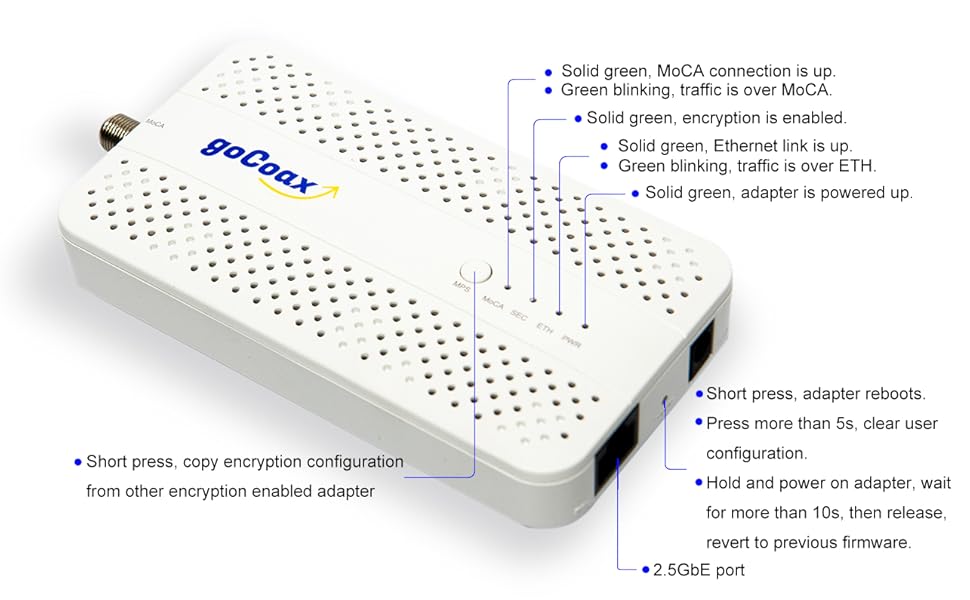
The goCoax MoCA 2.5 Adapter delivers up to 2.5Gbps bandwidth over existing coaxial cables, enabling ultra-fast, low-latency wired connections ideal for 4K/8K streaming, competitive gaming, and seamless video conferencing. It features a dedicated 2.5GbE Ethernet port, plug-and-play setup with all necessary cables included, and broad compatibility with major ISPs and networking devices. Perfect for professionals seeking a reliable, high-performance home network without new wiring.


| ASIN | B08XP8MMFG |
| Best Sellers Rank | 7,708 in Electronics & Photo ( See Top 100 in Electronics & Photo ) 99 in Coaxial Cables (Electronics & Photo) |
| Brand | goCoax |
| Brand Name | goCoax |
| Color | White |
| Colour | White |
| Compatible Devices | Desktop |
| Compatible devices | Desktop |
| Country of Origin | China |
| Customer Reviews | 4.6 out of 5 stars 859 Reviews |
| Data Link Protocol | MoCA |
| Data Transfer Rate | 2500 Megabits Per Second |
| Data link protocol | MoCA |
| Hardware Interface | Ethernet |
| Hardware interface | Ethernet |
| Item Dimensions L x W x H | 13.9L x 7W x 1.8H centimetres |
| Item Weight | 320 Grams |
| Manufacturer | goCoax |
| Manufacturer Part Number | MA01-0001 |
| Model Number | MA2500D |
| Number of Items | 1 |
| Number of Packs | 1 |
| Product Warranty | 1 year |
| Product dimensions | 13.9L x 7W x 1.8H centimetres |
| UPC | 860006283209 |
| Unit Count | 1.0 count |
R**A
They really do work!
Living in Edwardian terraced house built in 1900, getting ethernet up to the loft conversion was out of the question. Despite lacking the foresight to have ethernet installed during a rewire in 2018... we did have lots of multiple coax aerial connections installed in every room (that have never once been used, thanks netflix....) Fortunately for me these all terminate at a splitter in the loft. I could not get a link to establish when including the splitter (presumably it is not the correct standard) but disconnecting the various feeds and testing them individually to bypass it... I eventually got a green light. That was a few weeks ago, and I have not had to do anything since. They really just work. Our FTTP connection is gigabit so I cannot verify the 2.5Gbps claim.... but can confirm they deliver the full gigabit speeds whilst introducing a negligible 1-2ms additional latency in comparison to being connected directly to the router. My results are still <10ms where it matters, so virtually impossible to notice. PROS: - They deliver results comparable to ethernet - Come with everything you need in the box (including a UK power adapter which is rare for these devices) - So far require little to no maintenance - Quite small and easy to hide including holes for wall mounting Cons - Could be considered expensive when compared to more commonplace alternatives such as powerline adapters, but the results MocA delivers are far superior in my application - Require power (seems obvious but worth noting) If you are in a situation comparable to mine, these are a no brainer.
C**T
As fast as Ethernet
These work great and came with a UK plug! I tested two of these both with a direct coaxial cable between them and on my new-build home coaxial network which has a fairly typical "star" layout where cables go from each room to a central signal amplifier and aerial antenna in the loft (so quite long cable runs). In both cases I was able to max out the capacity of my hardware – 1Gbps ethernet. The tests also proved that these work well alongside the Freeview aerial signal and my preinstalled signal amplifier in the loft, which continues to work without any issues or interference. The 2.5Gbps rating is *not* full-duplex (i.e. not 2.5Gb up + 2.5Gb down concurrent) but rather dynamically shared between lanes and devices. This means that when I tested them with iperf3 in bidirectional/dual mode I could get the full 1Gbe ethernet full-duplex speeds (1Gbps download + 1Gbps upload concurrent; see first screenshot). The selling point of this model however is the 2.5Gbps capable ethernet port, so if you have network cards and/or switch capable of such speeds then you should see even more impressive performance. I only have 1Gbps ethernet devices so was not able to test that. The only downside to using these is the latency they add to the traffic: in my testing between 3ms and 4ms, but that is about the same as my Eero Pro Wifi6 extender, but my two Eero Wifi points can only do about ~400Mbps. The power consumption is about 2W per device which is incredibly efficient. Also, while not technically a fault since you know what you're getting when ordering and there are alternatives available, it is a bit annoying that these only have a single coax input and a single ethernet port each. You will need an additional coax splitter and ethernet switch to connect more devices. For this reason I will probably replace them with the Translite MoCA 2.5 with 2 Ethernet Ports Model: TL-MC85 , but I am a bit skeptical since those are a USA model.
W**K
If you have cable TV/freeview antenna cabling this will piggyback for 1 - 2.5Gbps networking!
I've been using 1200mbps homeplugs for a while and due to my mains and interference from things like mobile phone chargers I've not gotten over 150Mbps. I recently discovered MoCA is a thing in the US and Europe; in my house I have an antenna receiving freeview in the attic which goes into an amplifier, then into four lines - two feeding the bedrooms, one to the kitchen and one to a split box in the living room. As Freeview works in the ~850MHz band, and these things work in the 850-1500ish band, the two coexist really well. I connected one to the living room split box, feeding it from the LAN connection on my router. I put a second into the room that serves as my home office and the two immediately connected. A little configuration later for enabling encryption and they're both fast and secure. iperf3 only registered 350Mbps, but actual file transfers in-house hit around 950Mbps. They're a bit pricey for two units, but if you have antenna wiring in your house and have poor success with powerline and wifi this is going to be the solution to your problems - up to 2.5Gbps. One caveat - if your cabling is feeding satellite and not a freeview antenna, there will be a signal clash and they probably will not work. For my use case, they worked out wonderfully. Thank you for coming to my TED talk.
B**O
Works. Fast. Easy enough to set up.
I have relatively new Wifi 7 mesh routers, which are amazing on the same floor, but lose about half their bandwidth through the ceiling. It's still more than fast enough for most of our uses, but I figured a wired backhaul over Moca would be a fun project, benefit some of our gaming devices, and add a little redundancy to the home network. My home is wired for unused coaxial, but not ethernet. Took a bit of a chance, as the coaxial cables were raw, so wasn't exactly sure what connected to what from the junction box. Added ftype wall panels where available, and crimped the junction box cables and added ftype headers. Bit of trial and error matching the right cables, but once I did, boom - the two Moca devices connected instantly. Now my living room devices are basically hardwired to the ONT via a mesh network with wired backhaul over Moca. If the Moca ever fails, the mesh wireless backhaul takes over automatically, and while our wireless backhaul is still fast enough that none of my family would probably notice, it's nice to be able to max out our fibre broadband speed anywhere in the home.
A**T
Why aren't these mainstream???
so, i bought some of these, they didn't work, but then i found out with some reading that the signal amplifier that all my coax cables are connected to from the tv aerial - that device pretty much blocks moca signals. so i ended up figuring out which cable went to which room, i did this using the moca devices, so i plugged one in at e.g. the lounge where the main internet router is, then went to the attic and plugged each cable one by one into the 2nd moca device and saw which one got a signal. I then did the same thing again but for the target room and voila, connected those 2 cables directly, bypassed the signal booster, went into the user interface console to see what connection rate i was getting and it showed 3,400mbps, more than enough for gigabit internet. so now i can wire the backhaul on my mesh system to get full speeds at the satelites. so impressed, i'll buy a few more to hook up a few more rooms directly - namely my son who games a lot. what an amazing invention, using the existing cabling in the house vs having to get a professional install for ethernet tearing up the floors and walls or putting the cabling outside the house - no thank you.
M**B
Good when they work, can be problematic
I have these installed in a rental property as I cant run cable between floors, however someone did at some point, install Coax cable into every room in the house on the same ring which is great! As such I chose to use these to get wired connectivity between floors and, for the most part they work well. Firmware has been updated to the latest and I've been running them for 3 months now, and they are great.. until they randomly aren't. I've not been able to find a cause of the issues but these will randomly drop out for 5 minutes at a time as if they have rebooted, but the devices don't appear to have rebooted. The MoCA just looses its sync/link even after extensive testing and tweaking of settings, and trying different coax fly leads. Of which be sure to invest in something good like WF100 cables if you want to use these. I had all sorts of issue with cheaper RG6. I don't have ANY TV's attached to the coax at the property either so it shouldn't be that. Maybe it's a bug, maybe its bad cable I cant say for sure. The firmware updates are very sporadic in nature and the web interface is basic at best, and badly documented at its worst to the point of finding the documents for another manufacturers devices that use the same default interface. Great for rentals where you need faster wired connectivity, especially if you have issues with powerline like I did (even with g.hn kit getting no more than 200Mbps at BEST), and you know that all your coax is connected together and not via boosters or anything like that.
M**S
Works like a charm in the UK
I never knew MoCa adapters existed until I came across these. I’ve used powerline and in my house I would never get anything above 60Mbps. I was considering drilling through my walls in order to get a wired connection to my office and then I accidentally stumbled across these. After doing some research, they seem to be more of a US product as they are not popular or well known in the UK at all. My house has TV Aerial Coax ports throughout but I never use them. Now I have a use. With these I’m able to get my full 1Gbps connection in both up and down with only 3ms latency to my router. I’m yet to try the full 2.5Gbps rated bandwidth of these adapters since my router and switches are only Gigabit but I have no reason to doubt I wouldn’t get that speed internally on my network. I fully recommend these to anyone with pre-existing Coax cabling in their home. In the UK you may have to get the small cable adapter to convert it from the UK TV aerial connector to the f type connector like I did but these are very cheap.
M**S
I had no idea this technology was available! Brilliant!
My house was built 10 years ago without ethernet cabling but with 6 coax cables distributed around the property and converging in the loft. My broadband enters the property downstairs but my study is upstairs, and for years I've used wifi with matching Archer C7 routers upstairs and downstairs purely to provide a WDS link. It's been very fast and stable. But I would have preferred a wired link, and recently came across MoCA technology and thought I'd buy a couple of adapters to try. I bought goCoax as they are a highly visible brand, but have since read that MoCA compliance means that I could have bought cheaper MoCA devices of equal capability. My experience with these adapters is top notch. I have one at each end of a dedicated coax cable and they link at 3656 Mbps, so the published 2.5 Gbps into ethernet is entirely feasible. I can't check as my switches and NICs are 1 Gbps, but I'm happy to have capability for the future.
G**K
Works great, compatible with other brands like TP-Link.
These are an excellent alternative to Powerline Ethernet, which works reliably only 20% of the time. MoCA works a 100% of the time. Make sure that your coax splitters are capable of more than 1GHz. 3-way splitters often have one -3dB port and two -7dB ports. -7dB works better - it's higher attenuation, but wider band. Make sure you terminate unused ports with a 75Ohm terminators. Also keep in mind that they have a slightly higher latency - I'm seeing a 4ms ping round trip time on these.
I**N
Reliable, fast, easy to setup product
The best device for those who needs wired connection but don't want to run separate cable. Why I like it ? -Very easy to set-up, just plug in and go. -Connection quality is amazing. My home office is connected through one of these adapters and gets 980+ Mbps on a 1Gbps connection. Practically no loss for reliable work, streaming, and gaming. I have bought 4 such devices and ordered one more because I have 4 bedrooms. 4 years of working without a glitch! .
A**.
Blitzschnelles Netzwerk über Coax – echtes Highspeed ohne Kabelziehen!
Ich nutze den goCoax MoCA 2.5 Adapter zur Netzwerk-Erweiterung über bestehende Koaxialkabel im Haus – und ich bin positiv überrascht. Wer keine neuen Netzwerkkabel verlegen kann oder will, aber trotzdem hohe Netzwerkgeschwindigkeiten sucht, findet hier die perfekte Lösung. Was mich überzeugt hat: Volle Geschwindigkeit über Coax – Ich erreiche mit zwei Adaptern problemlos 2 Gbit/s brutto (real etwa 1,8 Gbit/s netto) – deutlich mehr als bei Powerline oder WLAN. Mein Coax-Kabel sind über 30 Jahre alt. Für Streaming, Gaming oder große Dateiübertragungen absolut zuverlässig und stabil. 2,5 GbE Ethernet-Port – Endlich ein MoCA-Adapter, der auch die volle Bandbreite weitergibt. In Kombination mit einem 2,5G-Switch oder NAS kann das Heimnetzwerk damit wirklich auf ein neues Level gehoben werden. Plug & Play – Adapter anschließen, einschalten, fertig. Die Geräte finden sich automatisch, keine komplizierte Konfiguration notwendig. Ideal auch für technisch weniger versierte. Nutzung vorhandener TV-Verkabelung – Ich verwende die vorhandene Koax-Verkabelung im Haus, ursprünglich nur für Kabelfernsehen, jetzt als Highspeed-Datenleitung. Perfekt für Häuser mit mehreren Etagen oder dicken Wänden. Stabiler Dauerbetrieb – Läuft bei mir seit Wochen im 24/7-Betrieb völlig unauffällig und ohne Hitzeprobleme oder Aussetzer. So muss das sein. Tipp: Wer Kabelfernsehen oder DVB-C parallel nutzen will, sollte auf ordentliche Splitter und ggf. einen MoCA-Filter am Hausanschluss achten – dann gibt’s auch keine Störungen. Fazit: Der goCoax MoCA 2.5 Adapter ist die ideale Lösung für alle, die echtes Gigabit-Netzwerk über vorhandene Coaxkabel wollen – schnell, stabil und ohne Kabelverlegeaufwand. Der 2,5G-Ethernet-Port macht ihn zukunftssicher und hebt ihn deutlich von anderen Adaptern ab. Klare Empfehlung von mir!
S**E
Meglio di quanto mi aspettassi
Premetto che utilizzo i powerline da anni e non ero nemmeno a conoscenza della tecnologia MoCA fino a pochi giorni fa. Mi sono documentato brevemente online e ho deciso di provare con questi goCoax poiché, tramite i powerline, riuscivo a portare soltanto 100 Mbps in down/up al mio pc fisso (che non posso connettere direttamente al modem) pur avendo la fibra da 2,5 Gbps a casa. Nel mio caso è andata anche meglio di quanto pensassi, lo speed test mi restituisce circa 950 Mbps in down e up (a causa della mobo sul fisso che supporta LAN fino a 1 Gbps) con 7 di ping. Se rimane stabile così anche nei prossimi giorni, sostituisco definitivamente i powerline. La configurazione è molto semplice, vi servono ALMENO due goCoax, uno lo connettete tramite LAN al modem e tramite cavo coassiale a una porta coassiale, così da fornire la connessione internet al cavo nel muro; l’altro goCoax lo connettete tramite LAN al dispositivo che volete (nel mio caso pc) e tramite cavo coassiale a un’altra uscita coassiale. In teoria andrebbe anche messo un filtro per le interferenze, che ho acquistato ma non ancora installato, se ne avrò la necessità lo farò. Nella confezione del goCoax trovate sia un cavo lan sia uno coassiale, ma quest’ultimo è abbastanza corto e vi consiglio di comprarne uno a parte. In definitiva, se avete la possibilità e il giusto impianto di cavi coassiali a casa vostra, vi consiglio sicuramente di sostituire i powerline con i MoCA
L**.
Amazing solution for my situation
I live in an apartment building and the powerline solution I was hoping to use dropped me from about 280Mbps of bandwidth (the full bandwidth of my internet subscription), 20ms ping and very solid reliability on wired ethernet, to about 25Mbps of bandwidth and about 100ms ping, and very frequent dropouts where there is no connection at all for minutes at a time. I live in a pretty modern building so I was not expecting issues but I guess there are many other individual powerline users in the building that run on similar frequencies or maybe another device or appliance is causing trouble. I really didn't feel like testing many different powerline solutions, and running a long ethernet cable would be a huge hassle here (I will only live here for about a year and my housemate is the homeowner, so they were not too keen on me drilling holes either) But I found my saving grace in this GoCoax MoCa solution. There was an existing coax cable running through the walls from a distribution box near the modem to the room where I need the wired connection, intended for a tv in this room. I was able to disconnect the coax cable from the main distribution box and hook up these GoCoax adapters directly, using an adapter on the other end from the "tv" plug in the wall. This way they are not on the main coax connection of the building but wired directly to each other. The result is an extremely stable connection, with no dropouts (even doing long uploads/downloads of hundreds of GBs that take multiple days at a time and which would fail if the connection would drop). I'm getting virtually the same bandwidth as far as I can tell, and no noticeable latency increase (probably a couple ms, but I can't tell the difference for normal daily use). I have not tested the total bandwidth I could get from an internal connection, but I suspect with this setup I would be able to saturate my gigabit devices as it all seems rock solid. The adapters are a bit more expensive than your average powerline solution and definitely more expensive than normal ethernet cable, and powerline is obviously more versatile (who knows if the next place I live will have a similar coax setup), but I am very happy with my purchase.
Trustpilot
5 days ago
3 weeks ago