Desertcart purchases this item on your behalf and handles shipping, customs, and support to Peru.
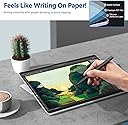
🖋️ Write like it’s paper, protect like a pro.
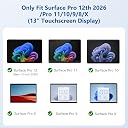
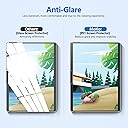
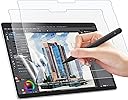
The MoKo Paper Screen Protector is a premium matte PET film designed exclusively for 13-inch Microsoft Surface Pro models (Pro 11 2024, Pro 10, Pro 9, Pro 8, and Pro X). It offers a paper-like texture for precise pen input, anti-glare properties to reduce sunlight reflection, and a 3H hardness rating to guard against scratches. Easy to apply with a bubble-free adhesive, it enhances your digital writing and drawing experience while keeping your device screen pristine.


| ASIN | B0B2VVDF47 |
| UPC | 840034696240 |
| おすすめ度 | 5つ星のうち3.9 339 レビュー |
| カラー | マット |
| ディスプレイサイズ | 13 インチ |
| パッケージ内に含まれる商品の数 | 2 |
| ブランド | MoKo |
| ブランド名 | MoKo |
| メーカー名 | MoKo |
| メーカー型番 | P840034696240 |
| ユニット数 | 2 個 |
| 仕上げタイプ | マット |
| 取替え可能電話機モデル | Microsoft Surface Pro 11 2024 / Surface Pro 10 2024 / Surface Pro 9 & Pro 9 5G 13インチ 2022 / Pro 8 13インチ 2021 / Surface Pro X。 |
| 同梱コンポーネント | タブレットスクリーンプロテクター1枚。 |
| 品番・型番 | P840034696240 |
| 商品の寸法 | 28.5長さ x 31.2幅 cm |
| 商品の寸法 L x W | 28.5長さ x 31.2幅 cm |
| 商品の硬度 | 3H |
| 商品の重量 | 1.78 オンス |
| 型番 | MoKo Paper Screen Protector for Surface Pro 11/10/9/8/X - 13 Inch |
| 対応アイテム | Microsoft Surface Pro 11 2024 / Surface Pro 10 2024 / Surface Pro 9 & Pro 9 5G 13インチ 2022 / Pro 8 13インチ 2021 / Surface Pro X。 |
| 対応デバイス | Microsoft Surface Pro 11 2024 / Surface Pro 10 2024 / Surface Pro 9 & Pro 9 5G 13インチ 2022 / Pro 8 13インチ 2021 / Surface Pro X。 対応デバイス Microsoft Surface Pro 11 2024 / Surface Pro 10 2024 / Surface Pro 9 & Pro 9 5G 13インチ 2022 / Pro 8 13インチ 2021 / Surface Pro X。 表示を増やす |
| 対応電話モデル | Microsoft Surface Pro 11 2024 / Surface Pro 10 2024 / Surface Pro 9 & Pro 9 5G 13インチ 2022 / Pro 8 13インチ 2021 / Surface Pro X。 対応電話モデル Microsoft Surface Pro 11 2024 / Surface Pro 10 2024 / Surface Pro 9 & Pro 9 5G 13インチ 2022 / Pro 8 13インチ 2021 / Surface Pro X。 表示を増やす |
| 材質 | ポリエチレンテレフタレート |
| 特別な機能 | アンチグレア |
| 画面サーフェス説明 | マット |
| 硬度 | 3H |
| 素材 | ポリエチレンテレフタレート |
| 透明度 | 95 |
A**E
Reposant pour les yeux!
Le protecteur n'était pas très facile à mettre en place. En revanche, une fois que c'est fait, le résultat est très satisfaisant: mon écran est devenu beaucoup plus reposant pour les yeux, moins brilliant, et l'effet papier eat agréable.
G**R
Great product! Almost as natural as paper and pencil
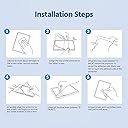
I read the reviews after I had received the protector and before I put it on. Lots of complaints about not sticking properly, lifted corners, bubbles, and other problems. I think there are three things of extreme importance: 1) Prefitting on the screen before taking off the backing film so you know how it is going to fit, 2) Cleaning the screen. Before I cleaned the screen, I turned off fans and anything else that might be blowing dust particles around. I cleaned the screen with my cleaner and cloth and then cleaned with the enclosed wipe and cloth. 3) Take your time and work the bubbles out as you go. I peeled off just enough film on the right edge for the protector to stick to the screen and then worked across the screen peeling the backing film and using the enclosed tool to remove the bubbles. It worked out great! I had a flawless installation and was very pleased. I then tested the surface for the pencil and paper feel. It was a little rough in my opinion it worked fine. I have tried Supernote and Remarkable notebooks and while they have excellent paper/pencil feel, the screen protector was not as good but, certainly better than the smooth screen surface. If Microsoft would provide a screen surface like the Supernote or Remarkable, they could be crushing the market. Overall, VERY pleased with the screen protector. I would recommend to anyone wanting to use a Surface Pen or Pen 2 to invest in this very reasonable price product. I have purchased the same protector to fit my Surface Go which I use more as a notebook.
I**C
Would have been a great product.
I had to return mine because it shipped with a dent in the packaging and screen protectors which may have happened during transportation. The texture makes it a lot easier to write on the surface pro. I didn't really notice the screen qualitiy diminish after applying the screen protector. It's a little hard to apply but once you've got it on, it doesn't come off easily. There is significanly more friction when writing and I noticed the nib of the slim pen feels slightly ruffer than a new one after writing on the screen protector for a day. But the bright side is, it is a lot more comfortable to write on. There is also 0 interference with touch sensitivity and pen input. Great screen protector for your surface pro if you don't mind having to get new nibs more frequently.
P**O
Calidad media. El anti reflejo es muy flojo
Muy facil de poner. El tacto rugoso es muy agradable, pero bastante ruidoso con los dedos (como acariciar un papel de lija). Lo compre principalmente por el anti-glare/anti-reflejo, y la verdad es que hace muy poco al respecto. Sigue reflejando bastante, solo que algo mas borroso.
D**K
A must-have for pen users; great feel and value
If you use the Surface Pen for writing or drawing, this MoKo screen protector is an absolute game-changer. The stock glass screen on the Surface Pro is slick, which can make handwriting feel unnatural and imprecise. This screen protector adds a subtle, paper-like texture that provides the perfect amount of resistance for the pen tip. It genuinely feels like you're writing on a sheet of paper, offering much better control and making note-taking a far more pleasant experience. Beyond the writing feel, the matte finish is fantastic for reducing glare. Working near a window or under bright overhead lights is no longer an issue, as the screen protector diffuses reflections effectively, which also helps reduce eye strain. Installation was straightforward, and the fit on my Surface Pro is perfect. The best part? You get two in the pack! Considering the high price of other "paper-feel" screen protectors, this MoKo 2-pack is an incredible value. It offers all the benefits of the premium brands—excellent writing texture, anti-glare, and scratch protection—at a fraction of the cost. I highly recommend it to any Surface Pro owner whether using their pen or just wanting to reduce the glare. FYI: I purchased this using my own funds and was not compensated by Moko or anyone else to write this review.
Trustpilot
2 weeks ago
1 month ago