
Desertcart purchases this item on your behalf and handles shipping, customs, and support to Peru.
🎬 One remote to rule your entertainment kingdom!
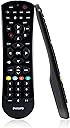
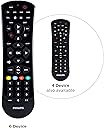
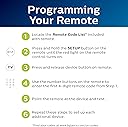
The Philips SRP9263C/27 Universal Remote consolidates control of up to six devices including TVs, Blu-ray/DVD players, soundbars, and streaming boxes. Preprogrammed for Samsung and Roku devices, it supports thousands of other brands via infrared technology. Featuring simple setup with auto code search or direct code entry, ergonomic design, and primary audio control, it streamlines your home entertainment experience with a stylish, compact black finish.


| ASIN | B07CDVLZFG |
| Additional Features | Universal |
| Battery Type | Alkaline |
| Best Sellers Rank | #9,023 in Electronics ( See Top 100 in Electronics ) #415 in Remote Controls (Electronics) |
| Brand | PHILIPS |
| Button Quantity | 46 |
| Color | Black |
| Compatible Devices | Sony, Samsung, Hisense, Westinghouse, LG, Toshiba, Sharp, Vizio, Insignia, Philips, TCL, Panasonic, Roku, Apple TV, Smart TVs, Streaming Players, Blu-Ray, DVD, VCR, Home Theater Compatible Devices Sony, Samsung, Hisense, Westinghouse, LG, Toshiba, Sharp, Vizio, Insignia, Philips, TCL, Panasonic, Roku, Apple TV, Smart TVs, Streaming Players, Blu-Ray, DVD, VCR, Home Theater See more |
| Compatible Television Models | LG 55NANO90UPA, Sharp 4T-C50EQ3EM2AG, Sharp 4T-C70BK2UD, Sharp 8M-B80AX1E, Sharp LC-32HI3322E, Sharp LC-40CFE6242E, Sharp LC-40CFE6351E, Sharp LC-40CFG4042E, Sharp LC-40CFG6022E, Sharp LC-40CFG6352E, Sharp LC-40CFG6452E, Sharp LC-40FG3342E, Sharp LC-40FI3012E |
| Connectivity Technology | Infrared |
| Controller Type | Button Control |
| Customer Reviews | 4.1 out of 5 stars 9,145 Reviews |
| Global Trade Identification Number | 00030878406024 |
| Item Weight | 109 Grams |
| Manufacturer | Jasco Products Company, LLC |
| Max Number of Supported Devices | 6 |
| Maximum Number of Supported Devices | 6 |
| Maximum Range | 10 Meters |
| Mfr Part Number | SRP9263C/27 |
| Model Name | SRP9263C/27 |
| Model Number | SRP9263C/27 |
| Number of Batteries | 2 AAA batteries required. |
| Special Feature | Universal |
| UPC | 889446010589 030878406024 |
| Unit Count | 1.0 Count |
| Warranty Description | 90 day limited |
M**H
Good Remote
Bought this to replace a Black Web universal remote, which was so old the words/symbols on most of the buttons were worn off, but was still functional and worked well with my tv and DVD player. But the BW finally died and I bought this remote which I had on my Amazon list to eventually replace my BW because I couldn’t find another BW remote in my Amazon and other retailer searches.. This remote was easy to set up for each of my devices and allowed me access to all the functions and menus on each device, when the correct code was used. All the codes I tried worked to turn my tv on/off but some did not work the menu button to allow me access to my tv menu. I had to try five or six codes before I found the one that allowed this remote to work like the remote that came with my tv. Since this remote doesn’t have some of the buttons the remote that came with my tv have, I had to try different buttons to find the ones that serves the same function as those missing buttons. The only drawback is it’s not backlit, but I’m not going to take away a star because I failed to realize that until after I’d ordered it. 🤷🏽♀️
K**Y
Good replacement for roku tv
Works great , I had a Roku tv given to me without a remote and this did the trick.
M**S
Works Basics with Harmon Kardon AVR 230 and Fire Stick
Needed this to run an old Sony Bravia and Blue Ray, a Fires Stick and a newer Harmon Kardon AV receiver. It won't turn on the HK, but once on, I found a code through the code search that controls volume and will turn it off. It was actually the SECOND code that turned off the unit - NOT the first one. The first code that turned off the unit didn't actually work, though it did turn off the receiver. The second one works much better and controls the volume flawlessly. The codes in the code list for HK did not work on my unit, an AVR 230. I leave mine set to what I want and so volume and off are good enough. The Fire Stick (mine is older, not the 4K one) works fine once I am on the right input with the Sony TV selected as the setting on the remote. Apparently the Sony figures it out... The remote is not RF as far as I know, so I don't think it controls the Fire Stick directly. Exit backs you out of the menus - good tip that was in another reviewer's write up - Thanks for that one! Don't know how long it will last, but so far, so good. All of these remotes will do worse if you tend to push the buttons really hard. It can bend the circuit board and crack the wiring. So, if you want to have any remote last, press the buttons as softly as you can get away with and it will hold up better. Dropping them is also bad, obviously... Anyway, hope that helps. Reveivers are so often problematic with these universal remotes, but they sound so much better than the overpriced "sound bars" Bad Sound Bars is what I call them... Terrible sound quality, but better than the pathetic and ultra-harsh sound that the TV speakers create... Real speakers and surround make a huge difference... The HK has fantastic sound with the right speakers. I've had friends come over and actually comment on the sound quality. paired with some Polk towers and Technics speakers for the back - all found at thrift stores for a song..(except for the Polk towers) . . It replaced an old Kenwood and the difference is night and day, but finding a remote that controls the HK has been difficult. Good luck...
D**N
Pretty much perfect...
For price, ease of programming, and overall functionality...this is the value pick of the month. Couple details: it's light, like there is nothing in the case but the 2 AAA batteries and a tiny ghost that jumps from the front to control your stuff. Sort of an emerging plastic cost saving trend with manufacturers these days. It's mostly a good thing, rounded edges and very little weight behind it, should survive all the inevitable falls for a good long time, just don't step on it too much if you can help it. Ergonomically a B+ Although thin profile, buttons feel good and seem to indicate they will stay that way, layout is intuitive enough to memorize in a day or two. All required functions working on TCL Smart/Roku, Marantz DACT, LG Blueray and Display, 90's Sony CD and Yamaha AV surround receiver, Samsung Smart Display. Based on that random list, probably works on everything. Saw a couple transmit range complaints here, which I suppose depending on very high ambient light environment...maybe? Tested at about 22 feet as highly responsive and consistent. Geek trivia: Maximum range on any IR remote technology is about 30 feet. If you need beyond this for your palatial estate's luxurious function hall, spend the extra 10K for a home theatre pro AV control system. Want an actually awful IR remote? Try the brand new stock TCL/Roku...now we are talking bad. No range, slow/unresponsive, almost non existent off axis. This replaced that and others for now...and it remotes like a boss at half the cost.
J**E
Everything works, except very limited success with the "Input" button
I purchased the 4-device remote to replace a much more expensive universal remote (Harmony) that after more than 10 years of perfect use, no longer will program correctly, even when I bought a brand new fresh one. I ended up liking this cheap little Philips remote, since at least I got everything programmed -- my old Sony HDTV, Verizon Cable Box, Sony Blu Ray player, and Roku Express. My TV has 4 HDMI ports, which each of these is hooked up to. Therefore, I need this remote's Input button to take me to the appropriate HDMI port each time I want to use the device. However, everything works with this remote EXCEPT the Input button. My original remotes for the Sony TV, and Verizon Cable Box, and Sony Blu Ray ALL have Input buttons that work (tho not the Roku Express). However, this Philips remote simply won't program them in. EXCEPT for the Blu Ray. The Input button DOES work for that one. Therefore, in order to change inputs, no matter which device I'm currently "on" and watching, if I just press the "DVD" (Blu Ray) button first, and then the "Input" button, it will simply open the HDMI screen on my TV so I can scroll to pick which HDMI I want and it takes me there. If the Blu Ray player is not "awake", I can use it's button plus "Power" to wake it. It's not terribly hard to do this, but I do wish it would simply work the way it is supposed to. Also, the volume button and channel buttons also seem to work like the DVD button, when pressed before the Input button. I will probably try another version of the (expensive) Harmony remote (some are cheaper on Ebay), and return this remote if the Harmony remote works correctly, since the Harmony programs much more detail that I would like. We mostly get what we pay for I guess.
R**M
Works with my Yamaha receiver that has "System Power" and "Standby" on remote
Top Tip: If your Yamaha receiver that has "System Power" and "Standby" on the remote, try the Channel + (Channel Up) button on the remote to turn on the receiver, the "System Power" equivalent. Review: I have a Yamaha RX-V1400 audio receiver and I needed to replace the remote since it stopped working. I looked into replacing the exact same remote and it was over $100 so I just needed a basic one to turn on/off and volume control. At first I thought this doesn't work with my receiver because I tried every listed code for Yamaha and it failed to turn on the receiver. I ended up using the Auto Code Search (which starts with the receiver turned on) and it found the code - which was one of the ones listed. The tricky thing was, to turn on the receiver, you have to use the Channel + (channel up) button on the remote to turn on the receiver. To turn off the receiver, you use the Power button on the remote. This is because the Yamaha receiver has a separate button for "System Power" ("Channel +" on this remote) and "Standby" ("Power" on this remote). I was already happy to find a cheap replacement for my Yamaha receiver but I bought the 4-device version and decided to enter the codes for my Vizio TV (2020 P Series) and Verizon One FiOS STB and it has worked with the functions I care about. As an added bonus the Vizio TV remote, which uses SmartCast for its smart apps, also controls my Amazon Fire TV Stick 4K . This isn't a feature of this remote, per se, but I'm happy to see that the TV controls on this remote also works on the Fire TV Stick. I never intended this to be the one remote to control them all, but now I am testing it as such. Maybe I will update the review after using it for a while.
****
Not as advertised!!!!
This remote is advertised as: 1) Best Remote Code Library - This Universal Remote Works With All Major Brands And Supports "Thousands Of The Latest Audio/Video Equipment". 2) Compatible Devices: Television, Stereo System, VCR, DVD/Blu-ray Player, "Home Theater" 3) Add a touch of shimmer to your "home theater" 4) Simple Setup - This Remote Comes Preprogrammed For Roku And Samsung Tvs NOT SO! I bought this to control my Samsung TV, my Roku Ultra, and my Yamaha "Home Theater A/V", since that is what it is advertised to do. IT DOESNT! The ONLY "Home Theater-A/V" devices it will operate, are the ancient TV/DVD or TV/VCR combos, and a VERY short list of sound bars. Seriously? Ancient technology to control a VCR???? As far as pre-programmed to operate Samsung Tvs and Rokus? No, it does NOT! And get this: even when I programmed it to operate my Samsung TV, the only functions it will do (like many others have said) is turn the TV off/on and volume up/down. Seriously? My Roku Ultra remote would already do that!!! Added to that the fact it has 4 "programmable buttons" (A-Yellow,B-Blue,C-Red,D-Green) but the Instructions DO NOT mention these buttons in any way, or how to program them. So, they are useless. As others have also stated, there is NO model number stamped on this remote anywhere. Its bad enough you would have to get online for support due to poor documentation accompanying the remote.... but you cant find support for something when you cant find a model number! The remote is lightweight and not designed well. The streaming device buttons are TINY and hard to operate. I have attached a photo to prove it. Look how tiny the streaming device buttons are, compared to the Roku remote. Not to mention, the "home" streaming button is so tiny, and recessed lower than the buttons surrounding it... that its almost useless. Philips USED to be a high quality company. They should be ashamed for putting their name on this. Im sick of ordering junk that isnt as described, and decided a long time ago to just return everything that wasnt exactly as it was described or advertised, which is what I am doing with this junk remote. Dont waste your time or money.
S**7
Great universal remote for the price
We have ordered this remote several times, as my kids tend to lose or break things. It is super easy to program to our tv, streaming device, and dvd player. The compatability is diverse as we have used it on Proscan and Sony tvs, Roku steaming devices and multiple dvd players. And it's straightforward to use. The battery like is great and the build quality is fine (my kids are just hard on things). If you're in the market for a universal remote, we definitely recommend this one as it is a great value for the money. It has some color options too, which is nice because black remotes tend to get lost in couches easier.
S**T
Excellent! Exactly what I needed, and it's saving me a bundle
I thought my Philips TV was getting too old and I'd soon need to replace it, because I couldn't access the settings menu anymore and various functions just no longer worked for me. I'd change the batteries in the remote, but it didn't help, and I just figured the TV was in its twilight years and nearing the end of life. I started pricing new TVs and was about to drop over $2000 on a new system when I had the idea to try replacing the remote control altogether... And BOOM everything works again. The problem wasn't my TV, it was the remote control. Certain functions/buttons had just stopped working. But this new remote works like a charm, and allowed me to adjust my settings again and realize I can keep that $2000 in the bank. It's like I got my TV back. Setup was really easy! I'd never set up a universal remote before, but the process was super easy. There's an included list of 4-digit codes for different makes of TVs and other devices. You just find your brand on the list, and start with the first 4-digit code listed for that brand. There might have been a dozen codes but I only had to enter the first one, and it worked right away. It really could not have been easier, and I proceeded then to program it for my Blu-Ray/DVD player as well, so we've now replaced two remote controls with one. Huzzah! Highly recommend. It works with just about anything, it doesn't have to be Philips. Very, very pleased!
N**U
Remote is not working
Remote is not working properly
E**A
… and batteries are included!
Works perfectly out of the box. It was preprogrammed for my brand of TV but they offer codes in case you have to program something yourself.
A**S
Doesn’t work with my Bose
Easy to program but doesn’t work with my Bose
P**R
Don't buy
Didn't connect with Sony bluray player. Can't connect with Jio set top box. If it couldn't connect then what is the use of it.
Trustpilot
3 weeks ago
2 days ago