Buy anything from 5,000+ international stores. One checkout price. No surprise fees. Join 2M+ shoppers on Desertcart.
Desertcart purchases this item on your behalf and handles shipping, customs, and support to Peru.
🎮 Elevate your game and workflow with the ultimate precision powerhouse!
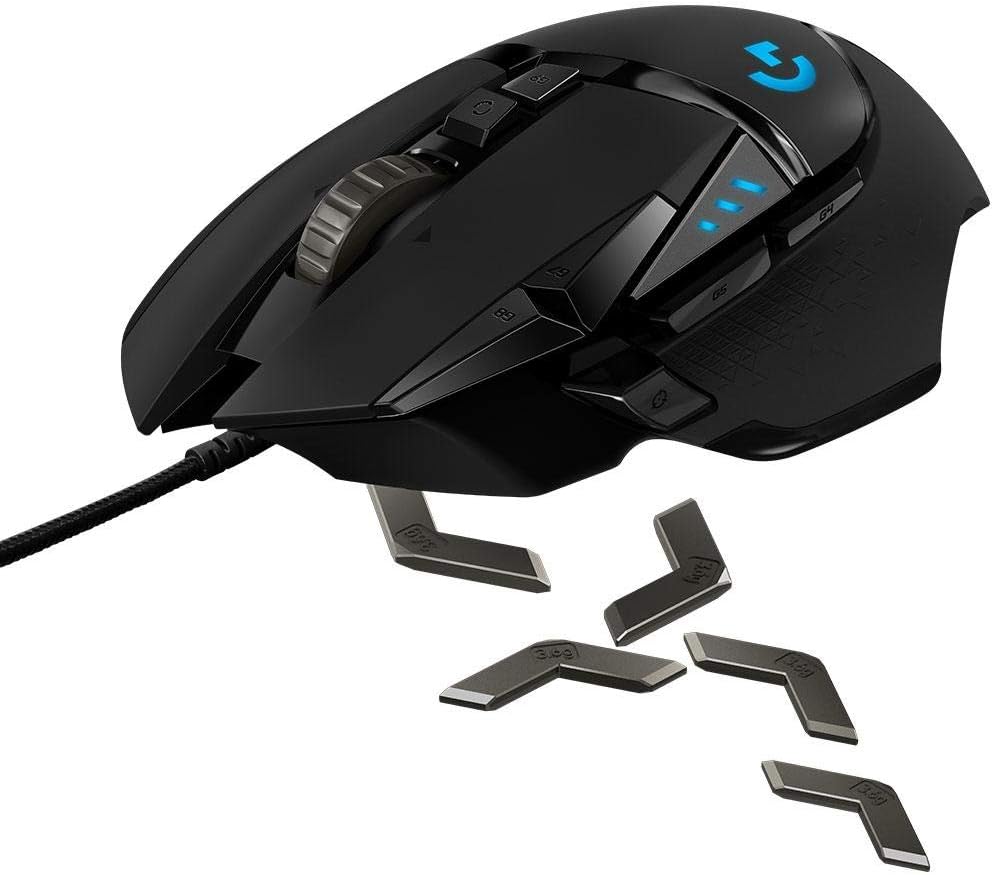
The Logitech G502 Proteus Core is a high-performance gaming mouse featuring up to 12,000 DPI optical sensor with on-the-fly sensitivity switching, customizable weight and balance tuning via five adjustable weights, and 11 programmable buttons for personalized command execution. Its surface tuning calibration ensures optimal tracking on any mouse pad, while the dual-mode hyperfast scroll wheel offers both precision and speed. Designed for gamers and professionals alike, it combines ergonomic design with advanced customization to deliver unparalleled control and comfort.
| ASIN | B00IRHE892 |
| Additional Features | Ergonomic Design, Programmable Buttons |
| Antenna Location | Gaming |
| Are Batteries Included | No |
| Are Batteries Required | No |
| Battery Average Life | 48 Hours |
| Best Sellers Rank | #47,740 in Video Games ( See Top 100 in Video Games ) #333 in Mac Gaming Mice #1,485 in PC Gaming Mice |
| Brand | Logitech G |
| Button Quantity | 11 |
| Color | black |
| Connectivity Technology | USB |
| Customer Reviews | 4.6 4.6 out of 5 stars (3,611) |
| Enclosure Material | Plastic |
| Finish | Glossy |
| Global Trade Identification Number | 00097855105073 |
| Hand Orientation | Ambidextrous, Right |
| Hardware Platform | PC |
| Item Weight | 5.86 ounces |
| Manufacturer | Logitech |
| Model Name | G502 |
| Model Number | 910-004074 |
| Mouse Maximum Sensitivity | 12000 Dots per Inch |
| Movement Detection | Optical |
| Number of Batteries | 1 A batteries required. |
| Operating System | Windows (with possible compatibility with other operating systems) |
| Power Source | Battery Powered |
| Range | feet |
| Style Name | Blue LED |
| UPC | 097855066565 617407426533 488117759712 705554848701 097855107077 801940717528 809394592371 804904109650 097855105073 667649398600 808112945192 801940481818 804067306224 651231759719 |
| Unit Count | 1.0 Count |
| Warranty Description | 1 Year |
✨**✨
Golden standard for gaming mice. Performance guaranteed.
After looking around for a good mouse to play games like CS:GO and Dota 2 with, I stumbled upon this beauty. The problem with a lot of gamers looking to buy a mouse, is that they want something that looks ultra cool with tons of flashy lights, and something that fits their $20 budgets. They also want something that will feel and play good, better than their choppy Walmart wireless mouse. I'm sorry to say, but that really cool looking $20 mouse that you found here on amazon that has more lights than a house decorated for Christmas, is NOT going to preform well or last long at all. So then, what can I buy for a decent price that looks cool, AND preforms well enough to make a difference? That is exactly what this mouse is, affordable, accurate and swag-driven. There are a ton of pros to cover here. TL;DR, it is the best you can get for it's price. The overall feel of this mouse is wonderful. Unlike that cheep mouse you are probably using now, it has a heavier weight to it, and it fits perfectly in my hand. I have a medium sized hand, and it fits wonderfully. If I were complain about anything, I would simply tell you that you are going to have to get used to it once you start getting used to it. I find that when people use my mouse that aren't used to it, they accidentally click the sensitivity buttons (DPI adjusters) right next to the left-click button. It takes very little time to get used to avoiding these buttons, and having smaller fingers might also help. As far as the weight goes, you can open the bottom (Held on magnetically and sturdily) and add and remove small weights that come with mouse. The weights come with a little case to contain them when not in use, a nice little bonus. I personally like the heavier feel, so I leave all of them in the mouse. As for changing them out, you probably won't even touch the weights again once you get used to a particular weight. Taking just one or two out won't make much a of a difference, so you will most likely put all of them in and never bother with the weights again. All of the buttons feel smooth and crisp, the left-click and right-click buttons aren't too loud, aren't too stiff and feel just right. They also cover a good area of the mouse and the click buttons feel consistent all over, even close to the back where you'd expect them to be stiff. There are 5 extra buttons, all of them feel pretty good in reach, and don't feel awkward like some mice tend to. The scroll wheel feels amazing, each little click is buttery smooth, and the size is just perfect. It's not hard to depress the scroll wheel either, it feels perfect in almost every aspect. The wheel has a feature where you can completely loosen it, allowing you to give it one good scroll and it will continue on it's axis for a real long time. Like I said, it's so smooth, that each little click you get from the wheel just feels incredible. The software is anything but cheep. You can tell the second you open it that it wasn't just an afterthought. Each button can be totally customized, I currently have my two side buttons set to change the volume on my computer. The DPI setting in the software is very acute and specific, but totally easy to work. You can change between 5 different DPI levels without having to even enter the software, and you can change the DPI for each one of those levels. Only need 2 different levels? No problem, you can change the amount to any number ranging from 1 to 5. The software allows up to 3 different profiles, each with different settings (which you can customize, of course), and you can change between these profiles with a click of the middle G9 button. The only button I don't use is the DPI shift button, which allows you to enter a lower (or higher) DPI setting as long as the button is held down by the thumb. It's intended use is for sniping and aiming in FPS games, but I hardly bother with it in that sense. Looks are fairly subjective, but I personally thought that this mouse was sleek and very futuristic. LEDs are always a bonus when it comes to gaming mice (to match the cool LEDs on your gaming laptop), and this mouse has some nice LED features. In the software, you can edit the brightness of the "G" symbol of the mouse, and you can even give it a "breathing" effect. You can tell the mouse to leave the side LEDs on, or to turn them off based on a set amount of time. The 3 lights on the side of the mouse signify your current DPI setting, and the lights will turn dark blue when you are changing your profile. It's not too hard to understand how it works, and it's really neat looking all at the same time. The grips on each side have a cool triangular texture, and are made out of a quality rubber/silicone. It's smooth looking for sure, and it's just as easily recognized as a gaming mouse as that super cool looking cheepo mouse you were just about to buy. The wire on this mouse is really nice, and it's covered by a nice woven fiber material. I've owned mine for a while (about a year), and it starts to eventually become just a little bit coarse, but nothing that effects the quality of the mouse or the wire, or even the look. The USB plug is very nice and smooth, with indentions where the thumb goes when plugging in and taking the USB plug out. The wire shows little to no wear, and I can't see how it would break any time in the next year or so. It's sturdy, and the plug where the wire inters the mouse is nicely reinforced, so it won't short out upon regular everyday use. It's fallen off of the table a few times, and no damage was done to it whatsoever. None of the weights fell out, even though the magnetic cover fell off, and there were no scratches or mares on the mouse after two or three drops. Certainly durable, I feel like my laptop would stop working before my mouse would. The price is perfect. Yes, there are probably nicer mice out there, but none are going to scratch the incredible price of $60/70 of this mouse. No lasers shooting out of the bottom, it's an optical sensor that's been super accurate and responsive, so much that I can actually tell a difference when using cheep wireless mice. The software even has a fine tuning option that will allow you to fine tune your mouse to different mouse pads, allowing you to calibrate your mouse to any surface. The software alone feels like it could be $20, but it comes free and you can just download it from the website, no hassle. I don't think you are going to get a whole lot more performance out of more expensive mice, maybe a few more buttons and cooler looks, but this mouse has what you need for you to improve your game play and overall experience with your computer. Please, I beg of you, save your money and don't buy the cool looking mouse. Rather, buy this mouse and be happy with the performance, the looks and the software. I would buy this mouse again the second it breaks (tough I doubt that will be anytime soon). I prefer this over some more expensive mice I have tried out, including some Razer mice, and they can't beat the price. 10/10, I can't say that I could be happier with it.
M**D
The best I've ever used
Scroll Wheel: I had heard bad things about the scroll wheel. I love this mouse's scroll wheel. I just want to clear this up first: this ain't your grandma's scroll wheel. There are two modes, "clicky mode" and "inertial mode" both do what they sound like. The wheel itself has some nice heft to it for excellent sustained rotational inertia, meaning this thing spins satisfyingly well. It can spin so much it's completely impractical. The clicky mode has satisfying strong clicks, likely to compensate for the weight of the wheel, but it has extra utility when playing games in which you need to use the scroll wheel to switch between things, (e.g. Arma, VALVe titles). The actual click is not exceptional, but it doesn't feel too cheap. It can also scroll side to side, but I personally don't like how it's utilized in Windows so i don't use it, which has nothing to do with the mouse itself. Maybe Windows 10 will give me a reason to want to scroll left and right. I don't find myself accidentally scrolling side to side like some other reviewers are pointing out, but I will report that the right side scroll is indeed harder than the left. The weights: I have never owned a mouse with adjustable weighting. These weights are very insignificant in my opinion, 5x 3.6 gram weights. The difference between extremes is noticeable, but honestly I would think that the tracking surface that you use would have a larger impact on the feel and resistance of the mouse. The weights add additional inertia which I might understand is good for some gamers, but I don't feel like it gives me a "technical advantage." But my plan is to play with the weights in and when the game counts, I'll take the weights out and my power level will go up Dragonball Z style. The materials: The feet are surprisingly numerous. Two large bevelled plastic feet on the top and bottom, one large one under the thumb, and a little one on the right side, and two tiny ones flanking the sensor. I personally have a Razer Manticor mouse pad, which is aluminum and this thing flies over it, its even smoother that the Razer Taipan which felt like it was scraping the aluminum sometimes as one of the feet would stick out a little too much. The actually grip is fantastic. The rubber on the thumb sides is not that soft, but it has a decent texture to it and feels like it will last for many years. The plastic on the buttons and main body is smooth, and feels nice. The material design is a great all around combination in my book. The sensor: Shiver me timbers, 12000 DPI sure is a lot. I have used 8200 DPI mice in the past and coming from that, 12000 feels unusable in most cases. As for accuracy, it does't feel like the mouse struggles to reach this sensitivity. In contrast, my old Razer Taipan at its max of 8200 felt a little like the measurements suffered from a small amount of noise. The G502 felt nice and smooth, even at 12000, but this is of course rather subjective. The Buttons: My hand is likely smaller than average hand size, and the G502 did feel a tad big, but the ergonomics of the mouse still shined. Coming from the ambidextrous Taipan, the G502 was the perfect mix of ergonomic enough to feel relaxed, but not alien. The placement of the buttons makes plenty of sense to me, and I found that I click erroneously less now that I don't have to rest my right most two fingers on the right side buttons Razer thought were necessary. The "Sniper button" is farther up than i thought, so having small hands i have to reach my thumb up to press it. It works though, and its not out of reach.primary buttons are great too, and side buttons are in convenient locations given the design logitech had in mind when designing them. M4 and M5 are above the thumb in pretty typical places, and they are pressed upward, convenient for thumb placement. Two additional buttons were placed left of the primary click intended for DPI switching, and for this, they are excellent. Button use is customizable of course. I personally don't really touch the profile switcher, no real need for more than one for me. Design: You can evaluate this one for yourself by looking at the pictures. I don't like the look that most gaming peripherals have, and I think this is true of a lot of modern gamers out there. This is where Logitech fumbles the most for me, just look at there newest G910 keyboard and the keycaps on those. This mouse is toned down a little from that, but I'd personally like to see a more minimalistic and comfy-looking design rather than the angled look they have going that draws your attention. Marks off here for me. love the cord though, it's actually nicer and smoother than the one on my Razer Taipan and that's saying something. Software: The Logitech gaming software has come a long way since I first got my G35 headset many years ago. It's fairly polished and I like the presentation of everything, simple and clutter free, yet still there are lots of options. You can have three profiles, each of which can have different button and DPI layouts. These profiles can be toggled using the profile switcher button in the middle of the mouse, simple. Heatmaps, and light customization is available too. The software tries to start up with windows, but since all settings are stored within the device, thats not necessary, so I'd recommend disabling the startup with windows. TL;DR Conclusion: The G502 is better than my old Razer Taipan in pretty much every way possible, except the look. It's not ugly, but I'm not a fan of the gamer aesthetic. It fits my hand well, even though the mouse is just a tad big for my small hands and I am satisfied with all buttons and software. This is hands down (pun intended) the best mouse I've ever used.
A**O
Todo perfecto, hubo problemas con el envío pero el proveedor supo solucionarlos eficientemente, sin duda es de confianza la tienda.
2**9
ゲーム用に未使用品を購入。 説明の通り、使用された形跡も無く、外箱も比較的いい状態で満足していたのですが.... 使ってみるとセンサーの調子が悪いらしく結構頻繫にポインタが飛んだり止まったりして使いづらいです。 少し残念な買い物でした。
S**N
Fits my larger hand just fine. The build quality far exceeds those old $8 mouses I used to use for CS:GO. Im glad all buttons have defined click feelings to them. As for the weights, I found that 3 in the center was perfect for my grip on my mousepad. The software was easy to install and provides the user with just enough customization to give you the control you want over the mouse but not too much to the point it bothers you. If only the price would drop down, Im sure a lot more people would get this mouse. No doubt it's worth the $93 CAD i paid for it, and heres hopes that I wont need to replace it for at least 2 years, but in reality, that's probably the most I ever spent on a mouse simply out of frustration that previous mice I used for gaming would wear out after 5-6months of use. I still strongly recommend this, there are enough buttons to be used for many games. The free scrolling wheel has not yet come in practical use in any game so far but it really makes browsing long game wiki's feel great. If there was anything I wish could be improved on a newer revision of the G502, It would be an addition for multiple light colours seeing as my laptop's backlit keyboard is red, my headset is red, but the mouse is blue. I've seen mods done online to change this but after spending $93 on a fricken mouse, I wont be opening it up to mess with any internals anytime soon. 10/10, would purchase another as a replacement if this broke. Also would hope the price drastically droped to like $50 or less.
C**)
Time Taken for Delivery : 5 Days [Chennai, India] Cost while i bought : 4900 Rs ------------------------------------------------ ■ In the box: ------------------------------------------------ 1. Logitech Proteus Core Mouse 2. Additional weight blocks (3.6 grams X 5 = 18 grams) ------------------------------------------------ ✔ Pros: ------------------------------------------------ 1. Has 6 Usable additional buttons on mouse. a. DPI Shift button (reduces dpi while holding with thumb - used for sniping or doing precise work) b. G4 & G5 buttons (can be clicked with thumb - used for Back/Forward in webpages or in music tracks) c. G7 & G8 buttons (can be clicked with index finger - can rotate the dpi from predefined 5 levels [200-12000], G7 to reduce dpi and G8 to increase dpi) Also this 5 dpi setting from low to high can be seen with 3 blue led light on mouse to see which level it's presently locked. d. G9 button (can be clicked with index finger - i use it for Mute/Unmute) 2. And the most useful feature of this mouse is, flywheel, press the button below scroll wheel to lock unlock flywheel, when its locked, it'll click and rotate wheel like normal mouse, when its unlocked, the scroll wheel will rotate infinitely for long time, this is extremely used to scroll long documents or web pages!!! 3. Also the scroll wheel has one more additional feature, you can bend/lean the scroll wheel left/right, to scroll horizontally left/right in image/webpage/documents/excel etc ! 4. Left/Right click is clicky and very nice and also rated for 20 million (2 Crore) clicks, which is exceptionally durable and generally last for 5+ years without any problem to the most used button in the mouse 5. Feature for loading additional weights to the mouse is a good feature (3.6g x 5 = 18g) 6. Big thanks to logitech for designing colorless/invisible laser below, so that it's less annoying while playing in night/dark, and also consumes less energy (though it's wired and not uses energy from battery, in future wireless mouse would benefit a lot from this technology) 7. The logitech gaming software is really great, which bring all the logitech products into one single app from mouse, keyboard, headset to speakers which is really great and has lots of customizations !! ------------------------------------------------ ✖ Cons: ------------------------------------------------ 1. The most important problem i need to highlight is the Scroll wheel click, which feels very heavy/tight, you need to give a lot of pressure to click the scroll wheel button (which is frequently used for closing/opening new tabs from browsers) 2. The left side of the mouse has many buttons, but the right side is fully empty, logitech could had loaded at least 4 buttons to the right side of the mouse, which would be very useful for the gamers and power users 3. The braided wires are very heavy and stiff, when gaming the wire is heavy and pulls the mouse below, so i run through a loop which makes the mouse wire go straight without bending with support for some distance to neutralize the effect I hope Logitech will make the wire very light in future to avoid this problem 4. Though the default weight of the mouse is 168g without additional weights, i still prefer even lighter mouse and lots of additional weights, so that people will have wider range to adjust the weight of the mouse from ultra feather light to very heavy mouse 5. Though cycling through 5 dpi modes (Set in Logitech Gaming Software) is more than enough for normal users, power users will need at least 10 dpi modes to shift dynamically with buttons while working on different applications to gaming Logitech really needs to look into this feature in future! 6. Instead of just glowing the 3 led lights and G logo, in future logitech might glow the led lines on mouse for better perfecting looks ------------------------------------------------ ፨ Additional Information: ------------------------------------------------ 1. The weight of the mouse is 168 grams, and as i used wired cheap mouse before (very weight less at around 100 grams), this already feels very slightly heavy, so i am not using any additional weights which came with the mouse Generally only the people who used wireless mouse with AA battery (200+ grams - extremely heavy), used to load the additional weights to the mouse Heavy mouse is literally useless and tough to play FPS or any shooting games which needs very quick movement and reflex of mouse, so i suggest not to load any weights to the mouse 2. Though the laser below the mouse is invisible, it's only invisible to human eye, but the light waves still emits, so don't look into the back of that laser closely as it might damage your eyes in long term. I seriously think, logitech should notify this to user in bright red font at the back of the mouse as warning 3. I use this mouse with Steelseries QCK Mass to avoid CTS (Carpal Tunnel Syndrome) which causes pain on wrist after using mouse for long time (which needs surgery to correct, if you keep on causing pain for your palm in long term), as this mouse pad i am using is about 1 cm thick, i feel relaxed while using mouse for long time SteelSeries 63010 Qck Mass Mousepad- Black ------------------------------------------------------------------------------- Chandraprakash [சந்த்ரப்பிரகாஷ்] Please give a Thumbs up [YES BUTTON] below if you got any info from my review.
A**Y
Cons:- 1. The mouse is a bit heavy i was using the Logitech g400 and this one is heavier than that, now I'm writing this in con because while playing games like CSGO you need to pick up and reposition your mouse. For me it's not a big of a problem. By the way, I'm not stupid and I haven't placed any extra weight in the mouse yet, it is heavy as it is. 2. I found myself clicking the sniper button accidentally sometimes while playing, this can be a problem when you are in a firefight. Pros:- Everything else. The mouse is just perfect. It's surface, the button placement, the tunable tracking (must use for perfect tracking), the braided wire, its really well built and moreover it's a headshot machine. I will absolutely recommend this mouse if you are serious about gaming. Gl Hf EDIT- If you are want the light weight version of the same sensor as this mouse then go for the g402(wired). I'm using g402 currently and its much lighter than this without compromising the accuracy whatsoever.
Trustpilot
3 weeks ago
1 week ago