Desertcart purchases this item on your behalf and handles shipping, customs, and support to Peru.
🖨️ Print Anywhere, Impress Everywhere — Your Portable Powerhouse!
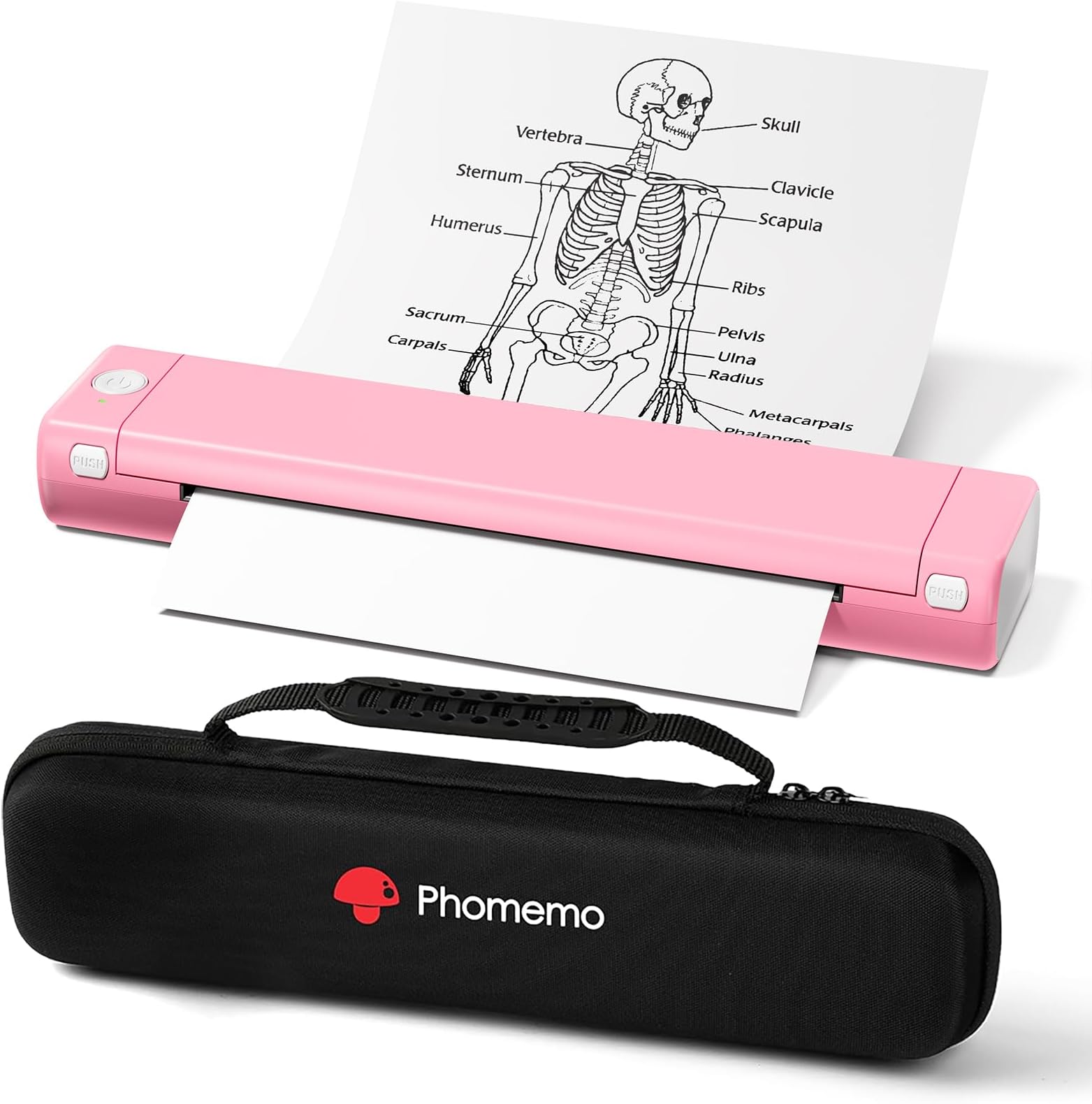
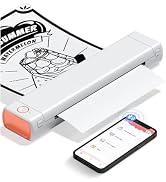
The Phomemo M08F is a lightweight, wireless thermal printer designed for professionals and students on the move. Compatible with iOS and Android via Bluetooth and USB for PC, it prints high-quality black-and-white documents and images on 8.5" x 11" thermal paper without ink. Its compact size, fast setup, and included carry case make it the ultimate travel-friendly printing solution.


| ASIN | B0CW5BWZKT |
| Additional Printer Functions | Print Only |
| Best Sellers Rank | #7,452 in Office Products ( See Top 100 in Office Products ) #12 in Portable Thermal Printers |
| Brand | Phomemo |
| Built-In Media | Paper |
| Color | Pink |
| Color Depth | 1 bpp |
| Color Pages per Minute | 3 |
| Compatible Devices | Smartphones, PC/Laptop |
| Connectivity Technology | Bluetooth |
| Control Method | Touch |
| Controller Type | Android, iOS |
| Customer Reviews | 4.3 out of 5 stars 3,449 Reviews |
| Duplex | Simplex |
| Hardware Interface | USB |
| Ink Color | black |
| Item Dimensions D x W x H | 10"D x 2"W x 3"H |
| Item Weight | 1.09 kg |
| Manufacturer | Phomemo |
| Maximum Copy Resolution Black and White | 200-300 dpi |
| Maximum Media Size | 8.5 x 11 inch |
| Maximum Print Resolution Black and White | 200-300 dpi |
| Maximum Sheet Capacity | 1 |
| Model Name | Phomemo M08F |
| Model Number | Phomemo M08F |
| Model Series | Phomemo |
| Number of Drivers | 1 |
| Number of Trays | 1 |
| Other Special Features of the Product | Compatible with mobile phone & PC, Gift for Christmas, No inkless, Portable |
| Output sheet capacity | 10 |
| Paper Size | 8.5x11 inches |
| Print media | Thermal Paper |
| Printer Connectivity Type | Bluetooth |
| Printer Output Type | Monochrome |
| Printer Type | Thermal |
| Printing Technology | Thermal |
| Processor Count | 1 |
| Resolution | 200-300 dpi |
| Scanner Type | Portable |
| Special Feature | Compatible with mobile phone & PC, Gift for Christmas, No inkless, Portable |
| Unit Count | 1 Count |
| Warranty Description | 1 Year manufacturer |
| Warranty Type | limited warranty |
S**N
Great buy
In a pinch, great printer. I DO NOT have to worry about ink which was awesome. Now I will say I love the compact size of putting this into my bag and it was good to go with me, very easy to set up and to use. I could use it with my personal computer, phone and tablet with ease. Need to do everything through their app, so FYI on that. I did return it because I wanted one that could also do the roll of paper and the individual paper and the other paper that comes in a stack. Great printer, just bought the wrong one, that’s on me. I have bought a different one from the same company that I should have gotten the first time around. This printer only does single sheets or the paper that is conjoined together. Great printer. And there is no ink so that makes it better. It is compatible with iPhone, android, tablet, iPad, computer for Mac and windows too. And it is very small which is great. It fit right into my backpack and went all over the country with me for a few weeks.
B**.
Perfect for On-the-Go Printing! Easy, Fast, & Wireless. Compact & Reliable, Great for School & Work!
I’ve been using this new portable thermal printer, and it has consistently exceeded my expectations. Setup was quick and simple—install the Phomemo app, power on the printer, connect via Bluetooth, and you’re ready to go. I was printing within minutes. The inkless thermal system is a huge advantage. No ink, no toner, no clogged cartridges—just clean, sharp prints every time. I’ve used it for PDFs, shipping labels, and school documents, and everything looks crisp on thermal paper. It’s also more versatile than I expected. I print from my phone for quick jobs, but I’ve also connected it to my laptop via USB for longer documents. The included carrying case makes it easy to take anywhere, and the compact, lightweight design feels sturdy without being bulky. Battery life has been excellent as well. The only thing to keep in mind is that it works exclusively with thermal paper, but that’s part of what makes it so low‑maintenance and cost‑effective. Overall, this is an outstanding little printer for students, professionals, travelers, or anyone who wants reliable printing without the hassle of traditional printers. I’m extremely happy with it—definitely a 5‑star purchase.
J**E
Affordable/Easy To Use/As Described
The printer works as it should. I needed something portable and easy to use. The printer came with everything needed, including a carry case. It is lightweight and does not take up much room. I would recommend.
L**A
Perfect printer for college studying.
I bought this for my niece for college. She doesn’t need to print tons, but it can be helpful to print out charts and lists for studying — particularly before an exam. I love that it’s small and has a case. She can put it in a drawer when it’s not in use. I really love that she doesn’t have to find replacement ink cartridges. As an added bonus, it’s pink! I was really thrilled to find a pink printer. My niece had it out of the box and printing before I could open the manual. :-) Very reasonable price, too.
R**X
Buy it only if you like being locked into a single vendor's app ecosystem with no exit strategy.
The hardware is fine. Compact, decent print quality on thermal paper, battery lasts long enough. The problem is everything around it. There is no standard printer driver. On a phone you are locked into the Phomemo app, which is very spammy, requires an account, requests excessive permissions, and phones home constantly. Spyware. On a PC you get a proprietary driver that only works over USB, not Bluetooth. There is no IPP, no CUPS integration, no way to print from arbitrary applications the way you can with any normal printer. You cannot select this device from a system print dialog on any platform. What is the point? The printer does not accept text. At all. It is raster-only, meaning every page must be pre-rendered as a full-width bitmap image (1680 pixels across for A4) and transmitted over Bluetooth Low Energy one row at a time. A single A4 page is roughly half a megabyte of image data pushed through a BLE connection. This is SLLLOOOOWWW... and there is no way around it without their app or writing your own BLE driver from scratch using reverse-engineered protocol documentation. YEAH, nope. There is no open protocol specification from Phomemo. Everything known about how to talk to this printer has been figured out by clever hardware hackers sniffing Bluetooth packets. The command set is a nonstandard dialect loosely related to ESC/POS but incompatible with any existing ESC/POS library or tool. Seriously. It's like they tried really hard to design a hostile product. What this means in practice: you are completely dependent on the horrific Phomemo spyware app for the life of this device. If they drop support for your phone OS version, change their backend, or shut down, you have a nice paperweight brick. There is no fallback. No generic thermal printer driver will work. No third-party app can print to it without reimplementing the entire proprietary protocol. If you need a portable thermal printer that works as a normal printer -- one you can print to from any app on any device -- THIS IS NOT IT. Buy it only if you are comfortable being permanentlylocked into a single vendor's app ecosystem with no exit strategy.
A**A
Fast, portable, and easy to use.
Disclaimer: The manufacturer compensated me for the cost of the printer, with the only expectation being that I provide direct feedback. Box comes with: 8.5 x 11" Thermal Printer, USB-C to USB-A adapter, USB-C to USB-A chord, 10pc of Sample Thermal Paper, Soft suede fabric cover, and instructions. The printer is compact and small right out of the box. I tested the connection using the Phomemo app, and it worked smoothly without any issues. However, the box included sample thermal paper that was creased, and I noticed that the thermal "ink" tends to smear around those creased areas. Other than that, the quality of the print is pretty good. I wouldn't create a whole painting on it due to the print only being semi-permanent. Over time the ink will fade due to UV, heat, or how it's been stored. Since my box did not come with a USB, I had to go to their website to install the driver. It did take me awhile to realize that it doesn't turn on automatically when plugged in. You do have to hold the power button to turn it on and it will connect via Computer. After it's connected, it will read that you have an available printer to use. Printing works well on the computer and had no issues whatsoever. The box only came with 10pc of sample paper and you would need to invest in purchasing thermal paper, which is about $0.12/p if you purchase one from Amazon. You can tell which side based on the material. The "Print" side feels more glossy and soft while the side facing up is more matte. If you rub the two sides together you can feel it. Overall, I feel like it is pretty useful if you are in a hurry and need to print something very quickly. I would say to not use it to store important information that needs to be printed. I would just a laser or inkjet. Just remember that thermal ink has a shelf life of about 3 years.
M**.
very high‑quality
Phomemo portable wireless printer is perfect for travel. It connects easily via Bluetooth and supports full‑size 8.5’’ x 11’’ printing. Compact, lightweight, and reliable for quick documents on the go and at home. The printer arrived well packaged and included a practical carrying bag, where you can safely store the paper and USB cable for transport. It also came with printing paper, a USB charger, and clear instructions, making setup quick and easy. The material feels very high‑quality and durable, so I’m confident it will last a long time. Plus, the app works smoothly on both iPhone and Mac laptops, which makes it even more convenient.
J**.
Great no-mess ultraportable thermal letter printer
Disclaimer: I was compensated for the cost of the printer by the manufacturer without any request other than to provide feedback directly to them on what would make this printer better which I also offer here. Phomemo M08F Letter Size Thermal Printer Straight-to-the-Point Overall Usability Great portable printer for the times when you absolutely must have a hard copy a non-intricately detailed document. Works well for text and line art in non-permanent things like tickets or event signage which I happen to print often enough. Since this printer uses thermal paper, I would not recommend it for long-term legal documents (Quick Guide states 7-10 year print viability if kept dry, at room temperature, and out of sunlight) but if you need a semi-permanent document, it completely fits the bill. You will likely want to purchase additional thermal paper to do any appreciable printing Likes • Compact • No ink - no mess • Easy to use hardware • Easy to use Android app • Easy to print on Windows with driver installation • Relatively quick for a non-industrial thermal printer • Great quality prints for the right use-cases • Great battery life Dislikes • Paper can get misaligned on insertion every now and again • Difficult to cancel or know if a print job has been cancelled • Noisy prints if on a resonant surface Things to consider • Prints can be expensive at 15¢ to 26¢ per page • Photos and very small text are not the intended use for the printer • Color graphics should be converted to grayscale before printing In the Box • Printer carefully supported in foam • Two Quick Start Guides (one more graphical and the other more text laden) • 2 ft. USB-A to USB-C for computer connectivity and charging • USB flash drive of computer drivers • Velvet carry bag • 5 sheets Phomemo thermal letter paper which are creased in thirds from being packed in the box and best to flatten a bit before use Build Quality As with all the Phomemo products I own, the quality is tops. There is no wasted space in the case and the entire printer feels sturdy if not a bit heavy (721g / ~1.6lbs). The hinge and hinge opening buttons, which allow for paper release or roller and thermal head cleaning, have a good feel without any play. The printer has two rubber feet which do a good job of preventing printer movement but they do little to address one of my few complaints about printing. Phomemo App (Android) I have used and generally like the Phomemo label printer Android Apps ‘Print Master’ and ‘Labelife’. The eponymously named ‘Phomemo’ App is no different. In app, it is easy to connect the printer with Bluetooth or the QR code on the printer’s top sticker, change settings (Auto Shutdown – I recommend setting to at least 30 mins.), and print all or individual pages from various sources of documents (browse the filesystem or Share to ‘Phomemo’ from an open document. There is even an available library of line art drawings over a range of categories for simple sign or coloring sheet printouts. The one thing that wasn’t entirely clear with the app was the best method for cancelling a multi-page print and what I found to work for me was powering off the printer and force stopping the app. Windows 10 Driver The ‘Phomemo’ App, Quick Start Guides, and the printer’s top sticker all make it easy to locate the drivers form Windows and MacOS. I only have Windows machines and had no issues finding, downloading, and installing the M08F driver. Printing was as simple as connecting the printer to the computer with the USB-A to USB-C cable and choosing the printer by name in any print dialog. Printing My test prints were done from a 100-sheet pack of Phomemo branded letter thermal paper that was on-sale for $20.99 (21¢ per sheet, a 200-sheet pack is available for $29.99 for 15¢ per sheet). Inserting paper and getting it to be properly aligned in the printer can be tricky if done too slowly. Make sure the thermal paper is oriented with the correct side up (‘This side should face up.’ is labeled on one side) and insert it as straight and swift as you can until it butts up against the roller bar inside. An improperly aligned sheet will print but the page can be skewed and the page edges torn ragged (only 2 of 20 printed sheets). If a sheet is inserted incorrectly, it is possible to open the printer and re-insert the sheet again. I printed using both Medium and Heavy darkness settings and observed a minimal difference in quality for most documents. If you have very small details or text (8pt or less) the Heavy darkness setting will make those parts more legible. Be warned that 6pt or smaller font can be spotty or illegible. All linear bar, Data Matrix ,and QR codes on tickets that I printed scanned with ease using my cellphone. The average time for a full sheet print was ~25 seconds. Battery Usage and Charging When unboxed, the printer had 97% charge. I printed 20 sheets, 18 at Heavy darkness, and that only took the charge to 84%. I cannot envision many scenarios that would have this printer use more than 25% charge. Charging back to 100% took about 30 minutes and, as stated in the text heavy Quick Start Guide, had to be done using the 5V 2A power which I had on my computer’s USB hub. Neither my Samsung Fast or Super Fast phone chargers nor my Anker 20W or 45W chargers would charge the printer. Recommendations to Phomemo to Improve the Printer • Adding pop-out or fold-out paper guides could ease proper paper alignment on insertion • Adding thicker or more dampening rubber cushions on the bottom of the printer could reduce the amount of resonant sound generated by the printer • Depending on the desired typical usage per charge, the battery size could be halved and still allow for 50+ pages per charge while likely taking the weight of the printer to less than a pound
Y**N
Excelente producto
a mi hija le encantó, la impresora es pequeña, fácil de transportar en la mochila, obviamente no ocupa tinta es térmica y se pone fácil el papel
T**C
Great little compact printer!
I was sick of my printer ink drying out due to lack of use. When I needed it I had to purchase more ink, but then let it sit for another stretch. Buying this wee thermal printer does the trick. Easy to use and set up on IPad and phone. Happy with purchase.
J**E
El producto cumple con su función , pero...
Es práctico y sencillo, te saca de problemas cuando necesitas imprimir un archivo de imprevisto. La imagen es clara y precisa. El problema es la aplicación que usa, aunque es sencilla de usar, hoy detectó un problema de archivo troyano tipo que puede causar problemas y robo de información. No se si se puede usar otro tipo de aplicación para esta impresora, se tuvo que desinstalar la aplicación hasta que no sepa y no sea seguro no puedo usar la por el momento.
S**N
Best of the best!
Best of the best! I bought 3 and use every day for my business. One stopped connecting after several months but the company sent me a new one for free! Love their support!
E**E
Easy to setup
"I am very impressed with the Phomemo M08F. The setup process was incredibly straightforward and I was able to start printing within minutes. It is very user-friendly, making it perfect for printing on the go. The printer arrived very quickly, and I was pleasantly surprised to find some sample thermal paper included in the box to get started right away. Additionally, the included carrying pouch is very practical and high-quality, providing great protection for travel. Highly recommended for anyone needing a reliable and portable A4 printing solution!"
Trustpilot
1 month ago
2 weeks ago