⚡ Transfer Like a Pro, Sync Like a Boss!
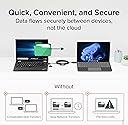
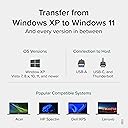
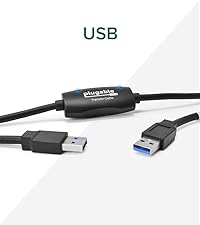
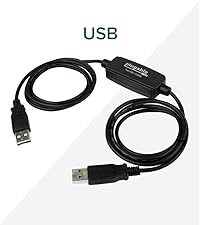
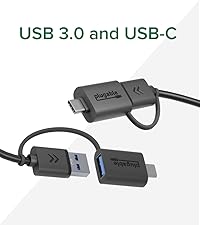
The Plugable USB Data Transfer Cable (6.6ft) offers ultra-fast 5Gbps file transfers between Windows PCs using a hybrid USB-C and USB 3.0 cable. It includes Bravura’s Easy Computer Sync software for secure, direct PC-to-PC data migration without cloud or external drives. Compatible with a wide range of Windows versions and USB standards, this cable ensures seamless, hassle-free data transfer for professionals upgrading or syncing multiple devices.


| ASIN | B0D79Q4PDL |
| Best Sellers Rank | #472 in USB Cables |
| Brand | Plugable |
| Brand Name | Plugable |
| Cable Type | USB |
| Color | Black |
| Compatible Devices | Windows, Windows XP, Vista, 7, 8.x, 10, 11 |
| Compatible Phone Models | Compatible with smartphones, specific models not listed |
| Connector Gender | Male-to-Male |
| Connector Type | Usb, Usb 3.0 |
| Customer Reviews | 4.3 out of 5 stars 7,721 Reviews |
| Data Transfer Rate | 5 Megabits Per Second |
| Global Trade Identification Number | 00819927013440 |
| Included Components | 1x 6ft (2m) USB 3.0 Transfer Cable, 1x USB-C Keychain Adapter, 1x 16 character alphanumeric Product Key, 1x Quick Start Guide |
| Indoor Outdoor Usage | Indoor |
| Item Height | 16 centimeters |
| Item Shape | Dot |
| Item Weight | 0.42 Pounds |
| Manufacturer | Plugable |
| Model | USBC-TRAN |
| Number of Items | 1 |
| Number of Pins | 9 |
| Other Special Features of the Product | Data Transfer |
| Recommended Uses For Product | Ideal for seamlessly transferring large amounts of files between older and newer Windows PCs without the need for cloud storage or external drives |
| Special Feature | Data Transfer |
| Specification Met | USB-IF |
| UPC | 819927013440 |
| Unit Count | 1.0 Count |
| Warranty Description | 2 Year Limited Parts and Labor |
S**L
Easy Peasy Transfer Cable - Get it!
Great product! Easy to use, super fast data transfer. No problems whatsoever.
B**.
Easy to use
This cable worked great! I am not tech savvy, but I had no problem at all following the easy directions. It took about 5 minutes to download the software, hook the 2 computers together, and hit run... It ran for about 45 minutes and the job was complete. The great thing is, I can use it again if I buy another computer. I hope in the future the software programs will transfer as well, but all pictures, songs, folders transferred quickly and easily.
A**R
Functional and fast
Fast transfer, easy to use
B**H
Time to use
Worked decent, but can use for only 30 days
D**H
Reliable Data Transfer Cable That Does Exactly What It Promises.
We recently purchased a new laptop and needed an easy way to transfer all of our files and data from the old one. After researching different transfer options, I decided on the Plugable Data Transfer Cable—and I’m so glad I did. I ordered it on Amazon and it arrived the very next morning. Installation was simple. I followed the easy instructions to download the software on both laptops, then connected them using the cable. The cable includes both USB-A and USB-C ends, which made it fully compatible with both devices—no adapters needed, so it fit perfect! Once connected, the software opened a clear, user-friendly window where I could select exactly which files, photos, and data I wanted to transfer. It even gave me the option to set up the new laptop just like my old one, which I selected. The entire process took about 20 minutes, and when it finished, my new laptop looked and functioned just like the old one—everything transferred perfectly. The cable itself feels sturdy, well-made, and high quality. Overall, this was an incredibly smooth, fast, and stress-free experience. I highly recommend the Plugable Data Transfer Cable to anyone needing a reliable and easy way to move data to a new computer.
C**A
HARD TO USE AND NOT RELIABLE
Difficult to get started with this product. Instead of including everything in the package - you have to go to a website and download the software to it, which is no intuitive. The link is buried in a product brochure page with various options. This is especially a problem if your "old' computer is having issues and takes a long time to boot up. I finally got the two computers connected and followed the installation (which has to be done on BOTH computers separately), and 2 minutes into this ordeal, the computers lost contact with each other. No cable were moved, nothing was touched. I found this very frustrating, seeing that I chose a product that would be connected by cable one to the other, not by wifi, so there wouldn't be any connections issues. Going back with rebooting both computers, reinstalling the software, the computers never again connected. Going to the "help" page of the product website is not helpful at all. I even tried using ChatGPT to talk me through possible fixes, and some of these included updating firmware and long lists of "fixes" to try. This product is just too time consuming, and especially maddening when you have the "old" computer having problems, which is why you got a new one in the first place. I'm past my date to return the product, so now I'm stuck with it. Ack.
L**Y
Functional Product, Slower Than Advertised, Saddled by Mediocre Software
Syncing between my desktop and laptop was always done via SyncBack Pro over a gigabit network. As file sizes grew, it became evident that the gigabit ethernet was the bottleneck. Set up was easy enough but despite the cable being identified by Windows 10, it still required the Bravura software, and ONLY the Bravura to operate. And this is where things go a bit sideways. I couldn't use Syncback Pro to synchronize between my laptop and desktop over the Plugable USB 3.0 cable because I was unable to create a network over the bridge cable The next problem, is that the Bravura software, is unable to SYNC hidden system folders, like the AppData folder wherein some application specific data resides. This becomes problematic if one is synchronizing data from applications that store information int his folder. Support recommends using manual drag-n-drop copy of files. Finally to cap things off, the theoretical bandwidth available to USB 3.0 is 5Gbps or roughly 640MBps theoretical maximum. Doing a benchmark test took 50GB of ISO images roughly 17 minutes to transfer. That's about 49MBps average. Copying the same files across the network goes faster than >100MBps. Copying between USB and internal SSD drives have >400MBps write speeds. Both systems are rather robustly spec'd, ie. Core i7's with 32GB of RAM and solid state drives. Referring this to support yielded responses saying "we can't comment on network speed" or "can't comment on other sync applications" *paraphrasing*. I'm quite disappointed with this purchase given the anticipated performance boost was nowhere to be seen. However, if you simply need a no-frills quick sync application with a USB3.0 connection, this will pretty much fulfill your needs. Pricepoint wise, it isn't half bad, and it is far less complicated to set up than syncing over a network. Support, however, was rather prompt in their responses and appear to be taking feedback rather well, adding one star just for that.
R**B
This cable did not work for me, but customer service sent me a compatible one
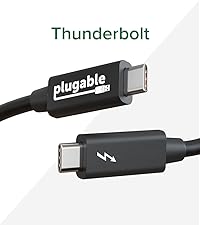
The cable I originally bought - TBT-TRAN - did not work with my old (circa 2019) laptop. Customer service advised me to download a new Thunderbolt driver, but it would not load. Hence, they shipped me a new cable, USBC-TRAN, which uses older more compatible technology and worked great. Software was easy to use to transfer old data (65 GB worth) to my new computer and was pretty fast (although I didn't time it). I'm giving 5 starts for the customer service, and for the USBC-TRAN
Trustpilot
2 months ago
1 week ago