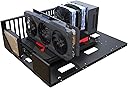
TGDGAMER Open Computer Case,Two-way Server E-ATX Motherboard Tray Test Stand, Test bench, E-ATX Mid Tower,Full Pc case,Atx case,matx case,itx case,Computer Motherboards Test Bench
Product ID: 599159077
Details
- BrandTGDGAMER
- Case typeFull Tower
- ColourBlack
- Motherboard compatabilityExtended ATX
- Recommended uses for productPC building
🎮Unlimited GPU length
💾2X SSD/HDD slots
❄️No CPU cooler height limit
Details
- BrandTGDGAMER
- Case typeFull Tower
- ColourBlack
Description
🖥️ Build Bold, Test Fast, Game Hard!
- COOLER FREEDOM - No CPU cooler height restrictions for optimal thermal performance.
- EFFORTLESS ASSEMBLY - Designed for quick setup with all parts included—get your rig running fast.
- MASSIVE STORAGE READY - Dual SSD and HDD slots to power your high-capacity builds.
- ULTIMATE COMPATIBILITY - Supports E-ATX, ATX, M-ATX, and ITX motherboards for total flexibility.
- UNRESTRICTED GRAPHICS POWER - No GPU length limit means you can install the latest, largest GPUs without compromise.
The TGDGAMER Open Computer Case is a versatile, open-frame test bench designed to support a wide range of motherboard sizes (E-ATX to ITX) and standard ATX power supplies. It features dual SSD/HDD slots, unlimited GPU length, and unrestricted CPU cooler height, making it ideal for professionals and enthusiasts who demand flexibility and easy access during PC assembly and testing.
Specifications
| ASIN | B0CPLWLXN3 |
| Antenna Location | PC building and testing |
| Brand | TGDGAMER |
| Case Type | Full Tower |
| Color | Black |
| Compatible Devices | Computer |
| Cooling Method | Air |
| Customer Reviews | 4.0 4.0 out of 5 stars (20) |
| Enclosure Material | Pc |
| Fan Size | 120 Millimeters |
| Hard Disk Form Factor | 3.5 Inches |
| Internal Bays Quantity | 4 |
| Manufacturer | TGDGAMER |
| Mfr Part Number | OPEN-E-ATX |
| Model Number | OPEN-E-ATX |
| Number of Items | 1 |
| Other Special Features of the Product | [POSSIBLE] Versatile Motherboard Support, Highly Adjustable Cooling System |
| Power Supply Mounting Type | Bottom Mount |
| Supported Motherboard | Extended ATX |
| Total USB 2.0 Ports | 4 |
| Total Usb Ports | 4 |
Common Questions
Yes, all products are sourced directly from authorized retailers in the US, UK, UAE and India. We maintain strict quality control processes and verify each product before shipping. All items come with applicable manufacturer warranties and are covered by our standard return policy.
Delivery times vary by destination country, typically ranging from 3-9 business days. Each order is fully trackable through our system. We handle all customs clearance and use reliable courier partners for last-mile delivery. You'll receive regular updates about your order status via email and our app.
Desertcart is an international e-commerce platform operating since 2014. We securely process thousands of orders globally each day. Every product goes through our quality verification process before delivery, and we provide end-to-end order tracking, 24/7 customer support, and a comprehensive returns policy to ensure a safe shopping experience.
Our prices include the product cost, international shipping, import duties, customs clearance, and local delivery charges. We handle all customs and import procedures, ensuring there are no hidden fees upon delivery. PRO members receive additional benefits including free shipping.
Trustpilot
TrustScore 4.5 | 7,300+ reviews
Shop Global, Save with Desertcart
Value for Money
Competitive prices on a vast range of products
Shop Globally
Serving millions of shoppers across more than 100 countries
Enhanced Protection
Trusted payment options loved by worldwide shoppers
Customer Assurance
Trusted payment options loved by worldwide shoppers.
Desertcart App
Shop on the go, anytime, anywhere.