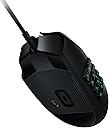
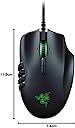
🔥 Dominate Every Click with Razer Precision 🎮
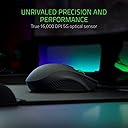
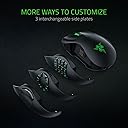
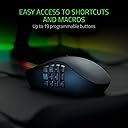
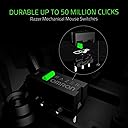
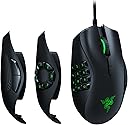
The Razer Naga Trinity is a wired gaming mouse engineered for MOBA and MMO enthusiasts, featuring a cutting-edge 16,000 DPI 5G optical sensor, three interchangeable side plates with up to 19 programmable buttons, and award-winning mechanical switches rated for 50 million clicks. Its ergonomic right-handed design and fully customizable RGB Chroma lighting make it the ultimate tool for precision, comfort, and style in competitive gaming.


| ASIN | B077KJKMYD |
| Antenna Location | Gaming |
| Are Batteries Included? | No |
| Are Batteries Required | No |
| Battery Average Life | 100 Hours |
| Best Sellers Rank | 480 in PC & Video Games ( See Top 100 in PC & Video Games ) 23 in PC Gaming Mice |
| Brand | Razer |
| Brand Name | Razer |
| Button Quantity | 19 |
| Colour | Black |
| Compatible Devices | Laptop, Personal Computer |
| Connectivity technology | USB |
| Customer Reviews | 4.4 out of 5 stars 10,343 Reviews |
| Embellishment Feature | RGB |
| Enclosure Material | Plastic |
| Global Trade Identification Number | 00814855026340, 08886419332374 |
| Hand Orientation | Right |
| Hardware Platform | PC |
| Included Components | 3 Plates, Razer Naga Trinity |
| Item Dimensions L x W | 11.9L x 7.4W centimetres |
| Item Weight | 4.23 Ounces |
| Manufacturer | Razer |
| Manufacturer Part Number | RZ01-02410100-R3M1 |
| Model Name | Naga Trinity |
| Model Number | RZ01-02410100-R3M1 |
| Mouse Maximum Sensitivity | 16000 Dots per Inch |
| Movement Detection | Optical |
| Movement detection technology | Optical |
| Network Connectivity Technology | USB |
| Number of Batteries | 2 AA batteries required. |
| Number of buttons | 19 |
| Operating System | Windows |
| Pattern | single |
| Power Source | Corded Electric |
| Product Features | Programmable Buttons |
| Product Warranty | 24 months warranty after purchase |
| Range | 1.2 |
| Special feature | Programmable Buttons |
| Style Name | Naga Trinity |
| Theme | Video Game |
| Unit Count | 1.0 count |
A**G
Amazing mouse, lets u go between targets in no time!
I wasn't 100% sure what i needed for my next gaming mouse, i had the Razer Abyssus before which still works perfectly fine being razer & having amazing build quality, however with no side buttons meant i had to use more of my keyboard to control the game, but without trying the different styles i didn't really know what to go for however with the Razer Naga Trinity u get the best of both worlds & its super easy to swap between the 2, 7 & 12 button configurations, all 3 pull off & snap back on with strong magnets, so far for me i'm liking the 2 & 7 configs but i'm sure if i was to play more MMO's then the 12 button would be perfect for that. Sensitivity wise is next level, which for me will take some getting used to on the highest setting of 16,000 to put into prospective if i go all the way to the left side of my 27" monitor on the lowest settings @800dpi it takes around 13cm of mouse movement to go from far left to far right, on the flipside @16,000dpi it takes only 1cm of movement so u can go from target to target way faster giving you the advantage in the game over your opponents. The dpi is also really easy to change on the fly with up & down buttons on the mouse itself just under the scroll wheel, it has dpi speeds of 800,1800, 4500, 9000, 16,000 so there's a speed to suit all players & games. Having a Razer keyboard too u can adjust the lighting to match the keyboard lighting effects or just use the software to match the mouse to your pc. Being Razer i'm sure the Naga Trinity is going to last me many years like all my other razer products & i feel it was a really good upgrade from my last Razer mouse so i would 100% recommend to others
J**.
worth. every. penny.
performance, ergonomics, and the convenience of 3 sets of side buttons for the mouse made this a winner for me. after using a cheap and nasty mouse for almost 2 years the Razer Naga Trinity was so refreshing to use, straight off the bat the FIT was as if it had been made for my hand (obviously not...but you get the picture) the small contours allow your hand and fingers to rest on the mouse more naturally and help your wrist sit more comfortably and flat as your hand sits behind rather than over it, allowing greater range of movement for longer as it staves off wrist pains or cramps. the side panels detach via small magnets....MAGNETS. no clips or buttons or anything, which means no snapping or breakages. the panels consist of a range of different buttons in circular or panel configurations allowing the mouse to become (for gaming purposes at the least) the main control point for MOBA or shooter etc rather than the keyboard being the larger role, shortening reaction time and making moves or actions easier to map and perform as the only thing moving is YOUR THUMB, saved me so many times and helps get your game up that little bit was just out of reach before. the CHROMA with Razer Synapse is just the icing on the cake for me. truly mind blown and annoyed I took this long to convince myself to buy. if you're thinking of getting this...just get it. seriously. I could go on, but I wont.
J**N
Superb gaming mouse!
yes the mouse is a little bit expensive but once you use it you'll realise why. As a PC gamer i wanted a mouse that was capable of responding fast but also had programmable buttons to make certain games easier. I originally looked at cheaper gaming mouses and wasn't sure if going cheap was the way to go. In the end I went for a more expensive mouse and i'm really glad i did. Here are my reasons why. Mouse is larger than expected.- I have large hands and these days a lot of computer mice and gaming mice are getting smaller the help with weight, this mouse however was larger than i expected and a pleasant surprise. It also has an ergonomic to it which helps with my RSI. Its also worth noting that although its bigger than expected the mouse is still rather light weight. customisation- The level of customisation on this mouse is insane, not only do you get three different side pieces to use but the buttons themselves can be programmed to do some pretty impressive things from simply binding them the a Key, all the way up to using and opening programs. the RGB feature is also widely customisable and makes your set up look cool haha. DPI and Reaction time- For those who play faced paced games you'll know that input lag from the mouse can be a huge factor and from button lag too. The lag on this mouse is as far as i can tell minuscule. You are also able to customise the speed of the buttons and the DPI down the smallest digit. Overall- On the whole this mouse does not disappoint. It does its job and more. I would recommend for any serious gamer and even programmers. You pay the price you get the quality.
R**R
Very good, minor drawback with dial type attachment
Overall, I love this mouse. Its a bit small for my hands. But, still feels nice because of how my fingers rest on it. It looks good, the software Has got a lot better now and it's nowhere near as heavy as it was. Which is always a plus. The main drawback lies on the attachment and the magnetic mechanism used. Randomly I noticed that the side buttons will just stop working and thought it was software. So, changed stuff on my OS and on the app, reinstalled it too and still didn't fix it. Then, I noticed that it just wasn't picking up the attachment sometimes. Now I know the connection used for the side button attachment is a bit weak? I don't class myself as being heavy handed and can't even feel it slide off. But, it does sometimes and it gets really frustrating whilst playing a game and you have to push it up or down to get it work. I even have to open the software sometimes just to check. This doesn't happen that often though and is an easy fix.
A**S
As someone with Motor Problems in my hands this Mouse is incredible
I suffer With dyspraxia Which effect the Monitor control in my hand, so When doing certain types of gaming and action on the keyboard it can be a real trouble to be able to hit certain keys and buttons, so when i was looking for a new mouse to fit my needs i came across the Naga Trinity, Now I was Super interested in the MMO side of the mouse, because moving and being able to hit 1-9 on a keyboard for MMO combat, has always been a massive trouble for me, So i bit the bullet for the Naga Trinity mouse, and i have never looked back, The ability to quickly and easily hit button using my thumb is a god send, i am able to quickly and effectively engage with my activities with no Pain or problems, it Increase my enjoyment and just make my time on my Pc a whole much easier, with the Slip on and off sides for quick and easy change allows me to switch to switch to the playstyle of the game within seconds with no problems are all, So if you struggle with motor control, or just want to be able to speed up your gaming, with quick access buttons, Honestly Look no further,
N**N
Get what you pay for
I've had a few gaming mice over the years and you do get what you pay for. The build on this mouse is excellent as you would expect from Razer. The software (Razer Synapse) is easy to use and functional and overall I have been very impressed. My only gripes so far as that it is not as ergonomic as I would have hoped; however, I do have very large hands, so it is just a case of getting used to it and remembering that one size does not fit all. The other point is that it is hypersensitive when set on a hight DPI as you can imagine. There are two buttons on the top of the mouse that control the DPI change function and it is easy to hit these, and suddenly the mouse becomes ridiculously sensitive. The DPI levels can be changed in the Razer software and I would recommend lowering these to make it easy to use. Would I pay full price for this mouse? After owning and using, no I wouldn't, I don't think it is worth the over £100 pricetag, however, I purchased in the sale at £49.99 and for that it is an absolute bargain. The only downside, is Razer is like Apple, once you buy in, you will want all the other bits of matching fancy kit, so I now own a headset, mousemat, keyboard and I'm looking at other peripherals, so I've ended up spending a fortune overall
K**O
Very good mouse
Liked the different keypads my normal use one is the plain 2 button one and is superb. Very accurate especially with the up down accuracy button next to the scroll wheel. So for CAD software is very good. Circular buttons great for some games. The area for thumb could be a little further forward for my big hands. The 12 button pad is good for other games. Imo the buttons could have a stronger spring on them as I have a tendency to click one or two wrongly. Other than that a super mouse with enough flexible braided wire to get back easily to the under the desk tower. A sideways push either way on the scroll wheel allows you to set up a sideways scroll. Useful for wider documents than you have screen. not a drawback for me as I already have razer items but you do have to use the razer software to make a lot more things happen on the mouse, macros, colours etc.
J**R
STAY AWAY IF YOU VALUE YOUR SANITY
Wow.. This product (razer naga trinity) is terrible! But not just normal terrible, it's really really bad. First of all, you have to use Synapse 3 for it to work.. Which has got to be one of the worst pieces of software written, it's buggy, it's not intuitive, it's mostly useless. I created multiple profiles for varying games (as you can't port them across from synapse 2) and when switching games, the software is supposed to detect the game and switch profiles... Does it?.. Nope!!! Synapse 3 decides itself which profile it wants as the default, (regardless of whether you've picked a profile to be the default profile) and sticks with it. If you want to change profiles, it throws a small fit, hangs for ages and maybe then allows you to change the profile, if it decides it's going to crash on you though, you have to restart synapse, (fantastic if you're in the middle of a game because it hasn't changed when it should do) if you restart synapse, don't expect it to always automatically detect that you have a naga-trinity (or any other device for that matter) sometimes you'll have to unplug and plug your device in again multiple times before synapse will recognise it (again, great if you're in the middle of a game of Dota or overwatch etc...) then when it does recognise it, don't expect it to let you switch profiles unless you quit your game and restart it. I honestly can't believe how bad this software is, it's abysmal!! STAY AWAY, DO NOT BUY IF YOU VALUE YOUR SANITY Then there's the mouse ergonomics, it's smoothly slippery in your hand and the buttons on the side press very very easily, meaning you can't easily stabalise the mouse in your hand without accidently pressing the buttons on the side.. (12 button pad) Would I buy this mouse again?.. No!!!!....!!! Would I recommend it? NO WAY! EDIT(11/01/2020): ok, so thought I’d update this review after using the mouse for a bit and having paid so much for it, and having had various software updates, essentially I still dislike Synapse 3, you can’t use the mouse without it, though the useablity of the software has improved. One of my main bug-bears is that whenever you change programs, although it does now change automatically if you set it up, it also splashes at least one (or two of you’ve got a lighting profile and a button profile) massive profile indicators up in the bottom corner of the screen which is annoying as hell if you’re switching apps as it takes up screen space right where the windows system tray is, and you can’t stop them from coming up like you could with synapse 2. Other than that, I’ve managed to get it working as expected, pretty sure they’ve lost a customer here though! Edit: got gifted a wireless V2 Pro - newsflash, it freezes often mid-game, it’s going in the bin.
E**S
Un ratón versátil con espacio para mejorar 🖱️💡
He podido experimentar de primera mano la versatilidad y potencia que este ratón gaming ofrece. Aquí está mi análisis detallado tras un uso intensivo en diversos géneros de videojuegos. 🔹DISEÑO Y CONSTRUCCIÓN🔹 👍 LO QUE MÁS ME HA GUSTADO: + Placas Laterales Intercambiables ➤ La capacidad de cambiar entre 3 placas laterales diferentes es una característica destacada, permitiéndome adaptar el ratón a cualquier juego, ya sea MMO, MOBA o FPS. 👎 LO QUE MENOS ME HA GUSTADO: - Sensación de Calidad ➤ A pesar de su funcionalidad, el material y la construcción dan una sensación algo barata, especialmente en comparación con otros ratones de precio similar. 🔹FUNCIONALIDAD Y USO DIARIO🔹 👍 LO QUE MÁS ME HA GUSTADO: + Sensor Óptico de 5G ➤ El sensor de 16 000 PPP ofrece una precisión excepcional en juegos, capturando cada movimiento con detalle y sin retrasos. + Botones Programables ➤ Hasta 19 botones programables brindan una gran flexibilidad para asignar macros y funciones, lo cual es invaluable en juegos complejos. 👎 LO QUE MENOS ME HA GUSTADO: - Rueda de Desplazamiento ➤ Varios usuarios han reportado problemas con la rueda de desplazamiento, desde rigidez hasta fallos completos, lo que pone en duda su durabilidad a largo plazo. 🔹ERGONOMÍA🔹 👍 LO QUE MÁS ME HA GUSTADO: + Ergonomía General ➤ A pesar de algunos comentarios sobre su tamaño, encuentro que el ratón es cómodo de usar incluso durante sesiones prolongadas. 👎 LO QUE MENOS ME HA GUSTADO: - Tamaño para Grandes Manos ➤ Usuarios con manos grandes pueden encontrar el ratón algo pequeño, lo que podría llevar a incomodidad o fatiga. 🔹SOFTWARE Y PERSONALIZACIÓN🔹 👍 LO QUE MÁS ME HA GUSTADO: + Personalización Extensiva ➤ El software de Razer permite ajustar los PPP, la iluminación y programar botones con facilidad, lo que añade un gran valor al ratón. 🔹CONCLUSIÓN🔹 El Razer Naga Trinity se destaca por su versatilidad y la gran cantidad de botones programables, siendo una herramienta poderosa para gamers serios. Sin embargo, la calidad de construcción y los problemas reportados con la rueda de desplazamiento son aspectos que requieren atención. Recomiendo este ratón a aquellos dispuestos a invertir en un dispositivo altamente personalizable, pero sugiero considerar las alternativas si la durabilidad es una prioridad clave.
O**S
naga trinity
Souris polyvalente assez solide qui as résisté pour la précédente a 3 ans de mmo acharné. Le réglage de la sensibilité et les faces amovibles sont un gros avantage. j'aime avoir une souris ayant du poids et la trinity donne de bonne sensations ainsi qu'une bonne prise en main. Elle peu sembler un peu chère, mais son confort d'utilisation vaut l'investissement.
L**S
Elle es parfaite
Je cherchais une souris « MMO » dans le but d’optimiser mon heal puis je suis tombée sur celle là qui a la génialissime option de pouvoir changer les bonton ainsi de passer d’une souris 5bouton+2dpi a 9 ou 15bouton sans a devoir changer de souris et c’est très pratique si vous changer de jeux qui a besoins de 2bouton ou plus La souris et confortable les plaque tienne bien C’est aussi ma 1er souris razer et c’est vrai que j’ai pas compris pourquoi quand je bouger la souris le pc ramer , normal synapse régle de base le rafraîchissement des mouvements de la souris a 1000/sec minimum réglable 125 Le dpi et réglable exactement comme vous le voulez genre 800/1600/2200/2600/3200 ou 500/5000/10000/15000 Ou encore 1500/3000, libre à vous de choisir combien de dpi et en combien de reglage entre 1et 5 On peut régler la lumière aussi en faire des profils et les sauvegarder Enfin moi elle me convient parfaitement
A**O
Bir healerın aradığı herşey :)
Öncelikle nasıl yaptılar bilmiyorum ama 1 gün de kargoyu Mersin'e ulaştıran Amazon'a tşk borç bilirim :) başka bir online alışverişimin 1 ay kargo takılması akabinde iyi hissettirdi sürpriz oldu ürüne gelirsek zaten bildiğim üründü Paladin ile raid heal atan bilir ekstra tuşun artılarını ,7 li tuş takımı favorim oldu, Druid ile daha bi kolay oldu HoT ları kullanmak. Eksi olarak roll tusu takılıyor hissiyatı veriyor belkıde takılıyor :) ben pek kullanmıyorum
C**R
Super Maus für Spiel und Arbeit
Ich benutzte die Maus, um MMORPGs zu spielen, deshalb habe ich mir die geholt. Die 12 Knöpfe sind Gold wert, aber man kann nur Tastaturtasten auf die Maustasten "mappen" - das bedeutet, man hat keine gesonderten Tasten für das Spiel sondern muss z.b. die NUM Tasten benutzen. Das muss man aber nur 1x einstellen, und dann klappt alles wunderbar. Die Tasten sind grandios, ich habe keine Probleme mit einer heruntergedrückten Maustaste 1 oder 2 während ich erneut klicken will. Das Feedback ist 1 A. Das Highlight ist das Scrollrad. Ich hatte in keiner Maus so ein Hammer Scrollrad. Das Einrasten des Rades ist klar, es gibt keine "Zeilenübersprünge" oder ähnliches. Also da macht sogar das Arbeiten freude. Zusammenfassung: Pro: + 12 Tasten und austauschbare Seitentasten funktionieren gut + Klick von Maustaste 1, 2, Daumen Vor- und Zurückbuttons sind gut, tolles Feedback + Mausrad ist exzellent, tolles Feedback, präzises einzelzeilenscrollen ist genauso möglich wie auf einmal 5 Zeilen. Contra: - Die Seite, wo man den kleinen Finger ablegt ist "ergonomisch" geformt mit einer Einkerbung, was mich manchmal stört. - Die Razer Software hatte Sicherheitslücken und es wurde zwischenzeitlich ein Update zurückgezogen, aber ich denke das ist inzwischen gelöst. - 12-Tasten und MOBA-Tasten Seitenteil kann nur mit Tastaturtasten gemappt werden, also man verliert beim Spielen effektiv Tastaturbelegungsmöglichkeiten Fazit: Trotz der kleinen Contras der Maus würde ich sie nie wieder hergeben. Ich hatte vor dieser Maus eine Logitech MX 518 und bei der ging nach zig Jahren die Maustaste 2 kaputt. Die Razer Naga Trinity ist die beste Maus, die ich jemals besessen habe, übertrifft in der Haptik die MX518 und ist auch noch individuell und schnell modifizierbar (ca. 5 Sekunden, bis man von 12-Tasten Seiteneinlage auf die 2-Tasten vor-und-zurück Seiteneinlage gewechselt hat). Besonders möchte ich noch einmal hervorheben, wie geil das Scrollrad ist. Danke Razer, ihr habt ein Top Produkt gebaut, wofür jeder Euro wert war, den ich bezahlt habe. Ich bin unfassbar glücklich mit dieser Maus.
Trustpilot
2 months ago
3 weeks ago