Desertcart purchases this item on your behalf and handles shipping, customs, and support to Peru.
๐ Elevate your calculations, own the classroom and boardroom!
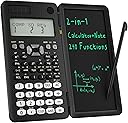
The ROATEE 82MS Scientific Calculator is a sleek, durable tool designed for middle and high school students, featuring 240 functions, a dual-line display for simultaneous calculations, and an innovative integrated notepad with stylus. Powered by both solar energy and a replaceable coin battery, its foldable, anti-drop design ensures portability and longevity, making it the ultimate companion for academic and professional success.


| ASIN | B0C33BZDQS |
| Best Sellers Rank | #1,506 in Office Products ( See Top 100 in Office Products ) #12 in Scientific Calculators |
| Brand | ROATEE |
| Calculator Type | Engineering/Scientific |
| Color | Jet Black |
| Customer Reviews | 4.4 out of 5 stars 3,475 Reviews |
| Display Type | LCD |
| Enclosure Material | Plastic |
| Item Dimensions L x W | 6.31"L x 3.3"W |
| Manufacturer | ROATEE |
| Mfr Part Number | AB0607 |
| Model Name | AB0607-U-5D-1002 |
| Model Number | AB0607 |
| Number of Batteries | 1 C batteries required. (included) |
| Number of Items | 1 |
| Number of Packs | 1 |
| Power Source | Battery Powered |
| Screen Size | 3 |
| Unit Count | 1 Count |
A**L
Perfect Calculator for Middle School โ My Daughter Loves It
purchased this scientific calculator for my daughter, who is in eighth grade, and it has been such a great buy! She absolutely loves it and uses it daily for her math classes. The layout is clear and easy to understand, with all the functions she needs for algebra and beyond. Itโs not overly complicated, but still advanced enough to handle the more complex problems sheโs starting to learn. She says the buttons respond smoothly and the display is easy to read, even when working through long equations. It feels sturdy and well-made, so I know it will last her through middle school and into high school. I also appreciate that itโs lightweight and portable, so she can keep it in her backpack without it taking up much space. Overall, itโs a reliable, user-friendly tool that makes her feel confident in her work. Five out of fiveโdefinitely worth it for any student!
J**S
Amazing for the price point
I picked up the 991ES Scientific Calculator with the attached drawing notepad for my college engineering classes, and itโs honestly one of the best study tools Iโve ever owned. The calculator itself performs just like any high-end Casio โ fast, accurate, and easy to use. Very good for the price and It handles complex equations, trig functions, and conversions with zero lag, and the display is super clear with a natural textbook format that makes it easy to follow along with formulas. What really makes this setup shine is the notepad thatโs built into it. I didnโt realize how useful it would be until I started using it every day. The magnetic stylus feels smooth, and being able to jot down quick notes, steps, or rough sketches right next to the calculator saves a ton of time. I use it constantly for solving statics problems and quick trigonometry sketches without flipping through my notebook. The build quality is solid, too. The buttons have that perfect clicky feel, the cover slides smoothly, and the notepad erases completely clean every time. Itโs lightweight but feels sturdy enough to toss in my backpack without worrying about it. If youโre a student in math, physics, or engineering, this combo is worth it. Having both a professional-grade calculator and a small reusable notepad in one compact setup makes studying and problem-solving so much easier. I honestly wish I had bought it sooner โ itโs one of those tools that just makes schoolwork smoother and more enjoyable.
M**Z
Great
Works awesome. My son loved it .
B**N
Clone of the Casio 991EX ClassWiz, but with some interesting and cool tweaks
First off, this is NOT a review by a "paid" reviewer, or in exchange for a free product I received. I see quite a few reviews in exchange for a free calculator in this listing, so I suspect the company is new and trying to get the word out about their product. This calculator caught my eye because it appeared to be an more feature-rich version of several recent competitor models that have the write/erase slate (the "e-writer") feature. Disclosure: I'm a die-hard Hewlett-Packard calculator collector, so my preference is always for RPN-based calculators, but I do think highly of the Casio 991ES/EX models, and so I decided to take a chance and check out this one. It's possible this is a legitimate re-badged or Casio-licensed version of the 991ES Plus, sold by ROATEE, but I'm unaware of whether it is or is not, so I can't speak to that here. The calculator arrived in a very nice, sturdy box, reminding me of the kind of quality you get from an Apple product. White cardboard, form-fitted, and well protective. Opening it revealed the calculator and a beefy 72 page manual in very good English (I believe this might be taken verbatim from another manufacturer). This was not your typical single page manual like in most inexpensive calculators. The calculator itself appears to be well made and surprisingly thick and solid. I have a couple of other write/erase slate calculators which are significantly thinner, so it's interesting that this one is much thicker (probably about 15cm closed). It is held closed by a magnet, so the slate doesn't flop around like with others. The slate does not flip around the back, so it lays like a book on your desk. The calculator side contains the stylus in the lower right corner, firmly inserted. The top edge includes the battery compartment and the lock/unlock switch for the slate (more about this in a second). I'm surprised at the reviews who say they couldn't find the stylus or lock switch, because both are pretty obvious, and well called out in the first few pages of the manual. An imprinted legend on the back shows the position for the lock and unlock switch. The slate itself is pretty standard. I think the green "ink" could be a bit brighter, but it's very clear in bright light (classroom), and readable in low light, but a bit harder. The "clear" button is mounted on the calculator side as a round button at the top, above the screen. If the slate is unlocked, then pressing that button instantly clears the slate. If locked, then pressing the button does nothing. This is one of the better reasons to get this calculator; most competitors do not have the lock/unlock feature, and it's far too easy to wipe the slate by accident. This will not happen with this model, and it's really a must-have for this category of device. The electrical connection from panel to panel for erasing the screen is via a small copper flex ribbon cable near the upper hinge. It's possible that over time this ribbon cable could wear out and break, but it's super small, doesn't poke out, and it will likely be fine for life of the calculator. The calculator itself is VERY similar to the 991EX ClassWiz calculator, and functionally IDENTICAL to the 991ES Plus model, in terms of button and function placement. For example, on this version the RCL button is the default (face value), while STO is the shifted function, which is the same as the ES Plus model, whereas the EX model has them swapped. Comparing to the ES model, every button is in the same spot. Compared with the EX model, most are in the same spot, although the top row is a bit different. If you are familiar with the layout of either of the 991ES/EX family, you probably won't even notice a difference. Capabilities notably missing from this model, which are in the EX model, are the spreadsheet feature, the graphic "menu" in the mode screen, the super handy "QR" code feature in the Casio [really one of the best and most powerful Casio features!], more screen lines, more memory, and some additional helpful screens and more functions. 99% of the population, including Casio users, won't notice the missing EX features. I did not have the two-left-parenthesis problem with the keyboard that one user mentioned. The keys themselves are pretty typical for this type of product, and work well, with a sculpted edge to the shape of the keys. No missed or double presses, no super wiggly keys, etc. It's not an HP keyboard, but it's decent enough. :) The surface of the calculator is very similar to the EX model, with the textured matte black surface. The key legend colors are okay, but not super bright (the Casio colors are marginally better). Personally, I think the calculator looks very nice and professional, and has a good feel to it. It's lightyears better than the ES family, which has a semi-glossy black surface and picks up fingerprints like crazy. I'm a bit puzzled why it's so thick, given that virtually every similar model is thinner, but honestly, I think I like a bit of heft to it. It feels substantial and robust in the hand. Maybe it's just because of the stylus storage. My biggest complaint on this model is that the manual refers many features to the "Appendix", which is apparently a separate document that was not included. I'm not sure if that was intentional or accidental, but it is a bit frustrating, because some essential information is in there. For example, if you want to use the Conversion feature, you must know which conversion equation you want, by number [1-40]. These are listed in the Appendix document, and NOT in the manual. You CAN look them up online, or refer to a Casio manual, but it's not convenient. Same for the Constants, but at least they are listed by name (not number) in the supplied manual. In the grand scheme of things, this isn't a deal killer, and anyone reading this and thinking about getting it shouldn't be deterred by the lack of the Appendix. Note: the Casio ES Plus lists them on the attached hard cover, while the EX model has a set of menus grouped by function names. On the ROATEE, you're going to have to write down the numbers for each factor somewhere or keep a legend if you use those frequently. Basically, this is a clone of the Casio ES Plus model, and shares a majority of the EX functions. I can live without the Spreadsheet feature, which is honestly clumsy in a calculator form factor, of the EX, but I will always miss the QR code feature. Alas, you can't have everything, and I suspect that feature is copyrighted/trademarked by Casio, which would explain why it's not included. The rest of the differences from the EX are fine as far as I'm concerned, so other than these two small omissions, and the missing Appendix, there is no reason to pass on this calculator. It's excellent for any non-graphical needs, from middle through high school. Price-wise, it's more than the original, but then again you get a cool slate for taking notes and writing down intermediate answers, while still having access to all the same functions you need and like from the original. Overall, I give this a thumbs up, and hope to see more from this company. Especially if they ever would consider producing an RPN edition for all of us math nuts who love RPN. :) Well done, ROATEE!
G**S
My kid loved it
Greatest
R**P
991EX 552 CACULATOR
The product was exactly as advertised and exceptional to every detail I'm very pleased with my purchase and I highly recommend this item. 5 star Bravo!!!
A**R
Calculator
Excellent great quality met my expectations love the color options
B**T
Good calculator but not right for me
Overall it's not a bad machine. It does what it's supposed to. Calculations are good with reliable results. Some of the keys aren't where I would prefer them to be. For example, I would have made OFF a shifted function of ON instead of pairing it with AC. I also would have put INS and DEL closer to the 4-way scroll buttons to make it easier to edit. Yes, those are minor but they are somewhat irritating. More importantly is the memo pad display isn't nearly as bright as shown in the picture. It's very dim under normal lighting. While it can be handy, I found myself looking for scrap paper to do intermediate calculations rather than using the green memo pad. And speaking of dim, the display wasn't as clear as other calculators in normal room light. I tinkered with the contrast but it never got crisp enough to be useful. The biggest thing I disliked was that the thickness of the calculator body and the memo pad were not the same. This made it uncomfortable to use it on a flat desk top. Had the two halves been equal thickness or if the hinge mechanism had been designed to accommodate the difference, I probably would have used it more. In the end, I gave it away. Overall rating: 4 out of 5. It works well as a calculator but there are some deficiencies in the overall design.
H**N
Pad with stylus.
Goodone.
A**R
great calculator
Great scientific calculator - i have used it at Uni for my math module, great functions and the wriing note pad on the side is a great addition. no issues at all the screen is bright and you can clearly see eberything no matter at what time of day you use it.
J**O
De acordo com o anunciado
De acordo com o anunciado.
J**E
Costo beneficio
Buena calidad, la he estado usando a diario y la llego en la mochila, no tengo mayor problema, al ser de plastico duro protege bien el equipo y no se daรฑa por un manejo normal.
S**T
Nice, cheap and functional
Very happy with this calculator!
Trustpilot
1 month ago
2 months ago