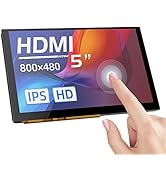
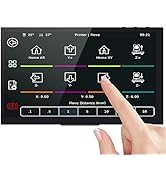
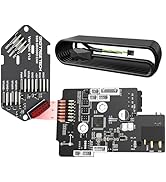
🚀 Elevate your 3D printing & DIY setups with BIGTREETECH’s sleek, smart touchscreen!
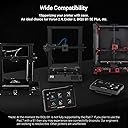
The BIGTREETECH PAD 7 is a 5-inch IPS capacitive touchscreen featuring an 800x480 HD resolution and 160° viewing angle. It supports 5-point touch input and offers versatile connectivity via HDMI and Type-C cables, compatible with Raspberry Pi, Sovol-SV08, PCs, and most FDM 3D printers. The device includes adjustable brightness and display orientation controls, plus a built-in audio decoding circuit with a 3.5mm headphone jack, making it a compact, multifunctional display solution for tech-savvy professionals and makers.


| ASIN | B0C8JCDV8Y |
| Best Sellers Rank | #439,013 in Industrial & Scientific ( See Top 100 in Industrial & Scientific ) #6,924 in 3D Printer Accessories |
| Brand | BIGTREETECH |
| Brand Name | BIGTREETECH |
| Color | Black |
| Customer Reviews | 3.9 out of 5 stars 41 Reviews |
| Display Type | LCD |
| Included Components | BIGTREETECH PAD 7 Klipper Touch Screen |
| Item Weight | 0.8 kg |
| Manufacturer | BIGTREETECH |
| Material | PCB |
| Material Type | PCB |
| Model | PAD 7 |
| Number of Items | 1 |
| Operating Temperature | 25 °C |
| Part Number | KINGPRINT-1040000041 |
| Warranty Description | 1 |
S**.
Dead out of the box, returned BUT reordered great device
1 compulsory star given because mine didn't even power on so I can't fairly give a review either way Checked multiple outlets, the power supply was in good working order. Swapped out the TF card with new formatted card and still would not power on. So I returned it and will be purchasing another hoping this doesn't occur a second time FOLLOW UP EDIT: I did end up ordering another one and the second Pad 7 works perfectly. Configured and working just fine. Very happy
D**H
Good Klipper Screen - after tuning it.
I have both the BTT Pad 7 and the Creality Sonic Pad, so I will be comparing them against each other. I have also set up a working Klipper instance on a Raspberry Pi. The Pad 7 is as much stock Klipper as you can get. BTT hasn't messed with anything here. The Pad itself is running stock Klipperscreen, and SSH is turned on by default. It runs Mainsail from the factory, but I installed Fluidd along side Mainsail at port 81. Setting up the firmware for your printer is pretty much like setting it up from a Raspberry Pi. I use the KIAUH script to build and install the MCU firmware. Using the screen is pretty easy, and it's pretty intuitive. I plugged in a Logitech C270 webcam for print monitoring, and after setting it up on the screen, it works as it should, although the webcam stream does not show up on the Pad 7 screen. You can only live view the webcam from a browser in Mainsail (or Fluidd). I only get about 15 FPS from the webcam on Mainsail, but I don't know it that's a camera problem, or the screen. WiFi is atrocious. I couldn't keep it connected to either 2.4 Ghz or 5 Ghz. Luckily it has a ethernet port, and following my rule that only portable devices connect to WiFi, and permanent devices are wired, this didn't impact me too much. I came with an actual Sandisk 32GB Micro SD card, which was a pleasant surprise. Pros: - Once set up, it seems to be rock solid. - Screen is clear and responsive. I notice no lag. - Just like using Klipper on a RPi, but you get a screen, too - BTT hasn't done any shenanigans with the Klipper install. It's seems to be wide open. In fact, it looks to be running Debian - There are example printer.cfg files on the SD card for a variety of printers. - Can replace the CB1 with an actual Adafriut CM4. - Includes an accelerometer for resonance tuning. Cons: - Setting up your printer is just like stock Klipper. You need to know your exact MCU processor to compile. If you - If your printer doesn't have a config file on the SD card, you need to manually confirm your printer's kinematics, thermals, and everything. - No live camera stream on the Pad 7 screen (not stock anyway, there might be a way to set this up) - Accelerometer cable is too short for big printers. - Basic features are missing from the screen's interface, like PID autotune. Compared to the Creality Sonic pad, it holds it's own. The Sonic pad is easier to set up (if you have a late model Creality printer), and the screen interface has more features. The BTT Pad 7 is more open than the Sonic Pad (Creality isn't running Klipperscreen for the Sonic Pad's UI. I have no idea how to modify it. I suspect it's running some weird firmware). Overall, If a person was looking at these, anything other than a stock late model Creality printer, I would get the BigTreeTech Pad 7. I use the Sonic Pad on my stock Ender 3 S1 Pro, and it works great. I have the BTT Pad 7 running my customized Ender 5 Plus (SKR 1.4 Turbo), and so far it working awesome.
S**K
Exactly what I was hoping for
I bought this to convert one of my 3D printers to Klipper and add all the extra functionality it brings. My experience with Klipper was very minimal before buying this so I fully anticipated needing to spend the time learning the basics and putting myself through a solid crash course on all the new features. I couldn’t be happier with the results and the new features. The screen is so clear and easy to use once everything is setup correctly. The WiFi connection and remote control features are so much more convenient.
K**Y
Not user friendly
Do not buy unless you know your way around coding , it’s a decent device but I think the developers should have made it more user friendly for the people who don’t know how to code at all that way when they go to set it up all they would have to do is link their printer to it
P**R
Bigtreetech never disappoints!
This was an amazing upgrade for my Ender 3 Neo Max! I wanted to add Klipper and this works perfectly for my printer after I was able to build out the config. It's a perfect size and bright and easy to see screen. Overall i'd say that this is one of the best values in Klipper pads out there.
O**Y
Wish it worked
Sadly had to return this item as it was defective, couldn’t boot up. I hope it’s a one off as the design and idea is great, maybe a little more quality control and this could be a game changer.
C**6
Great for Klipper, Struggling WiFi.
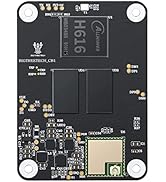
I purchased this to convert my Sovol SV-06 to Klipper. The included documents can also be found on its own GitHub which you may need to reference to update and configure the included CB1 MCU. After I got the config file how I wanted the Pad 7 got hooked up to my printer and It booted right in to Klipper without issue. The only issue I had with this was a very subpar wifi performance, I would start a wireless file transfer and it would get 5% done then loose connection. After some research I found out that if you are brave enough to open your Pad 7, take out the wifi antena and clip a trace your wifi performance will improve substantially (see my 3rd Pic). Again don't start clipping if your wifi works. Overall a great cost effective way to get in to Klipper with some minor adjustments.
K**N
Perfect
This thing is awesome, easy to set up, there are very decent guides online and being able to use klipper on my old machines is the best that has happened to me. This should be the first upgrade you should consider for any printer. Klipper is much more user friendly than Marlin in many ways.
F**M
A must have for older 3D printers.
Beautiful, It work’s awesome. Used it to update my Elegoo Neptune 3 Max. Once setup was done it work great. Klipper is the best way for any 3D printer. Had to put a larger MicroSD card in for pad firmware. Easy accepted 64 Gig card.
J**O
3D printer
Easy to set up. Would purchase again for my other 3D printers
D**W
Needs wifi connectivity issues addressed immediately!
Good, not great, the Pad 7 is far from plug and play. Before you even turn it on, you need to load the latest Klipper instance into the cb1 from the BTT GitHub. Even loading and then updating will not get the version current as it’s a completely different build. The biggest issue I have is that it doesn’t stay connected to wifi. This is apparently a known issue and has yet to be addressed in any way. Support keeps asking if I have a spare SBC card to test (don’t have a bunch of spares laying about) really disappointed the fundamental internet connectivity is worse than my 10 year old Pi3b. The interface and Klipper screen is great though you need to load all macros yourself as the cb1 image doesn’t come with anything (that works) if you own a Creality machine I highly recommend a sonic pad! My plans to setup multiple instances including controlling my Voron has been put on hold until I can get th ability to control constantly. I’m currently looking for a stand alone solution for my Headless V0.2
J**T
Dead unit
Dead waited just to get a dead unit
E**É
Wifi
Des probleme de wifi avec router helix, mais dois etre un pas pire produit
Trustpilot
2 weeks ago
1 day ago