Buy anything from 5,000+ international stores. One checkout price. No surprise fees. Join 2M+ shoppers on Desertcart.
Desertcart purchases this item on your behalf and handles shipping, customs, and support to Peru.
โจ๏ธ Elevate your desk game with silent power and vibrant style!
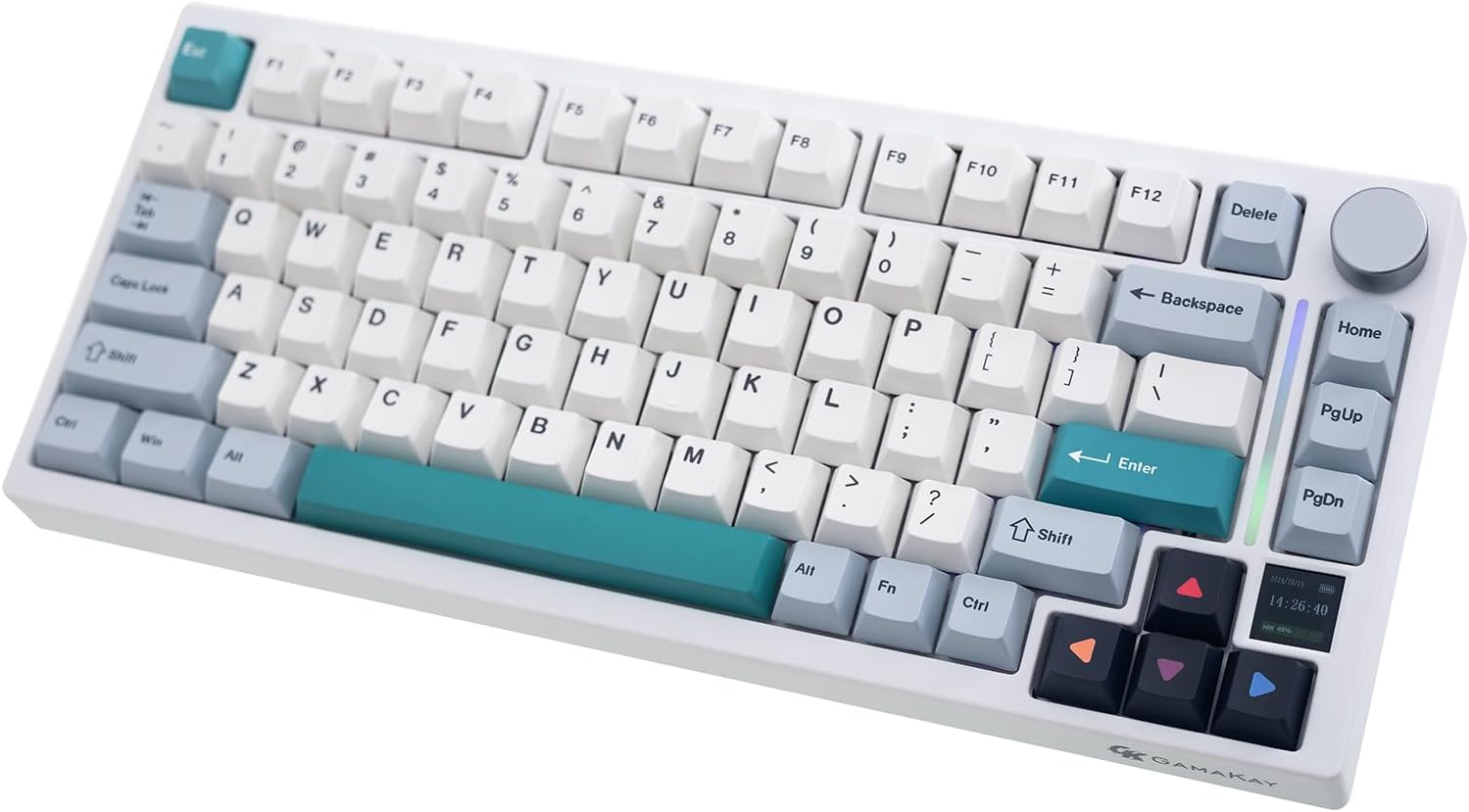
The GK GAMAKAY TK75 V2 is a premium 75% silent mechanical keyboard featuring hot-swappable GamaKay Pegasus V2 switches, versatile Bluetooth 5.0/2.4GHz wireless and USB-C wired connectivity, a vibrant dual-layer RGB lighting system, and a unique 0.85-inch TFT screen for real-time updates and customization. Designed for professionals and gamers alike, it offers extended 4000mAh battery life, Mac/Windows compatibility, and advanced macro support, making it a sleek, portable powerhouse for any modern workspace.


| ASIN | B0BRPRZJ1N |
| Additional Features | Customizable lighting, Hot-Swappable, II Pre-lub GamaKay V2 Switch, Shine Bright with Dual-Layer Lighting control, TFT Screen |
| Antenna Location | Business, Everyday Use, Gaming, Personal, Student |
| Best Sellers Rank | #10,878 in Video Games ( See Top 100 in Video Games ) #66 in Mac Gaming Keyboards #718 in PC Gaming Keyboards |
| Brand | GK GAMAKAY |
| Built-In Media | USB Cable |
| Button Quantity | 84 |
| Color | GamaKay Pegasus Switch |
| Compatible Amazon Tablet Models | Amazon Fire HD 10 11th Generation, Amazon Fire HD 10 13th Generation, Amazon Fire HD 10 5th Generation, Amazon Fire HD 10 7th Generation, Amazon Fire HD 10 9th Generation, Amazon Fire HD 10 Kids 11th Generation, Amazon Fire HD 10 Kids 13th Generation, Amazon Fire HD 10 Kids 7th Generation, Amazon Fire HD 10 Kids 9th Generation, Amazon Fire HD 10 Kids Pro 11th Generation, Amazon Fire HD 10 Kids Proโฆ |
| Compatible Devices | Laptop, PC |
| Compatible Operating System Family | MacOS, Windows |
| Compatible Tablet Computer Models | AAUB P30 |
| Connectivity Technology | Bluetooth, USB-C |
| Customer Reviews | 4.2 out of 5 stars 147 Reviews |
| Enclosure Material | Polybutylene Terephthalate |
| Hand Orientation | Ambidextrous |
| Item Dimensions L x W x H | 12.95"L x 5.68"W x 1.1"H |
| Keyboard Backlighting Color Support | RGB |
| Keyboard Description | Gaming |
| Keyboard Layout | QWERTY |
| Manufacturer | GK GAMAKAY |
| Mfr Part Number | TK75 |
| Model Name | TK75 V2 |
| Model Number | TK75 |
| Number of Batteries Required | 1 |
| Number of Keys | 81 |
| Number of Sections | 4 |
| Power Source | Battery Powered |
| Recommended Uses For Product | Business, Everyday Use, Gaming, Personal, Student |
| Series Number | 2 |
| Special Feature | Customizable lighting, Hot-Swappable, II Pre-lub GamaKay V2 Switch, Shine Bright with Dual-Layer Lighting control, TFT Screen Special Feature Customizable lighting, Hot-Swappable, II Pre-lub GamaKay V2 Switch, Shine Bright with Dual-Layer Lighting control, TFT Screen See more |
| Style Name | Contemporary |
| Switch Type | Linear |
| Theme | Gaming |
| Unit Count | 1.0 Count |
| Warranty Description | 1 |
S**Z
9.5 out of 10 (If you are having issues with battery/connection, please read)
Tldr; Bad manual, software is laggy, but overall great value. good build quality. Silent keys. Feel: 10/10 Sound: 10/10 (I got the Pegasus silent keys, absolute dream) Size: 10/10 Macros: 10/10 (takes a bit of messing around with) User Manual: 6/10 (Needs work) Why I bought this keyboard: I want to preface this with that I am not a "keyboard head". I don't know what is "thocciest", but I imagine this would be "creamy". I don't want to spend 4 hours lubing my switches. I just wanted a keyboard that felt good, was somewhat portable (hence 75%, though would have prefered 60%, but it was hard to find something that came prebuilt with silent keys), and quiet. I plan to take this to work, as now we are required to go back to the office soon, and you have to use a flexible/unassigned desk, it is hit or miss that you get a keyboard that is not grimy. Also I have gotten used to my Corsair keyboard feel, so the low profile ones are a bit less comfortable now. I received this keyboard today. Let me tell you, it is amazing how quiet it is. My mouse click is 3 times as loud. The keyboard feels great! I wasn't too thrilled about the caps, especially the lighter color, but they are growing on me. The software is ok at best. It is slow, and take some time to get used to, but once you figure out the macros, you can modify it pretty easy. Love macros on my old corsair. If you are into the gamer LED look, you will be pleased. It has a good range of options and customizations directly controllable on the keyboard. (NOTE: To change the mode, press FN+\, the user manual isnt too clear) I prefer not to attract attention and feel it looks a bit tacky, so I preferer white backlight or no lights. Its easy to change light settings directly with the keyboard function keys. I don't use the HOME, PAGE UP, or PAGE DOWN Keys so these are what I programmed my Macros as. I also changed to volume knob press function to pause/play music as the default is mute/unmute. Macros DO require the software though. I had issues when trying to connect Bluetooth. I connected fine the first time, however my battery seemed to hold no charge. It displayed 1% on the windows Bluetooth setting app, and would disconnect if I removed the power cord. And when I tried to connect it to another device it seemed to fail due to batter not lasting long enough to register connection. I contacted their customer support but had no answer, so I planned to return. BUT THERE IS HOPE. . . I was able to fix this issue! If you are having similar issues try these steps. I am not sure which steps solved this. 1. The switch on the back of the keyboard should be pushed to the far right side if set down (Closest to the mouse if you are right handed) 2. Reset the keyboard. FN+ESC for a couple second. 3. Hold the FN+1/2/3 for a 3-5 seconds. It will slow pulse red on the middle right light, and when released it should pulse faster. 4. Connect via TK75 5.0 (TK75 3.0 will not show you your batter life) 5. If you are having issues with 5.0 vs 3.0 unpair from your computer and repeat the steps above. Hope that helps! I was about to return this and write a terrible review, but I was able to fix the issue. Battery now shows 100% and I wrote this review with THIS keyboard! I will update if any other issues come up, but as of right now I love this keyboard. If you like building keyboards then maybe its not for you, but again I am not about wasting time lubing keys for 4 hours.
E**D
Amazing keyboard for an amazing price
Gamakay tk75v2 with pegasus v2 switches Pros : * Very silent * Good tactile response and doesn't feel too heavy for long typing sessions * Good compatibility with mac and windows * Initially I thought the tft screen was just a gimmick and would be useless, but after using it, I feel this makes the keyboard complete and the display is very sharp, bright and responsive * Good build quality [ even though the body is made out of plastic it feels very premium, better than aluminum keyboards at the same price ] * Good and stable connectivity * The keycaps are dye sub pbt, they have good thickness and don't feel cheap Cons : Haven't found any yet, will update if I find something Who should consider this keyboard ? * Office users * Roommates who ask you to be quiet * People who use macos, this is better than keychron k2 [ functionality, build quality and performance ], Not having function row keys when using macos [ like 67% keyboard ] is a pain as there will some struggle with the number row keys and function row keys * In general if you are someone who prefers silence over a thocky or a rainy keyboard, although it sounds like a membrane keyboard, the typing experience feels like a mechanical keyboard
P**K
Pegasus switches make this keyboard a rare bird.
O.K., yeah, that title would have been funnier if I had gotten the Phoenix switches, but there you go. The Good: * It is, indeed, very quiet. Not the absolute quietest I have heard, but quiet. * The case is very nicely padded out with several layers of foam and even a layer of silicone * Though the case is plastic, it feels solid and is heavy enough to stay put on your desk. * The volume knob is convenient and feels nice. * It's hot-swappable, so you can customize it later, to your liking. The Bad: * I hate, hate, hate the keycap set that came installed on my copy. (It looks as if they're moving away from that set, thankfully.) It is crowded with bits of text that don't tell you anything about what the keys actually do and pictograms that actively obscure the function of some of them, including, ironically enough, the Function button. The Meh: * The Pegasus switches have a somewhat heavy actuation, and are slightly mushy. This is not unusual in silent switches. They're nowhere near the worst on the market, but they're not the best, either, in my opinion. I would guess that, for the average person looking for a quiet keyboard, they are perfectly fine, and they are one of very few options if you want a pre-built, quiet, mechanical keyboard. *The only switch on the case is on/off, so you have to remember which buttons to pair with the function button to switch modes. At least they don't make you pry off a keycap to find it, like some manufacturers do. *No Via compatibility. (They do have their own software, but I didn't keep the keyboard long enough to try it.) * The design and colorway is rather ho-hum, in my opinion. In the end, I ended up returning this keyboard and going with something else. I think it is one of the better keyboards in its price point, but I wanted something a bit flashier and decided to go a more custom route.
M**.
More quiet!
I solely bought this keyboard cause I was banking on it being silent. And for the most part, it's silent when you're very light with it. With all my force on the keys it goes to lower than normal key clicking. Def an audible difference from a normal keyboard with Pegasus keys. With noise canceling headphones on while I'm gaming it's no noise. The keyboard glows, but I switched a keycap to see if it does glow for see thru letter keys and it does not unfortunately (I was just glad it was rbg and quiet) The keys feel AMAZING prob the only keyboard I've wanted to touch constantly. I did change some hotkeys on my keyboard with a different software cause my windows button was bugging out at first (didn't know fn plus windows can lock the windows button while I was messing with lights, so I feel dumb contacting customer support for that, they never replied). Bluetooth/the port thing works great for 2 ish days before it dies without warning, charges via plugging it into your pc anyway so might as well leave it plugged in. Overall great keyboard, good investment. It taught me a lot about switches, keycaps, changing those parts and etc with the tiny parts and tool they give you. For the vague symbol keys on the keyboard, they do give you replacements with the actual command keys so you can swap most of them out which is nice if you're worried about those!
R**R
it worth it to me , not good.
I hate this I tried to use it for about a month , the buttons are all wrong for me the only I liked was the buttons are quiet , I went back to my old keyboard .
A**R
Excellent, silent or extremely quiet keyboard.
The mini size is great (takes up way less desk space). The keys themselves are almost like a soft silicone, so very nice feel-wise. The letters themselves DO NOT light up within the keys themselves (but you probably shouldn't be typing in complete darkness anyway for your eyes). There's three different types of bluetooth connection, in addition to the USB cable and USB wireless connection options! It's extremely sturdy, probably good for traveling with it if you have a case?! I'm using it on the USB wireless 2.4Ghz option as my computer is dual boot for windows and ubuntu. It seems like the battery lasts in here a pretty long time, so shouldn't have issues there I assume. All around, I'm very happy with this keyboard, no more clickity clack from my other mechanical keyboard. This one is excellent (although I do wish there was just an all black version maybe with green, oh well)!
B**7
Great! Ehh design choice for some of the keys
Amazing, use it everyday. Feels cool. Pretty darn quiet, The delete buttons and stuff def could be an issue for some people bc the design is goofy. I love that about it but I can see frustration for some people. Sometimes I get frustrated because Iโm not in tuned with the top right of the keyboard. You can always paint on the key caps!
B**N
Quiet indeed
An amazing keyboard, it is very quiet, I only get noise on the spacebar, but even that isn't as loud as a typical mechanical keyboard
K**H
Keyboard bluetooth not in use
Not charging
E**L
Amore a prima vista
Perfetta per me. Spero solo di non farla cadere. Se la rompo mi picchio da solo.
A**N
best keyboard i have ever tried
i love the tactile feel of the keys and they don't really feel mushy or anything and THE SOUND (or lack thereof) !!! i have heard the switches in videos and reviews on youtube and they honestly don't do it justice since they boost the noise of it all and make it seem louder than it does in real life. but it's almost dead silent when using and it feels really good to type and game on as well I'm honestly making this review longer than it should be just out of the sheer enjoyment I'm getting from typing on this thing. connectivity is great, no input delay noticed at all, and the build quality feels solid. the one thing i would say is a con (which is down to personal preference really) is the green/arrow keys which i'm not really a fan of since they ruin the white/grey clean aesthetic of it all but that should be easily replaceable when i get newer key caps later the software isn't the worst, but it could be made better still as the screen controls don't offer alot of customization in my opinion but that's fine if you just wanna set up a gif or something like i did
J**A
its great but it has its flaws
not the best keyboard but most people will see it one of the best keyboard every build, its heavy . Sturdy for this unit a silent mechanical keyboard is the best , typing experience is very good , size is minimalist , value for money and functionality the only down side is firmware update and functionality of wireless to wired
R**.
Pegasus switch
Sehr leise. Top
Trustpilot
2 weeks ago
2 weeks ago