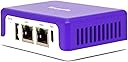
Desertcart purchases this item on your behalf and handles shipping, customs, and support to Peru.
🛡️ Stay ahead of hackers and keep your digital life bulletproof with Firewalla Purple SE!
Firewalla Purple SE is a high-performance cybersecurity firewall designed for home and business networks. Featuring a 500 Mbps intrusion prevention system, smart parental controls, and app-based management, it protects all connected devices from malware, hacking, and phishing without monthly fees. Its advanced router mode offers traffic prioritization and network health monitoring, while cloud-based analytics provide real-time threat detection and blocking, ensuring a secure and optimized internet experience.


| ASIN | B0BYMN4YZ3 |
| Antenna Location | Cyber,Security |
| Antenna Type | Internal |
| Best Sellers Rank | #3,028 in Computers & Accessories ( See Top 100 in Computers & Accessories ) #116 in Computer Routers |
| Brand | Firewalla |
| Built-In Media | Ethernet cable |
| Color | Purple |
| Compatible Devices | Personal Computer |
| Connectivity Protocol | Ethernet, Wi-Fi |
| Connectivity Technology | Ethernet |
| Control Method | App |
| Controller Type | App Control |
| Coverage | All devices on the home network |
| Customer Reviews | 3.8 out of 5 stars 519 Reviews |
| Data Transfer Rate | 500 megabits_per_second |
| Frequency | 64 GHz |
| Frequency Band Class | Dual-Band |
| LAN Port Bandwidth | 100 Mbps |
| Manufacturer | Firewalla LLC |
| Maximum Upstream Data Transfer Rate | 500 megabits_per_second |
| Model Name | Firewalla Purple SE |
| Number of Ports | 1 |
| Operating System | Linux |
| Other Special Features of the Product | WPS |
| RAM Memory Installed | 3 GB |
| Router Firewall Security Level | High |
| Router Network Type | Wired and Wireless |
| Security Protocol | WPA2-PSK |
| Special Feature | WPS |
| UPC | 850015548093 |
| Unit Count | 1 Count |
| Wi-Fi Generation | Wi-Fi 5 |
| Wireless Communication Standard | 802.11ac |
| Wireless Compability | 802.11ac |
R**.
Much easier setup than Netgate4200 and Netgate6200
I was shock how small this firewalla compared to the Netgate6200 and Netgate4200. So far does not heat up for something so tiny. I bought Netgate4200 for $609 and Netgate6200 for $1,000. And I could not connect the 2 pfsense firewall. I was trying to connect for 2-3 weeks until I gave up. Had issue with connecting to firewall and return them. I’m not a tech wiz. I only know how to build computer gaming rig. But not knowledge about coding. When I tried Firewalla and it’s easy to setup. At first I had issues connecting the firewalla trying to integrate it to my spectrum internet. I had to turn off mode and router. And after it turns back on it was easy. I was able to increase the upload speed and download speed without problems. Also was able to turn on Adblock feature. I did not even need to connect my phone to firewalla or my router to setup firewalla. I just download the apps on my phone and scan the QR code on firewalla. And it connected with the phone apps without me connecting my phone to WiFi. That’s how easy to setup the firewalla with my spectrum modem and router.
B**R
Overall great consumer firewall with potentially useful business applications.
Received this network firewall about a week ago and let me just say it is really well done. It's small size and simple setup (assuming you check your router against their incompatible list of routers on their website) make it rather approachable. I also like how the app you use with it has a well thought out interface that doesn't overwhelm you with information but let's you get deeper insight into your network by navigating the easy to use app. I do wish they would have better means of customizable content filters for groups of devices not all or individual devices. This thing is tiny but oh so powerful up to 100mbps. I have 83 devices currently and it seems to handle it fine. I contacted their support and received help after 5 on a Saturday which was impressive granted it was over email. They provided me with a solution to work around a newly discovered bug with firewalla. It was nothing major for home networks but essentially I had too big of a subnet mask for it to scan devices. The scariest thing about this is it spends all its time collecting alll this data that you may not even be aware is possible to obtain via the network. Monitoring and alarming features work exceptionally well except turning off some notifications such as abnormal activity doesn't turn off abnormal uploads. Having several cloud based cameras renders a lot of these types of alarms. Also I will add that having the map, Whois, and ips really help identify what's happenening with a device and potentially stop it. I noticed also it doesn't block certain activity on its own you have to tell it to allow or block activity. It is working great with my eeros 2nd gen. Can't wait for the firewalla Blue to get more performance out of our internet seeing as we are paying for 300mbps. I think it is definitely a cool new product/startup I also think given everything it gathers it may be concerning as to privacy implications in regards to protecting its database.
R**N
Zero support..died after 10 months.
For about 10 months my Firewalla box worked great. It was easy to set up and the app was easy and effective. About a month ago it died. It would no longer connect to anything. I’ve reached out to Firewalla by email on four separate occasions now. Zero reply! Watch out! At over $200 a pop….I feel it should last more than 10 months! I have an update. Firewalla finally got back to me. After they asked me to do a bunch of troubleshooting which I did over the course of two days, they asked me to buy another piece of equipment to re-flash my unit. I refused. I shouldn’t have to buy a piece of equipment to fix a product that is under warranty. At first they said it wasn’t under warranty…then I sent them proof and they agreed. After being thoroughly frustrated with troubleshooting, I asked them to take this unit back and ship me a new one. They would not do that. I had to ship my old unit back so they could test it and maybe fix it and maybe send it back. It’s really too bad. I loved it when it worked, but my review stays the same. Great when it works….if it doesn’t….good luck. Unless you are very tenacious and keep after Firewalla “customer service” you will be out your $200+. If they somehow redeem themselves…I will change this review….but at this point…I’d never buy another one. So I’m a little late with this update, but Firewalla did end up sending me a new device. It did function properly, but have since found a better solution. I did like the Firewalla interface/app, but after having such a hard time and it taking so long to get the old one replaced…I decided to go another route. If Firewalla had just sent me a replacement unit in a timely fashion once I’d reported a failure within the warranty period, this review would be different.
A**S
Good idea, but not for a complex environment.
Its OK, but for someone like me with an above-average network (utilizing a LAN-based DNS server, VPN tunnel, honeypot, etc, lol), it was not very comparable. While this would work OK for a normal home network, especially with kid and such (give the provided monitor / censor tools), it is not versatile enough to configure for a more 'complex' environment. The biggest issue I had was that, while I like the Suspicious Upload monitor,, I wanted to selectively disable it for a few nodes, while still monitoring for suspicious uploads on other nodes. This is not possible. It is a global on/off for monitored nodes. While you can select which nodes to monitor, you can't select WHICH features to monitor independently.
D**.
Great product offering by a consumer friendly and supportive company!
Basic setup was quick and simple. The capabilities and information provided by this box are far beyond what’s provided in its sales documentation. Firewalla Tech Support is highly responsive and helpful. While I would like to see these boxes have a much faster throughput, this box provides affordable and professional quality home (and small business) network protection that most anyone can use and benefit from without having to be an IT professional. Be mindful that you will occasionally find things that need follow up as you gain user time with this device. For example, after using Firewalla’s default settings when we enabled the blocking of all video sites, we found that our Apple devices stopped auto-updating their apps and the Apple App Store became unreachable. With the help of a quick email assist from Firewalla Tech Supoort, we learned that Apple uses an itunes server for both their video AND app updates. Firewalla was blocking itunes since we had enabled the blocking of all video sites. Armed with that information, we then easily customized Firewalla’s default video block settings to allow access to the itunes server and we restored normal app updating for our Apple devices. Firewalla quickly showed us which devices were our network’s biggest data hogs. It also flagged several suspicious uploads going to certain web servers. Thanks to Firewalla, we put the data hogs on a diet and closed the door on the suspicious uploads. Our home network is now performing more efficiently and is certainly more secure. As soon as I can get my hands on the Firewalla Blue box, I’ll have my small business network outfitted in like manner as my home network. I’m eagerly looking forward to using Firewalla products for many years to come.
M**K
If your a non techy person READ THIS!
First off as a product, I love this thing. Me and my husband are advocates of open source tech so this drew my attention. I love that the services are free just the cost of the device. I hope that business model doesnt change. TLDR; This will slow down your network pending on which mode you set it to. The most secure is NAT mode but that will limit your bandwidth to 50Mbs download and upload. If your a non techy person and have a faster internet connection go with the blue version of this product. If you are techy read the rest of this post. Now about the actual product. We are foster parents so we are working with teens most of whom have looked up age inappropriate things. Ive tried most open source software to mitigate the damage without affecting the internet experience and have been let down cause almost everything was outdated. I started looking at paid products and this caught my eye. I decided to buy it and I love it. This will lower your max overall bandwidth even between local devices to 50Mbs down and up. For a lot of people this is a deal breaker, so I would recommend the upgraded version of this the Firewalla Blue that one will limit to 500Mbs down and up. We have an 100Mbs connection and we still bought this. Since I am a techy person I setup 2 Wifi networks. One for the parents and one for the kids. I stuck the firewalla on the kids network and left the parent's devices on the main network. Since we are working from now, because of COVID-19, this made sure that we had enough bandwidth for our video conferencing. Since the kid's was capped at 50Mbs as a reserve for us parents. I am in the process of creating some blog posts on how to do this successfully. Will post a link after I do that. In tech lingo, I did this by creating a VLAN and a SSID that is tied to the VLAN. On the router side, I disabled the DHCP and blocked all traffic to the router except from the firewalla IP. Isolated multicast packets from Firewalla to not leave the VLAN. This is so kid's phones can still use devices like chromecast from a different network. Then configure Firewalla to be in NAT mode. Then POOF you have 99% control of the childrens network without it affecting the parents. I say 99% because we have a teen who I'm pretty sure is dedicating 100% of her free time to breaking my network :D.
J**R
Great Firewall for the Home User
I'm really enjoying the fact that I have more control of the traffic that goes in and out of my home network. When I first hooked it up, it had issues but I was able to download the software and reflash the MicroSD card and get it up and running. I'm a certified ethical hacker and have tried the typical methods a bad hacker would perform to gather information and attack a network and this device was quite good at blocking my attempts. I believe it can use more features like choosing your own DNS server for parental control as well as the ability to use more complex VPN passwords, but for the price, it does a good job. I had one of my clients order the blue version and so far it's been auto blocking some traffic from Russia and Panama due to an infected desktop that thier IT guy missed on their network. We we're able to find the system and isolate it quickly because of the alerts. Great product and I look forward to more updates!
S**I
Useless and pathetic n upselling
Useless purchase, after buying they upsell many things and cannot export the history, cannot keep history for long time and this can be achieved by using DNS service and get these details better than this useless product. U cannot review this product if u use Firewalla to post and I have to use my backup to post this. Don’t waste ur $$$. U cannot review see but can’t do much with this product. I am returning as I see better with dns services. I don’t recommend this product.
M**D
Parental control
Works as described. Best parental control firewall
A**N
Fantastic easy to use consumer level cyber security
This is a truly great cyber security tool for consumers as super easy to use. For UK folks first buy an adapter US type A to UK. Then as typical FTTC customer with BT like SmartHub cannot be used in bridge mode so it will be your router so use the Purple in Bridge. Next, if like me you have a Mesh unit downstream of the BT Smarthub you will need to run the Mesh in Access Point (e.g., Bridge mode) or if your Mesh does not support bridge mode you will see only the Mesh as one unit on the Purple. Even in this double NAT with both BT and Mesh acting as routers the Purple SE in bridge still is worth having for sure but to get per device visibility the downstream mesh must be in bridge and to get full control of devices (eg segmentation and priority) you need any upstream device to Purple to be in bridge just acting as a modem. But even stuck in the middle of a double NAT (two routers) the Purple SE still does full visibility and control of in and out flows with blocking and alerts, ad block and vulnerability scans. You add full device visibility if any downstream router is in bridge and add full device control and segmentation (vlans) if any upstream router is in bridge.
R**N
has no wifi
Product description is a bit confusing because the purple edition is normally indicating that it has wifi capabilities, but this one doesn't.
M**Ö
Halv bra +
Allt var nästan bra. Utom kontakten , den var inte avsett för Sverige utan amerikaner Där jag fick köpa ny. Annars hade det blivit 5 ⭐️.
J**Z
Buen producto complemento para administrar tu red
Muy buen producto, llevo 4 días usándolo y firewalla a monitoreado mi red, puede bloquear la mayoría de los anuncios, me alerta si un dispositivo en mi red está jugando en línea, si hace descarga inusual, puedo bloquear contenido para adultos, puedo crear una vpn (open vpn) y agregar mis dispositivos a ella, puedo activar alerta si un nuevo dispositivos se a unido a mi red. Puedo escanear puertos abiertos en la red. Lo malo es que no puedo monitorear mis dispositivos que están en mi sub red, es decir que están en un router que puse para extender mi red wifi.
Trustpilot
3 weeks ago
3 days ago