🛫 Elevate your simulation game—fly like a pro, feel the thrill every time!
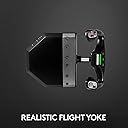
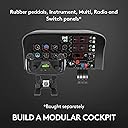
The Logitech G Saitek PRO Flight Yoke System is a professional-grade flight control setup featuring a durable steel shaft, 75 programmable controls, and a configurable throttle quadrant. Compatible with major flight simulators like FSX, X-Plane 10, and Prepar3D, it offers three customizable modes and secure adjustable mounts for a realistic, immersive flying experience on PC.

| ASIN | B01MCXJWD1 |
| Are Batteries Included | No |
| Best Sellers Rank | 3,689 in PC & Video Games ( See Top 100 in PC & Video Games ) 5 in PC Flight Controls |
| Brand | Logitech G |
| Colour | Black |
| Customer Reviews | 4.4 4.4 out of 5 stars (993) |
| Date First Available | 20 Oct. 2016 |
| Guaranteed software updates until | unknown |
| Hard Drive Interface | ATA |
| Hardware Platform | Desktop, PC |
| Item Weight | 2.79 kg |
| Item model number | 945-000004 |
| Manufacturer | Logitech |
| Operating System | Windows 10, Windows 7, Windows 8.1, Windows® 11 |
| Power Source | Corded Electric |
| Processor Brand | Refer_Manual |
| Processor Count | 1 |
| Processor Type | Unknown |
| Product Dimensions | 46.4 x 31 x 18.5 cm; 2.79 kg |
| Series | Pro Flight Yoke |
L**R
Game changer for serious flight simmers
I've racked up hours flying study-level heavy jets on MSFS, Prepar3D and XP11 but I've only ever had a joystick and throttle, GA flying has been quite boring so I've usually avoided it. Since getting the Yoke, throttle quadrant and pedals flying has become so much more realistic and has brought GA flying to life. Besides the obvious addition of the rudder pedals adding a whole new dimension, one example is that you need noticeably more flight control deflection at lower airspeeds because of the reduced control authority. This blew my mind and now I'm finding I fly the Cessna 172 just as much as the Zibo 737-800X, although each of these flight models are as enjoyable and engaging as eachother but in different ways. The Yoke is solid, slightly larger than a real Cessna yoke and slightly smaller than a Boeing but feels right. The movement of the Yoke is smooth and pushing/pulling for elevators has quite a large range too. The whole set is made from heavy duty plastics and you will appreciate that the first time you're fighting with a gusty crosswind coming into land. The throttle quadrant is good quality too although as the controls for throttle/mixture/prop are smaller they feel somehow marginally less robust than the chunky yoke - this is not a huge concern though and I'm sure they will survive for a long time. The rudder pedals are appropriately heavy, fully adjustable from a friction point of view, and have clever optional velcro tear offs on the bottom so if you're on carpet you won't find the unit slipping away. (If anything, these velcro strips are TOO strong as they pulled the corner of my carpet up off the edge grippers when I moved them. Lesson learned and lifting the front of the pedals unit first solved it. I use my office desk for work and simming and can easily get the whole system unplugged and stored within a minute or two. The twisty vice-like screws which hold the throttle and yoke to your desk feel very strong and after several weeks of going on and off show no sign of wear and tear. There are softer plastic pads on both sides of the Yoke and quadrant meaning there is almost no chance of damaging your desk. If you're into flight simming, this is a no brainer.
B**I
Logitech renewal
I purchased the Logitech flight yoke to replace my Saitek unit which after 14 years of service started to give some problems. A brilliant piece of equipment.
A**R
Yoke works, bundled throttle Quadrant not so good.
Where to start. So this bundle comes with a yoke and a throttle quadrant. The yoke works fine in Microsoft Flight Simulator 2020. However the throttle quadrant that comes with _this_ bundle does not. The bundled throttle comes with a PS/2 connector which is like 25 year old technology. This ps/2 plugs into the yoke, _IT_ is not seen by the OS as a separate device, therefore will not show as a game device within the control panel, device and printers sections - the yoke does. In order to get the yoke to also show the additional tab for deadzones you need to install the yoke software from their website. Do not try to install the throttle software, the next button will stay grey (as its not a USB device, but a PS/2), this is by design. In Microsoft Flight simulator 2020, no matter what you try to do, the levers do not move properly they do not move to start, then at 50% jump to 100%. There is no fix for this at this time. (Forums are not helped as you can buy a stand alone throttle quadrant which has a USB and does work, so mixed forum feedback..) What you can do, is to buy the stand alone Throttle Quadrant which I did, the non bundled stand alone throttle has a normal USB connection, thus is seen in devices and printers, is seen a separate device in flight simulator AND works perfectly. So buy this bundle and the stand alone throttle quadrant, still much cheaper than any other competitor, cost me £168 (£118 for the bundle and £50 for the stand alone throttle). I had to tweak the yoke roll axis set mine to 60 - takes some tweaking not too hard. tldr -Bundled throttle quadrant does not work in MS flight sim 2020, it comes with a PS/2 connector. Go buy the stand alone throttle quadrant which comes with a normal USB connection (that then works fine in MS flight sim 2020).
M**Y
Excellent build quality and outstanding value for money
I’ve been a long-time joystick user with my flight sims, so this was going to be a big change for me. I wish I’d made the switch earlier. This thing is fantastic. The build quality is superb. The yoke movement is slick and predictable. There are a multitude of buttons and rocker switches which can be mapped to sim functions of your choice, so you have a lot of control over aspects of the sim without having to move your hands too far. I purchased the package comprising of the Yoke and Throttle Quadrant. The throttle is also well built, but the levers don’t seem so sturdy. They should do the job well enough, though. The clamps on both are excellent. My setup means I can’t have these items clamped to my desk at all times (as I also have to use it as a desk now and then), but they’re both very easy to add and remove. The big plastic screws holding things in place don’t need to be tightened very much at all to keeps things in place, which should help with longevity. The yoke really has transformed my sim experience. I mostly fly the default Cessna 172 and Xibo 737 , both in X-Plane 11 (on an iMac), and both of these aircraft obviously have this traditional style of yoke rather than a flight stick, so the yoke helps mimic the experience more realistically than it does with a joystick. It’s also nice being able to hold the aircraft in a turn with one hand whilst adjusting controls with the other - not an easy trick with a joystick. If you’ve been sitting on the fence, I’d recommend you give it a try. It really has made a world of difference to my simming - all in a positive way. Also, it’s outstanding value for money for the Yoke and Throttle combination. --- Update: The original item failed after a couple of months, but was promptly replaced by Amazon. The replacement unit has been working fine since then. I would still recommend this product - I assume I just had a duff initial unit.
Trustpilot
1 day ago
2 weeks ago