


Desertcart purchases this item on your behalf and handles shipping, customs, and support to Peru.
๐ท๏ธ Elevate your workspace with labels that mean business!
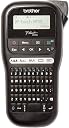
The Brother PT-H110 is a sleek, handheld thermal label printer designed for office pros who demand durable, customizable labels. Featuring a 16-character LCD for easy editing, it prints on 12mm laminated tapes available in over 60 color options. Perfect for cable management, file organization, and signage, it delivers high-resolution, smudge-proof labels without ink cartridges. Lightweight and portable, itโs the ultimate tool to bring order and style to your professional environment.
| ASIN | B01N5ID8FR |
| Additional Printer Functions | Print Only |
| Best Sellers Rank | 463 in Business, Industry & Science ( See Top 100 in Business, Industry & Science ) 13 in Label Makers 19 in Labels & Labelling Equipment |
| Box Contents | 12mm Black on White Tape Cassette |
| Brand | Brother |
| Brand Name | Brother |
| Color Depth | 1 bpp |
| Colour | Black |
| Compatible Cartridge | TZe-Tape Cassettes |
| Compatible Devices | PT-H110 |
| Connectivity technology | N,N,Data not available |
| Control Method | Touch |
| Country of Origin | Philippines |
| Customer Reviews | 4.6 out of 5 stars 2,722 Reviews |
| Display Type | LCD |
| Dual-sided printing | No |
| Duplex | Manual |
| Global Trade Identification Number | 04977766760645 |
| Hardware Interface | USB |
| Ink Colour | Black |
| Item Dimensions D x W x H | 19D x 10.5W x 28.5H centimetres |
| Item Type Name | Label printer |
| Item Weight | 477 Grams |
| Manufacturer | Brother |
| Maximum Copy Resolution Black and White | 468,9 dpi |
| Maximum Print Resolution Black and White | 468,9 dpi |
| Maximum Sheet Capacity | 100 |
| Maximum Supported Paper Size | 12 millimetri |
| Maximum print Resolution Color | 468,9 dpi |
| Model Name | PT-H110 |
| Model Number | PTH110TA1 |
| Model Series | PT-H |
| Model name | PT-H110 |
| Network Connectivity Technology | N,N,Data not available |
| Number of Trays | 1 |
| Other Special Features of the Product | Display Screen |
| Output sheet capacity | 2 |
| Paper Size | 12 millimeters |
| Print media | Labels |
| Printer Output Type | Colour |
| Printer Type | Thermal |
| Printing technology | Thermal |
| Processor Count | 1 |
| Product Warranty | 3 year manufacturer |
| Resolution | 468.9 x 468.9 dpi |
| Series Number | 110 |
| Special feature | Display Screen |
| Specific Uses For Product | office use, cable identification, signage, mail room, notice board, shelving, telephone extension number identification |
| Total USB Ports | 1 |
| Warranty Type | limited |
| Wattage | 3600 kilowatt hours |
M**!
Excellent
My work shop is so organised, I cant find anything!! All those neat little organisers and boxes all look the same. Time for a label machine! The Brother label printers are all pretty much the same, differing mostly in the pre-defined labels and things like emoticons, fonts and graphics. You can set up a special label on any of the printers but itโs handy to have the most common labels you might use on a button. In particular, this one offered a button for flag printing (for labelling cables) which was rather handy for me. The labels (or ribbons) are plastic, so water resistant and scuff resistant. The sticky is very good. Itโs sticky but not too sticky. A certain amount of re-positioning is possible. Sticks on glass but will come off without too much trouble. Peeling the backing off is really easy. They do tend to curl when you do that, though. I havenโt tried sticking them on a wet surface, like you can with vinyl for accurate positioning. One negative point about these printers is that the blade is some distance from the print head. It limits the margin at the start of the print to 3cm. This is rather large and there is no option to reduce it, like I said, itโs limited by the distance between the blade and the print head. You can reduce the margin at the other end, but this seems rather pointless since you probably want an even tab at the start and end. The blade is manual so you can print a single label or ribbon of any length. The printer always shows the length of each label, so this is easy to calculate. The blade is very effective and only requires light pressure. The power supply is a 9V 2A 5.5mm x 2.1mm centre negative. The โcentre negativeโ is important and means that most off-the-shelf power supplies will not work because they are โcentre positiveโ. Better get one that is specifically for the Brother printer. Anyway, it's great fun and great quality. It just leaves you wanting to label everything. My workshop looks like the Bat Cave now. Everything in it's place, everything with a label on it. Recommended.
A**.
very useful
Love it. This is the second one we bought as we couldn't agree with my daughter who should keep it. Strong sticker, easy to read letters, some options - small/medium/large etc. So far the nicest way to label things.
D**D
Good buy
Really easy to use and great labels. Love it! Not too expensive either.
N**K
Great
Great
M**N
It just works.
Simple. No fluff. Easy to use. Reliable.
M**S
Really good bit bulky
This is brilliant well worth it... my only criticism no matter the size you adjust it to, it wastes too much tape when printing label off.
G**Y
Very nice
It was very fast in getting delivered and arrived very well packaged. It is so simple to get it up and running, the longest part was going out to buy 6 x AAA batteries. Once batteries are loaded you just load the cassette tape, replace the back cover and you are ready to go. It is bigger than I thought it would be and the overall weight inspires confidence in the machine. I got the six extra coloured tapes (on the included link "Frequently bought together") they each contain 8M of tape where as the tape that comes with this machine only has 4M of tape. The prints are immediate and come out crisp and sharp looking making it very easy to read, I print mainly medium sized as the small print is too small for these old eyes of mine. You need to peel back the covering on the back of the labels once printed and at first I found it difficult to do, that is until it dawned on me that I was doing it wrong, the easiest way I found to do it is to fold the labels lengthways, this loosens the cover enough for you to peel it off. It will all become apparent once you have printed you label. I would absolutely recommend this labeller, they have progressed so much since the last one I used where I had to turn a wheel and press in each letter I wanted.
A**L
Needs batteries. Awesome machine!
Been itching to get one for ages. Already satisfied the itch to label everything! Takes x6 AAA batteries...incorrectly presumed it was rechargeable. Otherwise, perfect.
B**Y
Etiquetas rรกpidas y de calidad
Puedes comenzar a colocar etiquetas nada mรกs sacarla de la caja. Se agradece que trae una cinta de muestra para probarla. El aprendizaje es rรกpido y sencillo. Habrรก que comprobar la durabilidad de las etiquetas, pero por el momento estoy contento. Como punto negativo, lo mismo que comentan otros usuarios, el desperdicio inicial en cada impresiรณn es de algo mรกs de 1 cm de cinta. Es asumible.
C**R
Facile d'utilisation
Prise en main rapide.
D**D
Labelmaking Perfection
I got this label maker to print labels on some plastic dividers for my vinyl collection. It's extremely easy to use, has different fonts, and different sized fonts, that you can use. It's got a lot of flexibility for your needs, but is extremely simplistic to use. Very user friendly. And, very clean, professional-looking printing.
S**.
Ottimo prodotto.
Facile e intuitivo da usare. Fedele alla descrizione. L' ho comprato per creare etichette per citofono e cassetta postale. Ci sono anche le cornici e varie dimensioni e caratteri. Ma si puรฒ ovviamente usare per etichettare anche i contenitori del cibo e altro ancora. Sono soddisfatta dell' acquisto.
J**L
Super
Super
Trustpilot
3 weeks ago
3 weeks ago