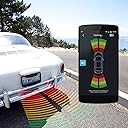
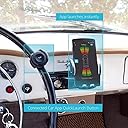
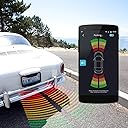
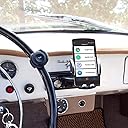
🚗 Park smarter, not harder — never miss a close call again!
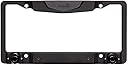
The FenSens Smart Wireless Parking Sensor FS122 is a sleek, license plate frame-based sensor that wirelessly connects to your smartphone via Bluetooth 4.1, delivering real-time parking proximity alerts. Designed for easy DIY installation in under 5 minutes, it offers up to 5 months of battery life and reliable performance in all weather conditions, making it an affordable, hands-free alternative to traditional backup cameras.
| ASIN | B0711ND5ZS |
| Brand | FenSens |
| Brand Name | FenSens |
| Color | Black |
| Compatible with Vehicle Type | Car |
| Customer Reviews | 3.1 out of 5 stars 195 Reviews |
| Fit Type | Universal Fit |
| Global Trade Identification Number | 00710051996992 |
| Item Dimensions L x W | 4.72"L x 0.39"W |
| Item Type Name | Wireless Vehicle backup camera |
| Item Weight | 1.7 pounds |
| Manufacturer | FenSens |
| Manufacturer Part Number | FS122 |
| Model Number | FS122 |
| Number of Items | 1 |
| Product Dimensions | 4.72"L x 0.39"W |
| UPC | 710051996992 |
| Vehicle Service Type | Car |
B**W
Fen Sensible
I have an older Fiat 500 Pop that lacks any kind of backup alert capability. I had looked at the Pearl backup camera but the price was just to high to for comfort. I was on Facebook one day recently and an ad for the FenSens Parking Sensor appeared. I read th description, I watched a couple of Youtube videos and I decided to go for it. Installed it two days ago and am still getting used to the slightly confusing interface but it does work as advertised. PROS: Easy to install and pair with my IPHONE SE. Seems robust enough and looks attractive It works as advertised CONS: Slightly concerned about the water resistance capability of the battery compartment. Does not seem to have any sort of O-ring type seal. (but I did just take the car through a car wash and it worked fine after) Instructions are a little confusing. Sometimes I have to close the app and reopen for the sensors to start sensing. Wish you could just have it constantly available as long as the app is open. Bottom Line - The price is maybe a bit higher than I would like but it works and I am satisfied. UPDATE - So I have been using the FenSens for several months now and I finally had that moment when a fender bender was avoided at the mall parking lot. I have it installed on my Fiat 500, a very small car, and found myself parked between two large SUVs. As I backed out, unable to see anything for the longest time, my Sensor started beeping and I noticed a car fly by. If I had not hit my brake when the sensor started active pinging, I am sure I would have been missing a rear bumper. SO THANK YOU FenSens, you saved my Fiat's A$$.
G**W
EDIT - Sensors are faulty, did not last a year.
I had written a glowing review on Fensens, and need to go from 5 stars to 1. I use it on the front my my Lexus, and the right sensor has stopped consistently working. You get zero from the left, while the right continues to work. Contacting Tech support, is brutal. I'm getting short replies, "pull the battery", which I did - with no success. WORSE - there is a thin rubber gasket that fits behind the batter door. It's 100% impossible to keep it in place putting the batter door back on. EVEN WORSE - the batteries pop out the multiple times before you can finally get them to stay in, "try" to use the gasket and get the door back on. The only way around the design flaws is to remove the Fensens completely. I asked Tech support if there was a trick to keeping the gasket in in, "wet it and it will stick". No it doesn't. With the left sensor working only 1 in 20 uses, terrible battery change issues, I feel like I got screwed right at 12 months. It's a shame. The concept is good, it fills a problem/need if you don't have front end sensors. Sadly, design flaws for the battery change, and failing sensors makes this useless. It gets WORSE - they updated their app to work for both a Camera and a Sensor. The app is confused when you start it up. Even when you select Sensor, it tries to start up a camera that doesn't exist on my car, creating an error message. What a mess. So 5 starts to 1 - Hope this gets the attention of the Entrepreneur. He has messed up a great idea.
F**N
It works but needs improvement
Ok I will be fair and edit the very bad feedback I left for this product. After ordering for a third time, I finally got a working item. The reason why previous ones weren't working was not because they had software defect as I initially thought. It was because I was sent used items as new and they were already locked to someone else's phone. The third one I ordered, unlike the first two, came in sealed packaging and worked fine. The product still does not deserve a 5 stars because the tap button has very slow response on the iPhone app and sometimes doesn't work. My previous feedback: This is my first time writing a bad review after countless purchases on Amazon. When I saw the product description, I had really liked FenSens. 2 weeks ago, I ordered one. The product came as described. However when I tried to connect it to the app, I kept getting "This is a registered device." error. It was super weird to get this for a brand new device but I said 'can happen, no big deal.' I returned the item and ordered another one, when the second one arrived, it produced the same error as well. So, I couldn't even start using FenSens at all. They don't even have a customer service number that one can call on their website to ask about the issue.
L**A
Park smarter with FenSens
The FenSens is a smart wireless parking sensor that connect via Bluetooth using the FenSens app on IOS and Android devices. The FenSens can be used with the front or back of the car, which is a nice feature. Or you can connect two FenSens and have visibility for the front and back of the car. In the FenSens app, you have to create an account and go through the setup before you can start using the device. The app will ask if you have the FenSens positioned in the front or back of the car and the clearance, which is how far the FenSens is from the edge of your car (i.e. if you have the FenSens on the back of the car then the bumper may protrude from the FenSens you should measure from the edge of the FenSens to the edge of the car so the parking sensor can adjust accordingly. The FenSens comes with a quick toggle button that can be attached to the car steering wheel. Within the app, the quick toggle button switches between the parking screen and the home screen (see video and photos for more details). On your phone’s home screen (for IOS), the button will activate the FenSens but will not open the app so if you are a visual person then you want to navigate to the app to see the sensor in action. Activation on the home screen will allow the FenSens to help you park if you have the sound and/or the vibration on. It is important to ensure that you have the sound and/or the vibration on before you use the FenSens because on the home screen, the toggle button can activate the app but no indicators will alert you if the sound or vibration is not on. For my iPhone, I have to turn on the ringer (using the mute switch) to enable the sound to play. The quick toggle button is a great addition for the FenSens although there were a few times when the button did not register for me (see video for example). In the app, the sensor will constantly beep if you are in the parking screen. Beeping occurs every one second when the indicators are green in the app, and will elicit a long beep when indicators show red in the app meaning that you are too close to an object. With a left and right sensor, the app is able to display if you are too close on the left but clear on the right side of the car and vice versa. This is great for angled parking or parallel parking because one side of the car may be too close to an object while the other side is clear so you can adjust as necessary. The parking sensor is a good alternative for those in the market for backup cams or the like. While the sensor does not display live visuals of the outside of the car, the sensor indicators provide the same type of feedback that a backup cam would give you. This is a great option for those who have a hard time seeing the front of their car also. Also, when it is raining, the backup cam may be compromised while the sensors on the FenSens would still be able to work. The user’s guide states that the batteries should last about five months. The app displays the parking sensor battery life on the parking screen and the quick toggle button battery life in the settings menu under the manage devices screen. The guide also indicates that FenSens is not recommended for cars higher than four feet off the ground. From my experience, I found the FenSens to be a good supplement to my car’s existing backup cam. Having coverage for the front and back of the car allows for greater security when parking. It is hard to see the front of my car so the parking sensor is able to help me with parking behind another car when parallel parking.
R**Y
regrets
most of the time it does not function properly, beeping when thre is nothing behind. a disappointment.
C**E
We just got our FenSens Smart Wireless Parking Sensor yesterday and got it installed
We just got our FenSens Smart Wireless Parking Sensor yesterday and got it installed. Installation was really easy and pairing the product with the app and setting it up only took a couple of minutes. In the box is the parking sensor license plate frame (which can be installed on the front or back of the car), a nob that goes on the steering wheel on the vehicle and a vent phone mount that comes with two magnetic attachments (so you can use it with two different phones). Using the parking sensor is very easy, you just open the app on your phone and it shows you with a lined color grid how close you are to something. The FenSens app also supports other apps like Pandor, Google Maps and Spotify. I also love that the sensor itself feels sturdy and well made so I don't have to worry about it breaking or falling apart. There is also a button you put on your steering wheel that lets you turn the sensor on and off with the push of a button. It is great and super easy when you are driving. In addition to the visual parking diagram on your phone, it will also make a beeping sound fast or slow depending on how close you are to the object. The parking sensor has been a lifesaver for us in our big truck. We installed it on the front and it has been so much easier to park everywhere we go, even at home. I recommend FenSens for a basic easy-to-use parking sensor for your vehicle.
C**.
Beep, beep, beep
Once you hit the tap button, the unit turns on and does what it is supposed to do. However, once it starts beeping, it won't stop. You can close the app and clear all open apps, but it keeps on beeping. If you have the time to go four menu layers into your phone to force the app to stop, you can end the beeping. The app also runs all the time, it took my battery from 90% to 15% in two hours. I uninstalled the app, and the sensors went into the garbage.
L**.
FenSens obstructs the backup camera on my RAV4
Returning it today. Great concept but does not work on my Toyota RAV4. FenSens license plate holder obstructs my back up camera. Tried re-mounting it in "truck" mode (upside down). It was a little better but still not satisfactory. Additionally, the FenSens app (installed on my iPhone can only be viewed in portrait view. the display does not rotate when I rotate my phone. Seems like the app was developed for Android and may not be fully functional on iOS. I emailed FenSens customer service a week ago about these two issues, hoping they could suggest some solutions. No response --- very disappointed with customer service. Do not recommend this product.
A**A
Go back to the drawing board!
Horrible product. Apps doesnt connect when needed. How long somebody can wait to make the apps connect with the device? Many vehicles positioned the rear licence plate in middle of the trunk lid. But incase of this, sensor only works if you install the plate in your bumper! Othereise for height, it doesnt work. How they expect to change the plate position of the vehicle?
J**N
FenSens Blue Tooth Connectivity an issue
Easy to Install. Only one major issue Blue Tooth constantly conflicts with my vehicles Uconnect system. Visual Display and Vibration work on phone, however beeping alerts cut out.
M**O
Don't Buy
Does not work correctly useless
Trustpilot
1 day ago
3 weeks ago