

๐ Elevate Your Internet Experience!
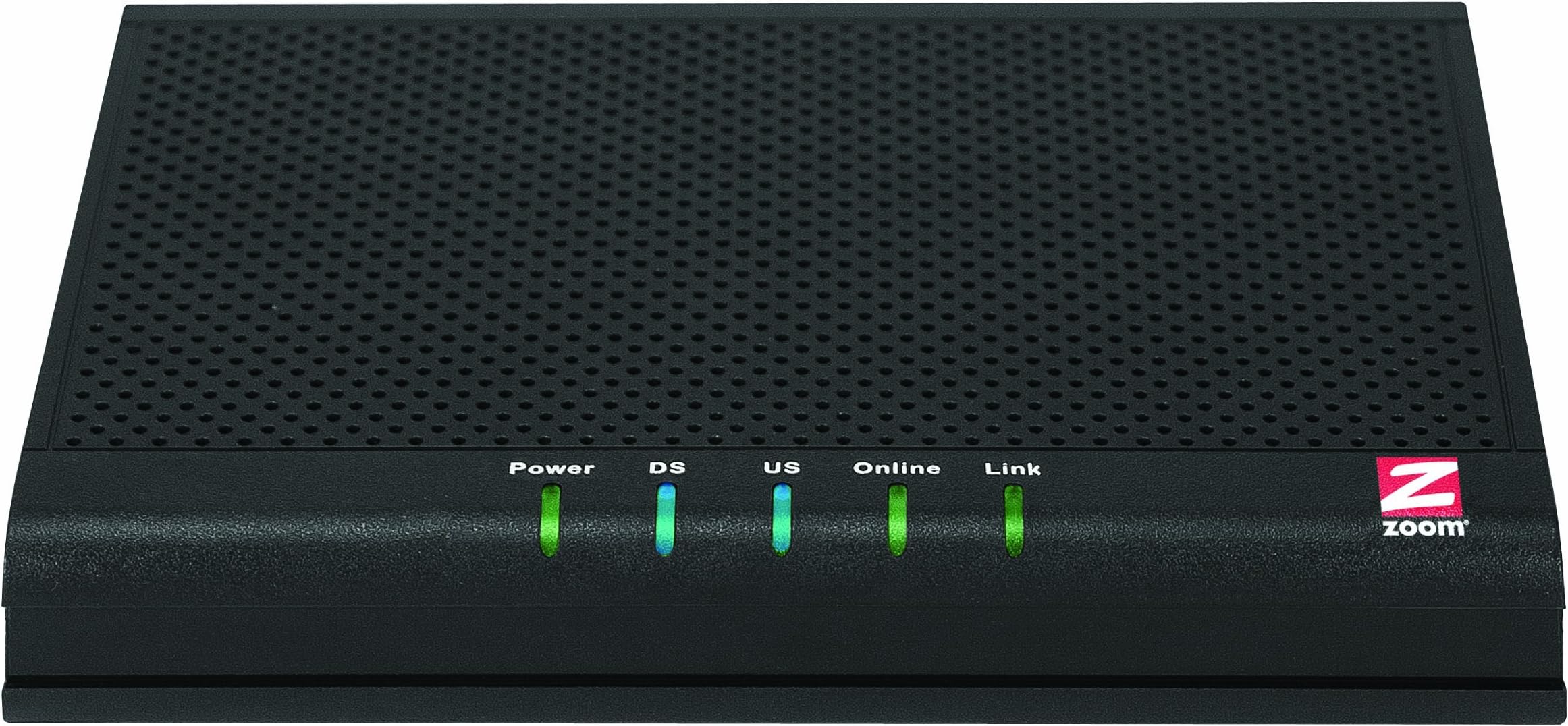
The Zoom 343 Mbps DOCSIS 3.0 8X4 Cable Modem (Model 5341J) delivers high-speed internet connectivity with impressive downstream and upstream speeds, ensuring compatibility with all major U.S. cable providers. Its compact design and advanced networking capabilities make it a perfect choice for modern homes and offices.
| ASIN | B0063K4NN6 |
| Best Sellers Rank | #203,508 in Computers & Accessories ( See Top 100 in Computers & Accessories ) #509 in Computer Networking Modems |
| Brand | Zoom |
| Color | Black |
| Compatible Devices | Either a Windows, Macintosh, Linux, Unix computer with an Ethernet port, or a router with an Ethernet WAN port (either a wired or wireless router) Compatible Devices Either a Windows, Macintosh, Linux, Unix computer with an Ethernet port, or a router with an Ethernet WAN port (either a wired or wireless router) See more |
| Connectivity Technology | wired |
| Customer Reviews | 4.4 out of 5 stars 1,636 Reviews |
| Data Transfer Rate | 343 Megabytes Per Second |
| Global Trade Identification Number | 00726947110793 |
| Internet Service Provider | Cable-based internet service providers |
| Internet service provider | Cable-based internet service providers |
| Item Weight | 9.28 ounces |
| Manufacturer | ZOOM |
| Mfr Part Number | 5341-00-00J |
| Model Number | 5341-00-00J |
| Modem Type | Cable |
| Number of Ethernet Ports | 1 |
| Number of Ports | 1 |
| UPC | 012301321487 168141495793 115971056250 088021465770 521227176076 803982717252 149042950390 763615762854 726947110793 044111214642 |
| Unit Count | 1.0 Count |
| Warranty Description | 2 years - parts and labor |
D**R
Out of the box inspection, installation, and testing. Comcast Houston. Love it.
This review is an "Out of the box installation, and testing" type review. I have had the modem in my possession for less than 24 hours, so I honestly can't say much about stability or long term reliability yet. I do intend on updating my review as I have more exposure to this device. After getting annoyed one too many times for paying a $7.00 / month lease fee to Comcast for the AMBIT U10C035 DOCSIS 3.0 modem that replaced the older Motorola Surfboard modem I had when the cable service in my area used to be Time Warner / Roadrunner. Well I decided to buy my own modem and bypass the middle man. After doing some thorough research of online reviews, I had the choices narrowed down to this modem, the Motorola SB6120, and the Motorola SB6121. Several factors, including the overwhelming positive reviews of this modem here, and on DSLreports.com, not to mention the recommendation of several Comcast cable technicians made me opt in favor of the Zoom modem. Now the last time I had purchased, or even considered Zoom equipment, it was a 33.6 kbps internal PCI modem I had installed in a Pentium 166 MMX box running Windows 95. Not exactly current. My experience with their hardware was positive, and I have never had a reason to doubt the quality of the design, or build of their devices. Just didn't have a need until now. First thing I noted when it came in is how well the item is packaged. Decent cardboard box that protect's its contents. baffling inside the box designed to hold the contents snug. The modem itself well wrapped, and the box as well fully plastic wrapped. Maybe not the best for allowing the plastics to outgas, but I digress... Included in the box was. #1. Zoom 5341j cable modem. #2. Wall wart type transformer. #3. Short, BRIGHT yellow ethernet cable. #4. Funny looking little foot thing a ma jig used as a stand. Mine will be shelf mounted eventually in a relay rack in my home office, the little foot isn't needed, but would be nice if I didn't have my setup planned the way I do. #5. Quick installation guide type pamphlet. Physically there are a couple of noteworthy things about this modem. #1. Matte black finish of the housing fits in very nicely with modern office and particularly home office decor. #2. Multiple, flexible mounting options. The only real mounting option this lacks, and it is one for my application annoys the snot out of me, is it lacks any means of attaching rack mount ears. So if you are doing a structured wiring install, using a relay rack or similar setup, you will have to use a shelf on the rack for your modem. For the most part, almost all current broadband modems and routers are like this. I guess the MFGs don't figure home or SOHO installs will use racks. #3. Much, MUCH brighter status LEDs than the Ambit, or Moto modems I have had in the past. There is no guessing to the status of a particular function of the modem in a bright office. I bet the lights could be annoying in a bedroom at night though. #4. Smaller footprint than the Ambit or Moto modems. Agan, for the most part no big deal, but again, for those doing structured wiring, say you are doing a mount board install in a closet, or basement. Or worse, an actual structured wiring enclosure. The smaller device is priceless in space confined areas. #5. Although I didn't measure scientifically, the Zoom produces significantly less heat than the Ambit did. For the most part, the Zoom seems to be running just a touch over room temp, the Ambit always gave me pause as it ran hot enough ti was concerned it would melt the plastic or worse. #6. Unless you have everything at the same desk area, forget the included ethernet cable. Too short to be useful. #7. The little foot thingy installs and removes fairly easily from the modem allowing you to stand it up like a book on a booshelf. Nice option if you need that. #8. The wall wart transformer. You'd think by now, manufacturers could figure out how to integrate the power supply INTO the housing of the modem. I hate external transformers. This one at least is one of the sideways ones so you can actually use it in a power strip, at least that's something. Setup was quick and relatively painless. #1. Get online, go to Comcast website, log in, then copy / paste my account number to a plain text file. #2. disconnect my existing cable modem. #3. Connect coax, power cable, and an ethernet cable from the wired workstation to the new cable modem. #4. Power the cable modem up and wait for all the lights except the last one on the right to stop blinking. The last one on the right if it blinks means data is getting passed... #5. Set my workstation to DHCP for adddress and DNS configuration. You can bypass this step if you are using DHCP, I am not. #6. Flush old IP, and obtain new ip address. (For Windows XP run ... ipconfig /release, ipconfig /renew). #7. Open web browser nd try to surf to a site. You will get taken to the self activation page. #8. Follow the simple to understand on screen prompts. #9. Once it shows up as activated, and confirms you are done, it will prompt you to close the window. Do so now. #10. Browse to a site or two, pull up amazon.com, google.com, whatever verify your function. #11. Push the button on the back of the modem and power it off. (How cool is that, an actual way to power cycle the modem without yanking the power cord!) #12. Connect ethernet cable from router to modem. Reconnect worksation cable from router to workstation. #13. Powe roff your router. #14. Power on your modem. Wait for it to fully initialize. #15. Power on your router. Wait for it to fully initialize. #16. Obtain new DHCP address by release / renew mentioned above, or reset your static IP addressing. #17. Log in to your router admin panel, and verify IP configuration is good. #18. From your worksation / browser, start browsing the internet. All told, my setup took all of 15 minutes. The overwhelming majority of that time was spent waiting on the Comcast website to do its thing. Prior to, and just after installing my modem, I ran several broadband speed tests to verify function. First testing was done at [...] My test prior to swapping the modem out came in with 24.86 mbps down 3.28 mbps up. My test after swapping the modem out resulted in 33.18 mbps down, and 3.74 mbps up. The results from testmy.net are similar. Prior to swapping the modem out I got 20 mbps down, and 1.8 mbps up. Post modem swap I am getting 24.9 mbps down, and 3.6 mbps up. I should also mention that I bumped my service tier up after the post modem test (I had intended to do that, and was part of the reason I got this modem). I am now on the Extreme 50/10 tier. My speed scaled right along with the tier inline with what I was seeing before. Download of 67.85mpbs, up of 9.89mbps. At the time of this test, for some reason I was unable succesfully run a speed test from [...] The Flash test app on their site kept hanging my browser something fierce. Overall browsing seems snappier, but it's not like it was a problem before. For the most part, I am limited to the speed of the connection the servers I am talking to, which makes me a happy camper. Youtube can still be choppy, but I have seen that across various networks, and the problem is Youtube. Netflix is smooth as silk, and a joy to watch. I am not much of a gamer, other than Facebook games. And those, well they don't appear to have been impacted at all. At this point, assuming no stability or reliability issues, there are 3 things I would like to see Zoom change about this device to make it more appealing to me. #1. Wrap the lenses for the LEDs around further to the front. This will make viewing the LEDs from just below the modem much easier. #2. Integrate the power supply into the modem housing. #3. Slightly modify the case design to allow for, and include, or offer as an accessory, rack mounting ears for the device. I know I am the odd man out here as it were, but it would be nice.. UPDATE: 3/31/17. I have owned this modem for 4 years and pretty close to 2 months. We are going to call it 50 months. I am saving $8.00 a month plus So effectively this modem has saved me after purchase price close to $440.00, and I can manage my own modem without Comcast sticking their nose into it. It's been wonderfully reliable, and a great performer. I am tempted by the newer 4x16 DOCSIS 3.0 modems, but our service here won't support them anyway. Might as well stick with the 4x8. I should mention my first modem, a dial up 2400 baud modem in the 1980s was a Zoom, my 33.6, and 56K modems were Zoom, I am glad beyond words that Zoom has kept their quality high over the literally decades. I deal with IT all day long and have seen a lot of junk networking gear on the market. This is a good modem.
R**M
Excellent cable modem from a great supplier
My DSL supplier recently increased my monthly price, after 12 years of reliable but never upgraded service, by nearly 15%. I took that as an opportunity to check out cable ISP and found I could get an intro price that not only allowed me to purchase a cable modem but save me total $$ outlay for more than three years - AND enjoy 10x increase over the d/l speed I had. I looked at various mfg offering cable modems, but couldn't find anything that I really wanted/had good ratings. Finally, a no-brainer kicked in... "Look to see who manufactured the DSL modem you've been using 24/7 for that past 12 years with complete satisfaction, dummy." Dah! It was a Zoom. The Zoom 5341J has all the features I want & need, is from a reliable mfg, approved by the cable company I was signing up with, and at a reasonable price. It works with my Netgear Router with no issues. Two negatives: The first modem I had was faulty and had to be returned, but crap happens. The other thing is that it (both) runs a little warmer than I'd like to see. However, after three weeks usage I am completely satisfied and would recommend this to anyone wanting to stop paying monthly modem rental to their cable company or looking for a new modem for any reason. Update: I've been using this modem for four months now, it is on 24/7, and I have had zero issues. I had a general question about the light activity on the modem and sent an email to Zoom. This was not a problem -- just curiosity. My question was answered and explained to me quickly and clearly. I am completely happy with my purchase.
D**T
Better than Motorola SB6121 & SB6141 *In my experience*
I'm writing this review as the Motorola SB6141 sits on my kitchen counter with the return shipping label, waiting to be dropped off at UPS. I will try and make this a lot shorter since I'm coming back to edit my last review in which I gave the product 4 stars and titled it "The jury is still out..." Well the jury is in with its verdict. Keep in mind, I'm no internet tech, and my experience is based solely on how the Zoom 5341J performed compared to the Motorola SB6121 and SB6141, *with my specific service provider (Comcast), in my area, and in my home*. All of these factors can have a significant effect on your own experience. Here is a rundown on my experience with each of the aforesaid mentioned devices. If you only want my comments on the Zoom 5341J just scroll down to it. All devices were used in conjunction with Comcast Performance Blast service with 50 mbps download, and 10 mbps upload bandwidth speed. I measured the speed using speedtest.net. Each of the test results were reported to me using a server based in my city, so all of the results are best case scenario. Motorola SB6121 To this day, I am still convinced I either bought a defective device, or Comcast did not recognize this device from the jump properly. From the moment I activated this modem, my bandwidth speed would jump from 58 mbps down and spike wildly all the way down to about 2 mbps, the upload speed would never eclipse 3 mbps, and usually hovered around 0.9 mbps. I tried restoring the factory settings online. The only result was the modem updated to a newer firmware, but that did not solve any of the bandwidth speed issues. The pings were very high as well about 70-160 ms, which is way too high for a test using a server in my own city. I also deactivated and reactivated the modem multiple times in hopes that whatever the issue was would resolve itself. I would get the same results over and over. I also tried a slew of fixes that I researched online. Nothing worked and internet was basically unusable. Motorola SB6141 This device worked much much better than its predecessor, it just didn't perform as well as I felt it should have. Hardwired to the modem the SB6141 would get me 58 mbps downstream / 14 mbps upstream, which was beautiful to behold. In my bedroom (where the device was set up) over wifi, I would get a steady 55 mbps downstream and 14 mpbs upstream. I was living the dream for a few days. About 2 or 3 days later the Netflix streaming out in my living room would start buffering, and this is something that never happened with my previous DOCSIS 2.0 modem (Motorola SB5101), so I started doing speedtests again HARDWIRED to the SB6141. This time, although I was still getting relatively good speeds, the mbps would jitter up and down. Sometimes one test would start at 58 mbps and end at 35 mpbs downstream. Others would start at 30 mpbs and go up and down and end at 45 mpbs. Like the internet was struggling to get through at a steady rate. Pings would range between 14-40 ms. Not the vision of consistency I envisioned. Again, I know these results can depend on a lot of things besides the modem, but I've come to the conclusion it was the modem based on how the Zoom has been performing. I did the same things I did to the SB6121 to try and remedy the SB6141. Sometimes the speeds would be great, sometimes they would be ok, and sometimes they would jitter, all within a few minutes of each other. I kept a hold of the SB6141 to see if the Zoom (which I actually purchased before this device) would suffer the same issues. Zoom5341J From the moment I activated, to right this minute as I write this review, this device has worked flawlessly. I actually bought this device after the SB6121 failed me, and because I did not trust the brand name Zoom as much as I did Motorola, and the device seemed to run a little warm, I went and got the SB6141 just to make sure I was getting a quality product. My experience with the SB6121 should have taught me Motorola wasn't going to work for me in my situation, but I wanted the certainty of the name. Through primetime internet using hours, over wifi, hardwired, using multiple internet devices simultaneously, this thing has been an absolute beast for me. It gets me 58 mbps downstream 14 upstream hardwired, over wifi in the same room it gets me 55 mpbs downstream 13 upstream, out in my living room over wifi it gets me 21-30 mbps down/ 11 mpbs up. Although the distance from my bedroom (where I set up my modem/wifi) to my living room is not very far (roughly 75 ft), there are 2 walls, an AC unit, a water heater, and a patio between them. I know a lot depends on the wifi router, but the 5341J has been making sweet sweet love with my Netgear N300 WNR2000v3 (which is very far from a great router nowadays). The most impressive thing thus far is that I haven't had to do any research to get it to act right, my internet speeds have been steady as a tank, and it has not disconnected one time throughout the period I've been using it (roughly 2 weeks). If Zoom keeps this up, I may have to start purchasing more devices from them. Sidenotes: The Zoom 5341J runs warmer than both of the Motorolas I purchased. I wouldn't call it hot, just warmer than other modems I've had. If anything happens with the modem, I will be back here to report it. Also, the LEDs on the 5341J are BRIGHT. They can light up a corner of a dark room. At night it serves as a nightlight to keep monsters away and if I have to get up and use the bathroom haha. Its not "burn your retinas bright," its just "3 x brighter than the SB6141/6121 bright." Its not a problem for me, just something maybe others would want to know about.
L**Y
Not All Good
I just received this modem yesterday, so I may need to provide an update. For now, though, my impressions are not all good. This modem replaced a Motorola SB6120, with which I was pretty pleased. I had some connectivity and performance issues that I suspected were ISP-related, but which I hoped might be helped with this newer model modem. Good 1. Contrary to reports I've seen, my modem does not run hot. Maybe this has been fixed. 2. Initial setup was easy, and the self-provisioning process with Comcast was easy and uneventful. 3. Initial channel bonding occurred very quickly. Bad 1. Unlike the SB6120, this modem's Web UI has no event logging. This makes it difficult to impossible to determine if the modem is having intermittent connectivity issues unless you are experiencing them firsthand. UPDATE: There is an event log but you must access it directly, e.g. "http://192.168.100.1/RgEventLog.asp" 2. The Web UI forces a log-out *very* quickly, probably under 2 minutes. This does not appear to be adjustable. For the most part, this modem seems fine and it does offer eight downstream channels (which presumably will be needed for 100 mb service); the SB6120 only has four, although Motorola has another model which supports eight. 10/2/2013 Update. This modem *will* run hot if you are not careful. Placed flat on a carpet, the carpet will prevent proper cooling. You need to place it on a solid flat surface or prop it up somehow to allow better air flow (I just discovered this). Whether related I don't know, but the unit smells strongly of plastic. I hope this will fade over time because it is quite distracting in a small home office, and probably unhealthy as well. 10/10/2013 Update. This modem seems to do a little better than my older modem in speed and latency. There is an event log, but oddly it is not available through the Web menu (see "Bad" point 1). If the smell of plastic/electronics dissipates I'd upgrade this rating to 4. But the smell is still strong after a week.
S**S
Save some money, the cable company gets enough
I have had Comcast cable & internet service for many years. Prior to that my provider was Adelphia Cable, a great company...and then they were bought out by Comcast. This review is not of Comcast however communicating with their "technical support" & "customer service" has always been a hit and miss proposition since they took over from Adelphia Cable. So here we go,,, I purchased this modem from Amazon after looking through Comcast's web site. They have a page that isn't too hard to find since they updated the look and functionality of their site a year or so ago. You just look down the page and there is a table on it that tells you which modems are compatible and approved (have been tested) with their service. I actually made a list of 2 different ones. While my previous Toshiba modem worked fine (I was on the 6 Mbps. plan and was receiving 6 to 7 Mbps download and 1.5 Mbps upload speed with great consistency. Actually, no complaint there. Unlike dealing with AT&T's DSL service. I had tried that out, also purchasing the 6 Mbps plan but after 3 months of never (and I mean NOT ONCE) getting over 2 Mbps download and .5 upload) decided to go back to my only other choice in my area; Comcast. And yes, I attempted to work with AT&T on the speed issues. The final straw came when a service technician came to my apartment and was, at least, honest. There are 58 apartments in my building and 1/2 are DSL and the other half cable. In his own words the technician said,"since about 1/2 the apartments are DSL, regardless of the type of modem you have you'll never get much more speed than 2 Mbps. Remember that DSL is comprised of a bunch of small localized networks so with the number of people in your building using the same network your speed is at its peek. The only thing that would make it faster is if 1/2 the people using DSL now switched over to cable." This technician was clearly the worst salesman in the world, but his honesty is what sent me back to cable. And now the reason I didn't just re-use my old modem. Comcast had sent an e-mail to all existing customers in my area stating that they had at least doubled the speed to all internet customers in this "zone". However, after switching back to cable, I was back to the exact same 6 Mbps I had received before. I called their technical support and was told that I would need a new modem that supported DOCSIS 3.0 to receive the higher speed. So, Amazon to the rescue. I went to the Comcast site I mentioned, copied down several modem models and came to Amazon. I found the most popular modem (the Motorola SB01121 - think that's it) and got the model the cable company said they use now for people who rent modems from them. The majority of the reviews were 5 star and most of the world seemed at peace; so I purchased one. When it arrived I called Comcast and gave them the info they needed when hooking up a new modem. Immediately...it didn't work After multiple calls and being told by both a customer service rep. and a technician (over the phone) that the modem I purchased must be "a lemon", their only advice was to get another modem. Problem arose that day and I ended up in the hospital for almost a month. By the time I got home and was able to get around a month had passed so it was too late to return it. So, there went the amount of money I would have been saving for a year by not renting a modem from the cable company. Thus, the purchase of the modem of this review. It was also near the top of the list of "approved" modems at Comcast's site, so I purchased the Zoom modem. I called Comcast, gave the the MAC address and everything they asked for. Surprise, this modem didn't work either. I was also told by their "knowledgeable" staff that once my account had been switched over in their computer to one capable of handling a DOCSIS 3 modem they couldn't undo the process so I now couldn't even use my old modem that had worked perfectly (I found out during a service call to my home that the cust. service rep. was wrong; it could have been changed back, it just would have taken a little more time). And so I had to set up a service call. The tech. was on time and I finally found someone with actual knowledge. I say that because he tried several things and none of them worked. As a side note, when it comes to Amazon review I read the bad as well as the good. Wish I had done it before ordering the second modem. I found 2 negative reviews that had the same problem, both with Comcast's new sped up service and one with the solution his technician had come up with. I told the tech. in my home at that time what I had read on Amazon and what the solution had been. I was as simple as there not being enough signal strength coming through the wiring, The tech went into the service closet where all the wiring comes in (and changes can be made), adjusted the signal strength and not only did the Zoom modem worked but so did the first modem I had purchased that I couldn't return due to the timing issues. Now it was simply a matter of deciding which of the two modems I would use. I was within time that I could have returned this (the Zoom) modem and used the Motorola that is the more popular of the two. However, just out of curiosity I tried both modems and tested the speed using 2 different internet test sites. The first modem, the Motorola, that Comcast suggested showed a download rate of 37 Mbs (seemed like a massive jump from the 6 Mbps I had been getting with the original older modem I had) but then I tried the Zoom, the one Comcast kept talking down. Surprise, I ran the test 3 times and with the Zoom the average download speed was 56 to 67 Mbps and has remained in that area since. So obviously, the Zoom is the one I've kept using. The upload speeds are equally amazing. I've been using it for a couple months with absolutely no problems, no need to do resets since it has never failed in any way. So just because of the speed increase alone, I didn't return the Zoom. Would I recommend it? As long as it is supported by your service provider the answer is Absolutely. Price-wise it will take about 11 months (based on Comcast's modem rental prices as of the time of this review) to pay for itself since there are no longer rental fees for a modem from Comcast.
T**K
Bad out of the box
From me to Zoom: Rob Heckart May 8, 7:50 AM I purchased this modem from Amazon and just received it. I hooked up the modem to the coax to Comcast and the Ethernet port straight to my laptop. A Comcast rep walked me through switching out the rental modem for the Zoom because I was unable to complete the switch online due to numerous website errors. After the Zoom rebooted a couple of times (as directed by the rep) *some* websites would come up but it would be VERY slow, unlike the rental modem. Trying to hit big sites like Netflix, Google, etc., causes browser timeouts and the sites are just not loading. I finally decided to try going into the modem configuration pages (192.128.100.1) to see if there was something there causing the problem. Even trying to hit those pages is slow and sometimes timing out on my laptop. This sounds to me like a bad modem since it can't even reliably access the configuration inside of it. Once I unhooked the Zoom modem and replaced it with the rental, everything went back to normal. Fast page loads with no time outs. Bad modem that I should send back to Amazon? I think the firmware version on the Zoom was 5.5.8.6J when I went into the configuration pages. Answer from Zoom 72 hours later: Hello Rob, Connect your computer directly into the 5341 modem with an Ethernet cable and then follow the instructions below Open your web browser and type the following address: http://192.168.100.1 and press enter Username: admin Password: password Once logged in, you should be on the Connection page. If not, click on Status > Connection. Take a screenshot of this page and attach a copy of it to this incident. Answer from me: This is the screenshot of the Connection page. Also, I made a screencast that you can watch to see the trouble I'm having even getting to the Connection page (http://screencast.com/t/RgJn1G5az3). At the time of this screencast, the Up and Downstream lights were solid blue and Online was solid green. I tried with two separate Ethernet cables and experienced the same problem. Answer from Zoom a couple of days later: From the screenshot you should be, channel 6 is having major issues. This could lead to dropped connections. Do you have a splitter you can change out? I have no splitter and they eventually offered to create an RMA for the modem. Won't be buying another one of these for sure.
J**W
The best part about this modem is you just remove your ...
The best part about this modem is you just remove your current leased modem, plug this one in, then call your cable company and have them provision (activate) the new modem (they'll need the modems MAC address). Return the old modem to your cable carrier and save $6-$10/month. It simply works. I started this modem off when I was subscribed to Comcast and it worked. The speed actually almost doubled with this modem as the Comcast was leasing me an older modem that didn't even have the capability to offer the connection speed of which I was a paying them. I was at around 37Mbps with their modem and when I switched to the Zoom went to around 57Mbps (using speedtest) immediately after making the switch. I switched to WOW as a provider and the modem continued working like a champ. ---Update 2016/07/07---- This unit is still going strong. I've moved and I'm back on Comcast. Just note that it does not have a phone jack. If you rely on your local cable provider for phone service, I'd suggest quitting it anyhow and getting a magicjack go for $2-$3/month unlimited period(I was paying well above that through my local cable provider especially when you add in taxes and other surcharges). You just plug the device into a router (I use a WNDR3700) on your network and you're good to go. Also note it does not act as a router. A modem's job is to provide you with a connection to the carrier. You can connect one computer to this device but also need a separate router if you want to connect more devices or connect devices wirelessly while using this modem. I already had a WNDR3700 wireless/gigabit router in place before purchasing this modem. So my internal equipment was in place prior to purchasing this modem. I have officially 'cut the cord' with the exception of the internet connection and am paying $30/month for cable internet. I was already an Amazon Prime subscriber and Netflix subscriber since nothing seemed to be on cable anyhow. I picked up Hulu Plus, a couple of recertified Rokus (have same warranty as new!) and a TabloTV dual-tuner with an Amazon Basics OTA regular performance antenna and I can record local stations' programming as well as watch all of the on-demand options of the previously mentioned services. With the TabloTV unit, I can stream live and recorded TV to Rokus, iPads, Chromecast, and PCs. My family streams to multiple devices simultaneously and we don't experience any hiccups with this modem. Through this modem I run streaming media, on-line gaming (PC, phone, iPad and Xbox Live) and IP phone services flawlessly. As you can tell, I send and receive data a lot of different ways through this modem. I am extremely impressed by the fact that this modem just simply does what it says it does and was a no hassle install.
R**K
It doesn't take security seriously, though it works well for a home environment.
The modem works great with Time Warner Cable. The only reason I gave it four stars instead of five is that it skimps on security. The fact that Zoom doesn't take password security seriously makes me wonder what else they may have skimped on where it relates to security. Technical stuff: I understand that firmware has limitations, though a proper password is approximately 15 characters long consisting of any possible character. The modem is limited to 8 characters where I can only choose from letters and numbers. 7 extra bytes isn't asking that much from firmware. In double byte charsets, it would only need 14 extra bytes. The interface is available through WAN, and if you don't configure your router to block access to the modem's console, it could reek havoc in an environment where many people are connected to the LAN. (Ex. Libraries, restaurants, or other places with smaller network needs) To try every password combination of upper and lowercase letters and numbers with a maximum length of eight characters would take approximately 15 years. However, the limitation could lead to people setting dictionary crackable passwords as they don't have enough room to create a proper random password with special characters. Therefore, this may not be an issue if you can create a random password. Also, you cannot change the username from "admin," and when you change the password, you have to enter the username. It's pointless to have to enter it unless there are other hidden logins available on the machine. In that case, could a hacker just log in with an account that the network admin does not even know exists? If so, they could reset the modem to the factory defaults from that console, or change the passwords. That could create headaches for network admins.
Trustpilot
1 week ago
3 days ago