Buy anything from 5,000+ international stores. One checkout price. No surprise fees. Join 2M+ shoppers on Desertcart.
Desertcart purchases this item on your behalf and handles shipping, customs, and support to Peru.
⚡ Unlock your iPhone’s full creative potential—connect, transfer, and create anywhere!
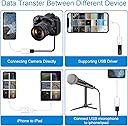
The WORLDBOYU Lightning to USB Camera Adapter is a compact, plug-and-play OTG cable designed for seamless connection between iPhone/iPad and USB peripherals like cameras, card readers, flash drives, and MIDI keyboards. Supporting iOS 9.2 through 18+, it enables fast USB 2.0 data transfer at 14-16MB/s without additional apps. Compatible with a wide range of Apple devices, it empowers professionals to effortlessly import/export multimedia and documents on the go, backed by an 18-month warranty for peace of mind.


| ASIN | B08R63KFP3 |
| Best Sellers Rank | #8,742 in Cell Phones & Accessories ( See Top 100 in Cell Phones & Accessories ) #47 in Cell Phone OTG Adapters |
| Brand | WORLDBOYU |
| Color | USB |
| Compatible Devices | iPhone, iPad, iPod touch, Digital Camera |
| Connector Type | Lightning |
| Current Rating | 1 Amps |
| Customer Reviews | 4.3 out of 5 stars 2,884 Reviews |
| Finish | Otg |
| Finish Type | Otg |
| Item Weight | 4.54 g |
| Manufacturer | WORLDBOYU |
| Mfr Part Number | Lightning to USB Camera |
| Model Number | Lightning to USB Camera |
| Number of Items | 1 |
| Number of Ports | 1 |
| Package Quantity | 1 |
| Power Plug Type | No Plug |
| Smart Home Compatibility | Not Smart Home Compatible |
| Specific Uses For Product | Camera |
| UPC | 742221132893 |
| Unit Count | 1.0 Count |
| Warranty Type | Limited |
L**T
Works PERFECTLY with a USB flash drive and a variety of files using an iPad, excellent price!
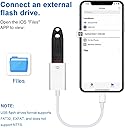
I bought this cable because my MacBook Pro is outdated and I can no longer email anything to get it onto another device! I have a newer iPad that I’ve been using, but I wanted a file from my old MacBook Pro and I used this Lightening to USB Camera Adapter to transfer the file over to my iPad and it worked! FYI I have an iPad 9th generation running OS 26.2. It is easy to use, compatible, portable, and has good connectivity that doesn’t drop off. I left the adapter plugged into my iPad for about an hour, and it never stopped working (the files were always visible when I tried to access them). When I was saving files, the process was quick with no problems. The price is excellent! For interested customers, I experimented and was able to import a pdf file, jpegs (photos), and a Pages document from a USB flash drive (the files were from my old MacBook Pro). I opened the Files App on the iPad and clicked on a rectangular icon next to “Recents” at the top of the screen. The name of my flash drive came up on the left side of the screen under “Locations” and then I opened the flash drive, selected the file I wanted to transfer to my iPad, and saved it to the Files App. I unplugged the Lightening to USB adapter and the files were all there! The trouble I had was figuring out HOW to do this on an iPad, so I looked it up online and found step by step directions. All the files could be opened and viewed on my iPad, and the Pages document looked the same (space between paragraphs, length, etc.) I was also able to reverse the process and copy a file from my iPad to the USB flash drive. This also worked perfectly. This Lightening to USB camera adapter is PERFECT for file saving to and from an iPad with a USB flash drive (and mine is an older, unknown brand). Highly recommend if you are using a flash drive!
J**S
Simple way to transfer files fast
This adapter is very convenient for transferring photos, videos, or files directly from a camera or USB device to your iPhone or iPad. It connects quickly and usually works without complicated setup, which makes it useful for both casual and more serious content workflows. The transfer speed is decent, and it helps streamline editing or uploading content on the go. It’s especially useful for photographers or creators who need quick access to files without a laptop. Overall, it’s a simple but effective tool for expanding device functionality.
B**Z
Reliable Adapter for Microphone Use
I ordered this Lightning to USB adapter to connect my Fifine AM8 microphone to my iPhone XR, and it worked exactly as advertised. The adapter is compatible with my old device and was super easy and hassle-free to set up. I also like that it’s a quality adapter, well-made with a durable-looking cable.
L**B
Works for most mass storage
While it works for many USB flash drives, some larger and SSD based USB mass storage drives could not get enough power to turn on. Best luck I has was with Microcenter 32/64/128/256 USB drives formatted in APFS. Will NOT work with mechanical drives, period. And remember that Lightning is limited to USB 2.0 so wait for the flash drive to stop blinking or the files to show proper data size before you unplug the drive.
M**T
Perfect to Connect my USB Headset to my Phone
My Phone (Samsung Galaxy) does not have a standard 3.5 MM headphone jack and I needed a way to connect a headset for voice and audio. I came across this simple device and it worked perfectly for my USB headset. At first I was concerned that it might only work when plugged into a computer, however voice and audio work perfectly with my phone using this connector. This is a very straightforward device, on one end it has the USB-C connector and on the other, a standard FEMAIL USB port. Assuming the transmitting device (My phone) and the receiving device (My headset) have the right connections, you this should work great for you!
F**O
Was able to connect iPhone to Logitech G733 gaming headset.
Easy to use, good quality, picture quality and speed. I needed to use the usb port to connect to an adapter for a gaming headset the LogitechG733 to be able to connect to her iPhone. It worked. So I’m happy with it.
D**.
A+ Seller experience
Fast shipping and the product came in as advertised.
P**N
Works well for basic file transfers and connecting accessories
I grabbed this adapter mainly to transfer photos and videos from my camera to my iPhone, and it does the job exactly like it should. Just plug it in, connect your device, and the Files app pops up automatically to import or move files. I’ve also used it to connect a flash drive and even a basic MIDI keyboard — no issues with recognition as long as the accessory doesn’t need too much power. One thing to keep in mind: if you’re trying to use a high-power device (like a big external hard drive), you’ll probably need a powered hub. But for cameras, flash drives, keyboards, or card readers, it’s been reliable. Good little adapter to have around if you need quick, direct connections without dealing with cloud uploads.
A**F
الجودة والاداء
يعمل بشكل ممتاز
V**T
Works as expected
I tried with a musical keyboard, usb mic connected to an iPhone - it works well.
D**E
Très satisfait de ce produit.
Connections facile et aucune coupure. Qualité prix incroyable
A**R
Útil
Si necesitas pasar archivos o fotos de iOS a una usb es ideal.
Y**I
Item doesnt work at all. Dont waste time and money
I received the product and when i used it with my iphone 12 pro max, 13 pro max and 14 pro max, it doesnt work as well with any of them. Even tried with 2 ipads as well which we have, still it doesn’t work. Dont waste time and money on this.
Trustpilot
4 days ago
3 days ago