Buy anything from 5,000+ international stores. One checkout price. No surprise fees. Join 2M+ shoppers on Desertcart.
Desertcart purchases this item on your behalf and handles shipping, customs, and support to Peru.
โก Power your smart workspace with effortless control and speed!
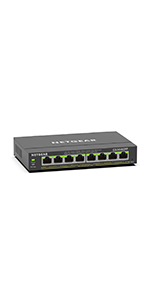
The NETGEAR GS308EP is an 8-port Gigabit Ethernet PoE+ Smart Managed Plus Switch offering a robust 62W power budget to support multiple PoE devices. Designed for easy setup and management via its user-friendly software, it supports flexible desktop or wall mounting and delivers reliable, high-speed network performance backed by a 3-year limited warranty.


| ASIN | B08MBFLMDC |
| Best Sellers Rank | #4 in Computer Networking Switches |
| Brand | NETGEAR |
| Built-In Media | 8-port Gigabit Ethernet PoE+ Smart Managed Plus Switch (GS308EP), 2V, 0. |
| Case Material Type | Plastic |
| Color | Black |
| Compatible Devices | Computers, IP cameras, VoIP phones, network devices |
| Customer Reviews | 4.7 out of 5 stars 939 Reviews |
| Data Transfer Rate | 16 Gigabits Per Second |
| Interface | RJ45 |
| Item Dimensions L x W x H | 10.2"L x 10.2"W x 2.2"H |
| Item Weight | 1.1 Kilograms |
| Manufacturer | NETGEAR |
| Maximum Power | 62 Watts |
| Mfr Part Number | GS308EP-100NAS |
| Model Number | GS308EP-100NAS |
| Number of Layers | 1 |
| Number of Ports | 8 |
| Platform | Not Machine Specific |
| Product Dimensions | 10.2"L x 10.2"W x 2.2"H |
| Switch Type | PoE Managed Desktop/Wall Mount |
| UPC | 606449153026 |
| Unit Count | 1 Count |
| Upper Temperature Rating | 123 Degrees Fahrenheit |
| Voltage | 2 Volts |
| Warranty Description | Limited 3-year |
M**R
Reliable plug-and-play PoE switch, no issues after months of use
Iโve been using this switch for several months now, and itโs been completely reliable. Setup was as simple as it gets. Plug it in, connect devices, and it just works. No configuration needed, which is exactly what I was looking for. Iโm using it to power and connect multiple devices over PoE, and it has handled everything without any drops or instability. Once itโs up, you donโt have to think about it, which is what you want from a switch. Build quality feels solid, and it runs without any noticeable issues during normal use. Pros True plug-and-play setup Reliable over several months of continuous use Handles PoE devices without issues Stable connection with no dropouts Cons No advanced management features (expected for this type of switch) Bottom Line If you need a simple, reliable PoE switch that just works without setup, this is a solid choice.
J**.
Reliable Power and Control in One Compact Switch
Iโve been using the NETGEAR GS308EP in my network setup, and itโs been a solid, no-nonsense upgrade. I needed something compact that could handle both connectivity and power for devices like access points and cameras, and this switch delivered exactly that. PoE That Just Works Having 8 PoE+ ports with a 62W budget has been incredibly convenient. Iโm able to power multiple devices directly through the switch without needing extra adapters, which keeps my setup cleaner and more efficient. Smart Features Without the Headache What I really appreciate is the โEasy Smart Managedโ functionality. It gives me just enough controlโlike VLANs and traffic prioritizationโwithout being overly complicated. I didnโt have to spend hours configuring it, which is a huge plus. Compact and Flexible Design The size is perfect for a desk or wall mount, and it feels well-built. It runs quietly and doesnโt take up much space, which is ideal for a home lab or small office environment. Perfect for Home Labs and Small Networks Overall, this switch hits a great balance between simplicity and capability. Itโs reliable, easy to use, and does exactly what I need without overcomplicating things.
R**T
Itโs a good Poe switch
I use with my ip cameras and access point. Hasnโt failed me yet and is easy to configure.
P**R
Works great and easy to use
Worked great to power my Unifi wireless access point. Used it to not only connect that device, but also to connect my wired home network to my router. Have it connected inside my networking box in my utility room. Nothing to setup. Just plug in the devices. There are specific ports to use for powered devices, but the instructions state that. This is one device where you want to read the instructions in my opinion.
M**S
Great Product
This is an amazing little smart switch with good features. I would suggest this switch for beginners in networking trying to learn and also those more seasoned who needs a small switch with smart capabilities and POE
C**R
It works!
It works great right out of the box no noise great value for the money perfect size
T**G
Awesome product with easy installation
Works flawlessly. Super easy install with plug and play (and forget it) installation. Speeds are more than adequate for networked POE security cameras.
R**.
NETGEAR is build with TRUST in mind
I read many, many reviews here on Amazon and the web about sending power through RJ45 to BNC cameras ( I don't have IP cameras yet ), so I started with the NETGEAR 8 Port PoE Gigabit Ethernet Easy Smart Managed Essentials Switch (GS308EP) - with 8 x PoE+ @ 62W ( ASIN B08MBFLMDC ) since I only have 4 cameras and 1 camera is PTZ ( when I get IP cameras I am already set to manage the power, QoS, VLAN, etc with the switch ). I purchased 5 pairs Passive PoE Injector and PoE Splitter Kit with 5.5x2.1 mm DC Connector RJ45 Power Over Ethernet. I have a NETGEAR GS308 5 port switch which will provide communication to the GS308EP switch so I can access the admin page. With all that and reading the reviews, unfortunately I could not get it to work. No power being sent to the cameras and the question of WHY. I continued researching the WHY until I found from NETGEAR that in order for the GS308EP switch to communicate and be able to manage the power to the cameras the splitters had to be 802.3af/at compliant, if not the baluns WILL NOT work, and that I needed ACTIVE baluns, NOT passive like the first 5 pairs I purchased. I did find and watched a video "How to Install AHD CCTV Cameras using POE switch as Power Source" that helped me understand about the active baluns. I then purchased a 4-Pack Active PoE to 2.1mm DC - IEEE 802.3af/at compliant. I could not be more happier when I received the ACTIVE baluns and connected them cause everything was set, I was just waiting on the ACTIVE baluns. The ACTIVE baluns are the ones that worked for me with the setup mentioned above and I hope it helps other people out there that have basic knowledge, because there is no single page on the internet that provides you a solution, you have to dig and read many, many pages to do trial and error until it works. I love Netgear products and still have ( of course not connected ) a Netgear Internet Gateway Router with a built-in 4-port 10/100 Mbps Ethernet switch model RT314. Netgear is build with TRUST in mind. Thanks
C**E
Switch nach einem Jahr tot
Switch ist nicht mal 1 Jahr alt und schon defekt
E**R
Excelente
Fรกcil de administrar, interfaz amigable.
M**N
Great product
Work perfectly
I**O
VLAN function work well
I bought this switch to setup VLAN that is part of my home network upgrading. For the VLAN function, it works well. But for POE, I have not yet tested as UniFi AP out of stock. BTW, I does not like the new interface for WebGUI. It has less option. I still prefer the old Web GUI.
G**Y
Good item
Good price and does its job without issue so far.
Trustpilot
5 days ago
2 months ago