


Desertcart purchases this item on your behalf and handles shipping, customs, and support to Peru.
โ๏ธ Own your data, own your cloud โ the future of home storage is here!
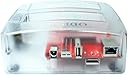
The HARDKERNEL ODROID HC4 is a powerful home-cloud server featuring a quad-core ARM Cortex CPU, 4GB DDR4 RAM, and support for two SATA drives. It offers versatile connectivity with HDMI 2.0, USB 2.0, and a 1GbE port, plus a built-in SPI flash chip for advanced boot options. Designed for professionals seeking customizable, high-performance personal cloud storage in a sleek transparent case. Note: power supply sold separately.
| Additional Features | SPI flash chip for Petitboot feature |
| Asin | B08MVJJX19 |
| Aspect Ratio | 16:9 |
| Best Sellers Rank | #5,093 in Single Board Computers (Computers & Accessories) |
| Brand | HARDKERNEL |
| Built In Media | Main unit |
| Color | Black |
| Compatible Devices | Keyboard |
| Connectivity Technology | HDMI, USB |
| Cooling Method | Air |
| Customer Reviews | 4.6 4.6 out of 5 stars (13) 4.6 out of 5 stars |
| Display Resolution Maximum | 3840x2160 |
| Display Type | LCD |
| Graphics Card Interface | Integrated |
| Graphics Coprocessor | ARM Mali GPU |
| Graphics Description | Dedicated |
| Graphics Ram Type | VRAM |
| Hard Disk Interface | Serial ATA |
| Hardware Interface | USB |
| Human Interface Input | Buttons |
| Keyboard Description | Standard Wired Keyboard |
| Keyboard Layout | QWERTY |
| Manufacturer | Hardkernel |
| Memory Slots Available | 2 |
| Memory Storage Capacity | 4 GB |
| Model Name | ODROID HC4 |
| Model Number | HC4 |
| Model Year | 2020 |
| Native Resolution | 3840 x 2160 |
| Number Of Component Outputs | 1 |
| Operating System | Linux |
| Personal Computer Design Type | Computer Tower |
| Power Consumption | 60 watts |
| Processor Brand | ARM |
| Processor Count | 4 |
| Processor Series | Cortex |
| Ram Memory Installed | 4 GB |
| Ram Memory Maximum Size | 4 GB |
| Ram Memory Technology | DDR4 |
| Ram Type | DDR4 SDRAM |
| Resolution | 3840 x 2160 |
| Style Name | Standard |
| Total Number Of Hdmi Ports | 1 |
| Total Usb Ports | 1 |
| Upc | 760488879399 |
| Video Output | HDMI |
| Video Output Interface | HDMI |
| Video Processor | arm |
| Wireless Compability | 802.11ax |
| Wireless Network Technology | Wi-Fi |
| Wireless Technology | Wi-Fi |
User
Great little device. Just a tip to watch out for though
This thing was awesome! Ran openmediavault on it, reliable, quiet, ran smooth and at great temps, and surprisingly performed better than I expected. Itโs clearly designed for one purpose - NAS. Donโt be expecting to run multiple containers with top performance.Unfortunately, it suffered a mobo failure a month in to me having it, but I donโt believe that to be the designs fault. Rather, it wasnโt on a surge protector, and it was plugged into a PoE switch, said it wasnโt supplying it power, but Im sure that may of influenced it. Donโt spend 600+ on a Synology for storage, you got a beautifully capable device here that can do it.Oh, one last thing, the 3.5 disks fit relatively snug. The 2.5s are flimsily held, SSDs are recommended in that case because they latch much better and are less sensitive to vibrational trauma.EDIT:Bought another one shortly after this, been running smooth (6+ months) no signs of faultyness now that I have it plugged into to a proper surge protected outlet.
User
Perfect for NAS solution
Using this to run Open Media Vault. Works like a champ
User
Works, but has issues...
Update:After a month online the board has performed its function with no issues. However, when the board is powered off for any reason it is unable to continue to track date and time due to its lack of a CMOS battery. This is an important issue, since having an inaccurate date/time stamp on data files when restarted could lead to newly edited files being dated earlier than their predecessors and lead to possible corruption of the files Clearly, unlike a desktop or laptop PC, the board is simply designed to be powered up constantly, day or night, rain or shine. If you ever shut it down, be certain you manually reset date and time after restart.Original post:I bought this board specifically to run Open Media Vault based on its great reviews. It's basically designed to run headless and is a good board for the purpose, but it's not perfect. Given it's special purpose build, it's good for a NAS application but lacks features to support most other purposes.Pros:* The SATA III drive interface is far faster than Raspberry Pi units that depend on USB for external drives and probably makes it the best available board for NAS applications.* Memory is included on the board, unlike some other single board computer designs.* It's very fast running OMV.Cons:* The "toaster" case is an awkward design. The slots fit fine for full sized HDD's, but more modern 2 1/2 inch drives just more or less balance precariously in the full sized slots. There's an enormous amount of sloppy wiggle room if the smaller drives are used, which could lead to destroying the drive or board's SATA connection. The case design might be great for drives that are frequently removed, but for its purpose as a server with permanently installed drives it makes no sense.* The board will not wake up if put to sleep using standard linux commands, either from inside OMV or from root. The Hardkernal website specifically says this board supports this function, but sleep commands using wake up parameters all fail to wake the machine; systemctl, systemd, rtcwakeup, pm-suspend, etc., etc., using standby, suspend, mem, hibernate, etc., etc., all universally shut the unit completely off and it will not awake when scheduled. The only way to resume is to remove power from the board and let it reboot. This is a major annoyance when your operating strategy is to have the unit powered down on a scheduled basis.* It only has a single USB port, which means that any root configuration that requires a mouse must have the mouse function integrated into the keyboard, either through a keyboard touchpad or a keyboard USB port the mouse can plug into.Note that the board comes with only enough operating system installed to get it to boot. Be prepared to find and install your linux distro of choice. Also note that OMV only works with Debian Buster as of this writing.To resolve the flimsy drive mount issue, I removed the board from the case and mounted it on a piece of ABS plastic. I connected the drives with SATA connection extension adapters and mounted the power supply on a "hat" on top. This is totally silent and works great for me.https://www.amazon.com/dp/B00NURHUSU?psc=1&ref=ppx_yo2_dt_b_product_detailsThe long term reliability of this board is unknown at this point. It may be perfectly fine for your app if you don't intend to use any of the features in the Con list above. I was specifically looking for those features, so their failure is a disappointment to me. Based on this, I don't know if I would buy it again.
User
Great little server for a homelab
I'm using this as a combination k3s master node and a moosefs chunkserver.The ARM CPU has nice low power consumption and is fanless, but beefy enough to run docker and/or kubernetes so it's a good choice if you need something for a home lab where you don't want high power consumption or noise levels.
User
Like this device
Seems well designed NAS/Home backup server!!!- I'm using Slackware ARM / AArch64 Linux Project- low power / able to load and host borgbackup.
Trustpilot
1 month ago
1 month ago