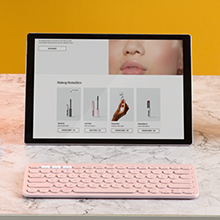
⌨️ Elevate your workflow—type smarter, switch faster, and stay connected everywhere!
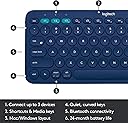
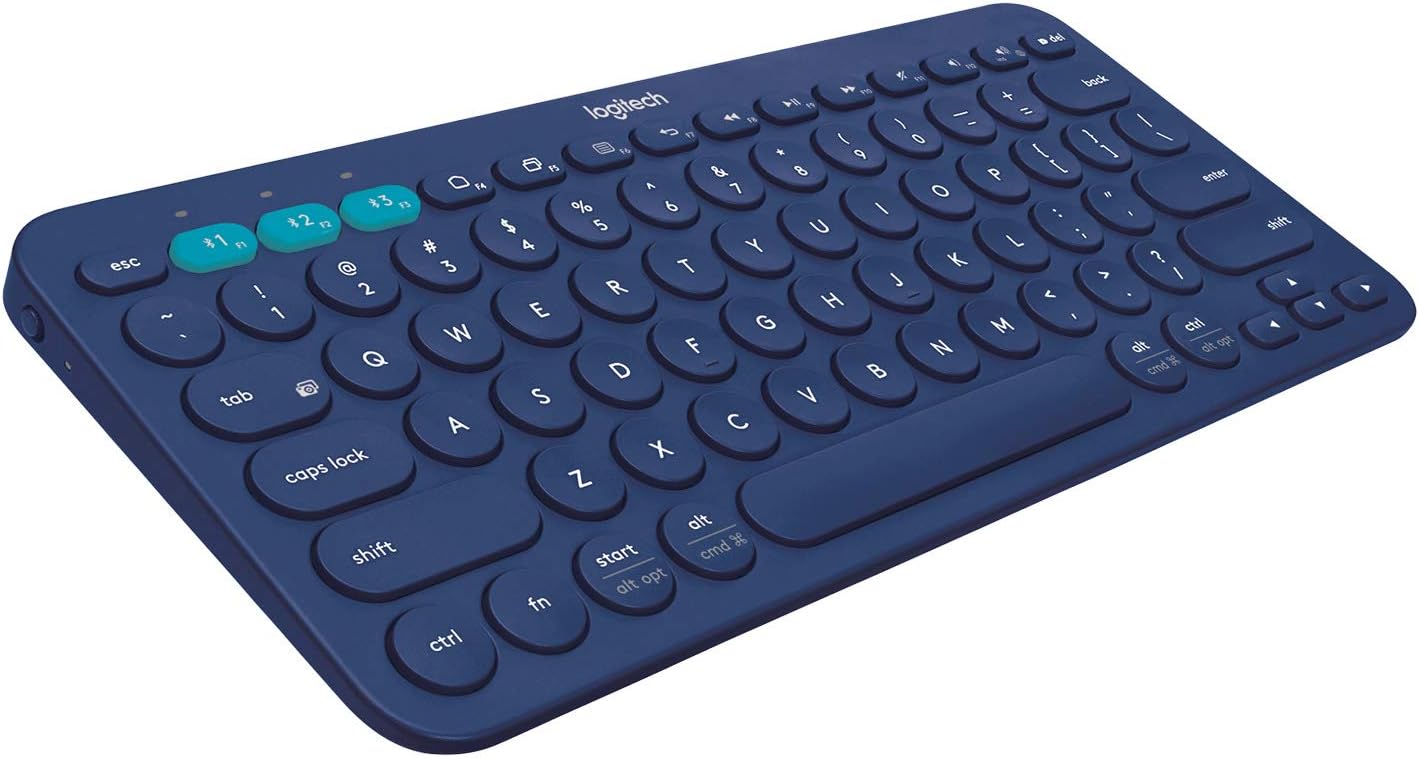
The Logitech K380 is a compact, Bluetooth wireless keyboard designed for professionals juggling multiple devices. It supports simultaneous pairing with up to three devices, offers an impressive 2-year battery life, and delivers a premium typing experience with quiet, ergonomic keys. Compatible across all major platforms, its lightweight design makes it the perfect productivity companion for the modern multitasker.


| ASIN | B0779R9GB1 |
| Antenna Location | Office |
| Best Sellers Rank | #56,260 in Computers & Accessories ( See Top 100 in Computers & Accessories ) #494 in Keyboards |
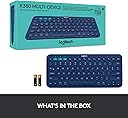
| Box Contents | Keyboard 2 AAA batteries (pre-installed) User documentation |
| Brand | Logitech |
| Brand Name | Logitech |
| Button Quantity | 80 |
| Colour | Blue |
| Compatible Devices | PC/Mac/Laptop/Smartphone/Tablet |
| Connectivity Technology | Bluetooth |
| Customer Reviews | 4.4 out of 5 stars 20,802 Reviews |
| Enclosure Material | chrome |
| Hand Orientation | Ambidextrous |
| Importer Contact Information | Rashi Peripherals Pvt Ltd, Rashi Complex, Survey 186, Dongari Pada, Poman, Vasai (E) Thane, Maharashtra -401208, Registered Address - Rashi Peripherals Pvt Ltd, Aristo House, 5th Floor, Corner of Telli Galli, Andheri (E), Mumbai 400069, India |
| Item Dimensions L x W x H | 27.9L x 12.4W x 1.6H Centimeters |
| Item Type Name | Keyboard |
| Item Weight Unit of Measure | 423 Grams |
| Keyboard Description | Multimedia |
| Keyboard Layout | QWERTY |
| Manufacturer | Logitech, Logitech Asia Pacific Ltd, Unit no. 1003, Tower 1, Cheung Sha Wan Plaza, Cheung Sha Wan Road, Kowloon, Hong Kong. |
| Manufacturer Contact Information | Logitech Asia Pacific Ltd, Unit no. 1003, Tower 1, Cheung Sha Wan Plaza, Cheung Sha Wan Road, Kowloon, Hong Kong. |
| Model Name | K380 |
| Model Number | 920-007597 |
| Number of Keys | 104 |
| Packer Contact Information | Logitech Asia Pacific Ltd, Unit no. 1003, Tower 1, Cheung Sha Wan Plaza, Cheung Sha Wan Road, Kowloon, Hong Kong. |
| Power Source | Battery Powered |
| Product Features | Hotkeys and Media Keys, Bluetooth, Lightweight, Low-Profile Key, Wireless |
| Recommended Uses For Product | Office |
| Special Feature | Hotkeys and Media Keys, Bluetooth, Lightweight, Low-Profile Key, Wireless |
| Style Name | K380, Blue |
| Switch Type | Clicky |
| UPC | 097855117724 |
| Unit Count | 1 Ounce |
| Warranty Description | 1 year limited hardware warranty |
S**R
Keyboard build quality is excellent but be aware if you have big hands
I am bound to write this review as I usually look out for user comments and feedback before buying myself. I have been using this keyboard for almost two months. Here are few points that might help you: Pros: 1. Superb build quality - Looks and feels study. Has a lot of weight so it does not wiggle while typing fast. 2. Connectivity: Easily connected to my laptop, phone and tablet. I can easily switch between devices with single button 3. Feels good while typing - The buttons are not as good as on a MacBook or Latitude, but does decent job. You might feel a little discomfort before getting used to it Cons: 1. For me the biggest con is the size of this keyboard. I knew that it is supposed to be compact, but it turned out to be too small fory giant hands. (See the picture) 2. If you have big hands (as said above) - Its really difficult to type smoothly as you will surely press other nearby keys. 3. Square is always better than round - I have always used keyboards (external or laptop) with Square keys. It takes much more time to make the switch. I could not get comfortable with round keys even after two months. 4. Keys which you use a lot - I like to use keys like Home, End, switch between monitors etc. (which are always part of a normal keyboard and not on the compact ones). These are not present or do not really show up. Final verdict - Good keyboard with study build quality - But not for someone with big hands!!
A**T
Brilliant keyboard. Beautiful work from Logitech.
This replaced a 10 years old Apple Wireless Keyboard and the transition has been super smooth and lovely. The keyboard feels very well-weighted - neither too light and not at all heavy. The four non-slip thin bushes at the corners are gripping the table beautifully - the keyboard won’t slide around at all. Next - the typing feel - BEAUTIFUL and butter smooth. Keystrokes are super quiet, like they are damped or something. The key travel is pleasurable and very comfortable. There is enough feedback from the keys and they are not stubborn when pressed nor are they too light or too springy - great calibration. There is a comfortable slant built into the shape of the keyboard without the need for foldable legs. The circular keys are well-sized and spaced. The keys have a very slight inward dip which I believe is contributing heavily to the typing comfort and joy. The major reasons to pick K380 over K480 (older, slightly less expensive) were the smaller size, lesser weight and overall better design for my liking. And also the fact that even though the K480 has the dock/slot to keep tablets or phones, which is indeed a smart feature, most tablets will be used with protective covers which may not fit into that slot and also most covers or cases support magnetic or other “standing” features anyways. Connectivity - easy, straightforward Bluetooth pairing. Can “remember” 3 devices at any given time (can be “connected” to only 1 device at a time though) and can switch between them instantly with the press of the dedicated three coloured keys at the top. The switching is implemented beautifully - takes only 1 second and maybe a few milliseconds to switch between the paired devices. There are tiny indicator lights above the three bluetooth device switching keys which light up for a few seconds when connected to a device and as a nice touch, they go out with a fade-out/theatre dimming effect! Little details. Design - it’s sleek and beautiful. Perfect blend of playful and serious. Dark Grey colour looks very good. It’s almost the same size as the Apple Wireless Keyboard. 1 thing to note - when connected to MacBook Pro, you don’t get to adjust screen brightness using the keyboard as those keys are marked for Bluetooth device switching. But you can adjust volume, music controls and mission control from the keyboard just like on Apple keyboard. This is not at all a major issue. The physical on off slide switch is good. Auto sleep/power off feature avoids the need to use the on off switch daily. Overall, thoroughly satisfied and even delighted with the keyboard. Grateful for Logitech to be making excellent products at great value price points. Using an external keyboard and mouse, along with a raised stand for the laptop can VASTLY improve the experience of regularly working on laptops without the need to think of desktops. Best of all worlds.
M**N
Smooth keyboard, portable and premium
I generally use a full mechanical keyboard at home with my desktop type environment and it is pretty good, but then I need a second keyboard if I wanted to work in cafe or office and need to elevate my laptop with portable stand. So here are the pros. 1) Thin profile, it remains close to the ground, so you don't need a wrist support to work on it. 2) Heavy enough to provide you a grip on the table and don't skid off. 3) Key's has good amount of travel; I am coming from a mechanical keyboard, and it still look like at home. 4) Can connect to 3 machines, with a touch of a button, so my tab, home laptop and office laptop are covered. 5) It has useful keys for android/mac operations as you might not always need the function keys, in android they act as a direct shortcut for many operations Cons 1) There is no inbuilt way to reverse function key role, you have to use logitech app, which is blocked on most of office pc as it is effectively a keylogger, so please check out if you are able to install logi option plus app on your office pc before making a purchase. 2) No mouse pad, which is really not a con but a trade-off to get a workable said good keyboard. 3) I think Bluetooth keyboards have small keys which are not really useful for gaming. Bluetooth does not provide best of the latency. 4) I faced a pairing issue once because my razor Bluetooth mouse of turned on nearby and till it was on my PC was not able to pair with it. Overall, it has been 3 days and it is a good experience by now.
S**R
Super cute and performs very well.
This is viral everywhere for a reason! Looks very minimal and aesthetically pleasing. Perfect for typing but not very sure about gaming because I don’t personally game a lot. Comes with the batteries. I love the feature to switch between interfaces instantly. Very compact and portable. It’s not too heavy and doesn’t feels cheap. You get the experience of typing on a laptop keyboard. Works on both macOS and windows. Overall the best Bluetooth keyboard you can find.
H**E
Great keyboard for students!! And coders!!
This keyboard is good for its built quality, at first it took me a week to get used to the round keys but now, I am used to it. The keyboard is compact, sturdy and sleek, also the multi device connecting feature is awesome and connects upto 3 devices simultaneously with 0 lag/ latency. Its good for people like me who type a lot everyday, if you are same as me then just go for it... And about the battery life, as per my experience its still at 100% from about a month ago.. and company claims that it lasts atleast 2 years so yeah is pretty great.. also u can just swipe the batteries provided in the box with other batteries such as duracell© that should last u a long time. I was confused between the k380 and k480, but the k480 is half a kilo!! And I can't handle that much weight while traveling... Also there's a risk or damage from falling down if its heavy... Overall just go for it, its a good keyboard!! If u wanna know more dm me on insta its._.harshvardhan
V**A
Perfect companion for Macbook Air
This is an amazing keyboard. I had recently got a 4k Monitor for my Macbook Air 2015. It supports is quite well in the clamshell mode (when the native LCD screen of the macbook air is turned off and only 4k display is being driven via Displayport)... However to work in clamshell mode, we need an external mouse and keyboard. I tried the wired alternatives and the wireless ones with dongles and they take up all the available ports. I cannot connect my audio interface if all USB ports are occupied just for mouse and keyboard. So I decided to get this keyboard and Logotech M557 mouse. This is an amazingly well built mouse. It weighs a respectable 500grams (feels well built from the inside but the outer shell is plastic). Pros: 1. The key travel is better than the keyboard on macbook air. 2. The keys have stronger feedback and weight to them. 3. Keys are almost the same size as the Macbook Air. 4. You can wake Macbook Air with this keyboard or the mouse. 5. All function shortcuts work perfectly, media buttons, volume, app expose etc. 6. There's absolutely no lag in the keystrokes and my typing speed seems to have improved (Attached image). My average speed used to be 75 to 80. With this keyboard, it's gone up above 80. Loving this keyboard and the feedback on key strokes. 7. Easy pairing. Cons: 1. It could've been a little wider. 2. Could've been made of metal (But that's just whishful thinking). For the price of 1600. I believe it's a very good investment in keyboard. 3. The arrow keys could've been bigger (but we don't use those as often). 4. Caps lock could've had led indicator. 5. Missing Home, Pageup, Page down keys (But they're also missing on Macbook air's keyboard) Overall, it's an excellent purchase for 1600. I saw that this was being sold a year or 2 ago for around 1200, I could've bought it then, but even at 1600 I think it's worth the price. Perfect swiss quality from logitech. Update: 24/3/2018 My highest achieved speed on this keyboard is 121 wpm. (refer to screenshot). I can't believe that this bluetooth keyboard can compete with some of the best wireless mechanical keyboards out there.
A**A
Logitech Keyboard: Simple and Better
If you are a user of the OnePlus pad, I would highly recommend considering this Logitech keyboard instead of waiting for the magnetic keyboard offered by OnePlus. I've been checking OnePlus's website almost daily, and it always showed the magnetic keyboard as out of stock. Instead of spending 7k on the OnePlus magnetic keyboard, you can get a similar typing experience with the Logitech keyboard at half the price. It's a cost-effective alternative that doesn't compromise on performance. I recently purchased the Logitech keyboard based on a recommendation, and I must say it has exceeded my expectations in every way. The keyboard's design is sleek and minimalistic, blending seamlessly with my workspace. One of the standout features of this keyboard is its fantastic tactile feel. The keys offer just the right amount of resistance, providing a satisfying and responsive typing experience. I found myself effortlessly gliding across the keys, resulting in improved accuracy and speed. In terms of value for money, the Logitech keyboard truly shines. It offers a premium typing experience at a fraction of the cost compared to other high-end keyboards on the market. I am genuinely impressed with the quality and performance this keyboard delivers
F**N
A Robust, High-Quality, Ergonomic Keyboard.
I bought this in combination with a Logitech Pebble M350 Bluetooth Mouse for the sole purpose of using it with my iPad. It has made my tasks easier and with recent iPadOS updates, there are tons of shortcuts that make iPad experience more productive. Since I was going for a retro-looking device, I chose Sand color. Makes me nostalgic about the old school computer devices that had similar finish. Connectivity is fast. You just switch it on and it's connected to your primary device in a matter of seconds, even less. They keys are not silent but at the same time not loud enough to disturb your environment. You can connect upto 3 devices and switch between them seamlessly with the push of a button. I'm also using the setup for gaming. Will maybe update later about that experience. Final Comments: Ergonomic, economic, portable and lovely! Recommend buy for all who need to get work done fast.
Trustpilot
2 weeks ago
1 month ago