Desertcart purchases this item on your behalf and handles shipping, customs, and support to Peru.
🔌 Power, speed, and clarity—your ultimate USB-C hub for the modern pro.
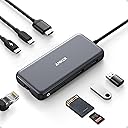
The Anker 8-in-1 USB-C Hub delivers ultra-high-definition 4K@60Hz HDMI output, 85W pass-through charging, and ultra-fast 10Gbps data transfer across multiple USB-C and USB-A ports. With Ethernet and SD card support, it’s a compact powerhouse designed for seamless connectivity with MacBook, Windows, and ChromeOS laptops, perfect for professionals demanding speed, versatility, and reliability in one sleek device.


| ASIN | B087QZVQJX |
| Additional Features | Fast Data Transfer, HDMI™️, Heat Resistant, Portable, Powered |
| Best Sellers Rank | #13 in USB Hubs |
| Brand | Anker |
| Color | Gray |
| Compatible Devices | Laptops, Macbook Air, Smartphones, Tablets |
| Customer Reviews | 4.3 out of 5 stars 9,471 Reviews |
| Data Transfer Rate | 10 gigabits_per_second |
| Enclosure Material | Aluminum |
| Hardware Interface | Ethernet , HDMI , MicroSD, USB, USB Type C |
| Item Dimensions L x W x H | 4.76"L x 2.17"W x 0.6"H |
| Item Weight | 4.48 ounces |
| Manufacturer | Anker |
| Mfr Part Number | A83830A1 |
| Minimum Required Operating System Version | Mac OS 12 Monterey |
| Model Number | A83830A1 |
| Number of Items | 1 |
| Number of Packs | 1 |
| Number of Ports | 8 |
| Operating System | iPadOS |
| Special Feature | Fast Data Transfer, HDMI™️, Heat Resistant, Portable, Powered |
| Total USB Ports | 3 |
| Total Usb Ports | 3 |
| UPC | 194644032999 |
| Unit Count | 1 Count |
| Warranty Description | 18 months |
A**N
Great 10gbps USB-C Hub, worked with Anker support through compat issues with PD4 iteration 1
Original Review (updates below): ----- The moment I noticed this thing on Amazon, I bought it and it literally just arrived. Finally, 4K60 over just USB-C with other ports (including making up to 10Gbps available to them) for a reasonable price. Unfortunately, the first two things I've done with it were both disappointing. I'll cut to the chase, the power delivery pass through isn't working with one of their own chargers. The first device I tried connecting this with is my Anker PD4 with one USB-C cable as the only thing plugged into it so I can test the truly up to 100W (-15 for its own power) claims. I've tried connecting it with Apple's 2m USB-C charge cable (100w capable) and an equivalent CableMatters cable that also supports 100W. When plugged directly into my laptop, both of these cables immediately start charging it and show up as 100W power sources. When this Anker hub is plugged in and either of them is connected to the power delivery port on the side of it, the laptop does not charge (laptop is a 16" Macbook Pro, I've tried multiple ports just for the heck of it). My second complaint is that when absolutely nothing is plugged into it, it becomes fairly warm to the touch. Why, when it's doing nothing, is it hot? I'm clearly not running data or even power through it so I have low hopes for it under load. The fact that it doesn't work in exactly the scenario they want it to most (a MacBook Pro with one of their own chargers) seems like a pretty big fail. I've got lots of USB-C things though so I thought I'd grab a couple and try those. Using an Apple 96W USB-C charger, the device does pass through power delivery properly. It shows up as providing 79W to the laptop (siphoning off 17W in this instance). I also have a 56W Aukey charger that splits power between a USB-A port and a USB-C port that can provide 45W of power delivery. When plugged into that charger it does appear to work as well and appears in macOS as a 30W power source. Maybe the problem is the Anker PD4? But it works fine providing power to the laptop directly. Would love to hear from Anker about these two products working together and what I should actually expect. Having it be unreliable for power delivery isn't great, but power and heat aside (it is getting a little bit warmer now that it's providing power from the Apple power adapter, but still definitely holdable), the hardware looks and feels good and the cable feels durable. Worth also noting that there's a white LED ring on the side of it that appears to be always on when it's plugged in. Don't know why it needs an LED. ----- Update, June 22, 2020: I've done some more testing and Anker has reached out to me to investigate what might be the issue. I can say that the hub works as I would expect from a quick test with my iPad Pro 11" with the above functioning chargers. It was able to pass through power with the 96W Apple Charger on the other end to both the iPad port as well as a Magic Keyboard port. The ethernet adapter showed up in iOS settings and an external drive was functional. When connected via the Magic Keyboard, which is a power only connection, as expected it provided only power. Still no power passthrough of any kind when connected to the PD4. ----- Update July 1, 2020: I've written back and forth with Anker and they've sent me a replacement hub. It also doesn't work with the PD4. I've tried multiple USB-C cables but they have also shipped a cable to test with it. For now I'm increasing the review from 2 to 3 stars because I am more and more suspicious about the PD4 and less about this hub. They claim that they have tested the setup I have separately without issue, and I've sent video showing the problems I've encountered, so the troubleshooting is ongoing. Have had a chance to use Ethernet on it without issue. Still need to try to test out its throughput when trying to use a 10Gbps USB-C enclosure and a 4K60 monitor at the same time (+ ethernet). More updates to come. ----- Update July 10, 2020: I've continued to talk with Anker support and they shipped me a replacement PD4. The one I had was labeled as "Iteration 1" on its barcode, the one I got back was labeled "Iteration 2". I tested it out and it works perfectly with this hub, passing through the correct amount of power to multiple Macbook Pros and fast charging an iPad Pro. Clearly the fault doesn't lie with this hub and is instead an issue with the first iteration PD4, so I'm updating my review accordingly. Working with Anker support was great. I've also been able to test USB-C throughput (without driving a display as well so far) and it properly utilizes 10Gbps. I've attached some extra images showing various devices connected to it (keyboard dongle, SD card, USB-C 10Gbps external SSD enclosure, USB sound card, ethernet).
T**Y
Good product, minor flaws
This port extender has the ports your MacBook Air needs, but it's bigger than you think. The cord is 6" which is 2" linger than you'd like. But it works well.
E**E
Like It, but it required additional equipment to charge iPad Air 4
I am exploring ways to make my iPad behave like a laptop, and with this little device, I am on my way. One of my primary concerns is that sometimes I have to troubleshoot routers at other people's homes. So I tried it out on my home. I found that I had to install an app from the manufacturer to make it work, then I had to reboot the router. Then, I got an amazing interface that was not the same as the interface on my laptop. It told me that I need a firmware update, but at this point, I am more comfortable doing the update on my laptop. One quirk I don't understand is that I plugged the PD port into my power cube, and the iPad told me it wasn't charging. That isn't good. I might have to return it and shop for a different brand. The newer Apple devices are awfully picky as to where they get their power from. Update: I found the email for Anker customer support, sent an email, and they got right back to me. Here is what they said: "Please first know: Due to the power input limitations of mobile devices, this hub can not provide pass-through charging to tablets (including iPad Pro/Air) or phones when using the original wall charger that came with your mobile device. To support full-speed charging for iPad Pro/Air, use an adapter that supports at least 15V (45W)." I found that the 3 foot power cord that Apple sent me is nowhere near long enough for charging while using the dock, so I sent away for a 45W charger and a 10 foot USB-C to USB-C charging cable that was compatible with iPad. Please be aware that Apple has circuitry embedded in the cord and you cannot use just any cord. The equipment I got was this: Charger https://smile.amazon.com/gp/product/B083BRKMJQ/ref=ppx_yo_dt_b_asin_title_o00_s00?ie=UTF8&psc=1 Cord https://smile.amazon.com/gp/product/B07LF1FNRV/ref=ppx_yo_dt_b_asin_title_o00_s00?ie=UTF8&psc=1 Cords are not rated in either volts or watts, so I sent another email to Anker asking if a 3 amp cable would work, and they told me that it should. Pay attention to the amperage when purchasing a cable to go with a high wattage charger. The cord that I purchased also comes in a 15 foot length. If this rig works, I will also purchase the 15 foot cord. The reason being that sometimes I need to do stuff in other people's houses, and I cannot count on a nearby outlet. I will update when the new equipment comes. Update: I installed a 45W charger with a USB-C TO USB-C cable that was advertised for iPads, and now my iPad is charging through the PD port, so that problem is taken care of. I sold the iPad and bought a 2019 MacBook Pro. The MacBook Pro has four Type C USB ports only, no others. I use one of the ports on the Mac for charging and another for the hub. I use the Type 3 USB ports on the hub for my mouse and graphic tablet. I like wired mice, because they use a wire for power, are more reliable, and do not generate dead batteries to pollute the environment. I wish the hub had an additional Type 2 or 3 USB port. Maybe I will buy an additional adapter, because I can't find a hub that sports the extra ports. I looked for a mouse that would plug into a USB C port, but did not find one to my taste. I like wired keyboards for the same reason I like wired mice. At any rate, all these wires that will not plug directly into my computer makes kind of a clutter, as depicted in my photo. Not much I can do about it at this stage of the game, however.
P**I
Convenient, but gets hot!
Pros Allows multiple devices (ext drives, keyboard) and Ethernet and HMDI cables to be plugged into one USB computer port (also has two card slots, SD and microSD) All devices can be disconnected from the laptop by pulling out one cable Can be powered either from the laptop, or from an external supply (not included) When powered from an external supply can provide power to the laptop Cons Gets very hot! This hub occupies one USB-C port on my new laptop, yet allows me to plug in two external hard drives and a keyboard. Most importantly, I can also plug in an Ethernet cable, to avoid the hassles (and security issues) of WiFi and take full advantage of my high-speed Internet connection. (I don't use the other features) In addition, I can route the power to the laptop through the same USB connection, potentially saving yet another USB port (while my MacBook has a separate power port, I can still use the USB for power). When I want to take my laptop somewhere (which is, after all, the whole point of a laptop!), I only need to unplug one thing. (Although I do have to remember to eject the external drives or I get a nagging reminder from the OS). The device gets very hot: I've measured 42C/108F with an IR thermometer. There is a warning label on the bottom saying that it may reach 122F (50C).This is disappointing: I got this unit as a replacement for another, similar unit from a different manufacturer that burned out on a hot summer day. (No, no flames and smoke, it just stopped working!) I got a small fan to cool the other unit on hot days (my room gets to 27C/81F). Now I'm concerned the same may happen to the Anker. I'll keep the fan on in the summer, I guess. The unit works as expected; I have gotten downloads from the Internet at speeds exceeding 600MB/s (probably limited by my ISP).
J**A
Excellent Quality and Reliable Performance from Anker’s 8-in-1 USB-C Hub
I’m really impressed with this Anker USB-C Hub with Ethernet (8-in-1). The build quality feels premium, setup was completely plug-and-play, and all ports work flawlessly with my laptop. The Ethernet connection is stable and fast, which has been perfect for work calls and large file transfers. I also love how compact and portable it is while still offering plenty of connectivity options. HDMI output looks great, USB ports transfer quickly, and the SD card reader is very convenient for photo and video work. Anker continues to deliver reliable products, and this hub is no exception. Highly recommended if you need a dependable all-in-one USB-C hub for productivity or travel.
S**T
Almost perfect, could use one more USB-C Gen 2 port and a metal case instead of plastic.
Never really had any problems with Anker gear, I've come to trust the brand name. This little hub is almost perfect for use with my 2019 MacBook Pro, but where Anker really dropped the ball is by not adding one more USB-C port. I mean, there's two, but if one is dedicated to power devices only that doesn't really leave much room for expansion by only giving you one extra, I mean they were thoughtful enough to give you two USB-A ports. I do like that the USB-C and two USB-A ports are version 3.2 Gen 2 rated for up to 10Gbps transfer speeds versus Gen 1 at 5Gbps. The plastic casing does get hot, not sure if aluminum metal would be any better, but it would feel nicer, plastic just feels cheap. Also, a dark case with dark letter printing doesn't work because you can't see the writing, should have used lighter letter coloring. Otherwise, solid performer. I'll keep it along with my other one because having two hubs with a laptop is convenient so I don't have to always haul a hub around from place to place. PROS: • 1 USB-C port version 3.2 Gen 2 rated up to 10Gbps. • 2 USB-A ports version 3.2 Gen 2 rated up to 10Gbps. • Also includes, HDMI, Ethernet, SD and micro SD card ports. CONS: • Plastic casing, gets hot. • Should have one more USB-C port. • Port description lettering is too dark, gets lost against dark case color, should have used white or silver lettering instead. • No audio port.
E**E
Read this if you are having issues
I bought this a while back and while shopping for a second dock for my wife, I came across a lot of reviews where people are complaining about this thing. I relate to those experiences, but the problem is not the dock itself. Mine worked at first and then it started to work intermittently. Sometimes, my external monitor would come on and sometimes it wouldn't. I tried it with different Anker cables (I had been using the one that came with it) and I even tried it with different Macbooks. At one point, I actually thought the problem was probably with Apple. It was really frustrating and annoying. But then I decided to try a new Thunderbolt 4 cable I had purchased from Cable Matters. I didn't really expect that to make a difference, but it solved everything. It has worked perfectly for over a year now. I connect my laptop and I can instantly use my monitor and get to work without a hassle. I've since realized that while Anker makes good power bricks and even hubs, they make really crappy cables. I have a LOT of them, unfortunately. They short out very quickly and I've noticed they often separate near the connectors. For stuff like lightning cables, you know right away when it stops working. But Thunderbolt cables can be confusing because they don't just fail. A bad cable will work really well sometimes and then not at all other times. It doesn't make sense that you would get perfect resolution on your monitor one day and not even be able to get it to turn on the next. For high bandwidth like 4K external monitors, you really just need a high quality, reliable cable. Don't try to save money on that and don't buy cables from Anker. I hope this is helpful to people.
T**N
Must have laptop accessory.
This thing is awesome. It suits all of my needs in one device. I’m currently using it with my MacBook and running an HDMI for a second monitor, power supply, USB port for an external hard drive and the chip reader that’s built in is superior to the one I was previously using. This one device changed my entire workflow and process for the better. I would definitely recommend trying it if you’re running in to the same issue I was having with my laptop and the lack of available ports. Game-changer for sure!
J**I
poszukaj czegoś innego, to jest do bani
Dysk podłączony przez usb-c nie jest rozpoznawany w komputerze , monitor podłączony przez usb-c także. Power deliwery nie działa. leci reklamacja.
H**D
Anker 533 is top notch
The Anker 533 is a great hub not only because the usb-a and usb-c ports are 10Gbps which is kinda rare.
G**O
Hub muito bom
Gostei bastante, é muito bem construído e, pelas portas serem USB 3.2, praticamente dobrou a velocidade do meu SSD externo comparado com outro hub que só tinha portas USB 3.0. O HDMI e RJ-45 estão funcionando sem problemas em um MacBook Air M4. Estou usando um carregador de 65W GAN para carregar o Air e dar mais energia para o hub, nem preciso mais usar o carregador da Apple. Não usei a entrada para cartões, então nada a dizer referente a elas. O ponto negativo, mas esperado, é que só tem 3 portas USB para uso (2 USB-A, 1 USB-C).
M**N
Funkar perfekt
Provat två andra först, men har inte funkat på gamla skärmar och hdmi. Den kopplade upp sig direkt både på hdmi och lan.
P**T
Just What I Needed!
Early review on this but first impressions are very good!
Trustpilot
5 days ago
2 weeks ago