


Desertcart purchases this item on your behalf and handles shipping, customs, and support to Peru.
🚀 Upgrade your PC’s USB game — never run out of ports or speed again!
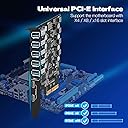
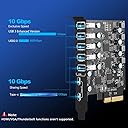
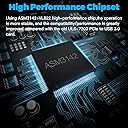
The YEELIYA 10Gbps PCIe USB 3.2/3.1 Gen 2 Expansion Card instantly boosts your PC with 7 high-speed USB ports (2 USB-C, 5 USB-A), delivering ultra-fast 10 Gbps data transfer. Designed for easy PCIe x4 installation without external power, it features advanced power protection and broad OS compatibility, making it the perfect upgrade for professionals craving seamless connectivity and performance.




| ASIN | B09V6SFDZQ |
| Best Sellers Rank | #23 in Internal USB Port Cards |
| Brand | YEELIYA |
| Compatible Devices | Supports Standard Tower Case/PC Motherboard, HP,Dell 8950,Lenovo P520,ASUS Z590/B550/AM4 TUF Gaming X570/ROG Strix X570-E,MSI B450 etc. Compatible Devices Supports Standard Tower Case/PC Motherboard, HP,Dell 8950,Lenovo P520,ASUS Z590/B550/AM4 TUF Gaming X570/ROG Strix X570-E,MSI B450 etc. See more |
| Customer Reviews | 4.2 out of 5 stars 164 Reviews |
| Hardware Interface | PCI Express x4 |
| Manufacturer | YEELIYA |
| Model Number | UP10072 |
| Number of Items | 1 |
| Operating System | for Mac Pro 4.1,5.1,7.1(model 2010~2020), Linux, Windows 10 |
| Style | Classic |
| Style Name | Classic |
| Unit Count | 7.0 Count |
| Warranty Description | 180 days warranty |
S**D
Working great after a month and still going
I built a new PC using all different parts. PC with a Ultra 9, Windows Pro, 128gb ram, ASUS motherboard with the works on it, I mean everything. I have a million things plugged into this PC. During the architecture part of my build this part was recommended by several of the AI systems I was using to evaluate the build. I've been on this new power house for about a month now without any problems. They really thought this through. I would not hesitate to buy this again.
A**.
Very easy installation!!!
Windows 11 Installation: 1) Plug the expansion card into an available PCI Express Slot. 2) Tighten the PCI Express Card into it's slot. Note: You may have to snip one of the rear PCI Slot Dividers to allow bigger USB plugs to fit. Normal sized plugs fit just fine. I couldn't plug in my wireless headset transmitter/receiver as it wouldn't fit (have to snip the divider first - Ended up just plugging it back in it's normal slot on the back of the motherboard). 3) Power up. Mine worked instantly when I powered the PC back up. Motherboard: ASUS PRIME X570-PRO
M**R
Useful accessory for pc builders
I am a pc builder and I wanted to add more usb 3.0 and usb c ports to my pc. This accessory was just what I was looking for to fit that need. It was easy to install to my motherboard and secure to my pc case. Finding the drivers to enable the usb ports to function was found easily in the included manual. This was well worth what I paid.
J**E
Cheap, no driver support, sketchy software.
Do not waste your time with this! The website they give you to download the drivers sends you to a very sketchy website that tries to trick you into downloading programs you don't want on your computer. Th cd it comes with doesn't work. And the instructions are written with such poor English you can't understand it. Do not buy this one!
W**E
Does not work with Dell XPS 8940
My 2021 Dell XPS8920 computer has only one USB-C port on the front panel and none on the back. I wanted back panel USB-C ports, and a couple more USB-A ports never hurts. I installed this on the appropriate slot on the motherboard and it booted right up. But when I turned the computer around, I found the problem in the picture. The cutout on the back of the computer is too narrow and covers the edge of the USB-A ports. I’ll have to return it and get a card with the ports oriented the other way. Since I had it installed, I decided to test the USB-C ports. My card reader downloaded photos at 80 MBPS, the same as the front panel port. This is probably the limit of the card reader. I only knocked off one star for the misfit. Dell’s design is not this manufacturer’s fault.
S**E
Good Quality Works Great.
Works Good
T**E
This is a gamechanger!
I really needed some extra USB ports, and while I was at it, I decided I should also put in some USB-C ports on my PC. Let me tell you, it was the best decision I could make. The ease of installing via PCIe added with the functionality of onboard USB is wonderful. The best part is, the speed of the USB-C ports fixed an issue I was having with my RODECaster Pro II through the onboard USB-A ports on my PC. Definitely recommend if you have a lot of devices that say you shouldn't plug them into a hub.
T**M
Nice quality
Works as advertised. Gave me some much needed usb ports.
B**T
Werkt zoals beschreven en zit er robust uit - Easy install
Om dit te laten werken op mijn systeem (W11) heb ik in device manager - bij USB controllers bij alle hoofd USB de optie uit moeten vinken dat de PC deze niet kan afschakelen (Power management). Voor de rest werkt dit plug&play en werkt zoals het moet en geadverteerd!
D**O
Plug & Play
I can't really speak of quality, I'm not an electric engineer, but plugging it into a PCI-E port on the motherboard was the only thing that I had to do. It just worked from then on. No specific or 3rd party drivers that I had to download and install, it was simply Plug & Play. I've never noticed any laggs or devices randomly disconnecting either. Black colored PCB is a nice touch since it's not ruining my pretty PC. The motherboard I'm using it on is Asus x370 Prime Pro.
D**I
Plug and Play
Che dire, plug and play, ed espande la capacità senza praticamente perdere segnale, consigliatissima
R**N
excellent speed
work well with MSI 13 gen
A**I
Doet wat de kaart moet doen
Ik ben er blij mee
Trustpilot
1 month ago
4 days ago