Buy anything from 5,000+ international stores. One checkout price. No surprise fees. Join 2M+ shoppers on Desertcart.
Desertcart purchases this item on your behalf and handles shipping, customs, and support to Peru.
🚀 Elevate your workspace — power, ports, and productivity in one sleek dock!
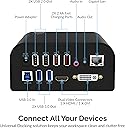
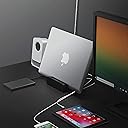
The SABRENT Universal Laptop Docking Station is a compact powerhouse featuring 18 ports including dual HDMI/DVI outputs, USB 3.0 and 2.0 ports, audio jacks, and a gigabit Ethernet port. It supports fast 2.4A charging on two USB-A ports and includes a built-in stand designed to hold tablets or slim monitors securely. Compatible with Windows and Mac (with some macOS limitations), this plug-and-play dock streamlines connectivity and boosts productivity for professionals on the go.


| ASIN | B013WQWCEA |
| Best Sellers Rank | #113,258 in Electronics ( See Top 100 in Electronics ) #1,161 in Laptop Docking Stations |
| Brand | SABRENT |
| Built-In Media | Dockin station |
| Color | Universal Dock with Stand (USB 3.0) |
| Compatible Devices | laptop, ultrabook, Chromebook, Android phone or tablet, MacBook, Apple iPhone or iPad |
| Customer Reviews | 4.2 out of 5 stars 1,099 Reviews |
| Global Trade Identification Number | 00819921012142 |
| Hardware Interface | USB Type C |
| Input Voltage | 12 Volts (DC) |
| Item Dimensions L x W x H | 4.74"L x 5.1"W x 2.43"H |
| Item Type Name | LAPTOP-COMPUTER-DOCKING-STATIONS |
| Item Weight | 12 Ounces |
| Manufacturer | SABRENT |
| Mfr Part Number | DS-RICA |
| Model Number | DS-RICA |
| Number of Ports | 18 |
| Product Dimensions | 4.74"L x 5.1"W x 2.43"H |
| Total Number of HDMI Ports | 2 |
| Total USB Ports | 7 |
| Total Usb Ports | 7 |
| UPC | 819921012142 780746400578 641275650462 |
| Unit Count | 1.0 Count |
| Warranty Description | 1 Year limited |
| Wattage | 120 watts |
E**Y
Best docking station at this price point
I recently purchased a portable 15.6" external/second monitor (amazon.com/gp/product/B07RGPCQG1) to use with my laptop. This form factor is great for use both at home and on the road. This monitor is powered by USB C (at least 2.1A) and connects via either USB C or HDMI. Using the cables which come with it is great for on the road, but a mess at home. Enter the Sabrent docking station. If I was going to design a docking station to work with this portable external monitor, I could not have done a better job than Sabrent. First, the Sabrent has a deep groove in the front of the dock. The slim external monitor sits in there perfectly, and a great viewing angle. Second, the dock has two USB A ports whose sole purpose is to deliver 2.4A of power for charging. I connected one of the ports to the USB C power port on the monitor and yahoo! it powered right up. Third, the dock has a HDMI out to connect to the monitor. It also has DVI (with a VGA adaptor) if that's your thing. I purchased 1 foot USB C and HDMI cables to make the connections, which eliminate the rats nest of cables you get using 3 foot cables. What else? Two USB 2 and two USB 3 ports. Why USB 2? Because keyboards and mice sometimes don't play well with USB 3, so you have that flexibility. Also audio in/out and an Ethernet CAT5 jack, if that's your thing. Even better, it's 100% plug-n-play. No drivers required (although up-to-date video drivers are recommended). For me, this means inserting one USB 3.0 A plug into my laptop and I get an external monitor, external audio/microphone, and connection to my external 2TB drive. No rats nest of cables. No cable swapping. It all works seamlessly. OK, what would I change? I'd love an on/off switch on the dock so I could power it off when I'm not using it (because I don't use it every time). Absolutely not a showstopper, though. I can always just unplug it power supply from the back of the dock if I want to. Again, the two features that are a game changer for me are the groove in the front and the two USB A power-only ports at 2.4A each (which can also be used to quick-charge your mobile devices). Plus, it's Sabrent. I've been using their gear for years and never had an issue. You really can't go wrong with this dock, and the price simply can't be beat.
P**P
Sabrent makes a great docking station.
I don't know what to say but I love this docking station. I use this so I could add extra screen real estate. I didn't want to get a desktop since I was always about portability. I never needed a powerhouse desktop, but I did need the extra screens. I use this for a 17" laptop and a 13" ultrabook. I really love having the extra usb ports for my ultrabook at times as well. I went with this docking station because of the dimensions. Sits comfortably underneath my monitor riser and monitors. UPDATE: I have been using this now for a few months now and I have to say, I'm still very happy to have purchased this. There is one drawback that I did not notice before and that is the headphone jack. Before I ran my audio off my monitor which is connected to the dock through the HDMI port. I plugged in my speakers into the dock instead of my monitor and started noticing a ticking/clicking/static-like noise. I chalked it up to old speakers. When I plugged my headphones into the docking station, the noise became apparent and annoying. Even with my computer muted I could hear the ticking. I switched my headphone to different devices and it goes away. I assume it's coming from the docking station because the noise is gone when plugged into other devices that are plugged into my computer; such as my monitor and laptop. This annoyance is not a deal breaker to me. It is an annoyance that I avoid. I say annoying because it's not loud but very annoying when there is silence. I don't see this as a high performing graphics adapter or high end audio so I'm not disappointed by a little noise running through this. Especially since I have an external hard drive , two monitors, one 2.0 in use, two 3.0 ports in use, one of which is connected to a usb hub. My two devices I use this for are both 3rd gen Intel processors. When plugged into my 3rd gen i5, my i5 is pushed to it's limits when I put my daily load. Operates fine, does not overheat, just that the processor is taking on the extra load of this dock. When used with my 3rd gen i7, the dock does not seem to phase my CPU. Yes the load is there but it does not normally go beyond 70-80% capacity, but that's easy to do without the docking station. I'm only stating that my average use ultra book runs without any problems, it just gets pushed harder than normal. My i7 on the other hand feels like it's just shrugging it off. Also, I've tested this many times and yes, you can definitely run three additional monitors; two off the docking station and one out the HDMI port on the computer(if you have one).
S**D
Good product except wireless mouse/keyboard performance issues
Its fairly compact size which can easily fit in any desktop computer setup. I just plug it in with my hp elite book and its worked out of the box. I did not need to install any software manually. I get connected with no time. I have connected with one monitor so far with HDMI port. I have not tried VGA port yet. Performance is good. I could have to give it 5 stars. But.. my biggest concern is my wireless Logitech keyboard/mouse performance after a couple of days of use. I have tried all both usb3 n 2 ports back on the dock. Basically, after using sometimes it makes the system slow. You need to wait for mouse and keyboard movement literally sometime. I noticed, its happen when you keep laptop ideal for some time when you try to log back and start using it back.. sometimes it even very hard to enter a password from the wireless keyboard. But if you attached wireless dongle then no issue. but in that case, why I need dock then if i need to attach everything in my laptop... i would like to reach out there customer service will see what they are saying...will update
S**H
Excellent Docking Station for Windows OS, Not so much for MacOS
This docking station works like a charm for Windows OS out-of-the-box. All I did to get this to work was to update the driver and everything was setup. The docking station has been well though off in terms of design given that it features dedicated ports for charging, connecting your mouse/keyboards and high transfer USB ports. It features a DVI and HDMI which makes it ideal to connect to 2 monitors which I think is the configuration for a majority of users. On the MacOS, I am not very impressed given that they are continuing to have problems supporting multiple displays for the High Sierra. I have not tested their work-arounds because its a "work-around", choosing to wait for them to officially support the High Sierra. What keeps my hope alive is they are reaching out through their websites and through the manufacturer of the display device by clearly indicating what can be done in the meanwhile. I see that they are working on it and thats fine. I am ready to wait. Nevertheless, this docking station has removed a requirement of having two different docking stations for different laptops. Its 1 docking station depending on what I intend to work on. If I am on my Mac, then just plug the USB cable to the USB port of the Mac, else, remove it and plug it to the USB port of Windows. As simple as that. There seems to be some confusion over using the USB port as a charging point too. The website is confusing in that regard in the way, their pictures and description talk about it. But seriously guys, were you really thinking of powering your laptops or gaming hardware by power through your USB port? Really? Apart from the display goof-ups on the MacOS, I am impressed with this docking station.
B**N
and so far it's working great! What I wanted
I felt compelled to write a review for this product. Reading the reviews I wasn't sure if it was going to work for me, but it did... and so far it's working great! What I wanted: I have a 2015 MacBook Pro (my personal computer) and a Thinkpad T450 PC (work computer). When I work from home I was finding myself unplugging numerous cables to set myself up for work and when I wanted to used my MacBook at my desk (external monitor, mouse, keyboard, etc) doing the same unplugging and plugging. I envisioned a scenario where I could plug in my computers into a dock of some sort and not have to go through attaching and reattaching cables, but figured since I was used Apple & Windows/PC this would be a no go. I found the Sabrent Docking Station and even after reading many of the reviews here on Amazon I couldn't truly figure if it would work for my needs as I don't have administrative privileges for my PC/Windows 7 laptop (i.e can't download 3rd party software). While I cannot vouch for all configurations, my work PC setup automatically downloaded the necessary drivers for the Sabrent Docking station and so far is working flawlessly. For my Mac, I had to download the drivers specified in the instructions and it mostly works. I do get some weird, albeit infrequent, graphical issues on my external display but they aren't deal breakers for me and the benefits of my new setup far outweigh these infrequent graphical anomalies. I've only been using for a short period of time, but so far it's working great and I very happy. I figured my work computer would be the "weak link" as I wouldn't be able to install the drivers (no admin privileges) but it worked just as "plug 'n play". Going from plugging in (or removing) multiple USB connectors for various components and monitor cables to one USB cable is very nice... I've also been able to eliminate the multiple monitor connects, added an ethernet jack, charging for my phone, etc. Very much like!
T**L
I now have a $90 paper weight
Final Update I updated my Mac to Sierra hoping that I could finally get around all these problems. The good news is that the problems have gone. The bad news is that the SABRENT made them worse but removing it from the loop allowed Sierra to fix the problem. To explain to the SABRENT programmers what I learned, they should learn about passive displays. After I updated the OS I dutifully went to the SABRENT web site to get the most recent driver. It said it was compatible with SIERRA. I installed it. Now the problem I had with some of my important programs I now have with every program (including the OS itself) When moving things to the secondary display they do not refresh and cannot be seen anymore. With a $5 dongle the problem has disappeared with SIERRA. Apple is usually very good at eventually fixing these problems. SABRENT seems to be the opposite. I have never been contacted by any technical staff except the marketing guy who wanted me to change the negative review. The problem has never improved and over the last year has become worse--to the point that the thing is unusable except as a $90 paper weight. FURTHER UPDATE The solution was ineffective. I contacted Manny at Sabrent a week ago have not heard back. I view customer support the most important attribute of a product so I removed the star I added last week. UPDATE: I received a call and an email from someone at Sabrent in response to this posting. He admitted that there were problems with customer support but they were working on fixing them. He asked for my help. I sent him the ticket number that got lost in the system. He also said that I would be able to find the most recent driver on the website. That process was totally fixed. I too the expected 2 or 3 clicks to find the proper driver. This is evidence that they are serious about cleaning up their act. However, the original display problem persist. Since I purchased the item to fix display problems I was having I can only bump the rating up one star. However I will revisit the rating when the problem is fixed Original Post: I purchased this Item in order to solve a display problem that my Mac Mini 2012 has. I chose it because there was a (solicited) review and demo using my exact model of computer. There are several programs that don't display properly on the screen supported. Most of these are photo editing programs designed to be run from Lightroom and/or photo shop. When the window is moved to the Sabrent screen they will only display if the mouse is over the picture. That is not the reason the I reduced it to 2 stars. The problem is that I have submitted several tickets to the Sabrent "technical support". Aside from the automatic email that the ticket has been received I have not heard a word from them. Most of the rest of the functions work fine so I decided to give in and give it one extra sign. But I am very displeased with the way the vendor has treated me. My advice, don't buy the item unless you can deal with zero customer support.
J**N
Awesome Idea but doesn’t work on my personal setup.
Works awesome everything was plug and play basically after i installed the software and driver update. Would definitely buy one again and probably will very soon to have in work for live music and djing and at home for the studio and etc. Just so I don't have to undo the cords everyday to take back and forth. The iPad is for some of the owners music, my laptop for recording the live music plus it's a back up setup and then a Mac mini for dj software and lighting control. I know it's kind of hard to see it all in one picture. Update: I’m changing my review because I found out when I started to use any programs it slowed my computer down tremendously compared to other cheaper options. The idea for the product was great but on my setup, it just isn’t efficient enough. I run a lot of live music with lighting and DeeJay music between bands so I already use a lot of the computer. I’ve never had the trouble running everything until I use the docking station though.
J**E
Super useful and incredibly reliable
I've been using this dock at work for about 8 months now and I couldn't be happier. It has a great array of ports and it's small enough to slide under my monitors. Also, bonus awesome thing I didn't know, you can daisy chain these bad boys. Basically, one dock gives you two displays, but plug another dock into the first one and you can get four! Really hoping someone at work no longer needs theirs soon so I can get a quad-monitor setup. If I had to mention negatives (which I do, since I never trust a review that doesn't mention anything negative): - DVI? Really? Why not just make it another HDMI port or, if you must, DisplayPort? Regardless, I got a DVI to HDMI adapter and it works great (dock comes with a DVI to VGA adapter) - The dock seems a little deep because of the "tablet stand" that's built in. I don't know if they threw that on because they needed extra volume for components or what, but I kind of wish it didn't have that. Be sure you're running an OS that supports DisplayLink (basically anything other than MacOS 10.13.4-6) and this thing will be worth every penny. My brother-in-law runs dual monitors off his MacBook Pro via Thunderbolt, but his dock cost him over $300. Using DisplayLink I get the same functionality for a fraction of the cost. I blew his mind when I told him about this thing, not to mention the daisy chaining. Bottom line, buy it. We have around 10 of these at my work now because of my recommendation (I'm head of IT), and no one has had any problems so far.
G**O
The complete package
Regarding USB docks, this one is my favorite. Impressive build quality, very nice design with all ports on the back (makes your workspace look neat and clean) and a place to conveniently hold your cellphone. I've experienced no sort of delay in commands (I have both my mouse and keyboard connected there), no loss of quality or any weird stuff in VGA and HDMI ports, and had no compatibility issues with any other peripherals linked there. One thing that it is important to beware of, and that caught me off guard I must admit, is that the charging ports can be used only for charging. I was hoping I could connect some other things there for the sake of comfort, but it is no big deal, 4 USB is still plenty. It still is a 5 star from me.
G**G
Perfect for extending dual display, even for older macs with USB 2
I've been looking for a dual display dock that works on both mac and windows and came across this. I specifically wanted to extend my display (rather than mirror) which is what this does. I'm using a 2010 MacBook Pro running sierra, and a surface book. There were two things that concerned me prior to ordering. The driver website said there may be issues on macs running sierra. Also, my mac is old and only has USB 2. I took the plunge and ordered it as I knew it would at least work on the surface book and was a much better price than their dock. I downloaded the drivers on both machines prior to arrival which took moments to do. I plugged it all in and it immediately worked with no settings or faffing about needed. Same goes for both machines. I was worried that my 2010 MacBook Pro may be too old for it to work but it is perfect. There is no lag on either machine. I can choose to extend the desktop to two monitors or mirror to two monitors. All in all, brilliant device at half the cost of the Microsoft dock, with the addition of working on mac and windows.
G**I
veramente completo, si connette immediatamente senza difficoltà
finalmente ho potuto collegare tutti gli accessori e i monitor hdmi e svga +stampanti cellulare ricarica ecc. insomma tutto! Perchè non lo preso prima?
S**N
Amazing Product!
Honestly the best product to have! Works wonders and I’ve had no problems with this what so ever! Charging USB Ports, 3.0 USB Ports, 2.0 USB Ports and an HDMI Port as well as a DVI Port! You can hook up 2 more Monitors if you wanted too! Honestly best investment I’ve done this year
G**E
Excelente producto
Para quienes tenemos varios monitores y además varios equipos laptop, esta estación de trabajo es una excelente solución para mantener nuestro centro de trabajo organizado y movernos con fácilidad, es excelente la cantidad de puertos, el que tenga puertos para carga rápida del celular, y las salidas de vídeo han funcionado adecuadamente, es necesario que el equipo tenga un puerto USB 3.0 e instalar los drivers, después de esto sólo hay que conectar la laptop a el puerto usb 3.0 y a disfrutar el trabajo o la multimedia con todas las opciones de este producto. He quedado muy satisfecho con su calidad, su capacidad, su tamaño y su tiempo de entrega. Muy recomendable!
Trustpilot
1 day ago
3 weeks ago