We remain fully operational. Our teams are working around the clock to ensure your deliveries continue safely.

DOWNLOAD THE APP


Copyright © 2025 Desertcart Holdings Limited
DOWNLOAD THE APP

Buy anything from 5,000+ international stores. One checkout price. No surprise fees. Join 2M+ shoppers on Desertcart.
Desertcart purchases this item on your behalf and handles shipping, customs, and support to Peru.
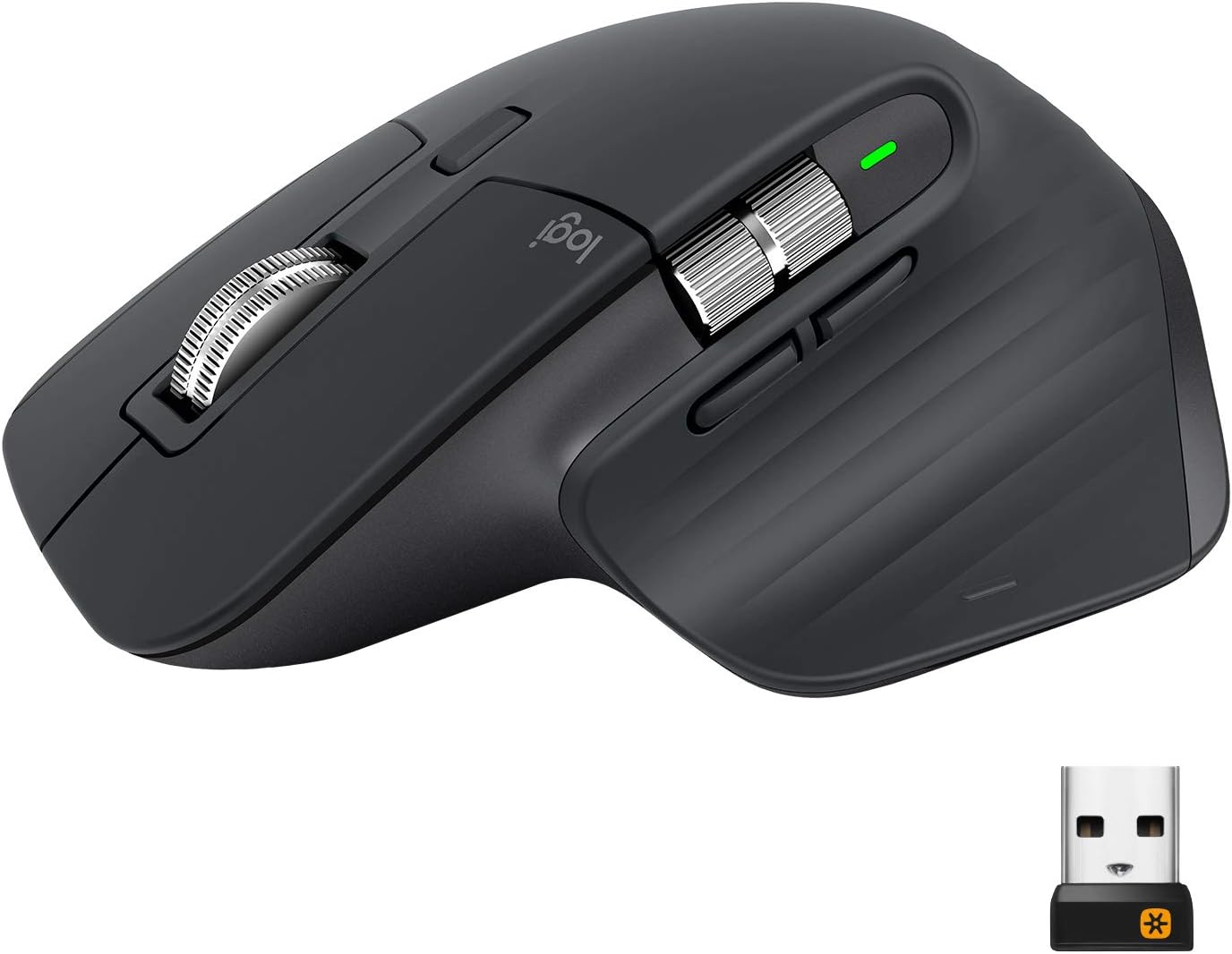
🖱️ Master your workflow with the MX Master 3 — where speed meets comfort and control.
The Logitech MX Master 3 Advanced Wireless Mouse is a premium, ergonomically designed input device compatible with Windows, Mac, and Linux. Featuring MagSpeed scrolling that’s 90% faster and 87% more precise, it offers ultra-quiet navigation and up to 70 days of battery life. Customizable buttons and app-specific profiles via Logi Options+ software enhance productivity, while seamless switching between three Bluetooth devices keeps multitasking effortless. Ideal for professionals demanding comfort, speed, and precision in their daily workflow.


| ASIN | B07W6JG6Z7 |
| Antenna Location | Office |
| Are Batteries Included? | Yes |
| Are Batteries Required | Yes |
| Battery Average Life | 70 days |
| Best Sellers Rank | 34,819 in Computers & Accessories ( See Top 100 in Computers & Accessories ) 759 in Mice |
| Box Contents | Batteries |
| Brand Name | Logitech |
| Button Quantity | 7 |
| Colour | Black |
| Compatible Devices | Personal Computer |
| Country of Origin | China |
| Customer Reviews | 4.7 4.7 out of 5 stars (16,123) |
| EU Spare Part Availability Duration | 2 Years |
| Embellishment Feature | Logo |
| Enclosure Material | Glass |
| Global Trade Identification Number | 05099206085800 |
| Hand Orientation | Right |
| Hardware Platform | Linux, Mac, PC |
| Item Dimensions L x W | 12.5L x 8.4W centimetres |
| Item Type Name | Mouse |
| Item Weight | 4.94 Ounces |
| Manufacturer | Logitech |
| Manufacturer Part Number | 910-005694 |
| Model Name | Logitech MX Master 3 Advanced Wireless Mouse |
| Model Number | 910-005694 |
| Mouse Maximum Sensitivity | 4000 Dots per Inch |
| Movement Detection | Laser |
| Network Connectivity Technology | Bluetooth, Unifying |
| Number of Batteries | 1 Lithium Polymer batteries required. (included) |
| Operating System | Android, Linux, MAC, Windows, iOS |
| Pattern | Smooth |
| Power Source | Battery Powered |
| Product Features | 4K DPI, Flow - Cross computer control, Magspeed scrolling, Tracks on glass |
| Product Finish Type | Matte |
| Product Warranty | 2 year manufacturer |
| Range | 10 meters |
| Style Name | MX Master 3 |
| Theme | Computer Accessory |
| Unit Count | 1.0 count |
D**D
Expensive but worth every penny
I’ve never spent more than £15 tops on a mouse before, usually putting up with whatever generic off-brand one came with my computer or was at my workstation in the office, so I was naturally quite hesitant to spend this much on a device I hadn’t actually felt in the hand before and that differed slightly from the standard “puck” form factor I was used to. Upon getting a new MacBook and being absolutely underwhelmed by Apple’s own Magic Mouse, which is probably the only Apple product I’ve ever actively disliked, I decided to go for this one. This mouse surpassed all my expectations, and I do not regret a single penny of the relatively high cost! It feels great in the hand, has a massive amount of customisation via the Logitech software, stores 3 preset devices to attach to, seamlessly can work between multiple devices via the Logitech software, can even assist in copying and pasting between different devices, has fantastic build quality with a nice rubberised feeling to the body and a reassuring weight in the hand. The scroll wheel feels amazing in use in both its free wheeling mode and in its measured by-the-click scroll, which can be toggled between very easily. Plenty of buttons and configurable in Logitech software with a wonderful multi use side button by the thumb, which allows 4 different actions to be set to a push then direction move on the mouse (eg press and mouse up can be set to ‘copy’, press and mouse down can be set to ‘paste’ etc). Side scroll wheel works perfectly too, which is handy navigating around artboards in the Adobe Suite or horizontally wide Excel spreadsheets. Battery life is excellent and I haven’t had to charge it once since its first charge, and this is with daily use from 9-5 every day, and I’ve had it a month or so now. With such a slow drain rate and no strain that comes with having to repeatedly charge the battery, I have every faith the battery lifespan of this over time will also be very good. I had a quick search online as when researching this to see if I could easily replace the battery myself in future should the need ever arise, and it looks fairly easy to do and currently very cheap to replace, which is reassuring given the cost of the mouse. I purchased the “PC version”, rather than the “made for Mac” branded one, purely because at that time this was cheaper. There is absolutely no difference in the mouse itself, it’s the same product and I’ve used this seamlessly between PC, MacBook and iPad without any issue. The only difference I can see is the Mac boxed version comes with a USB-C to USB-C cable for charging rather than the USB-A to USB-C one this came with, however I have a multitude of USB-C to C cables anyway and also a dock with USB-A. With the pricing as it was, even if I’d bought the PC one over the Mac one, I’d still have had enough to buy a cheap USB-C to C cable and still have saved money, but as mentioned this wasn’t necessary in my case. Beautifully packaged with the unified receiver dongle, which I haven’t had call to use really as it worked out the box just fine with Bluetooth on all of my devices. Could not rate this any more highly, and the ergonomic feel in the hand is fantastic. I guess I never missed what I’d never had before, but the quality of life improvements of having a good mouse when I spend all day using one is something that I now absolutely appreciate, and I don’t regret a single penny of the cost. In fact I was so impressed I only went on to spend more money on Logitech; buying the Master keyboard and wrist rest too!
K**N
Perfect for Productivity
This mouse is no ordinary mouse, as you might have guessed based on its price, but the fact you're reading this proves that you're interested in it. Check the reviews on YouTube - this is the King of Productivity. And for a reason. The ergonomics is superb, no matter your gripping technique. The build quality is beyond that of any cheap mouse, feeling sturdy and premium. The software it comes with allows for full customizability of all the buttons, which are not too many, yet just enough for you to actually use them. I personally prefer the media control layout in which I can play, pause, forward, previous and control volume of the songs playing. It comes with in-app specific commands, so if you use something like Photoshop you will be able to, say, adjust brush size with the side scroll wheel, which while you can do with a macro, it's just more satisfying using the scroll wheel. Talking about which - they feel premium af. The scrolling is as smooth as silk and the magspeed scroll wheel is... hit and miss sometimes. Not optimal for gaming, but darn is it fun to flick it. The infinite scroll option seems to be a bit too much for my laptop at times so if you have a relatively weak PC/laptop it may stagger a bit (but if you do then what are you doing eyeballing this mouse?!). I personally find myself using all the buttons on the daily, so they are no gimmic. But if you think you don't need so many buttons, it's worth looking at other options, like previous models. Overall, if you know howe to use such a mouse, there's a reason it's critically acclaimed. Worth the hunger the few weeks after purchase. P.S. The picture is just me playing around with product photoshoots, shot and edited on iPhone 7 Plus.
M**.
5 Star Windows - 1 Star Linux
This mouse is brilliant - as most other reviews will say. On windows, with the logitech software, it's great. *HOWEVER*, and this is a huge problem for anyone wanting to use this mouse on Linux, there is no Logitech software for Linux., only Windows & Mac. So what do you get for the 'Linux compatible Mx 3 Master'? - a 1000dpi mouse, with non-configurable buttons. There is no way on the mouse to increase the dpi from the default 1000dpi to its full 4000dpi, or to change what any of the buttons do. However, if you are willing to install, configure, and play with 'ratbagd' and 'piper', you can change the dpi, and change the button configuration. My first day with both of these has been hit and miss, sometimes after the machine sleeps, it doesn't detect that there's a device connected, and I'm back at 1000dpi, and I've not had success yet with changing the button actions. Logitech should be ashamed at putting 'linux compatible' on the product description, as it simply isn't correct, given their advertising of the features of this mouse. Oh, and if you were looking at the 'Flow' feature to copy & paste across machines? Forget it. Please don't just believe me in this review. Have a search online for 'logitech mx master 3 linux', there's plenty of information out there regarding Logitech & Linux woes. I will update this review, and decide if I'm keeping this lovely little rodent after more testing on Linux. The mouse is gorgeous, the software, and the company stating 'linux compatibility' isn't. *Update* - After a few days of playing with this, I have decided to keep it. The Piper GUI for Ratbagd isn't great and will frequently lose connection to the daemon, so you need to close and re-open it. If your PC/Laptop/Tablet goes to sleep, then you'll be back at 1000dpi again when you wake it. I have created a little script which runs 'ratbagctl "Logitech Wireless Mouse MX Master 3" dpi set 4000' which I run when I wake my Laptop. Also, if you are running OpenSUSE, then you will need to add your user to the group 'games', and restart after installing Ratbagd & Piper, otherwise Piper will never be able to communicate with Ratbagd, and will just give a vague error that doesn't indicate the solution above. It's a bit of a hassle, and if I had known about these issues beforehand, I would have opted for the cheaper MX 2S, as that's 4000dpi and as 'Linux Compatible' as the MX 3. The actual mouse is fantastic, the scroll wheel is brilliant (in free & ratchet mode), side scrolling works, and it tracks on glass. The shape fits my hand like a glove, and I don't randomly right-click as with other mice.
M**N
The MX master is a great mouse the product is original and certified from logitech thanks for the seller
V**2
Mysz działa poprawnie
C**S
Llevo más de dos años con el, busqué este modelo particularmente por el color ya que la serie S solo tiene blanco, negro y grafito. Me ha funcionado excelente para trabajar en diseño 3D, documentos, diseño gráfico, y gaming. También ha sobrevivido a una ocasión en la que mi perro lo mordió (lamentable) y sigue funcionando como el primer día.
Y**K
J'ai jusqu'alors utilisé des souris bas de gamme pas chère/offerte. Je passe beaucoup de temps à l'ordinateur et avais régulièrement mal au poignet. Depuis que j'utilise cette souris je n'ai plus de douleur. Ce qui la différencie des souris sans fil plus bas de gamme que j'ai pu essayer : - Le dongle fournis est plus réactif qu'une connexion Bluetooth, la souris est immédiatement accessible en sortie de veille - Possibilité de sortir la souris de veille en la secouant, pas besoin d'appuyer sur un bouton - Macro facilement paramétrable - Charge par USB C - Association à plusieurs appareils et bascule entre eux facile La souris est très bien faite, et le logiciel pour la personnaliser est efficace et régulièrement mis à jour. Je trouve la molette très satisfaisante : elle est à la fois crantée pour un déplacement précis sur des petites distances, et tourne librement lors d'un geste plus rapide. Dure à décrire mais très agréable, je me retrouve souvent à défiler des pages juste pour le plaisir du geste quand je suis dans mes pensées... Je n'utilise pas la personnalisation des touches par logiciel juste une personnalisation globale, avec accessible depuis la souris : réglage du son, pause/play, capture d'écran, sauvegarde du document en cours, ouverture de mes documents Le négatif : - quand je fais utiliser mon ordi à qqn qui est gaucher il faut que je sorte une souris plus classique, celle ci n'est utilisable confortablement qu'avec la main droite. - Les paramètres de la souris sont stockés sur l'ordinateur et pas la souris même, le niveau de personnalisation n'est donc pas aussi bon quand je la connecte au pc du boulot sur lequel je n'ai pas les droits admin pour installer le logiciel.
G**A
Uso questo mouse ogni giorno per produzione musicale, video editing e fotoritocco: è davvero impeccabile. Comodissimo, preciso, con un’ergonomia eccellente e un’autonomia che dura settimane. Si abbina perfettamente con la tastiera Logitech della stessa serie e funziona senza problemi con il mio Mac Studio. Molto utile anche la possibilità di personalizzare ogni tasto per ciascuna applicazione tramite il software Logitech: una vera marcia in più per chi lavora in modo professionale. Un prodotto solido, affidabile e ben pensato.
Trustpilot
1 month ago
1 day ago