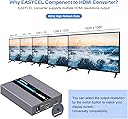
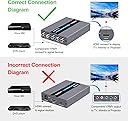
๐ Upgrade your vintage gear to HD gloryโno compromises, just crystal-clear connection!
The EASYCEL Component to HDMI Converter transforms 5RCA YPbPr analog signals into high-definition HDMI output up to 1080P. Featuring a built-in scaler engine, it resolves common compatibility issues such as flickering and distorted images, ensuring stable and vibrant video playback. Designed for easy plug-and-play use, it supports multiple resolutions and connects legacy devices like DVD players and gaming consoles to modern HDTVs, monitors, and projectors.
| ASIN | B07T29D4RY |
| Brand | EASYCEL |
| Color | Silver |
| Compatible Devices | Projector, Television |
| Connector Type | Component, HDMI |
| Customer Reviews | 4.1 out of 5 stars 307 Reviews |
| Finish | Hdmi |
| Finish Type | Hdmi |
| Input Voltage | 5 volts |
| Item Dimensions | 4.53 x 3.23 x 0.89 inches |
| Item Weight | 0.34 kg |
| Item dimensions L x W x H | 4.53 x 3.23 x 0.89 inches |
| Manufacturer | Easycel |
| Model Number | RM |
| Number of Items | 1 |
| Number of Ports | 1 |
| Package Quantity | 1 |
| UPC | 682141186791 |
| Unit Count | 1 Count |
| Warranty Type | Limited |
P**S
EASYCEL HDMI converter transmits clear video
Purchased Easycel to connect 2000 vintage Integra DPS-9.1 component DVD cables to LG 7000P TV HDMI inputs. This TV purchased 5/21, did not function properly when component inputs used.......the video flipped constantly. After much cleaning of discs, cable connections and changing cables I came to the conclusion the TV component inputs were faulty. The Integra DPS-9.1 was $1,800 new in 2000 and still an excellent unit so was not interested in selection of current DVD players. The Easycel functions perfectly with this setup and I can highly recommend the product.
R**T
Worked great converting component signal from McIntosh MVP 861 to HDMI for new Sony A9G OLED TV
Wow - what a shocker. This $30 converter successfully connected my legacy McIntosh MVP 861 DVD player to my new Sony A9G TV converting the triple RGB cable group circa 2006 component RCA cables to a single 1080p HDMI cable. A little background here. I own 2006 McIntosh audio equipment - an MHT 200 home theater amp, MC402 two channel stereo amp and the MVP 861 DVD player which does not have HDMI connections because it's 14+ years old. The new Sony A9G TV does not have component inputs so I cannot connect the MVP 861 to the Sony A9G TV without some sort of converter or buying all new audio gear. I emailed the electrical engineers at McIntosh customer support and asked them how to convert component to HDMI. Here is there exact reply verbatim - "No there is no adapter Iโm aware of that would work in that manner. We havenโt tested any converter boxes here at the factory". Bear in mind that McIntosh presents themselves as THE premium audio brand in the world with vaunted customer support. That is 100% unadulterated Bullsh*t! Since McIntosh got bought out a while back, they provide NO support for their legacy products. Their message to existing customers is "buy new". A new MVP 901 - the 2020 Bluray version of my MVP 861 is $5500. With online streaming of movies and other media, I rarely play DVD's but I want the capability to do so, I don't care about Bluray but I don't want to lose access to my 1000+ DVD library. I also don't want to buy a new home theater amp - my McIntosh MHT 200 home theater amp works great as does the MVP 861 DVD player WITH this Amazon sourced component to HDMI scaler/converter. Bottom line is that I am massively impressed with this Easycel converter and even more unimpressed with the jackwads at McIntosh these days. The McIntosh customer service guy told me to buy a new home theater amp, preamp and DVD player. Cost for that trio of new McIntosh components? $31,000+!! OR I could figure the problem out myself without the help of the McIntosh "customer service engineers" and spend $30 at Amazon for this Easycel converter. What would you do? (I know - avoid McIntosh - probably a good plan these days)
T**Y
underwhelming.
Bought this to connect a Nintendo Game Cube to a 24" monitor via YPbPr component (digital) signal. While it technicall does work, which is more than i can say for the last converter I had, the image is...bad...somehow. 1. The Game Cube is technically able to output at 480p (progressive mode) and in fact has the capacity to look incredible on an HDTV provided it has component input. You would think a converter that supposedly can manage up-scaling would be able to take advantage of this but no, it doesn't. for whatever reason, the up-scaler will only recognize the 480i signal and the output ends up stretched and weird, it looks no better than if i just went with the composite or s-video cable. You can tell if you're in fact getting the 480P signal because the output will say "progressive mode on" at the bottom of the screen when you get past the boot splash on the game cube. 2. The 1080p up-scaling generates noticeable artifacts on the screen. This is probably good if you have no other options, but but for my money, I guess I would keep searching....
J**R
Best Solution to the Modern TV Problem
The device works perfectly. I was skeptical after reading some reviews but I'm happy to report that it works as avertised. The setup was simple and problem-free. I have a Samsung AU8000 TV and used this device to hook it up to a Nintendo Wii. It recognizes the device as a computer which I assume is due to its internal components that are responsible for the scalling. It was a plug-and-play device. The device does need the input device to use a 5 prong component cable. You can't use a three-pronged one. They sell a separate device here on Amazon for that. The picture quality is very acceptable for what it does. I don't notice a true upscale personal using the Wii but it's the only converter that I've had worked. With that said the scaler hasn't caused any problems such as distorting the image. Overall I plan on buying a similar device from this company since this one worked so well.
S**E
Tried with a PS2 and converter failed miserably
What are we looking for in a converter? Something that can show on your tv that is easy to see, hear, and properly work. This box failed on all of that. This converter from Easycel sounds very interesting from the description. Can convert your revolutions, works with all these products, a good price, and has up scaling. When I first got it out of the box it look nice, came safe and sound, easy to connect, simple to understand. Connected it to my ps2, turned it on, and on default it's set to 1080p for me. The picture looked ok, it was a zig zag masterpiece showing outlines like they were Z's from the alphabet. I can make out what i was looking but it is a failing grade for up scaling. I decided to change the resolution on the box, which comes with a resolution button to change what output you want. I advise not to do this because this very attempt of pressing that button made this box a instant return. It turned the picture on the screen so dark that you feel like you are becoming blind. I could not make out anything. The product mentions that it will auto adjust the picture. So i gave it hours upon hours to fix it self, no luck. Packed, shipped, and return to sender in a day. I was hoping for an ok product, but what i got is something that should be never sold. This is the 2nd converter out of three i have bought in my life and it's making me worry if all these converters are just going to come broken like this one.
M**.
Video Problem Solved!
I bought a converter before buying this one but it didn't work. Then when I read that this one solved the problem of the DVD player showing the DVD player logo but not able to actually play discs due to screen resolution issues, I decided to buy this one, as this was precisely the problem I had. Connected it up and now all my discs play perfectly, especially after I changed the resolution to 1080P. If it wasn't for this converter, I may have been unable to play the nearly 350 DVD's I have in my old Sony megachanger! The last thing I wanted to have to do was to store all these discs in a binder and pull them out one by one to play in my single disc Blu-ray player! This device saved me from all of that hassle! GREAT PRODUCT!!!
C**Y
Almost
so i invested into a 4k tv awhile back, i decided to dust off my ps2, obviously i needed an adapter for my composite cables to HDMI for the TV, so the playstation2 played very well, there is like 5 picture settings for the perfect resolution/picture quality. The equipment is nice/compact, made out of good material, the playstation2 played movies with decent picture quality but here is the downside, playstation2 was also meant to play playstation1 games on there and i still have my playstation1 games, unfortunately, the image resolution can't keep up with the adapter and newer tv's, for every playstation1 game I tried and it said the same exact thing for all of them, it will appear to start up normally and then it will lead you to a black screen with a box in the middle that reads "Invalid format" so it was almost the perfect adapter for the PS2 but not being able to play my PS1 games was a disappointment for me.
G**E
Awesome device that works perfectly!
Wanted to connect my Sony PS2 component out to my Oled TV HDMI input. This allowed me to do that and upscale to 1080p! I'm amazed this thing works so well and is quite cheap. One issue that I first had and resolved was turning off the widescreen option in a PS2 game menu. The game would freeze for several seconds and then resume. Once I turned off the widescreen option it worked perfectly without any hiccups. The game is still displayed in a widescreen format and looks great.
Trustpilot
3 weeks ago
3 days ago