


🎨 Elevate your digital canvas—create anywhere, anytime with Wacom Intuos!
The Wacom Intuos CTL6100WLK0 is a medium-sized, Bluetooth-enabled pen tablet featuring a battery-free stylus with 4096 pressure sensitivity levels. Designed for Mac and PC users, it offers both wireless and wired connectivity, an 8.5" x 5.3" active drawing area, and comes bundled with professional-grade creative software licenses. This renewed model includes a one-year manufacturer warranty, making it an ideal entry point for aspiring digital artists seeking reliable, versatile tools.
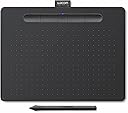
| ASIN | B07QHS4Z6G |
| Active Surface Area | 8.5 inches x 5.3 inches |
| Additional Features | Pen |
| Best Sellers Rank | #5,837 in Amazon Renewed ( See Top 100 in Amazon Renewed ) #170 in Computer Graphics Tablets #243 in Renewed Tablets #1,788 in Renewed Computers & Accessories |
| Brand | Wacom |
| Built-In Media | Wacom Pen 4K, 3 extra standard nibs, Quickstart guide, Cleaning cloth, Drawstring bag |
| Color | Black |
| Compatible Devices | Personal Computer |
| Connectivity Technology | Bluetooth, USB |
| Customer Reviews | 4.5 out of 5 stars 301 Reviews |
| EU Spare Part Availability Duration | 1 years |
| External Testing Certification | ID 00529-18-01796, ID 00529-18-01796 |
| Global Trade Identification Number | 00753218986146 |
| Item Dimensions L x W | 7.8"L x 10.4"W |
| Item Weight | 14.5 ounces |
| Manufacturer | Wacom Technology |
| Mfr Part Number | UCTL6100WLK0 |
| Model Name | CRTWCCTL6100WLK0RB |
| Model Number | UCTL6100WLK0 |
| Native Resolution | 1920x1080 |
| Number of Items | 1 |
| Number of Packs | 1 |
| Operating System | OS X 10.11 El Capitan, Windows 7 & above |
| Pressure Sensitivity | 4096 levels |
| Screen Size | 10.4 inches |
| Software Update Supported to Date | unknown |
| Special Feature | Pen |
| Specific Uses For Product | Drawing |
| Target Audience | Teacher |
| UPC | 753218986146 |
| Unit Count | 1 Count |
| Warranty Description | 1 year manufacturer |
W**L
Very Nice Tablet to Learn Digital Drawing!
Bought this to try out digital drawing and once I figure out to use it with a few drawing apps, I will teach my great grandson to use it. He is young, very smart (a quick learner), and has infinitely more drawing talent than I do, so hopefully once he gets the basics, he'll just fly with it. I bought a refurbished unit for about 25% off and it looks and feels brand new. The medium size feels right. I'm using it on Linuxmint with Krita at the moment. Will try it on Windows 11 as well.
G**U
Have always been expirimenting this has a bit of a learning curve to it.
Item arrived as advertised, quite nice really considering it was refurbished. I've scuffed it up first day. The software seemed a bit tricky to get the hang of and as they give 3 options I chose them all. Seems its a trial period I've only really used Corel Painter Essentials though did try the others Manga and Photo something I have photo some thing else where and Manga was is still impossible for me to understand though I do like Manga! Painter is a very robust program that my ancient computer struggles to keep up with. Yet still manages to get me thinking and trying new things. Again bit of a learning curve here but very interesting. Will if able get the full version. Oh the tablet works great also need to experiment to get the right touch with the stylus but all in all worth the $. Wacom got/has many great reviews as the standard in this venue, and while what I see currently available from them is awe inspiring as well as the competition. This seemingly bare bones tablet is just what I needed to get my feet wet in digital ink. Though I must say I still prefer pen pencil to paper, this really opens up a new avenue of research in artistic endeavor. A pro recently you tubed a brilliant exercise with the software but thought the auto paint features were a bit 'kitchy' ( probably didn't spell that right, is there supposed to be a 'Z'? ) but I took my own pen to the tablet and painter essentials 6 and had it re do what I did to see what would come of it (experimental right?) and was and still am encouraged to put electronic expression to the test. Hope this helps.
D**R
Graphics tablet, 'nuff said!
a good graphics tablet, but could have used some printed instructions for people who dont like looking up a user guide online! i bought a used one and have had no problems with it so far! (3 years and counting!) size was not what i was expecting, but a good size none the less! very durable.
H**R
Life changing
I was new to photo editing in adobe photoshop and one of my colleagues told me about Wacom. This tablet has been life changing in that respect. I was using a mouse prior which had no precision what so ever. This on the other hand gives me so much more control. I was able to apply more pressure for darker lines and shading, and lighter pressure for lighter lines and shading. The amount of time it saves me in editing it has already paid for itself. I plan to instruct a class online in the upcoming weeks and plan to use this with the whiteboard features within the zoom software. I expect it will make that experience much more valuable. If you are on the fence about buying this, do it! This is a great product and worth the money. Also, the pen nibs - they don’t wear out that fast. I’ve been using this one that came with the pen for months. It’s barely even worn down. It’s very durable.
T**T
Worked perfectly
The tablet arrived packaged in original Wacom box inside the Amazon delivery box and was in perfect shape. After plugging in (not using Bluetooth), I installed downloaded and installed Wacom software, then restarted my Windows 10 computer, the tablet worked perfectly. I had no issues immediately using in Photoshop. With a refurbished tablet, I thought there might be issues, but there were none. I love drawing with this tablet. When I set the pen down, the mouse takes over automatically. Very easy to use.
J**W
Nice Product Great Value
I've had several Wacom tablets over the years and they've always worked well. This refurb looked new and had fairly original packaging. I've not tried the Bluetooth interface yet but the USB was fairly easy to install on my iMac. I registered the product and received keys to unlock the software after downloading from Corel. I got the tablet to work with Affinity Photo but the bundled software was a nice addition to try out other uses for the tablet. It can be fun to draw on a surface that is pressure-sensitive. No problems so far!
G**N
I'm not a sketching artist, but it is still useful.
I'm still learning how to use it for my craft and hobby, but it has proved itself useful in other ways while I do. The Bluetooth function is invaluable, as I can position it where it is most comfortable and not have to worry about the cable. The pen is comfortable and the action is smooth. It took some getting used to because I have large hands and the pen is light in weight. However, it has become muscle memory to pick it up and just use it. I am a maker and use various software to design the things I create. It seems to work fine with all of them, including Adobe's Creative suite and in Windows itself. After using it for a few weeks, I can't imagine not having one on y desk.
E**S
Pen won’t work
While it worked the first day the next time I tried to use it the pen would not work. There was no touch sensors and I was not able to select/draw anything all it would do was move the cursor around when I moved the pen above the tablet. I’ve looked up ways to fix it but have had no luck. Although this is a problem I would still like to say that in the day that I was able to use it, it ran very well!
Trustpilot
1 month ago
2 weeks ago