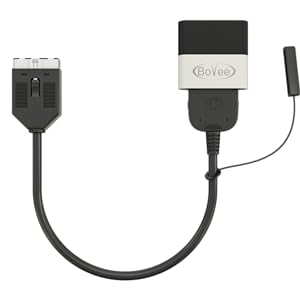
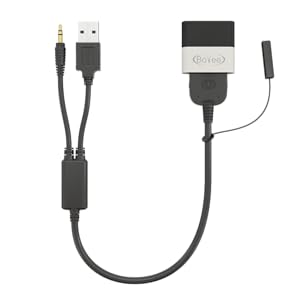
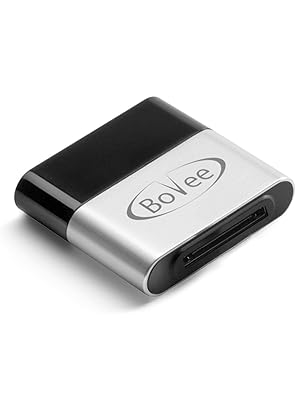
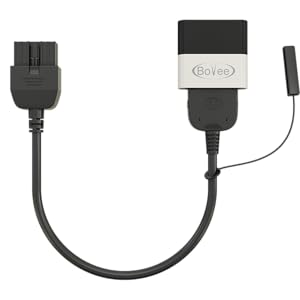
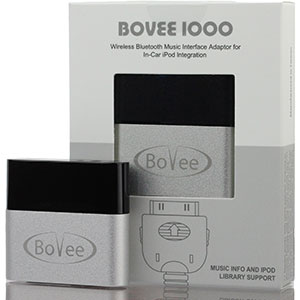
🎧 Upgrade your drive: wireless iPod magic for your classic car!
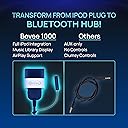
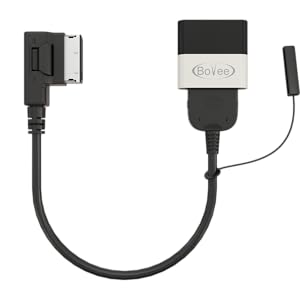
The Bovee 1000 is a compact Bluetooth music adapter that transforms your car’s original 30-pin iPod integration into a wireless streaming powerhouse. Compatible with major brands like Audi, Mercedes, BMW, and VW, it auto-connects to your Apple device, letting you access and control your full music library via your car’s display and steering wheel controls. Enjoy crystal-clear sound, hands-free calls, and seamless navigation prompts without ever plugging in your device again.


| ASIN | B00T2EVKSG |
| Best Sellers Rank | 48 in Bluetooth Car Kits |
| Guaranteed software updates until | unknown |
| Item model number | AMI Adapter (for Audi/Mercedes/VW) |
| Manufacturer | Bovee |
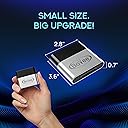
| Product Dimensions | 9.14 x 7.11 x 1.78 cm; 22.68 g |
R**M
This product is great and the quality of sound outstanding
This product is great and the quality of sound streamed via this device from Tidal and through my car's music system is outstanding (max volume no distortion). I hope the information below will help other Range Rover owners who want to listened to music streamed from their Android mobile devices in their car. If you are a Range Rover user you will not find the information below anywhere on the web (I searched for ages and then just bought the device to test it on my own) Details: - Car: a Range Rover 2011 (2011MY) Autobiography 4.4 TDV8 with Harman Kardon Logic 7 sound system and Apple iPhone integration - Mobile: Samsung S6 Android - Bluetooth Music Interface: Bovee 1000 Wireless (Note: the WMA3000A was not suitable for my Range Rover as its integrated cable's plug does not fit into the 30-pin iPad/iPhone socket of the Range Rover) I connected the Bovee Interface to the iPad socket in my car using the genuine Range Rover cable that came with the car when new (I have seen some available to purchase on Amazon and ebay). Then I switched on the Audio system. It took a few seconds for the Bovee to communicate to the car's audio system and then blue LED started flashing to indicate pairing mode was activated. I paired my phone with Bovee and then navigated in the cars menu to Audio/Video section. Bovee was listed in the Audio submenu and I touch-clicked it. On my mobile I started a song and it played through the cars sound system. Amazing quality and joy!!! A few more facts and clarifications. - You can pair your mobile with Bovee (for music streaming) or your Land Rover (for phone integration) or both at the same time. It works nicely. if someone calls you while music is being streamed the phone bluetooth connection takes over and music is volumed down automatically. Once mobile connection is ended the music playback resumes automatically. - You can also pair Land Rover with one phone and Bovee with some other. I often pair my S6 with the car for calls when my wife uses her own Samsung S6 to drive music streaming. When someone calls me on my mobile, music streamed from her mobile is volumed down and I can talk using the cars phone bluetooth integration. - You can use Bluetooth volume of the phone to volume down the sound in the car (i.e. is of help if you stream music from your mobile sitting in the back). - If you keep your mobile's bluetooth on all the time than every time you enter your car and switch on the car pairing with the car and Bovee will be done automatically. It does even start streaming music starting from where you stopped listening. - If you switch the bluetooth on and off then you will have to re-connect mobile to the car automatically. - In the security settings of android mobiles you can add the Bovee and/or your Land Rover RR as safe devices. As a result you will never need to type in password or scan your finger print when you are in proximity of your vehicle. You just swipe the screen and that is it. - If you are streaming your music and follow Google maps on the same device the music gets switched off just for the time the Navigation instructions are communicated and then resumes. - All the play, pause, forward, back buttons of the car work. You can use the touch screen as well as the buttons on the steering wheel to manage playback of the streamed music. - The main limitation is the dashboard screen does not list any names of bands or music titles - you need to refer to the screen of your mobile device. - I believe the Bovee tricks the car into thinking it is connected to an iPod/iPhone when in fact Bovee is paired with some Android device (not sure it works for Windows phones or other with bluetooth). I hope this will save you plenty of time. I have spent days trying to find a product that allows direct music streaming to my Range Rover. Do not search for any other solution - I have not been able to find any other product of this quality for digital streaming (there are plenty of the Aux jack interfaces but it is not the same). Grab Bovee 1000 and enjoy excellent quality. It is definitely worth its price for what it offers. Please note: I have found online some complaints about the quality of the device. If it happens the sound is distorted just get it replaced. My device works perfectly.
O**E
100% Perfect 👍🏾
Purchased for my Audi Q7 (10 plate) which had the iPod classic connector hard wired in the glove compartment. Wasn’t sure how good this device would be and was toying with the idea of replacing the entire head unit (for a princely sum) to stream my music. Thankfully, this device saved me a packet and works a treat. No wires or complicated set up - just plug in, pair and you’re away. Great sound; the playlists from both iTunes and Amazon Music appear on the display (and the dash) making it easy to scroll, listen etc. Calls interrupt the music and then playback resumes when finished. Playback also resumes from the last song as long as you don’t clear the playlist on your phone. Sat nav voice over also comes through the device. Great thing about the device is it’s so discreet, tucked away in the dash, you wouldn’t know it was there. If you have an older car, with the iPod connection and want the best/easiest way to stream music and calls from your handset, look no further.
R**N
Reliable solution
I've had this for 8yrs now, connected to a hard wired iphone cable that feeds into the glove box on a 2007 Audi. It works EVERY single time and has now worked with four different models of Samsung phone that I've used and replaced over the 8yrs Ive had the car for. Sound quality is perfect and, in my opinion, completely solves the issue of Bluetooth connectivity for older cars (where compatible). Paid for with my own money and highly recommended.
N**A
neat product
works exactly as described. I use it in a 61 plate Audi A4 with 3rd generation MMI which lacks music connection via bluetooth - only works with wired connection. Its a very small unit and seems well made with nice metal finish. Took me a little while to get the car-iphone bluetooth (for calls) connected at the same time as the car-viseeo-iphone (for music). The way I got round this was: 1) remove existing car-iphone pairing 2) plug in viseeo and pair viseeo-iphone 3) unplug viseeo and pair car-iphone again 4) plug in viseeo after this, both the car-iphone and viseeo-iphone are connected simultaneously on the iphone so phone functions and music functions work as normal. Once its all connected, the music interface works exactly as if the phone were plugged in with track information, listings by artists/track/album etc etc. I would say the sound quality is not quite as good as a hard-wired connection but still decent enough. Obviously you now have the downside that 1) the phone is no longer charging and 2) its connected to 2 bluetooth devices which are draining the battery pretty fast ! Because of this I plug mine into a cigarette lighter charger for longer journies so is not exactly 'wire free' but at least I dont have to grovel around in the glovebox any longer. Actually another reason I bough this was not for the existing ipod interface but because I wanted to play spotify/napster apps on my iphone over the car stereo. Due to limitations in the IOS/Audi interface, its not possible to use the car controls to navigate and play on 3rd party music streaming apps. You have to start the app on the iphone itself which will then over-ride whatever is playing from the iphone regular music library. However, if you want to change track, this must be done via the iphone as pressing anything (other than volume) on the car controls will make the regular iphone music libary start playing again instead. With the Viseeo, you can keep the iphone within hands reach whilst still having it connected to the car via bluetooth. This means I can use the iphone music library as normal with the full car interface and switch the napster/spotify when I like but the limitations is I have to use the iphone interface for that (which has nothing to do with Viseeo I should add). good product and fast delivery. only negative I would say is the instructions did not explain how to set up the 2 bluetooth connections simultaneously so had to figure it out myself.
S**K
Works great with the MMCS unit in my 2008 Mitsubishi Pajero. Would've been excellent if it could display the names of the songs too.. still a big improvement from using my old ipod to be able to stream my spotify playlist and still be able to use my steering wheel controls.
M**Y
So, on my 20-year-old 05 Toyota Solara, on the old DICE iPod player I had installed maybe 15 years ago, this gadget connected instantly and seamlessly in May 2025, on the first try, without a hitch. Am now able to stream music from iPhone thru my car system, crystal clear. The DICE player was installed to transmit through satellite, rather than FM, station, so no static or distortions now, as you have thru FM transmitter. In fact, this appears amplified thru the BOVEE...Sound quality on my original factory system is pretty incredible, like you're listening in 4K, if that makes any sense. Don't think my car ever sounded this good, thru FM radio, FM transmitter, or CD or cassette player...my only regret is that I never found this way sooner! Thanks :-) UPDATE: worked terrifically for a few weeks and then died...no blue lights, no longer able to connect at all. Should have waited a trial period before writing the above review. :-(
D**.
Beemn using this for about 3 months now, and I have no complaints. Works great with the 20 year old Becker Grand Prix radio. All I had to du was unplug the ipod and put this in. Pairs up quickly with my Google Pixel phone and I can stream Spotify or you tube all day long.
J**N
I purchased to upgrade my stereo to Bluetooth. I added a few subs and amps and figured I would get a better signal than streaming through a fm band radio signal. I am absolutely impressed with the sound I get through my above 1000. Flawless sound!, no static. Installation was as easy as plugging it in. Although my Audi Music Adapter was already installed. I do have issues with connecting it. It has taken me way too long to figure out how to connect. And every time I get in my car I have to reconnect. It should automatically connect. It may be operator problem or equipment issues. Still, I would recommend a Bovee1000 to anyone looking to upgrade to Bluetooth!
A**S
My husband purchased an older Audi TT. It came from the age of iPods, not what we have now. This adapter fits perfectly and works great.
Trustpilot
2 weeks ago
2 days ago