We remain fully operational. Our teams are working around the clock to ensure your deliveries continue safely.

Descargar la aplicación


Servicios al cliente
Sobre nosotros
Copyright © 2025 Desertcart Holdings Limited
Descargar la aplicación
🚀 Elevate your storage game with enterprise-grade speed & rugged reliability!
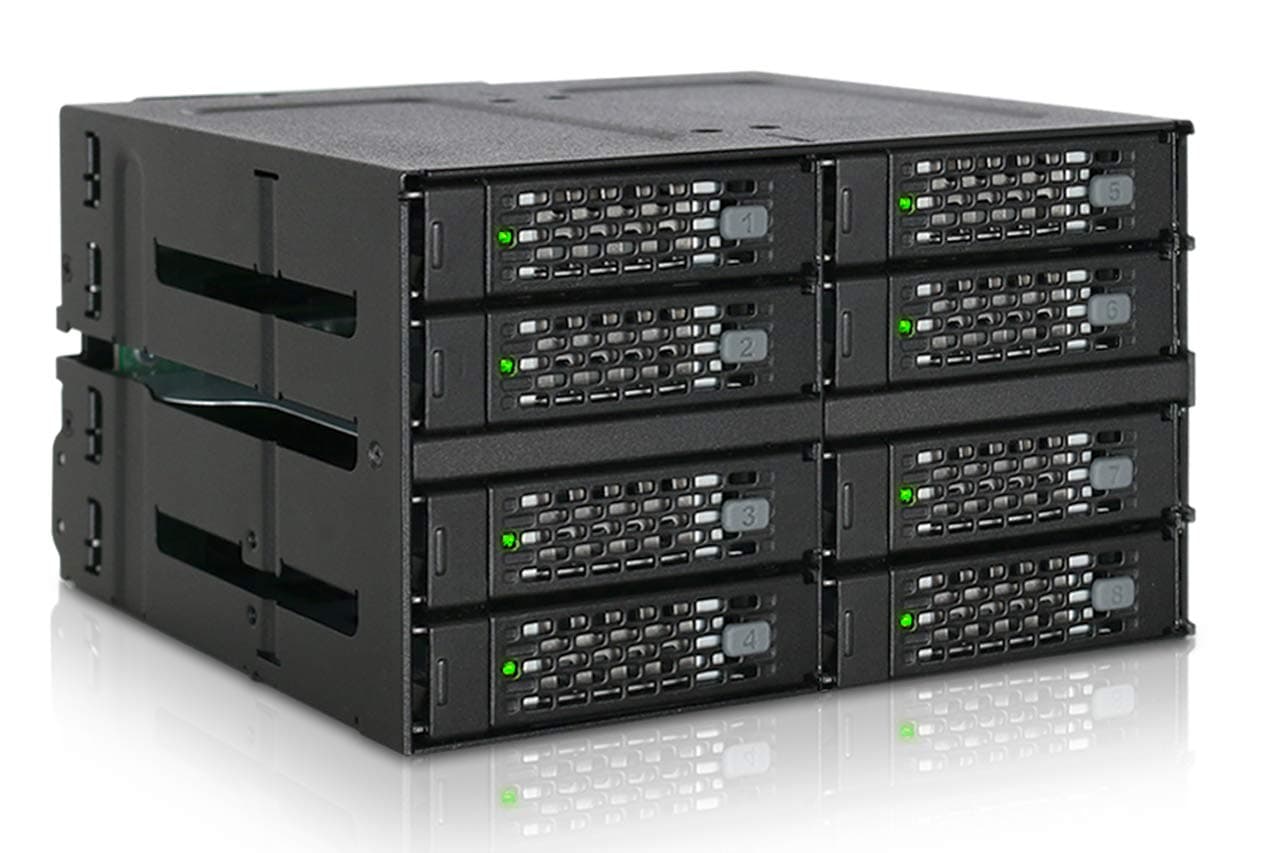
The ICY DOCK MB508SP-B is a premium 8-bay 2.5" SAS/SATA hot-swap backplane enclosure designed to fit into two 5.25" external bays. It supports SATA 3.0 up to 6Gbps and SAS 3.0 up to 12Gbps, compatible with enterprise SAS drives from top brands. Featuring a full metal build, dual Mini-SAS HD ports, and flexible fan control, it delivers robust performance and durability for professional-grade storage solutions.


| ASIN | B07K8PK8JP |
| Best Sellers Rank | #203 in Enclosures |
| Brand | ICY DOCK |
| Built-In Media | MB508SP-B |
| Compatible Devices | Laptop |
| Customer Reviews | 4.3 out of 5 stars 432 Reviews |
| Enclosure Material | Metal |
| Global Trade Identification Number | 00884826508090, 04713227445085 |
| Hard Disk Form Factor | 2.5 Inches |
| Hardware Interface | SATA 6.0 Gb/s |
| Hardware Platform | PC |
| Item Type Name | ICY DOCK MB508SP-B Rugged Full Metal 8 Bay 2.5" SAS/SATA SSD/HDD Backplane Cage for 2X External 5.25" `Bay |
| Item Weight | 1460 Grams |
| Manufacturer | ICYDOCK |
| Material | Metal |
| Supported Devices Quantity | 8 |
| UPC | 884826508090 |
| Unit Count | 1.0 Count |
| Warranty Description | 3 Years |
J**D
5/5 Stars - Excellent build quality for my studio setup and huge amounts of data!
Been running this ToughArmor for about 8 months now in my Lenovo P520 and it's been rock solid. Was initially torn between this and some cheaper alternatives, but the full metal construction and MiniSAS HD connectors sold me - glad I spent the extra money. Installation was pretty painless once I figured out the cable routing. Fits perfectly in two 5.25" bays, though you'll want to make sure your case has enough depth. The included SAS cables are good quality and the connectors feel solid. My only minor gripe is that the mounting screws could be a bit longer - had to be careful not to cross-thread them. Hot-swap functionality works exactly as advertised. I've pulled drives while the system was running multiple times with no issues. The individual drive status LEDs are bright enough to see clearly, and the activity indicators actually help when troubleshooting. Build quality is genuinely impressive - this thing feels like it could survive a small earthquake. Running a mix of Samsung 870 EVOs and some older Intel enterprise SSDs with no compatibility issues. Temps stay reasonable even under heavy load, though I do have decent case airflow. The drive trays slide smoothly and lock securely - no wobbling or loose connections. Only real downside is the price, but you get what you pay for. This isn't for casual users - if you're just looking to add a couple drives to your gaming PC, there are cheaper options. But if you're building a proper server or NAS and need reliable hot-swap capability, this is worth every penny. Would definitely buy again for future builds. ICY DOCK clearly knows what they're doing with enterprise-grade storage solutions.
M**N
Works like a charm, well engineered, note on fan
Works like a charm. Solid metal design, good airflow above and below for each slot, and a single power connector for all four (separate SATA data cables, one sata-power cable). Being me, I took the thing apart. Five screws and the backplane comes off, one more and its circuit board can be taken out and examined. Totally trivial, very well seated and secured... notches into the frame... zero wiggle room (good!). I counted 9 capacitors on the power distribution bus so they didn't cut any corners there. Inserting an HDD did not glitch the power for the other drives that were already in. I give the backplane a big thumbs up for design and engineering. The drive bays are solid. Considering that we are cramming four 2.5" drives into a 5.25" enclosure, the design is very good. The bottom of each bay drops out a little to give the bottom of the drive a little space. The areas near the screw holes are flush, though, but it didn't seem to have any issues mounting the seagate HDDs I had without a plastic protector (clearance on the HDD drive mounts is about 1mm to the drive's circuit board). It is not screwless... requires four screws (flatheads are included). Two are round holes, two are oval. Not sure why they didn't use round for all four but the two round holes are near the connector side so the drive's connector is guaranteed to be properly aligned. Easycakes, and honestly you only need to use two screws (in the round holes nearest the connector) anyway. The fan is the only downside, being small and noisy, but I still give the device 5 stars for several reasons. First, they included a fan control switch (OFF, LOW, HIGH settings). Second, airflow looks good for all four slots. In terms of the fan control, no point ever using 'HIGH'. Just use LOW or OFF. The LOW setting is definitely audible which is unfortunate but there isn't a whole lot of room on the design side considering the fan has to fit the height. On the plus side, not only is there an 'OFF' position (if you have SSDs, you don't need the fan), but if the case itself has good airflow you can physically remove the fan with two simple screws to open it up and allow the case airflow to handle any cooling requirements. The fan's power able goes to a connector and just pulls off, so its easy to remove. In fact, if you really wanted to and didn't want the hot-swap, you could unscrew the whole backplane and just use it as four permanent slots. Silly I know, but the case is so well engineered that it has that flexibility if you wanted it. Fan tests, Four 1TB Seagate HDDs. Writing mean all four drives writing continuously for 20 minutes or so. Temperatures taken using SMART info (all four returned the same temp within +/- 1C): idle, low fan: 26C Idle, no fan: 27C (i.e. PC case fan only, no direct airflow) writing, high fan: 38C writing, low fan: 41C writing, no fan: 47C (i.e. PC case fan only, no direct airflow) So with all those features and easy modding, ICY gets 5 stars. ADDENDUM - I had one issue with the dock. On one of the machines I used longer screws to mount the dock in the bay. They turned out to be too long and infringed on the tray area, causing damage to one of the trays which I didn't realize until I tried to pull the tray out and couldn't. This was my own fault. So remember to use the low-profile screws that come with the unit... or at least make sure they don't infringe the bays. ADDENDUM2 - If you purchase your own 40mm fan you may not be able to use the LOW setting. Depending on the fan, it might not startup unless you use the HIGH setting. I still definitely recommend purchasing your own low-noise 40mm fan and not using the cheap noisy one that comes with the unit. You don't need much airflow to cool HDDs (and don't need any at all for SSDs), so find the quietest 40mm fan you can and you will be a happy camper. The only downside to the unit is having to screw the drives into the hot-swap trays... in particular, losing the screws for the trays you aren't using atm. I recommend storing the unused screws in their plastic bag IN one of the unused trays. -Matt
M**H
Excellent Product!
I was pleasantly surprised with this product. It often seems any type of conversion bay from any vendor at any price point has poor reviews or downsides to it. This turned out to be great. I had very few issues to raise with mine and even those ones weren't a big deal. I used mine to house 4 SSDs for my rig. Seeing as my case didn't have native 2.5" bays/trays it was nice to separate all my 2.5" SSDs somewhere they fit. It is fully SATA3 (6.0Gbps) compliant. When putting it all together it felt like everything wasn't going to line up, but once I was done it did. It looked great and fit in just fine. Pros: -Nice sleek look. Metal front panels look nice and are durable. Other brands use plastic and/or look cheap and use flashy "gamer" colors. -Activity/power LEDs for each drive, although my case is usually shut so I don't see them. -Only requires 2 molex ports, others require more. With a molex splitter it was easy to power both off of 1 source. -2 Fans. They move a good bit of air too. They probably weren't even necessary for 2.5" drives but they're a welcome feature. -The molex and SATA ports are spread out nicely, and line up with their corresponding drives. I've seen others where they're tight, lined up sideways, etc., making it difficult to plug everything in and maintain cable management. Plenty of room here. Cons: -Drive trays can be difficult to open and close. My SSDs were a tight fit to slide in and out, and I felt like the SATA pins could've gotten scratched in the process. I have no intention of "hot-swapping" these drives any time soon, if ever, so these aren't an issue going forward. -Could've been a little cheaper, but this price point is the norm for this type of product with these features.
T**K
Decent high density bay
Used for a desktop storage array where low volume high IOPS (all inexpensive SSDs) were needed. Case arrived slightly damaged (bent frame prevented a caddy from ejecting, easily bent back). Bought this for the high density in a single 5.25" bay. The power connectors wont mate well with a daisy chained power cable; use a splitter instead. Suggest having a cable management strategy before buying, including measuring the necessary SATA cable lengths. Have not yet fully tested all drive bays, but no issues with 4/8 populated. Also, note that some 2.5" SSDs (and maybe HDDs) are thicker than others. This will not fit thicker drives. It works fine with the Samsung and Crucial SSDs I had. The drive caddys are OK, but their insertion is sloppy. There is little in the way of guidance without the adjacent bays being populated; be careful and gentle when inserting even empty caddys. The price I originally paid ($136) is excessive, but alternatives are limited. I like the all metal construction, but if the price were lower I'd have bought another. The fans were garbage and I eventually replaced them with two noctua brand fans that were quieter and of higher quality. For $250 this is an absolute rip off if you're using SSDs. I would sooner let my SSDs dangle in the case and have to crack it open to replace them once in the next 3-5 years than pay for this overpriced product. Used without issue with a cheap LSI 9260-8i. I recommend buying more modern card if you can afford it to better take advantage of the increased connectivity this bay offers.
S**Y
Great product for SAS 4.0 drives.
Works great for me after tech support figured out that the enterprise SAS drives I had would not start up due to a 3.3V signal applied to the PWDIS pin. The fix was to use a molex to SATA power cable that doesn't include a 3.3V power source. I currently have a number of SAS 4.0 drives working correctly at the max speed of 22.5Gb. Sometimes the latch pops open when the drive is loaded, which is a bit annoying, but they seem to be holding correctly for now.
W**E
working fine. Excellent density - I have all 8 bays ...
Overall, working fine. Excellent density - I have all 8 bays populated. 8 SSD's in the space a 5.25" bay is awesome and allowed me to remove the internal drive storage I had in front of the fans feeding air into my case. So, in that respect, it did what I needed it to do. It didn't do what I wanted it to do. On top of the need, I wanted it to look clean on the front of my 900D case.And I expected good quality latches and easy installation. Build quality is just OK and is one reason for knocking this down a star. Had some trouble with the drive bay latches when it first arrived and debated replacing it. But I chose to work the latches until they closed properly. Since I'm not pulling these out regularly (hot swapping) it's not a major issue for me, but could be for others. Also, the "lights" on the front of the drive are not the same intensity. Could be due to the construction issues noted above, but they diminish the clean look of the build. 4 are solid and 4 are dim. Finally, the fans in the back are louder than the fans in my case and there is no speed control. So, I may just disconnect them. They make this thing a dust magnet anyway.
A**R
Enormous storage potential, sturdily built, one of my favorite pieces of hardware so far
I had no idea it was possible to fit 16 drives into two standard 5.25" drive bays, but apparently it's possible. Currently, I'm only using 8 drives with it, because I don't have another $400 to spare right now, but I'm extremely happy with the setup as is. I haven't had anything to complain about here. If you want an extreme amount of storage in a small form factor, this is one very good way of achieving that. Alternatively, you could buy fewer, dense (e.g. 10+ TB drives) and achieve a similar effect, but a larger number of smaller drives in RAID10 is probably better from a read/write performance perspective. I should know better, but I don't always carefully research my hardware purchase. In this case, I did, and avoided potential disappointment. Some advice: Drive size: not only are these 2.5" SATA/SAS/SSD drives, they're only 7mm tall. Check the height. If the height is listed in inches, and the math comes out to just over 7mm, that's technically a 7mm height drive and will probably be fine--at least it was in my case for some Seagate drives. Double, maybe triple check that your drives are going to fit, to spare the wasted time on returns. Data cables: You can use standard SATA data cables to your motherboard or PCI expansion cards with this, but that's a really bad idea. This drive bay has 4 Mini SAS data slots, each one is equivalent to 4 sata data cables. You might not bother to get a Mini SAS expansion card, and instead use 4 Mini SAS ->4 SATA "breakout" connectors. For the sake of cable management/sanity, please don't try this, get one 4-slot MiniSAS card or two 2-slot Mini SAS cards; ensure your motherboard has an appropriately sized, available PCI slots--this will be easier if you get 1 card with 4 slots, though frankly they are a little expensive, check your options. Power: You only need 4 standard power connectors. Really shouldn't be the primary drain on your power supply, Air Flow/Fan: It's expected this is installed on the front of your case, by default it will blow inwards, meaning if installed on the front, air flow is front to back. You could reinstall the fan the other direction if you wanted to install this on the rear of your server, like some psychopath. It also has a spare Installation: The drives are hot swappable, so there's no reason to bother installing them until the whole bay is safely installed in the system (obviously, completely compatible with either a desktop tower or a rack case, if it has at least a 2x5.25" drive bay slot). Also, there are hard drive covers on the Mini SAS port which I found were surprisingly difficult to remove after I already installed a bunch of other hardware into my server, but obviously are good to have in shipping and maybe if you're clumsy. Might also want to adjust the fan speed to its desired setting before it's a challenge for your oversized fingers to reach into a tightly cabled corner of your case. These are tray drive bays, not trayless, meaning you have to screw in the drive to a little platter you pull out of the slot before reinserting it, but this takes 15 seconds, just keep your spare screws stored in a safe place. Compatibility: have to reiterate that this is compatible with any case that has two 5.25" drive bays, which is a lot of cases, but perhaps not some which have a tempered glass panel on the front.
T**C
Physically defective - poor MFG or QA
Poor quality - cannot remove drives. I installed this and all my 4 drives went in smoothly on their caddies. Everything connected and worked perfectly. I went to remove the drives later to swap them for some larger ones and found that the bottom left and bottom right caddies literally would not come out at all. The bottom left one, the front arm swung open normally, but I had to pry on it to the point of breaking the caddy to get my disk out. On the top right, I can't even depress the button to get the arm to swing open. Guess I'm gonna have to cut open the enclosure to get my disk out. Avoid ICY DOCK and their poor manufacturing/QA
Trustpilot
Hace 1 mes
Hace 4 días