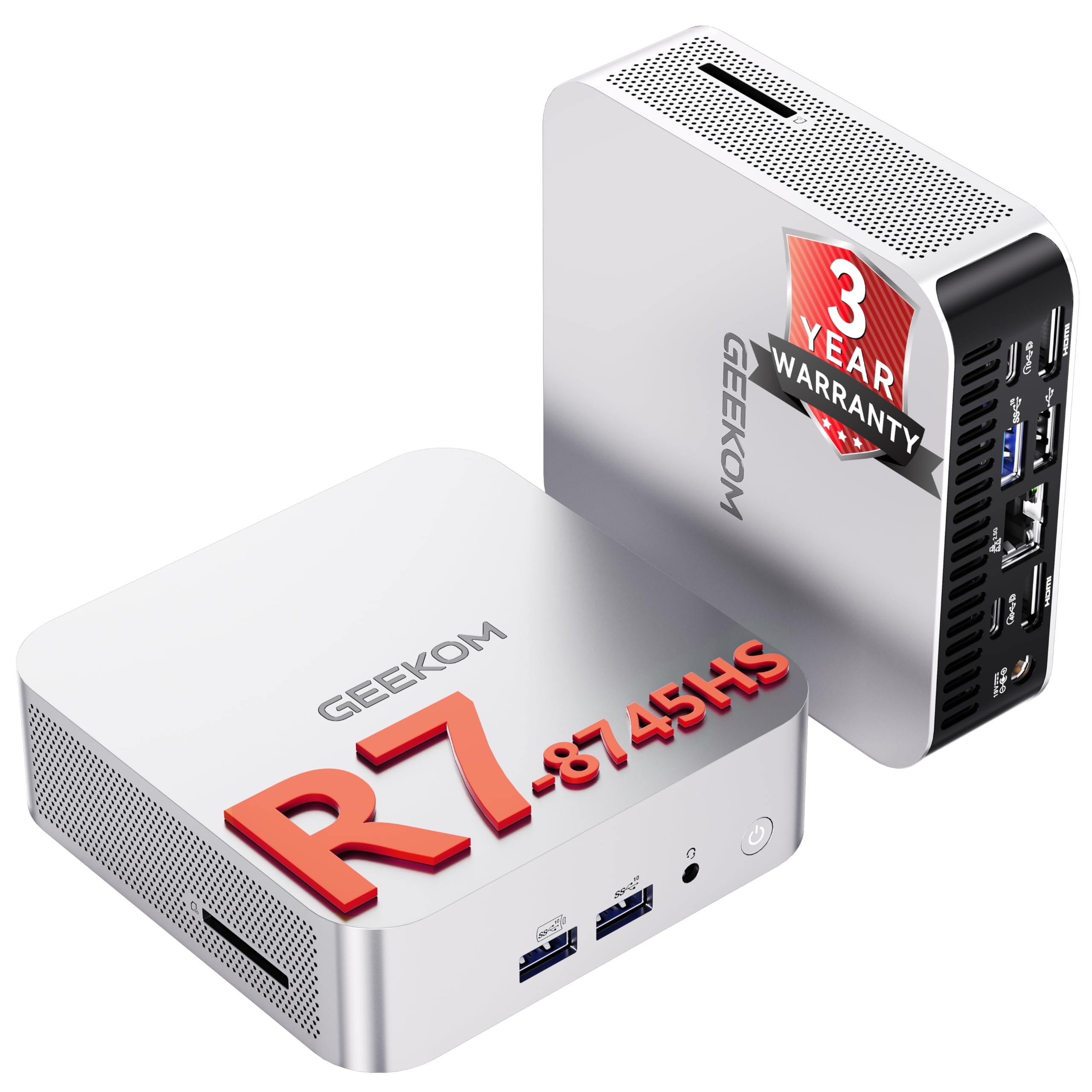
🚀 Compact Powerhouse: Big Performance, Tiny Footprint!
The GEEKOM 2026 A8 Mini PC packs a cutting-edge AMD Ryzen 7 8745HS processor with Radeon 780M graphics into a sleek, minimalist chassis. Featuring 16GB DDR5 RAM and a 1TB PCIe 4.0 SSD, it delivers desktop-level performance optimized for professional multitasking, 4K content creation, and gaming. USB4 connectivity at 40Gbps combined with dual HDMI 4K@120Hz ports supports up to four simultaneous 4K displays. With Wi-Fi 6E, 2.5Gb Ethernet, and a 3-year warranty, this mini PC is designed for longevity, speed, and seamless productivity in office or home environments.


| ASIN | B0G2S1BM5M |
| Aspect Ratio | 16:9 |
| Best Sellers Rank | 14,984 in Computers & Accessories ( See Top 100 in Computers & Accessories ) 88 in Desktop PCs |
| Box Contents | 1 x GEEKOM A8 Mini PC, 1 x HDMI Cable, 1 x VESA Mount, 1 x Power Adapter, 1 x User Guide |
| Brand | GEEKOM |
| Brand Name | GEEKOM |
| CPU Model Number | with AMD R7-8745HS |
| CPU Model Speed Maximum | 5.1 GHz |
| CPU model | Ryzen 7 |
| CPU speed | 3.8 GHz |
| Cache Memory Installed Size | 16 GB |
| Cache size | 16 GB |
| Colour | White |
| Compatible Devices | Various devices with compatible connectivity options |
| Cooling Method | Air and Convection |
| Country of Origin | China |
| Customer Reviews | 4.5 out of 5 stars 347 Reviews |
| Display Type | LCD |
| Global Trade Identification Number | 00810190723845 |
| Graphics Card Interface | Integrated |
| Graphics Card Ram | 16 GB |
| Graphics Coprocessor | AMD Radeon 780M |
| Graphics Description | Integrated |
| Graphics Ram Type | DDR5 SDRAM |
| Graphics card description | Integrated |
| Hard Disk Description | SSD |
| Hard Disk Interface | PCIE x 4 |
| Hardware Interface | DisplayPort, HDMI, SDXC, USB, USB 2.0 |
| Human Interface Types | Buttons |
| Keyboard Description | Standard QWERTY keyboard |
| Keyboard Layout | QWERTY |
| Manufacturer | GEEKOM |
| Maximum Display Resolution | 5120 x 2880 Pixels |
| Memory Clock Speed | 5.1 GHz |
| Memory Speed | 5600 MHz |
| Memory Storage Capacity | 16 GB |
| Model Name | GEEKOM A8 8745HS |
| Model Number | GEEKOM A8 8745HS |
| Model Year | 2026 |
| Native Resolution | 3840 x 2160 |
| Network Connectivity Technology | Bluetooth, LAN, USB, Wi-Fi |
| Operating Systems | Linux, Windows 11 Pro, ubuntu |
| Operating system | Linux, Windows 11 Pro, ubuntu |
| Optical Storage Device | BD-R |
| Personal Computer Design Type | Mini PC |
| Power Consumption Size | 45 Watts |
| Power Plug Type | No Plug |
| Processor Brand | AMD |
| Processor Count | 8 |
| Processor Series | Ryzen 7 |
| Processor Socket | BGA 413 |
| Processor Speed | 3.8 GHz |
| Product Features | 8K Display Support, Flicker Free, Memory Card Reader, Optical Drive, upgradable ram |
| Product Warranty | 3 years |
| RAM Memory Installed | 16 GB |
| RAM Memory Technology | DDR5 |
| RAM Type | DDR5 RAM |
| Ram Memory Maximum Size | 128 GB |
| Resolution | 5120 x 2880 |
| Screen Size | 16 Centimetres |
| Specific Uses For Product | Home, Business, Office, Education, Gaming, Photo Editing, Video Editing, Daily Use,Multimedia,Multimedia,Healthcare, Manufacturing, Retail, Edge Compute, Productivity, Creativity, Gift, upgradable ram |
| Style Name | Minimalist |
| Total HDMI Port | 2 |
| Total USB Ports | 7 |
| Total Video Out Ports | 2 |
| Video Output Interface | HDMI, USB4/DisplayPort |
| Video Processor | AMD |
| Wireless Compability | Bluetooth |
| Wireless Technology Type | Wi-Fi |
W**L
Big desktop power in a tiny case!
I bought this for my wife to use, replacing a (2017) Dell XPS 15 laptop that was stuck on Windows 10 with no supported option to upgrade to Windows 11. I set it up for her and have had a good dive into using the mini-PC to test it out. This is quite an incredible computer packed into a small chassis. The AMD Ryzen AI 9 HX 370 easily powers through daily tasks such as email, web browsing, Microsoft Office apps, graphics packages (Affinity etc) and video editing. The 32 GB RAM ensures you can have as many apps and web tabs open as you need, whilst the generous 2 TB SSD provides more space than we are ever likely to fill (I partitioned ours to 1 TB for Windows, the rest for local user data). My wife is a writer, so she tends to have a lot of Word documents open at the same time. In the background she does research across a high number of Edge browser tabs. The mini-PC can handle all that easily without needing the fans to spin up (more on that later). The unboxing experience itself was impressive, being well packaged and protected. Having previously bought an Apple Mac Mini M4 (for myself), I can say Geekom have done a wonderful job replicating the high-end experience that Apple provide. The ‘Geekom A Series’ labelling on the sides of the box is presented in a shiny silver font, clearly messaging that ‘There is something of quality in here.’ The outer silver metal casing is beautifully crafted. It looks equally as nice as my Apple Mac Mini M4. Plugging things in/out of ports feels solid, there is no loose wiggle to anything. Having Windows 11 Pro installed, over the typical Home version, is certainly a boon. As a techy and ex-software engineer, I’m only too aware that there are Windows features (or certain types of applications) that will only work on the Pro versions and not Home e.g. BitLocker, Remote Desktop (Host) and Hyper-V (useful for developers needing full emulator support). It’s great that Geekom include this by default and don’t try to charge you a large chunk extra for this better OS. Port selection is fantastic, particularly after years of using the limited ports of a laptop. I love the fact this has integrated Ethernet ports (no external LAN dongle required). Yes, it has Wi-Fi and that works great, but I always prefer a faster/more-reliable network cable when possible. That said, we are having to use Wi-Fi today as I’ve had to temporarily disconnect the powerline networking and cables due to some DIY being done — thank goodness it’s all built in! We are using a Logitech Signature K650 Wireless Keyboard via Bluetooth which works perfectly (no typing delay etc) — as if it were wired. A Logitech M100 mouse is plugged into the one USB-A 2.0 port on the back whilst a Logitech Brio 500 webcam is plugged into a rear USB-C port. We’ve got an external USB 3.0 HDD enclosure connected to a rear USB-A 3.2 port for regular backups, and the HDMI socket is being used for an external 27” monitor (2560x1440). All four front USB-A 3.2 ports are still free for ad-hoc connections. The mini-PC is managing all that without bother. Superb! Generally, the fans stay quiet once you’ve got into Windows, opened all your apps and things have settled down. However, during booting Windows, Windows Updates, a virus scan or other more intensive process the fans can spin up, and they can be quite noisy. It’s not quite the same noise as a laptop where you might get the increasing pitch of air being blasted through small vents. Instead, the fan noise on this is a little more unpleasant, more like a pulsing sound that can bounce off the wall behind that then manages to sound like it’s come from either side of you. It’s so odd it did make me wonder if the fan is catching on something inside the casing. Thankfully it doesn’t last very long when it does happen. In fact, the fans spin up a lot less than they did on our prior Dell XPS 15 laptop. We’ve not played any games on this (my wife’s not into any of that) so I can’t say how well it holds up with gaming — however online reviews state the Radeon 890M performs a lot better than you might expect, certainly better than Intel’s integrated GPU chips. YouTube videos certainly have no issues streaming and running in a window or full screen. For support, Geekom’s own UK website does have a section where you can download BIOS and driver updates. Unfortunately, there’s no information as to what changes or improvements are provided in any of those updates. However, as everything currently available is dated from earlier this year (February or April), before the mini-PC was even released, there’s nothing to update yet. Geekom do not provide their own automated driver update software, such as Dell have via their Dell Command Update utility — as such you will have to manually check if/when these drivers get updated and manage installing them yourself. I have emailed Geekom directly to ask if they could please provide better information for drivers and BIOS updates. I also asked if they would ever provide their own auto-update utility software. They did reply, indicating they would look into providing better download information in the future — however they didn’t say anything about any potential auto-update software. Finally, it’s worth mentioning how little power this mini-PC uses. The CPU TDP is stated as up to 54 W; on average the entire mini-PC is probably using between 40 – 80 W (according to Copilot). This is less than our previous laptop (which was always plugged into the mains as the battery died years ago). It’s also far less than the 250 W average the previous (older) desktop PC was using — and only a fraction of the 600+ W my current gaming PC uses when running games. Switching over to daily use of this Geekom A9 mini-PC and my own Apple Mac Mini M4 (for writing and work etc) should save us a lot of money in electric over the next few years. Overall, a fantastic computer. It’s astounding what Geekom have managed to get working in such a small device. My wife loves using it due to its speed and efficiency and also appreciates having more desk space now that the prior 15” laptop has been retired. It’s worth mentioning that I bought this Geekom A9 Max mini-PC during its UK release week (August 2025) when they offered a big £400 discount for early buyers. I’d actually been waiting for it to release since I heard about it being announced during the CES 2025 show in January. For the money, this is an incredible value purchase. I see now they have another offer on via Amazon which is still £300 below RRP. This is a fantastic offer, and I’d highly recommend it to anyone considering buying a new computer for home or office use.
A**R
Compact AI Workhorse
Loved it! I’m running a couple of local LLM models, and it handles them surprisingly well. Performance is smooth, thermals are stable, and the noise level under load is acceptable — expected given the processing demands. Perfect little machine for AI experiments or light model deployment. Excellent balance of power, size, and value.
Z**R
Impressive outcome
A really nice piece of kit, this. As it transpired, I experienced some inital issues with a component failure, which left me disapointed, as I needed to crack-on workwise. That being said, I have to say Geekom did step up to the mark. My initial dissapointment had been about initail difficulty in communication over the fault, not the machine per-se. However, I was then contacted by Geekom who could not have been more helpful, so credit where credit is due; it turned out to be an excellent response. Geekom offered me new replacement plus a free portable monitor for my trouble (I didn't accept this as it would have been of little use to me, but the gesture was much appreciated). However, given the hiccup and the item having already been returned and in process of a refund, Geekom were kind enough to offer an expedited refund. I was very heartened and impressed by this, especially as they appear to be taking genuine steps to correct what had gone wrong with their initial service contact situation in my particular case, which is the most important factor. Well done Geekom. I would not be averse at all to buting again and would have but for my time constraints.
N**R
Beautifully finished and easy to set up
Well packaged, beautifully finished, and easy to set up. The fan noise is no louder than it is from my laptop when running the same processor-intensive apps or games. Excellent range of connections, and I really appreciate the 2TB (nominal) SSD. All apps appear to load and run faster than they did on my old laptop which had a Ryzen 7 and 500GB SSD, but I have not yet had time to do any serious photo processing, though I’m certain that I will notice the improved performance. Recommended, especially at a sale price!
H**R
Very happy with this mini PC
Great mini PC so far. As a fan of YT Creators like GTA Prime and similar I bought this as a new dedicated entertainment center and it's performed exactly as I'd hoped. I might try it out with DaVinci Resolve,Blender or Clip Studio Paint later to see how to handles creative tasks as well. I know it can't replace my desktop but I'm curious to see what it can do with some of my favourite software and how fast it can run. The PC runs very quietly and efficiently. The HD is very large so I shouldn't have to worry about storage for now (but I will be buying a new external HD as you should always backup your files). It comes with Windows 11 which I'm not too interested in keeping. I will be updating that with a Linux OS as soon as I know how to as I'm told it's a lot better OS without the bloat that comes with Windows. The back of the PC has lots of ports for various bits of hardware that are easy to setup. Overall I think this was an excellent choice and great value for money.
M**J
Good small PC
I’ve been using the GEEKOM A9 Max Mini PC with Windows 11 Pro and the AMD Ryzen AI 9 HX 370, and overall, I’m very impressed. It runs standard home office applications seamlessly – everything from Office suites to web browsing operates smoothly without any lag. What surprised me most is its performance with gaming. Even quite demanding games run well, providing a smooth experience with minimal issues. For a mini PC, the combination of compact design and powerful hardware is remarkable. In summary, the GEEKOM A9 Max is a versatile mini PC that handles both productivity tasks and gaming efficiently. I highly recommend it for anyone looking for a small yet powerful PC for home use. Downside: It becomes noticeably louder under heavy graphical load, such as gaming or rendering.
D**L
WOW 🤩
At an INCREDIBLY small form factor of just four inches by four inches and weighing less than 500 grams, WOW I am impressed on the performance of this mini PC at a very solid price point. GEEKOM also often launches deals where you can get as much as £120 off! It is very capable for almost any task you throw at it, from rendering a detailed 3D model in Blender to everyday tasks like streaming music and web browsing. I didn't really test it on gaming but I am sure it is quite capable. The mostly aluminium chassis feels really premium and like the Mac Mini. The fan noise even when performing demanding tasks is noticeable but not too intrusive. It is comparable to my MacBook Pro fans. And if you have ever used a MacBook Pro before, you'll know that the fan noise is almost nonexistent even when performing demanding tasks again. GEEKOM has done a very good job at developing the IceBlast Cooling System, it efficiently keeps my machine nice and cool while not being overly loud.
R**Y
Very poor wifi
TERRIBLE WIFI. I ran tests on my IPAD M4, AND IPHONE 16 from exactly the same location, and I was getting over 600mbs. But from this Geekcom 8, a mere 76mbs download - yet faster 315mbs upload. I updated drivers - to no avail. I've since discovered its a common issue with this model - and it seems other brands of these mini PCs. Chat GPT found this for me:- Absolutely. Multiple reviews and user reports confirm significant Wi-Fi shortcomings: A review by Liliputing noted: “Probably the most significant issue I encountered … was poor WiFi performance.” Download speeds on both 5 GHz and 6 GHz bands were under 80 Mbps. It turned out that electromagnetic interference (EMI), largely from the SSD and inadequate shielding, was to blame. Temporary fixes—like taping over the antenna or adding a makeshift Faraday shield—dramatically improved performance. Liliputing
Trustpilot
Hace 2 meses
Hace 2 días



