We remain fully operational. Our teams are working around the clock to ensure your deliveries continue safely.

Descargar la aplicación


Servicios al cliente
Sobre nosotros
Copyright © 2025 Desertcart Holdings Limited
Descargar la aplicación


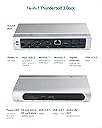
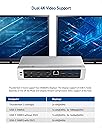



⚡ Power your productivity with seamless connectivity!
The Cable Matters 107044 is a sleek, silver Wi-Fi enabled device featuring a single HDMI port and 96 watts of power delivery, designed to provide reliable, high-quality connectivity in a compact 1.9 kg form factor.



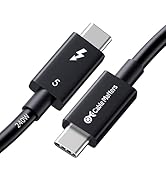

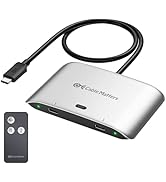


| ASIN | B08L9TCY25 |
| Brand Name | Cable Matters |
| Colour | Silver |
| Compatible Devices | Monitors |
| Customer Reviews | 4.2 4.2 out of 5 stars (90) |
| Hardware Interface | USB |
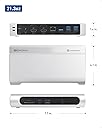
| Item Dimensions L x W x H | 19.6L x 10.4W x 3.6H centimetres |
| Item Weight | 1.91 Kilograms |
| Manufacturer | Cable Matters |
| Manufacturer Part Number | 107044 |
| Model Number | 107044 |
| Number of Ports | 14 |
| Total HDMI Port | 1 |
| Total USB Ports | 1 |
| UPC | 818707029381 |
| Wattage | 96 watts |
P**M
This seems to be a solid device. I've used it for only a full day with my new 14" Macbook Pro, today is my second day, but it was a long day with about 3 hours of Zoom and WebEx. It's fairly heavy, and comes with a nice weighted base, which I'm not using. Without the base, it's still heavy enough not to get pushed around by loads of stiff and heavy cables. I really like that everything hooks up in the back, so you can make a nice tidy installation. The power supply is substantial, it's a significant brick with a detachable AC cord, including a ground return. I only had two minor issues, which may not have been the fault of the dock. Once when I was moving stuff around (physically) the mouse quit responding, the other, when I did an OS upgrade and it automatically rebooted, with the laptop closed, the displays didn't come up. Both times, I just unplugged and replugged the dock any everything was fine again. It's likely those weren't dock issues. I wish my old PC (an X1 Carbon with the hard dock) were so compliant. I'm running: Two monitors, one is a 4K60Hz on HDMI, the other is 1650x1050(?) 60Hz on an HDMI to DVI converter cable; A GigE hardwired internet; A USB 4 port A/B switch with wired camera, mouse and keyboard. The dock is performing very well. No kinks or glitches with the display or usb, everything is working exactly as you would expect. It's had no issues with the computer going to sleep or anything strange. I did use the microSD port and copied several gig worth of photos from that to my networked NAS and it was pretty quick. When you're up and running it does get warm. I would recommend not stacking it up with a bunch of other gear, I have mine sitting on the desk under the two displays, where it's convenient to access the ports on the front, and like I said earlier about the weight, its not flopping around when you're trying to plug into the SD card or USB port, just one finger on top is enough to steady it when plugging in or out. Another thing I like is that it doesn't waste a bunch of space on USB2 ports. For my purposes they're useless. The two "accessory ports" on front are USBA and USBC 3.1 ports, so good for 5 Gb/s. To be honest, I bought this one because it was the only one available without waiting a week. It was less expensive than many of the others and I could get it delivered the same day, so I thought "what the hell, let's give it a go". I'm glad I did, as its a keeper. Thinking about, for example, the lack of a downstream Thunderbolt, it really isn't an issue. My objective was a convenient one cable dock for my Macbook. The TB4 is only good for 40Gb/s, no magic will increase that in the dock, so if you're running Ethernet, 2 4K displays, USB camera, mouse and keyboards, any attached mass storage is fighting over the scraps left over and isn't going to perform at its best, so if I had a stack of SSD's then I'd go for a second port on the Mac, not try to stick it in with the video! So I'd probably prefer a second Thunderbolt only breakout port just for mass storage. If you're running 1 or 2 DisplayPort or HDMI (or analog) monitors, this dock is very well designed.
W**L
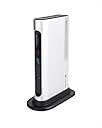
Works very well with apple silicon MacBook Pro. Connects at the full fat 40gbs as advertised. Plug and play, works right out the box with my MacBook. EXCELLENT value for money. If you are looking through the mess of available “docks” for an m1 or any apple silicon Mac, and you cant seem to find one that works as advertised without spending $200, this is what you want. It is real thunderbolt, no USB4 shenanigans where it works with some machines and both with others. It’s real thunderbolt 3 and supports multiple monitors on apple silicon. The build is solid aluminum and high quality. It is compact and comes with a little stand to reduce the footprint. Literally the best price to performance of ANY dock I have tried and works flawlessly. Only complaint is that it technically connects in TB3 mode over TB4 but this doesn’t matter for real world use and isn’t likely to affect your use-case.
J**K
I purchased two of these Thunderbolt 3 docks on the prime day special deal. This dock build quality is excellent with a metal build and comes with a vertical stand that is solid. It has extensive ports which includes the following ports at the rear : 2 HDMI, 2 Display ports, five 5Gbps USB A ports, an Ethernet port, a Thunderbolt 3 port for the host computer with 96W power delivery and a power port. The front of the dock has an sd slot, a tf/micro sd slot, a 10Gbps USB C port, a 10Gbps USB A slot and an audio in/microphone port. This is a full featured Thunderbolt dock. It also comes with a short Thunderbolt 3 cable to connect the dock with a laptop and a robust power supply for the dock. I connected the dock to my MacBook Pro 14 inch with M1Pro and a 29 inch wide screen monitor and everything worked great. The Ethernet port delivers fast connectivity and the multiple usb ports are great to connect my wired keyboard and mouse as well as an external SSD. I would highly recommend this full featured high quality Thunderbolt dock! I am pretty happy with its performance so far. ‘I use the second dock with my MacBook Air and it works flawlessly too!
D**K
This isn’t the newest model of Thunderbolt dock, but it may be the most affordable one out there. My laptop for work was recently upgraded to one that supports Thunderbolt (don’t ask how old the previous one was). I was using a USB-C hub at home with two monitors, one being a 4K display. USB-C did not have enough bandwidth to drive both monitors, so I had multiple cables running into the laptop. After keeping an eye out for a while, this Cable Matters Thunderbolt 3 dock turned up on sale used (but very good) for only $70! That was too good to resist. I’m now running my work laptop (a Dell), and a personal one (a HP) I picked up later, with only a single cable connected and driving both monitors, keyboard, mouse, camera, and Ethernet. One thing that sets this dock apart is the amount of connectivity it provides. Five USB ports on the back allow connecting every accessory I needed and still having a port left over. The video output can be either HDMI or DisplayPort to two monitors, removing the need for any adapters. The metal case adds a touch of class that you don’t see with many competing products out there. I also like that the Thunderbolt upstream port comes out of the back, so the dock looks better sitting on a desk. The Thunderbolt cable it comes with is rather short for that setup (at only 2’ long), but it is easy to pick up a longer cable to fit your needs. I picked up a 5’ cable with a right-angle connector on one end for under $20. There are two issues that caused me to drop one star off of the rating. First, there is no power button on the dock. I normally don’t keep my laptop display open, but I have to open it to turn the laptop on if it is hibernating. Most docks have a power button that can activate the laptop. I know that Cable Matter’s newer Thunderbolt dock contains this button, but at a considerably higher price. The second issue I had involved support from Cable Matters. My 4K display was flickering on and off when running through the dock if set to 60Hz refresh. This happened with two different laptops. If I run the HDMI cable directly into the laptop’s HDMI port, there was no issue. Of note, I do use a KVM switch and there was no flicker if running direct from the laptop or from my desktop through the KVM. If I bring the refresh rate down to 30Hz, there is no issue with flickering. I contacted Cable Matters and to their credit they came back to me quickly. They asked me to try bypassing the KVM and go directly from the dock to the monitor. In that configuration, it worked at 60Hz. At this point it was clear that the issue was communication between the dock and the KVM. Cable Matters washed their hands of the issue at that point, even though the KVM worked fine at 60Hz with other sources. Support could have put more effort into understanding why this setup was not working with their dock. As long as I’m content with using the laptop’s power button and running my 4K monitor at 30Hz, I can’t ask for more in a Thunderbolt dock. Considering the price I was able to get it at, there is no way I would trade my new setup. Update, three months later... Reworked my home setup. Added a second 4K display, replaced my KVM with a dual DisplayPort one, and rewired everything with DisplayPort cables. Both monitors are running 4K at 60Hz from the Thunderbolt dock through the KVM. Have tried it with both of my laptops and it worked great for the Dell and HP. No more screen cutouts. When it comes to PCs, HDMI is dead to me. I'm leaving the review at four stars due to both issues mentioned earlier, but I would definitely recommend this Thunderbolt dock if you can pick it up at a reasonable price. Fortunately, even new, it is at a better price than most comparable offerings. If it was reissued with a button on the front it would be a definite five star product.
K**R
I have tryinig to find a working docking station for my Macbook Air M4. I tried a couple of recommendations from Macworld and other vendors but none worked to play dual monitors. I was looking for USB hubs and/or docking stations that used a single USB C stations. I ordered and received this docking station the next day. It was impressed by weight and stand right off the bat. It was super easy to set up - just connect power and plug into your Mac. Both of my dual monitors worked in extended mode along with the Mac. Finally a dock that worked. I then tried installing a SSD drive and Pluggable SSD enclosure drive. On the other docks only one or the other would connect. Wiht this dock no problem. The network port also working flawlessly giving me a wireless node connection speed to 800 Mbps from my 1 Gig fiber modem over my wireless ASUS node. Best connection I have ever had. For those of you needing a dock for your new Macbook Air M4 this will meet the bill. I also like the fact that Cable Matters is US based company.
Trustpilot
Hace 2 meses
Hace 1 mes