We remain fully operational. Our teams are working around the clock to ensure your deliveries continue safely.

Descargar la aplicación


Servicios al cliente
Sobre nosotros
Copyright © 2025 Desertcart Holdings Limited
Descargar la aplicación
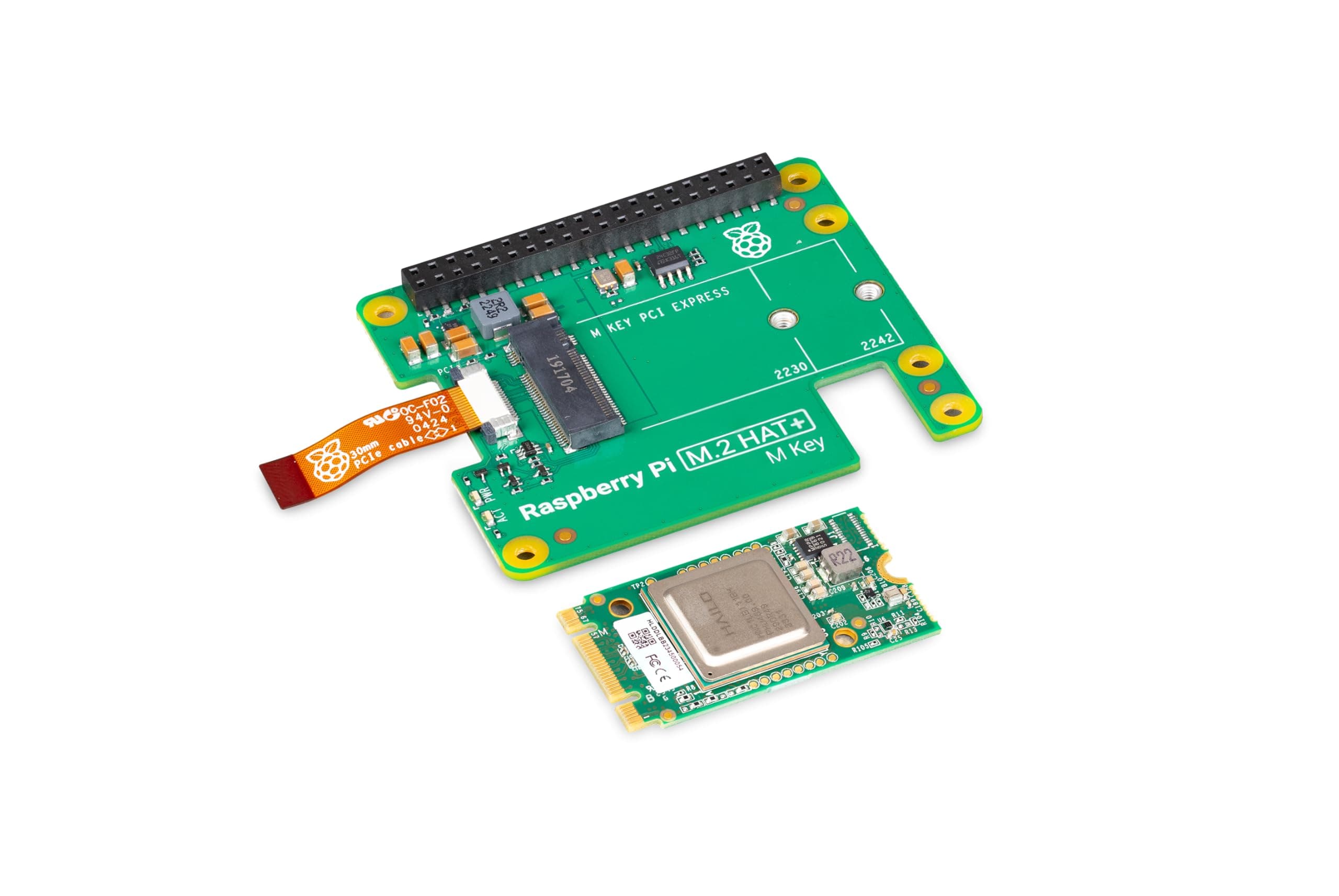
🤖 Elevate your Raspberry Pi to AI powerhouse status — don’t get left behind!
The Raspberry Pi AI Kit combines a powerful 13 TOPS neural network accelerator with seamless camera integration and advanced thermal management. Designed specifically for Raspberry Pi 5, it includes all necessary hardware for easy installation alongside active cooling. Ideal for real-time image recognition projects, this kit brings cutting-edge AI capabilities and Bluetooth connectivity to your single board computer setup.


| ASIN | B0D6GMXH73 |
| Best Sellers Rank | #3,141 in Single Board Computers (Computers & Accessories) |
| Brand | Raspberry Pi |
| Built-In Media | Raspberry Pi M.2 HAT, Hailo AI acceleration module and supplied with 16mm stacking header, spacers, and screws. |
| CPU Model | Unknown |
| Compatible Devices | Raspberry Pi 5 |
| Connectivity Technology | Ethernet |
| Customer Reviews | 4.0 4.0 out of 5 stars (72) |
| Global Trade Identification Number | 05056561803906 |
| Item Weight | 0.04 Kilograms |
| Manufacturer | Raspberry Pi |
| Mfr Part Number | SC1438 |
| Model Name | AI Kit |
| Model Number | SC1438 |
| Operating System | Raspberry Pi OS (Debian-based Linux distribution) |
| Processor Brand | Raspberry Pi |
| Processor Count | 1 |
| RAM Memory Technology | LPDDR4 |
| Total Usb Ports | 4 |
| Wireless Compability | 802.11ac, Bluetooth |
M**T
Fun kit! This won’t run LLM’s efficiently, but yolo/image recognition no problem!
Kits came very nicely packed with all required hardware. Fits like a glove on the pi 5. Work seamless with any pi camera. Works well with multiple versions of yolo. This is not designed for LLM/chat bots. Primarily different types of image recognition. The documentation is good, however one of the example yolo projects doesn’t work. I would buy again
A**H
Need a larger case if using case fan
It fits exactly on the RaspPi over a cooling fan. You will however need a larger case. The regular case will not work if you have a case fan.
J**S
Not for serious projects or products.
Extremely poorly designed system. All the benchmarks you're seeing on Hailo model zoo, divide those FPS by 2.5, that is the real speed of the unit. You can not program with their system like you would with a normal system like NVIDIA Orin, or on a laptop using GPU... you HAVE TO USE THEIR APPs, or nothing works. Which means you have very little control of your programs, you are constrained by their apps, and the whole system becomes brittle. You can not just install their libraries and use it, you have to download their entire file structure, and then use their own venv environment to get anything to work, therefore you will have to migrate your entire project into their setup rather than the other way around. AVOID at all cost. Better to spend a few extra dollars and buy a different system. There is a reason why you don't see this being used in the industry. I am in the process of returning mine, and purchasing Orin Nano. This is just not worth the hassle, between the price of RPI5 + heatsinks/fan + Hailo, you might as well throw in a few extra dollars and get the Orin.
P**I
Works well and easy integration.
Works perfectly with Raspberry Pi 5. I'm running a Frigate server for my own IP Cameras. Using the RPi5 alone worked with slow framerates and decent AI object identification, but attaching this HAT significantly increased the usability of the system. I get high framerates, accurate object identification, and low RPi resource usage. This is a significant improvement for the overall system.
A**D
Doesn't work with LLM's
I wish that they made it more obvious that this only works with visual AI and doesn't do much for LLM's. Still a solid product, and it's easy to install and operate.
D**N
Fantastic!
Easy as Pi. Added to my Pi 5, running Mistral 7B locally/offline without issue. Not as slow as I expected.
A**R
AI hat mounted on.
Can add extensions, just be careful.
A**U
Nightmare setup, but great performance
Little to no documentation and strange pipeline architecture, the examples don't even compile with the lastest rasbian unless you edit the config files and source code yourself. Great performance boost once you get it working tho. Not recommended for beginners that's for sure
E**E
Resimlerinde gösterilen Raspberry ürünü "AI Kit" isimli M.2 girişli HAILO çipini içeren ürün. Ancak bana gönderilen ürün "Al HAT+" isimli bütünleşik HAILO entegresini içeren benzer bir farklı üründü. Lütfen ürün resimlerini düzeltin.
A**R
Worked first time
S**R
Modified one of the sample apps to take an rtsp stream from my UniFi gear and look for people on cameras at times there should be no people. I previously did this on my ranch in California using a server and a rtx3090 and yolo. This hailo unit is gonna replace that setup now that I live in Britain 👍
M**.
Marche très bien branché en direct sur le port pci du raspberry pi 5 avec le petit câble ruban orange fourni (il est estampillé 94V et il est assez rigide) pourquoi je dit cela, et bien c'est par ce que au début j'ai voulu le monté avec un HAT qui fournie de Port pci pour mettre un HAT SSD M.2 en plus. Et cela n'a pas marché, le SSD et le Kit doubleur de PCI fonctionné mais pas le KIT HAT+AI, pourquoi, et bien j'ai du remplacé le câble ruban d'origine très petit du kit AI par un des autres fournie dans les autres HAT pour pouvoir câblé correctement, mais il s'avère que ces autres câbles ne sont pas assez "performant" certain sont estampillé 60V et d'autre juste 100 Ohms et sont très flexible à la différence de celui fourni par le Kit HAT+AI, et c'est a cause de cela que le Kit ne démarre pas (pas de lumière orange qui s'allume ni de détection sous Debian en faisant lspci ni après installation des drivers par un sudo apt install Hailo-all -y et la commande de vérification (voir le site du fabriquant) Donc soyez attentif aux câbles que vous voudrez utiliser, rien n'est mentionné sur ce fait et les gens pensent à un problème de drivers sous Debian et font réinstallé le tout (vérifié bien cela en premier et tester votre Kit HAT+AI tout seul la première fois pour voir si il fonctionne au niveau Hardware (le circuit à l'allumage) puis software ( par un lspci ) Ps oublié pas de mettre à jour le config.txt dans /boot/firmware voir le site du fabriquant
M**O
Superb for learning
Trustpilot
Hace 2 semanas
Hace 1 semana