We remain fully operational. Our teams are working around the clock to ensure your deliveries continue safely.

Descargar la aplicación


Servicios al cliente
Sobre nosotros
Copyright © 2025 Desertcart Holdings Limited
Descargar la aplicación
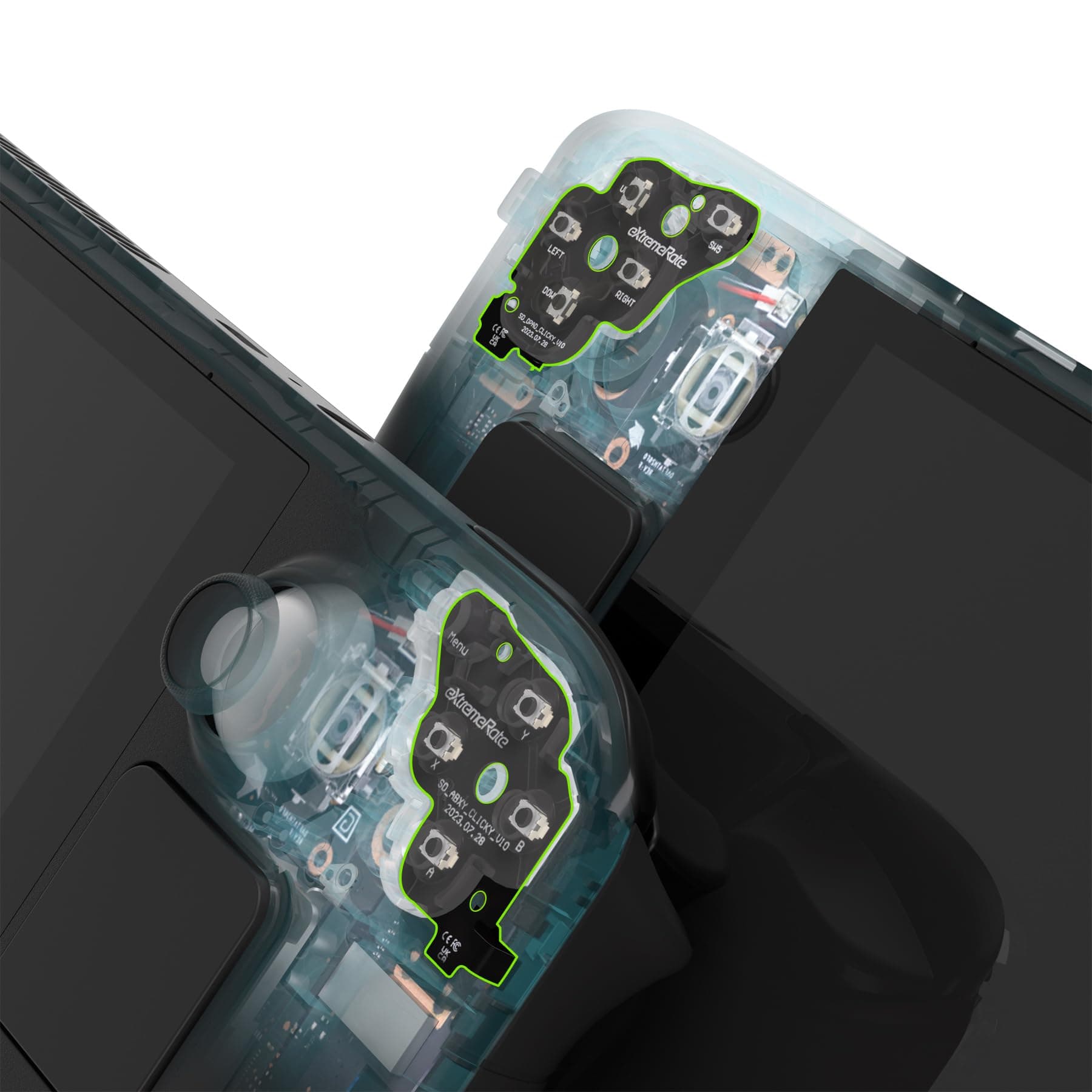
🎯 Click faster, play smarter — upgrade your Steam Deck’s tactile edge!
The eXtremeRate Face Clicky Kit is a precision upgrade designed exclusively for the Steam Deck LCD (2022) handheld console. It enhances the responsiveness of Dpad, ABXY, View, and Menu buttons by reducing their travel distance, delivering sharper, more satisfying clicks. Installation is straightforward with no soldering required, supported by a detailed video tutorial. The kit includes custom FPC boards, conductive pads, screwdrivers, and spare screws, compatible with both official and replacement buttons. Perfect for gamers seeking a tactile edge and faster input response on their Steam Deck LCD.


| ASIN | B0CQ29423Q |
| Best Sellers Rank | #6,614 in Video Games ( See Top 100 in Video Games ) #33 in Nintendo Switch Repair Tools & Replacement Parts #1,734 in Legacy Systems |
| Brand | eXtremeRate |
| Customer Reviews | 4.3 4.3 out of 5 stars (156) |
| Date First Available | December 12, 2023 |
| Hardware Platform | nintendo_switch |
| Item Dimensions LxWxH | 1.18 x 0.79 x 0.39 inches |
| Item Weight | 0.353 ounces |
| Item model number | NYESD001 |
| Manufacturer | eXtremeRate |
| Product Dimensions | 1.18 x 0.79 x 0.39 inches |
C**E
Works on OLED… kinda. LCD is fantastic
Product itself (with LCD in mind). The install is super easy, their tutorial is very clear and didn’t bring any confusion. Overall quick install, took me about 10-15 minutes. Clicks do vary button to button but that’s to be expected, clicks are sharp and you KNOW you pressed the button. The pause and select buttons being clicky is a very welcome change. Really recommend this for people that don’t have an issue with sounds/late night gaming. Yes, I know they don’t promote OLED compatibility. I attempted it either way. The cables are very much different, and while it ‘fits’ and functions, it can pretty easily be shifted and moved. So yes it functions and could be fine. If you plan on never opening up your deck again, if you travel a lot, I wouldn’t recommend it for OLED, FOR LCD it is completely fine no issues whatsoever. For me someone with an OLED and doesn’t travel and will open it up again… more than happy with the compromise for the moment. I ordered mines for my OLED (if it didn’t work it would go in my partners LCD)… didn’t even take 2 days before she ordered a pair for her deck.
E**R
Worth it
Good kit, 5.5/10 to install. No hair dryer needed. Makes buttons feel good and clicky. Take your time and remember to put the proper screws into the right spots. Don’t over tighten as they strip easy
I**R
It's clicky
First thing, I enjoy these over the default membrane buttons, but they aren't the 'right' click for me. I was kinda expecting something along the lines of Razer's mechanical gamepad buttons. These are 'chunkier' in feel and require about twice the force to actuate than the Razer pads. I'd say they even require more force than the default buttons do, and it's noticeable harder to spam an input. With that being said, it's also nearly impossible to make a false input by mistake. I'm not sure if this is a universal feature for everyone else who's installed these buttons, but each one feels different. Start and select feel the same, but A, B, X, & Y feel different from one another. X feeling the best, then Y, followed by B and A. That's where I dock points, if it wasn't for that they'd be 5/5 Installing these was pretty easy, at first it felt like I was destroying anyway for my steam deck to ever have face buttons, but it's really just that blunt of a process lol. I used a hair dryer to remove the original receiver pads and rolled on the new mechanical pads no problem.
D**E
Great product, BUT I kind of regret swapping them in
I 100% consider this product to be 5 star quality. The switches, the documentation, the ease of installation (I was doing a shell swap, so swapping the button switches was very simple) are all of great quality, hence the 5-stars. But I will caution people the make sure they really want the clicky buttons. Using my steamdeck on a plane recently made me feel like a jerk for making so much noise, and playing anything while my wife is asleep is now out of the question. So I somewhat regret the swap on these cases. Like I said though, the product itself is amazing, works exactly as advertised, but make sure that you really want them before swapping them out.
J**C
Took Me 4 Hours - Totally Worth It!
Took me 4 hours to do it right but it was absolutely worth it. Important things to note: - There at least 3 seperate times in which you must use a specific (shorter) screw in a specific place (center bavkplate, center aluminum shield, off-center of daughter boards). - If you have the JSAUX case with the aluminum plate on the back then you will have to carefully peel back the thermal pad on the aluminum shield to reveal the screw covered by the foil. - Make sure the ABXY buttons / D-pad is aligned correctly. If they aren't the buttons will be sunk into the shell and feel terrible to press or won't be usable at all. - The D-pad has a "windswept" curvy bit on one of the directions. This bit should point outwards from the Deck. - The "bumper assembly" is imo the trickiest bit to work with. If you don't reinstall it correctly then your buttons / d-pad / bumpers will not be flush with the case and or will not properly click or actuate. This is what caused me to take 4 hours to figure out why my buttons felt awful. I did this mod specifically to play Tomb Raider Remastered 1-3 and its AMAZING!! The stock D-pad on the Deck is just sttaight up unusable. As a bonus my buttons have less pre-travel and don't wiggle around in-place as much. They're less noisy and don't rattle as much either.
S**S
Will break very quickly under light normal use.
Do not buy. They work great until the switches wear out in less than a month and a half. Sure they can send you replacements but how many times do you feel like opening your steam deck to replace them? I had no issues for a few weeks, then they started losing the tactile feel. Not ideal but not a huge deal. What is a huge deal is now my buttons straight up lose inputs. I can be holding a button and it will just actuate the button then let go of it. And about 50% of the time I will press the button and it doesn’t respond at all. Horrible quality, and after they break you have to press the button with an uncomfortable level of force.
A**X
Must have for Helldivers 2!
I was fed up with the mushy stock D pad on my Deck especially while playing Helldivers 2. Stratagem calls would always be messed up when I press up but somehow left or right gets pressed. Happy to report this is completely fixed with installing the clicky kit. The tactile feedback is amazing and I can call in my stratagems much more accurately and quickly now! Moreover, the kit really tightened up the D pad input and an up never triggers a left or right anymore. In my mind, this is a must have for anyone playing games that require D pad interaction. The D pad that comes with the Deck is pretty much unusable. Here are some helpful notes for this kit: - Installation is simple, just take your time and follow the video they have on Youtube. If you can follow simple instructions and work a screwdriver you can install it with enough patience. - You can just install clicky buttons on the D pad OR the buttons. This would be sufficient for me because I only care about the D pad. However, note the video starts with the buttons side and I only realized this after following much of the procedure. Don't make this same mistake if you're replacing only the D pad. - Be careful not to drop the screws in the gap between the circuit boards, I did this and had to spend a lot of effort fishing the screw back out the small gap. - Take your time making sure every screw/plastic part is put back. It wasn't until I closed up my Deck that I realized I had 1 lone screw I forgot to put back and had to open it all up again. Overall, this is a great upgrade and for a very reasonable price point too. Highly recommended!
J**E
Superb product - a must have for Steam Deck owners
Short quick tip before the review: Just in case you're reading this and aren't aware, there are two different kits, this kit is for the LCD steam deck and there's another on extremerate's store for the OLED version of the steam deck. I was a little nervous to purchase these given I heard some mixed experiences around clicky kits, but wow am I glad I did. I always hated the mushiness of the steam deck d-pad, this kit is what the steam deck dpad should've been. I've seen comments around it being "fatiguing to push" and I just can't relate at all - the button stiffness is less than that of a vita (what I'd call very stiff) and even less than something like a 3DS. It's most similar to something like a Switch, but with more "depth" and spring (in a great way). To me it's just about perfect in terms of pressure required. I thought the install process was incredibly straightforward and easy. If you've assembled a PC (which if you're buying a steam deck I assume you've done at least once), you can easily do this mod. Just take your time and be careful - the whole thing from beginning to end took me less than a couple casual hours with lots of coffee breaks. Extremerate's youtube channel has a step-by-step guide that shows you every single disassembly and reassembly step. It's possibly the best video guide I've ever watched - extremely thorough and well shot. Big props to extremerate for this - I'm very impressed at how much time and thought went into all aspects of instruction. The main caveat/downside you need to know with this is that if you decide to go back to "non-clicky" you'll likely need to get replacement "sticker sensors" for your dpad/face buttons. This is unavoidable if you want to try clicky buttons as the "click" is built into extremerate's contact sticker. I guess you could try to reuse the originals after peeling them off, but I wouldn't recommend it. Speaking of which, I've seen the peeling of the button/dpad sensor sticker mentioned as the "hardest part" of the process, and I honestly can't imagine why. As the guide instructs, simply use a blow dryer to get the original sticker sensor off the face button/dpad plate. You by NO MEANS need to use a heat gun or anything intense. Just hold a blow dryer on its hottest setting for a minute or two (I was probably a few inches away while holding), and the contact sticker will peel right off. All in all, if you're a little disappointed with the Steam Deck's face buttons and/or d-pad you MUST try this kit, it is absolutely incredible. Above and beyond my expectations!
Trustpilot
Hace 2 semanas
Hace 2 días