We remain fully operational. Our teams are working around the clock to ensure your deliveries continue safely.

Descargar la aplicación


Servicios al cliente
Sobre nosotros
Copyright © 2025 Desertcart Holdings Limited
Descargar la aplicación

🚀 Elevate your workspace with speed, style, and smudge-free perfection!
The Brother MFC-L3780CDW is a wireless all-in-one color laser printer designed for small businesses and professionals seeking high-speed, laser-quality printing, copying, scanning, and faxing. Featuring up to 31 ppm print speed, single-pass duplex scanning, and versatile connectivity options including dual-band Wi-Fi and Gigabit Ethernet, it streamlines office workflows. Eco-friendly and secure, it supports Brother’s toner subscription service and integrates with Alexa for voice control, making it a powerhouse for modern workspaces.

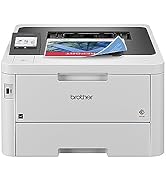
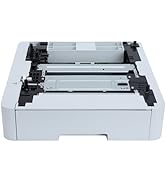


| ASIN | B0CFCW8PGV |
| Additional Printer functions | All In One |
| Best Sellers Rank | #3,019 in Office Products ( See Top 100 in Office Products ) #7 in Laser Computer Printers |
| Color Depth | 24 Bits |
| Compatible Cartridge | TN229BK; TN229M; TN229C; TN229Y; TN229XLBK; TN229XLM; TN229XLC; TN229XLY; TN229XXLBK; TN229XXLM; TN229XXLC; TN229XXLY; DR229CL |
| Compatible Devices | Laptops, PC, Smartphones, Tablets |
| Control Method | App, Touch, Voice |
| Controller Type | Android |
| Customer Reviews | 4.2 4.2 out of 5 stars (699) |
| Date First Available | August 10, 2023 |
| Dual-sided printing | Yes |
| Duplex | Automatic |
| Hardware Interface | USB 2.0 |
| Included Components | Toner Cartridges |
| Initial page print time | Less than 12.5 Seconds |
| Ink Color | Cyan, Magenta, Yellow, Black |
| Item Weight | 47.8 pounds |
| Item model number | MFCL3780CDW |
| Manufacturer | Brother |
| Max Copy Speed (Black & White) | 31 ppm |
| Max Input Sheet Capacity | 250 |
| Max copy resolution black-white | 600 x 600 dpi |
| Max copy resolution color | 600 x 600 dpi |
| Maximum Black and White Print Resolution | 2400 x 600 dpi Dots Per Inch |
| Maximum Color Print Resolution | 2400 x 600 dpi Dots Per Inch |
| Maximum Media Size | 8.5 x 14 inch |
| Maximum copies per run | 250 |
| Memory Storage Capacity | 512 MB |
| Model Series | MFC-L3780CDW |
| Number of Trays | 3 |
| Output sheet capacity | 250 |
| Power Consumption | 660 Watts |
| Print media | Card stock, Envelopes, Glossy photo paper, Labels, Paper (plain) |
| Printer Ink Type | Toner |
| Product Dimensions | 16.1"D x 18.2"W x 15.8"H |
| Scanner Type | Flatbed, Sheetfed |
| Sheet Size | 8.5 x 11, 8.5 x 14, 4 x 6 Inches |
| Specific Uses For Product | Home, Office, School |
| Supported Media Sizes | A4, A5, A6, B5, B6 |
| Total USB Ports | 1 |
| UPC | 012502666486 |
| Warranty Type | Limited |
K**H
This printer doesn't suck!
I thought it was the holy grail -- to find a printer that doesn't suck. I found it here! Not only does it NOT suck, I actually hug it every time it prints. 1. Easy as hell to set up, you don't even have to use the mobile app (but I did set that up also and it was a few extra steps but also easy). Airprint works instantly. 2. So fast, so quiet. I had a Canon MX something that would take about a few minutes to think about printing, and then another minute to print, and the page would usually jam in the middle of the job. The Brother has NO such issues. The Canon could take two days to print a 60 page document (because I had to keep taking breaks from unjamming it and resetting the job so as not to throw it through the window). Those days are gone forever! 3. Color is not going to be like a photo printer -- it does not take photo printer, please note -- but color is fast and bright and perfectly acceptable for a document (vs. a photo). 4. My setup is a home office, my printing needs are relatively light, so I agonized over the cost vs. use but when a printer JUST WORKS these days, it's so miraculous that I decided the cost was worth it and used the Affirm payment plan to make the finances work. 5. I did not have to sign up for the ink program, my uses are so light it would be an unjustifiable expense. I spent about a month researching and comparing and reading all of you good people's reviews -- some of which are super funny -- of this printer and others, and finally the day came where I couldn't stand even the thought of trying to print on the Canon so I pulled the trigger. I know I'm not alone in the "I hate my printer" category but I might now be one of a dozen people in the "I love my printer" category. It arrived in a speedy timeframe and it was packaged so well that if it had been a baby, it would have slept without waking from a single bump. Brother is my brand and this printer is 5 stars!
T**.
Excellent Choice of Laser Printers
I replaced a Canon laser printer with this Brother printer. 1 - The Brother printer is MUCH quieter. The Canon printer made so much noise and took a while for it to stop cycling before it actually printed anything. 2 - The Brother printer operates faster both when printing and scanning. Much faster. 3 - The Brother printer turns on and off much faster. The Canon recycled (why I don't know) several times before actually powering down. 4- Setting up the Brother printer was more complicated, but it went through security settings that the Canon printer did not do. Connecting to my wifi was automatic. The Brother printer found the wifi without input from me. So much easier. In conclusion, I am pleased with this Brother printer. I have been a hard core Canon fan, but I prefer this Brother printer over the Canon. Yes, I would recommend this to those looking for a good laser printer.
A**R
Refurbished surprise - better than new and way too powerful for me =)
I purchased one of the refurbished models and was pleasantly surprised by how smoothly the process went. The machine arrived spotless, packed securely in styrofoam, with all the flaps taped down and the toner cartridges locked in place for transport. This was the complete opposite of my experience buying a printer from an auction site, where the toner spilled everywhere in transit and I ended up with a “worthless” rainbow-colored printer that printed rainbow-colored pages. Once I had removed all the tape and travel inserts, the machine sprang to life. There were no manuals included, so I had to find them on Brother’s website. For macOS, the rest of the setup was handled by downloading their installer and following the prompts. The only hiccup was configuring Wi-Fi manually since I didn’t have a USB-C to USB-B cable for the setup program to transmit the network configuration (seriously, who still uses USB-B plugs?). Afterward, I spent about fourteen minutes updating the firmware and then ran the built-in test page. The print was crisp and clear, even on second-rate paper—the good paper should arrive in a couple of days. Overall, this printer is complete overkill for something marketed as a “personal printer.” Not too long ago, this would’ve been an office workhorse shared by twenty people. The feature set is fantastic, the speed is ridiculous, and the connectivity options cover just about everything short of telepathy. iOS printing works flawlessly, and the relatively compact size is a bonus. Then again, I might just be biased because I remember wrestling the original HP LaserJet that weighed about as much as dishwasher. I’ll have to print a lot to justify the cost compared to running down to the package store, but it’ll all be worth it the first time I don’t pick up a virus or forget to log out.
D**G
Cloud Brother Refresh program is greedy and buggy
Mechanically, the printer is fine, but the business practices of the company is unacceptable. On Friday, Oct 31st, 2025, I had to print out a document for an urgent reason but the printer at my house did not work. Why? Because I was subscribed to Brother’s “Refresh” program. I’m a light user and Brother had gotten a lot of monthly payments from me over the past three years and I’ve printed perhaps 200 pages total. The printer is mostly for emergencies. However, since I recently lost my credit card, the old version had started getting declined. Brother could have prevented the issue for itself by accepting PayPal or another payment service which would have automatically transitioned its payments. They did not. They could’ve fixed their site so when I logged in to correct the problem last month, it would’ve offered me a chance to fix it rather than saying everything was fine. They didn’t. They could’ve given me a chance to pay on Oct 31, when they shut off my service and I needed to print. They didn’t because their site is down for “maintenance.” On a late weekend morning. I tried calling them to ask if they could take the card over the phone. They had shut down all their support lines, hanging up on customers instantly, because they are down for “maintenance.” If you’re going to create a lucrative monthly fee to exploit customers, at least have the decency to use some of the money to build the infrastructure that could support it.
V**.
Muy buena compra. El servicio de venta es muy bueno.
H**R
Easy to set up Quiet Fast and great quality copies and scans
J**N
Easy set up, quiet and prints great!
R**K
Súper funcional, una excelente compra
P**.
This printer is great. Took me a little bit to set up on my network but once done, it works like a charm. Love it
Trustpilot
Hace 2 días
Hace 2 semanas