We remain fully operational. Our teams are working around the clock to ensure your deliveries continue safely.

Descargar la aplicación


Servicios al cliente
Sobre nosotros
Copyright © 2025 Desertcart Holdings Limited
Descargar la aplicación

Buy anything from 5,000+ international stores. One checkout price. No surprise fees. Join 2M+ shoppers on Desertcart.
Desertcart purchases this item on your behalf and handles shipping, customs, and support to Peru.
❄️ Stay cool, stream longer, game harder — the magnetic chill your tech deserves!
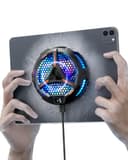
The ACEDAYS iPad Cooler is a cutting-edge magnetic tablet cooler featuring 20W semiconductor refrigeration technology for rapid heat dissipation. Designed with a durable alloy and PC body, it offers two-stage cooling modes and a vibrant LED temperature display. Compatible with a wide range of devices including iPads, Surface Pro, Steam Deck, and Samsung tablets, it ensures sustained performance during intensive gaming, streaming, or professional workloads by preventing thermal throttling. Its strong magnetic suction guarantees a secure fit without bulky attachments, making it an essential accessory for millennial professionals demanding peak device performance.


| ASIN | B0C7PC3155 |
| Best Sellers Rank | #17 in Computer CPU Cooling Fans |
| Brand | ACEDAYS |
| Color | Black/Red |
| Cooling Method | Semiconductor |
| Customer Reviews | 4.4 4.4 out of 5 stars (484) |
| Enclosure Material | Aluminum |
| Item Weight | 0.25 Kilograms |
| Manufacturer | South City Inc |
| Warranty Description | 1 Year |
Z**E
Magnetic iPad Cooler That Actually Reduces Throttling on Sustained Compute Workloads
Running intensive apps on an iPad Pro M4 for extended sessions generates meaningful heat, particularly during video editing, running complex apps like LumaFusion, or using the device as a secondary display through Sidecar for extended periods. While the M4 chip is considerably more efficient than the processors it replaced, sustained workloads still result in thermal throttling on iPads over time, and that throttling manifests as noticeable performance reduction in compute-heavy tasks. The ACEDAYS magnetic tablet cooler came through the Vine program and I tested it specifically on the iPad Pro M4 in scenarios designed to stress the thermal management. The cooler uses a magnetic attachment mechanism that holds it against the back of compatible iPads and tablets without requiring any bracket, clip, or stand modification. On the iPad Pro M4 with its flat aluminum back, the magnetic hold is firm and the cooler does not shift or wobble in normal use. The magnetic strength is sufficient to hold the unit securely even when picking the iPad up and carrying it. The fan inside the unit is more powerful than I expected for the compact form factor. It runs noticeably quiet at lower speed settings and ramps up smoothly to higher output when you push it. The noise level at maximum is present but not disruptive in a normal work environment, and for most use cases the medium speed setting provides adequate airflow without significant fan noise. I tested thermal performance by running a sustained video render in LumaFusion that normally takes the iPad into significant thermal throttling after about eight to ten minutes. With the cooler attached and running at medium speed, the render completed faster than baseline and the system did not trigger the same degree of thermal throttling I observed without the cooler. I measured the back temperature of the iPad during the test and the cooler-side surface was noticeably cooler than a non-cooled reference session. The USB-C connection for power draws from the iPad itself, which is a consideration if battery life is important to your use case, but the power draw of the cooler is low enough that the performance benefit in sustained compute tasks offsets the battery cost. For iPad Pro users who regularly do sustained intensive work, this magnetic cooler is a practical accessory that delivers measurable thermal improvement. It does not eliminate heat but meaningfully extends the thermal headroom before throttling, which translates to more consistent sustained performance.
H**R
A little air goes a long, long way!
The tl;dr - this thing works *brilliantly*. Long version: I have a Surface Pro 9 which I use as an art tablet, and from which I'll sometimes stream my artwork. Running Clip Studio Paint and XSplit at the same time, while driving an external monitor and recording the stream to an external drive is kind of a lot of work for the SP9. The CPU is up to it, but there's no cooling inside a Surface Pro. The back of the device gets hot enough to deliver 1st-degree burns. Seriously. Sometimes the FRONT of the device would get hot enough that it would be uncomfortable to rest my hand on while I was drawing. But the real problem is that when it gets hot it starts dropping frames. I suppose that's better than it overheating and dying, but for the stream the end result is the same: no stream. I used to aim an external fan at the back of the Surface Pro, and this did an okay good job, but it was noisy and inconvenient. Enter the ACEDAYS cooler. I stuck the metal ring to the back of the Surface Pro, a bit to the left of center, where the device got the hottest. This off-center attachment let me keep the tablet mounted in a clamp, while still making room for the fan. The fan, by the way, is so quiet sometimes I forget to turn it on. I'm running an in-line rocker-switch to turn it on and off, which is more convenient for me than reaching around behind the tablet to flip the switch. It works brilliantly. No dropped frames, and the Surface Pro never gets hot. The LEDs flashing around the ring of the cooler would probably be annoying, but I can't see them from the front of the device, so that's not a "me" problem, it's a problem for people on the other side of the room. RECOMMENDATION: If you use a Surface Pro in any sort of an intense capacity, if it's getting hot to the touch, YOU NEED THIS FAN. It'll extend the life of your device, and it'll make your apps run more smoothly because the CPU thermostat won't have to throttle things back when it gets hot.
S**7
It does cool my Surface in my thick protector case!!!!!!!
I was very hesitant before I've bought this cooler, and was prepared to return it. I definitely won't return it, because it cools my Surface even when it's plugged in!!!!!!!
P**R
Fantastic cooling. Must have for the ROG Ally
I'm blown away at how well this works. I was able to increase my graphic settings significantly by adding this fan. I cut the back out of my protective case to make room for the fan. The only reason I'm giving this 4 stars instead of 5 is that my adhesive thermal Plate keeps coming unstuck... I cleaned the back of my ally before application, followed the instructions to the T.. not sure why it has trouble staying stuck on.. I don't know if it's a product issue or a ME issue. Either way this is an amazing fan especially at this price point. I ended up buying a 100w power supply to support my Ally and plug in this fan. Since the fan takes around 25w you'll need an additional power supply for it. Best thing to do is swap your original supply for a multiport 100w supply to have ample available power for your device and Fan. To help with cable management I secured the power cables to the fan and used cable ties to hold the two cables together. This helps prevent tangling and knotting. I highly recommend this fan
M**.
Work very well with my ipad while gaming
L**.
Non funziona bene
M**�
No se por qué a los tres meses dejo de enfriar un poco menos, será por qué el cuarto en el que estoy no tiene ventilación, pero funciona más o menos, aún me sirve por eso le doy 4 estrellas
R**D
Esse realmente funciona, é um cooler relativamente grande, de fato maior do que os de celulares...abaixando bem a temperatura do tablet... Valendo muito a pena o custo e o benefício que entrega.
ف**ه
انا العب ببجي ومره حلو بس عيبه ان السلك قصير
Trustpilot
Hace 1 mes
Hace 3 semanas